
Introdución
Welcome to the user manual for your new Xiaomi Redmi 14C 4G LTE smartphone. This guide provides essential information to help you set up, operate, maintain, and troubleshoot your device. The Redmi 14C features a rounded design aesthetic, a 6.88-inch cinema-view display, a 50MP ultra-clear AI dual camera system, and a powerful 5160mAh battery, designed to enhance your mobile experience.
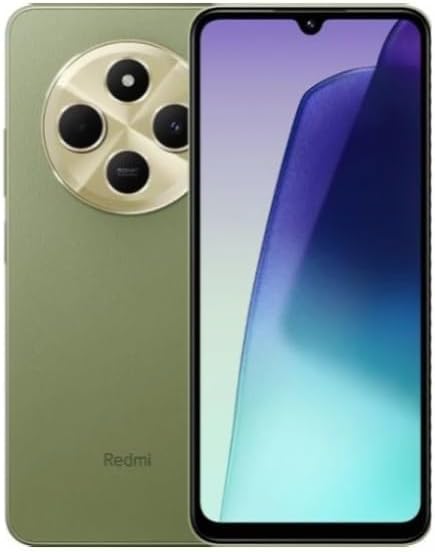
Figure 1: Xiaomi Redmi 14C in Sage Green, showcasing its front display and rear camera module.
Configuración
1. Que hai na caixa
- Smartphone Xiaomi Redmi 14C
- Cargador de pared de 18 W
- Cable USB Tipo-C
- Ferramenta de expulsión da SIM
- Funda do teléfono
2. Inserción de tarxetas SIM e tarxetas MicroSD
The Redmi 14C supports Dual Nano SIM cards and one MicroSD card. Locate the SIM tray on the side of the device. Use the provided SIM eject tool to open the tray. Carefully place your Nano SIM cards and MicroSD card into their respective slots, ensuring correct orientation. Gently push the tray back into the device until it clicks into place.
3. Carga inicial e acendido
Before first use, it is recommended to fully charge your device. Connect the 18W wall charger to the USB Type-C port on the phone. The device features a 5160mAh (typical) battery. Once sufficiently charged, press and hold the power button on the side of the phone until the Xiaomi logo appears. Follow the on-screen prompts to complete the initial setup, including language selection, Wi-Fi connection, and Google account setup.
Operando o seu dispositivo
1. Características da pantalla
The Redmi 14C boasts an immersive 6.88-inch Dot Drop Display with a resolution of 1640x720 pixels (260 ppi). It offers a contrast ratio of 1500:1 and 8-bit color depth (16.7 million colors). The display supports a refresh rate of up to 120Hz and a touch sampling rate of up to 240Hz for smooth interactions. For eye comfort, it includes Reading mode, TÜV Rheinland Low Blue Light (Software Solution), TÜV Rheinland Flicker Free, and DC dimming.
2. Sistema de cámaras
Capture stunning photos and videos with the 50MP ultra-clear AI dual camera system. The main camera features a 5P lens and f/1.8 aperture. Supported modes include filmCamera, HDR mode, Night mode, Portrait mode, 50MP mode, and Time-lapse. Rear camera video recording supports 1080P at 30fps and 720P at 30fps.
3. Rendemento e almacenamento
Powered by the MediaTek Helio G81-Ultra processor with a CPU frequency of up to 2.0GHz and Mali-G52 MC2 GPU, the device ensures smooth performance for daily tasks. It comes with 4GB of RAM and 128GB of internal storage, providing ampespazo para as túas aplicacións e medios.
4. Conectividade e sensores
The Redmi 14C supports 4G LTE connectivity across various global bands (FDD: 1/3/5/7/8/20/28; TDD: 38/40/41) and Wi-Fi. It includes comprehensive navigation support with GPS, AGPS, GLONASS, Beidou, and Galileo. Essential sensors such as a proximity sensor, ambient light sensor, and accelerometer are integrated. A 3.5mm headphone jack is also available.
5. Características de seguridade
For enhanced security, the device is equipped with a rear-mounted fingerprint sensor and AI face unlock capabilities, allowing for quick and secure access to your phone.

Figure 2: Certification details for the Xiaomi Redmi 14C, including model number and FCC ID.
Mantemento
1. Actualizacións de software
Ensure your device's software is always up to date to benefit from the latest features, security patches, and performance improvements. You can check for updates in the 'Settings' menu under 'About phone' or 'System update'.
2. Coidado da batería
To prolong battery life, avoid exposing your phone to extreme temperatures. Use only the original charger and cable provided with your device. Avoid completely draining the battery frequently.
3. Limpeza do dispositivo
Usa un pano suave e sen pelusa para limpar a pantalla e a carcasa do teléfono. Evita o uso de produtos químicos agresivos ou materiais abrasivos que poidan danar o acabado ou o revestimento da pantalla.
Resolución de problemas
1. O dispositivo non responde
If your phone becomes unresponsive, press and hold the power button for approximately 10-15 seconds to force a restart.
2. Problemas de conectividade
If you experience issues with Wi-Fi or cellular data, try toggling Airplane Mode on and off. For persistent cellular issues, ensure your SIM card is properly inserted and contact your network provider.
3. App Performance
If an application is not functioning correctly, try clearing its cache and data via 'Settings' > 'Apps' > [App Name] > 'Storage'. If the issue persists, consider uninstalling and reinstalling the app.
4. Restablecemento de fábrica
As a last resort for severe software issues, you may perform a factory reset. Aviso: Isto borrará todos os datos do teu dispositivo. Back up important data before proceeding. Navigate to 'Settings' > 'About phone' > 'Factory reset' and follow the instructions.
Especificacións
| Característica | Especificación |
|---|---|
| Nome do modelo | Redmi 14C |
| Sistema Operativo | Xiaomi HyperOS baseado en Android 14 |
| Tamaño de visualización | 6.88 polgadas |
| Resolución de visualización | 1640 x 720 |
| Procesador | MediaTek Helio G81-Ultra (2 GHz CPU Speed) |
| RAM | 4 GB |
| Capacidade de almacenamento | 128 GB |
| Cámara principal | 50 MP AI Dual Camera |
| Capacidade da batería | 5160 millónsamp Horas (típicas) |
| Cargando | Carga rápida de 18 W |
| Conectividade | Wi-Fi, Cellular (4G LTE) |
| Jack de audio | 3.5 mm |
| Seguridade | Rear Fingerprint Sensor, AI Face Unlock |
| Dimensións (paquete) | 7 x 4 x 2 polgadas |
| Peso do elemento | 6 onzas |
Garantía e Soporte
Your Xiaomi Redmi 14C is covered by a manufacturer's warranty. For detailed warranty terms and conditions, please refer to the warranty card included in your product packaging or visit the official Xiaomi website. For technical support, service, or further assistance, please contact Xiaomi customer service through their official channels. Keep your proof of purchase for warranty claims.