
1. Introdución
The eletechsup SMSPN06 is a highly cost-effective ultra-low frequency sine wave signal generator designed to output frequencies within the range of 0.01Hz to 9999Hz, including the natural 7.83Hz Schumann Resonance. This device features a high-speed DAC for pure sine wave signal generation and is equipped with a digital tube display and simplified three-button control for ease of use. Its compact and lightweight design makes it suitable for various applications, from enhancing audio-visual spaces to promoting relaxation and improving focus.
2. Características clave
- Adjustable Frequency Range: 0.01Hz to 9999Hz pure sine wave output.
- Default Schumann Frequency: Automatically emits 7.83Hz Schumann wave upon power-on.
- High-Speed DAC: Ensures generation of a pure sine wave signal.
- Pantalla de tubo dixital: Clear four-digit display for frequency indication.
- Simplified Control: Three intuitive buttons for easy operation.
- Double-Sided Antenna: Ultra-long antenna for effective signal transmission.
- Características de seguridade: Built-in over-current and over-voltage protección.
- Saída de audio: Includes a 3.5mm audio interface.
- Deseño compacto: Mini size (78*50*8MM) and lightweight (17g).
- Type-C Power Interface: Supports Type-C to Type-C power supply (DC 5V).
3. Especificacións técnicas
| Parámetro | Valor |
|---|---|
| Traballo Voltage | DC 5 V |
| Corrente de traballo | 14-17 mA |
| Interface de alimentación | Type-C (supports Type-C to Type-C) |
| Frecuencia predeterminada | 7.83 Hz |
| Adjustable Frequency Range | 0.01Hz ~ 9999Hz Pure Sine Wave |
| Sinal Voltage Amplititude | 3V |
| Saída de audio | Conector de 3.5 mm |
| Tamaño | 78mm * 50mm * 8mm (Mini Size) |
| Peso | 17g (Lightweight) |
Frequency Adjustment Steps:
- 0.01Hz - 99.99Hz: Step 0.01Hz
- 100.0Hz - 999.9Hz: Step 0.1Hz
- 1000Hz - 9999Hz: Step 1Hz
4. Guía de configuración
To begin using your eletechsup SMSPN06 Schumann Wave Signal Generator, simply connect it to a DC 5V power supply using the provided Type-C cable. The device will automatically power on and display the default 7.83Hz Schumann wave frequency on its digital tube display.

Image: The eletechsup SMSPN06 Schumann Wave Signal Generator shown alongside its Type-C USB power cable.

Imaxe: Detallada view of the Type-C charging cable, highlighting its specifications including USB-A/Type-C interface, 1A current recommendation (0.5A recommended for use), 1-meter length, and 18.5-gram weight.
5. Instrucións de funcionamento
The SMSPN06 features a simplified control interface with three buttons: "SET", "++", and "--".
5.1. How to Adjust the Frequency
- When powered on, the digital tube displays the current frequency. Press the "CONFIGURAR" button. The last decimal point on the display will flash, indicating that the setting mode has been entered.
- Preme o "++" or "--" button to increase or decrease the frequency. Long-pressing these buttons will speed up the adjustment process.
- After setting your desired frequency, press the "CONFIGURAR" button again to exit the setting mode and save the new parameters.
Video: Demonstration of adjusting the frequency on the eletechsup SMSPN06 device, showing the digital display changing and the corresponding sine wave on an oscilloscope.
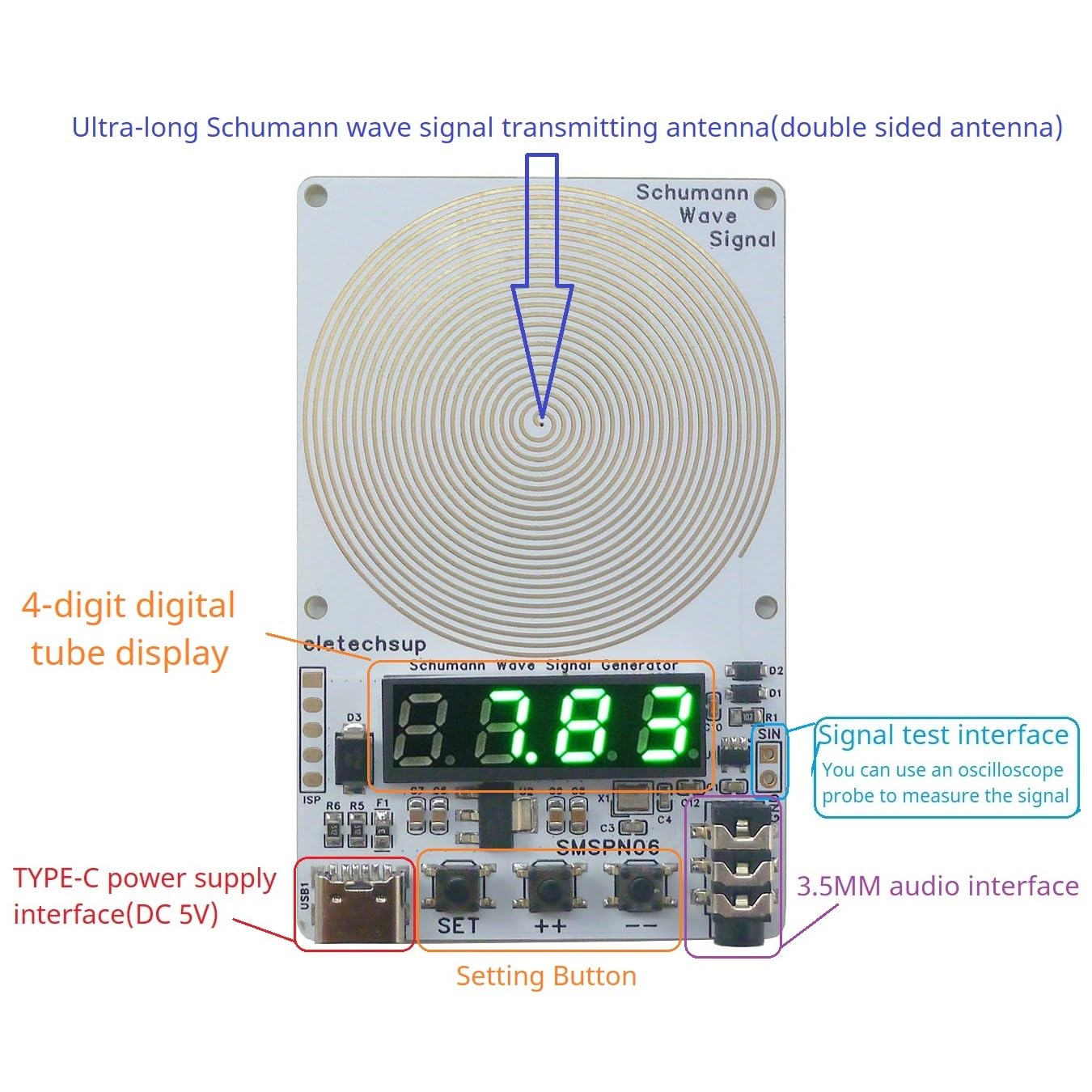
Image: A detailed diagram of the SMSPN06 board, labeling key components such as the ultra-long Schumann wave signal transmitting antenna, 4-digit digital tube display, signal test interface, Type-C power supply interface, and setting buttons.
5.2. How to Save Parameters After Power Off
To ensure your frequency settings are retained even after the device is powered off, press and hold the "++" botón ata que a pantalla LED mostre "S-N". This indicates that the power-off save function is enabled.
5.3. How to Restore Factory Settings
- Default Restore: Normally, simply power the device off and then on again to restore default settings.
- If Power-Off Save is Enabled: If you have enabled the power-off save function, press and hold the "++" button until the LED displays "S-F". Then, power the device off and on again to restore factory settings.
5.4. How to Turn Off the Digital Tube Display
To turn off the digital tube display, press and hold the "--" button until the digital tube displays "S-P". The digital tube will automatically turn off after 10 seconds.
If the digital tube automatically turns off after 10 seconds, it means the energy-saving mode is active. To disable this, press and hold the "--" botón ata que "N-P" móstrase.
5.5. How to Verify the Output Waveform
To verify the output waveform of the device, use an oscilloscope to measure the "GND/SIN" port. You should observe a pure sine wave.

Image: The SMSPN06 device connected to a digital storage oscilloscope, demonstrating the output of a 7.83Hz sine wave, confirming the purity of the signal.
6. Mantemento
To ensure the longevity and optimal performance of your eletechsup SMSPN06, please follow these general maintenance guidelines:
- Manteña o dispositivo limpo e libre de po e residuos. Use un pano suave e seco para limpar.
- Evite expoñer o dispositivo a temperaturas extremas, humidade ou luz solar directa.
- Non deixe caer o dispositivo nin someta o dispositivo a fortes impactos.
- Garda o dispositivo nun lugar fresco e seco cando non estea en uso.
- Non intente desmontar nin reparar o dispositivo vostede mesmo, xa que isto anulará a garantía e podería causar danos.
7 Solución de problemas
This section addresses common questions and issues you might encounter with your SMSPN06 device.
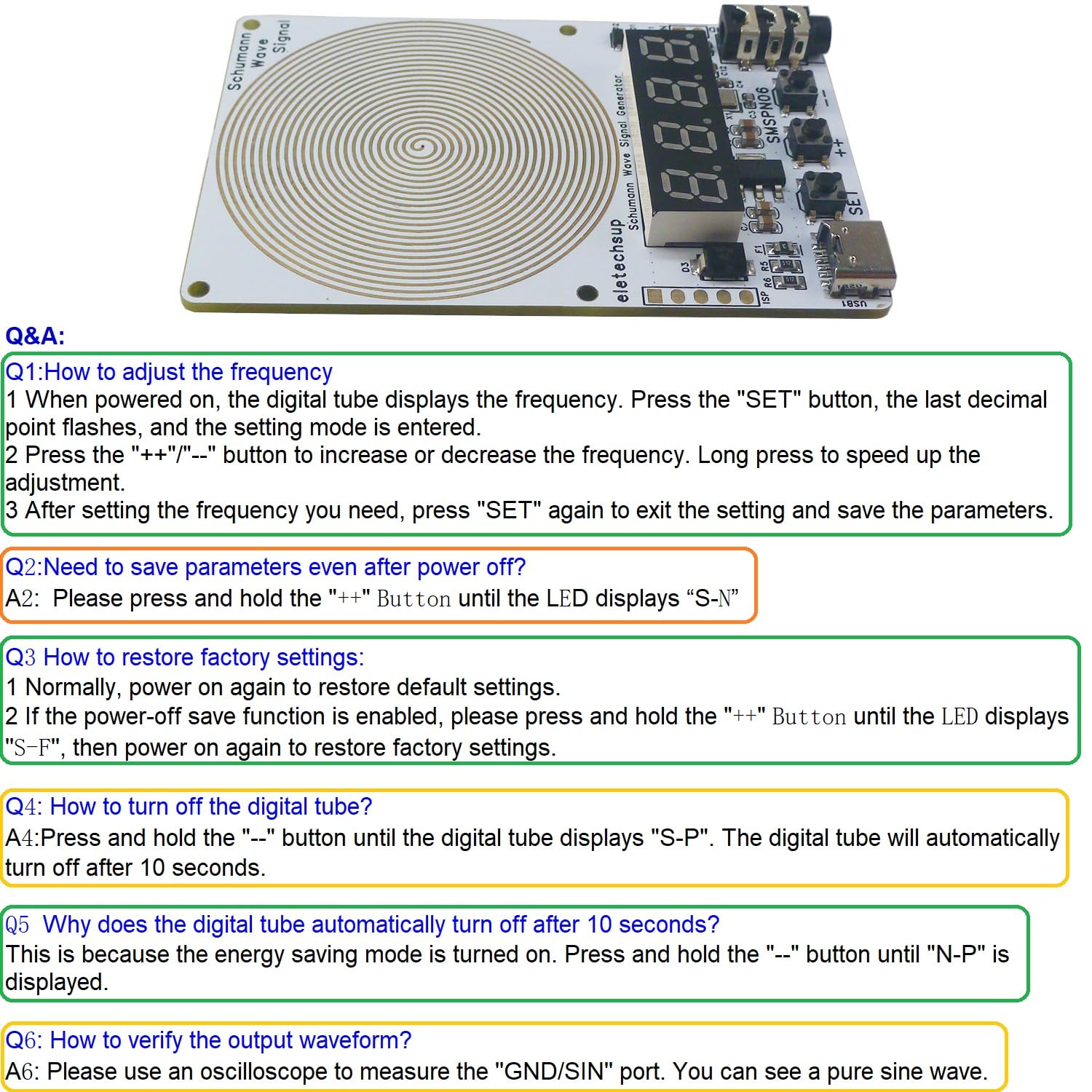
Image: A visual representation of the Q&A section, providing quick answers to common operational queries regarding frequency adjustment, parameter saving, factory reset, and digital display control.
- Q: How to adjust the frequency?
A: Press "SET" to enter setting mode (last decimal point flashes). Use "++" / "--" to adjust. Press "SET" again to save and exit.
- Q: Need to save parameters even after power off?
A: Press and hold "++" until the LED displays "S-N" to enable power-off saving.
- P: Como restaurar a configuración de fábrica?
A: Normally, power off and on again. If power-off save is enabled, press and hold "++" until "S-F" is displayed, then power off and on again.
- Q: How to turn off the digital tube?
A: Press and hold "--" until "S-P" is displayed. The digital tube will turn off after 10 seconds.
- Q: Why does the digital tube automatically turn off after 10 seconds?
A: This is due to the energy-saving mode. To disable it, press and hold "--" until "N-P" is displayed.
- Q: How to verify the output waveform?
A: Use an oscilloscope to measure the "GND/SIN" port. A pure sine wave should be visible.
8. Garantía e soporte
For warranty information and technical support, please refer to the product packaging or contact eletechsup customer service directly through their official channels. Keep your purchase receipt as proof of purchase for any warranty claims.