
1. Introdución
Thank you for choosing the Candy Wave 600 Built-in Microwave. This manual provides essential information for the safe and efficient operation, installation, and maintenance of your appliance. Please read these instructions carefully before using the microwave oven and keep them for future reference.
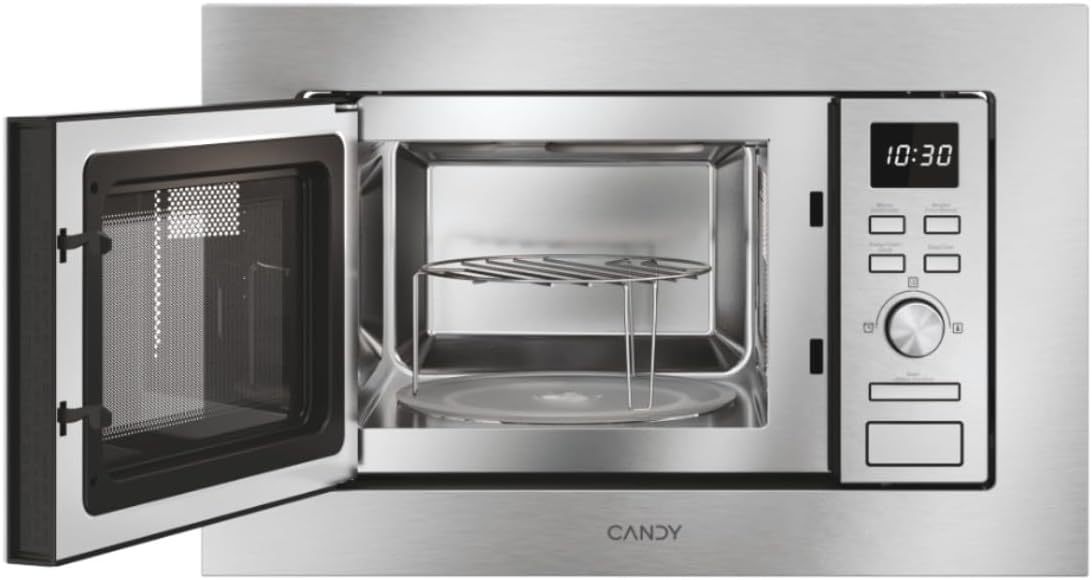
Figura 1: Fronte view of the Candy Wave 600 Built-in Microwave.
2. Información de seguridade
Siga sempre as precaucións de seguridade básicas ao usar electrodomésticos para reducir o risco de incendio, descarga eléctrica, lesións persoais ou exposición excesiva a enerxía de microondas.
- Le todas as instrucións antes de utilizar o aparello.
- Non intente usar este forno coa porta aberta, xa que isto pode resultar nunha exposición prexudicial á enerxía das microondas.
- Non quentar líquidos ou outros alimentos en recipientes pechados xa que poden explotar.
- Permitir que os nenos usen o forno sen supervisión cando se lle dean as instrucións adecuadas para que o neno poida usar o forno de forma segura e comprenda os perigos dun uso inadecuado.
- Non empregue produtos químicos ou vapores corrosivos neste aparello.
- Se a porta ou os precintos da porta están danados, o forno non debe funcionar ata que sexa reparado por unha persoa competente.
- The appliance must be earthed. Connect only to a properly earthed outlet.
3. Configuración e instalación
Proper installation is crucial for the performance and safety of your microwave oven. This appliance is designed for built-in installation.
3.1 Desembalaxe
- Remove all packaging materials from inside the oven cavity and from the door.
- Comprobe se o forno ten algún dano, como amoseduras ou unha porta rota. Non o instale se está danado.
- Asegúrate de que estean presentes todos os accesorios: prato xiratorio, soporte do prato xiratorio e grella.
3.2 Colocación e dimensións
The microwave must be installed in a cabinet opening that meets the specified dimensions. Ensure adequate ventilation around the appliance.

Figure 2: Installation dimensions for the Candy Wave 600 Built-in Microwave.
- The cabinet opening should be 560mm wide and 362mm high.
- The microwave itself measures 59.5 cm (width) x 34.4 cm (depth) x 38.2 cm (height).
- Ensure a minimum depth of 500mm for the cabinet.
3.3 Conexión eléctrica
- Connect the microwave to a properly earthed 230V AC power outlet.
- Non use cables de extensión ou tomas múltiples.
- The power cord should be easily accessible after installation.
3.4 Limpeza inicial
Antes do primeiro uso, limpe o interior e o exterior do microondas cun pano publicitario.amp cloth. Ensure the turntable and support are clean and correctly placed.

Figura 3: Interior view with turntable and grill rack.
4. Instrucións de funcionamento
Your Candy Wave 600 microwave offers various functions for convenient cooking. Familiarize yourself with the control panel for optimal use.
4.1 Panel de control rematadoview
The microwave features an integrated screen and touch controls for easy operation. A rotary knob is used for setting time and selecting options.
4.2 Axustar o reloxo
- When the oven is plugged in, the display will show '0:00'.
- Preme o botón do reloxo (normalmente indicado por unha icona de reloxo).
- Use the rotary knob to set the hour, then press the clock button again.
- Use the rotary knob to set the minutes, then press the clock button to confirm.
4.3 Microwave Cooking (Power Levels)
The microwave offers 5 power levels. To cook with microwave power:
- Coloca a comida no forno e pecha a porta.
- Press the 'Microwave' button repeatedly to select the desired power level (e.g., P100 for 100% power).
- Use o botón rotatorio para axustar o tempo de cocción.
- Prema o botón "Inicio" para comezar a cociñar.
4.4 Función grella
A función grella é ideal para dourar e crocar os alimentos.
- Coloque os alimentos na grella (se a hai) directamente sobre o prato xiratorio.
- Prema o botón "Grellar".
- Use the rotary knob to set the grilling time.
- Prema o botón "Inicio".
4.5 programas de cocción automática
The microwave features 7 automatic cooking programs for various food types. These programs automatically adjust cooking time and power.
- Press the 'Auto Menu' button.
- Use o botón rotatorio para seleccionar o número de programa desexado.
- Enter the food weight (if prompted) using the rotary knob.
- Prema "Inicio".
4.6 Easy Touch Controls
The Easy Touch controls allow you to select the food weight, and the microwave will automatically adjust the cooking time and power.
- Select the desired cooking function (e.g., Microwave).
- Press the 'Easy Touch' button (or similar icon).
- Use the rotary knob to input the food weight.
- Prema "Inicio".
4.7 Start Express Function
The Start Express button provides quick cooking at maximum power.
- Press the 'Start Express' button once for 30 seconds of cooking at maximum power.
- Each subsequent press adds another 30 seconds.
4.8 Defrost Program
The defrost program thaws food based on weight.
- Prema o botón "Desconxelar".
- Use the rotary knob to select the food weight.
- Press 'Start'. The oven will automatically calculate the defrosting time.
4.9 Función de bloqueo infantil
The Child Lock prevents accidental operation, especially by children.
- To activate: Press and hold the 'Stop/Cancel' button for approximately 3 seconds until a 'beep' sounds and a lock indicator appears on the display.
- To deactivate: Press and hold the 'Stop/Cancel' button again for approximately 3 seconds until the lock indicator disappears.
5. Mantemento e Limpeza
Unha limpeza e un mantemento regulares garantirán a lonxevidade e o rendemento óptimo do seu forno microondas.
5.1 Limpeza interior
- Limpar a cavidade do forno despois de cada uso cun anuncioamp pano.
- Para manchas difíciles, use un deterxente suave ou un produto apto para microondas.
- Non empregue limpadores abrasivos nin almofadas metálicas.
- Remove and wash the glass turntable and turntable support in warm soapy water.
5.2 Limpeza exterior
- Limpe as superficies exteriores cun suave, damp pano.
- Limpa a porta e as xuntas da porta regularmente para garantir un peche axeitado.
- Avoid excessive moisture near the control panel.
6 Solución de problemas
Se tes problemas co teu microondas, consulta os seguintes problemas e solucións comúns antes de contactar co servizo técnico.
| Problema | Causa posible | Solución |
|---|---|---|
| O forno non comezará | Cable de alimentación non conectado; Porta non pechada correctamente; Fusible fundido ou disyuntor saltado. | Asegúrese de que o enchufe estea firmemente na toma de corrente; peche a porta con seguridade; comprobe o fusible da casa ou reinicie o disxuntor. |
| No microwave power | Incorrect power level selected; Technical malfunction. | Verify power level setting; Contact customer support if issue persists. |
| A comida non se quenta uniformemente | Food not stirred or rearranged; Turntable not rotating. | Stir or rearrange food during cooking; Check if turntable is correctly placed and rotating. |
| A luz non funciona | É preciso substituír a lámpada. | Póñase en contacto co persoal de servizo cualificado para substituír a lámpada. |
7. Especificacións
Technical details for the Candy Wave 600 Built-in Microwave (Model CA20FMW7NG).
| Característica | Especificación |
|---|---|
| Número de modelo | CA20FMW7NG |
| Marca | DOCE |
| Capacidade | 20 litros |
| Potencia de microondas | 800 vatios |
| Voltage | 230 voltios (CA) |
| Tipo de control | Control táctil |
| Material | Aceiro inoxidable |
| Dimensións (D x W x H) | 34.4 cm x 59.5 cm x 38.2 cm |
| Peso | 15 quilogramos |
| Método de calefacción | Radiant and Grill |
| Compoñentes incluídos | Parrilla Grill |
8. Garantía e soporte
Your Candy Wave 600 Built-in Microwave comes with a 2 anos de garantía do produto.
For warranty claims, technical assistance, or to purchase spare parts, please contact Candy customer support. Refer to the contact information provided with your purchase documentation or visit the official Candy websitio.
Please have your model number (CA20FMW7NG) and proof of purchase ready when contacting support.


