
Introdución
The SEUNKWANG EWEADN V20 is a versatile 104-key mechanical keyboard designed with a retro typewriter aesthetic. It offers multiple connectivity options, customizable backlighting, and ergonomic features for enhanced user experience. This manual provides detailed instructions for setting up, operating, and maintaining your keyboard.
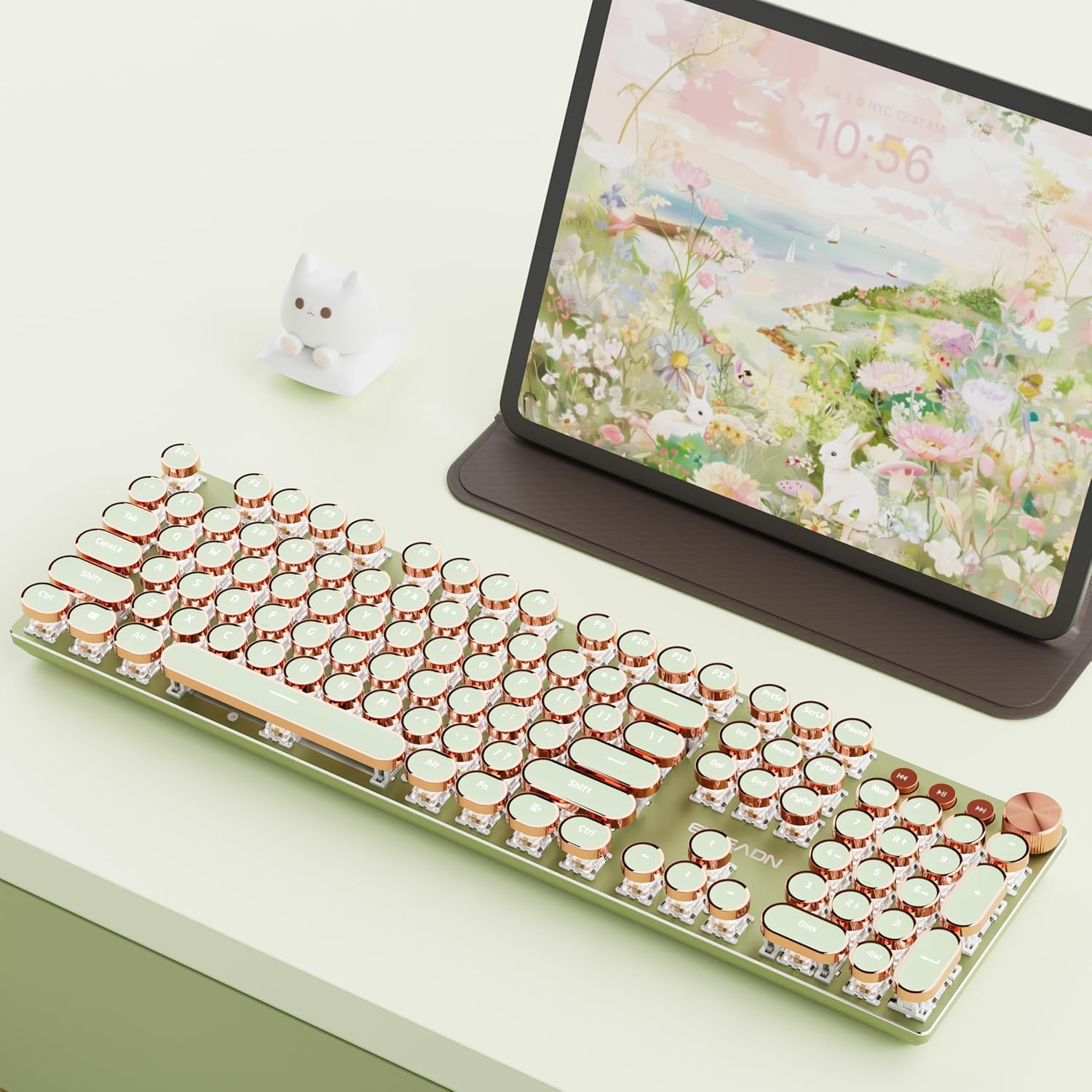
The EWEADN V20 keyboard features a retro design with round keycaps and rose gold accents.
Configuración
O que hai na caixa
- SEUNKWANG EWEADN V20 Wireless Typewriter Keyboard
- Cable USB-C
- 2.4Ghz USB Receiver (located in the keyboard's back compartment)
Carga inicial
Before first use, it is recommended to fully charge the keyboard using the provided USB-C cable. Connect the USB-C end to the keyboard's port and the USB-A end to a compatible power source (e.g., computer USB port, wall adapter).

The keyboard features a built-in 2000mAh battery for extended use.
Instrucións de funcionamento
Modos de conectividade
The V20 keyboard supports three connection modes: 2.4Ghz wireless, Bluetooth 5.0, and USB-C wired.
- Modo sen fíos de 2.4 GHz: Locate the USB receiver stored in the back compartment of the keyboard. Plug the receiver into an available USB port on your computer. The keyboard should connect automatically.
- Modo Bluetooth 5.0: The keyboard can connect to up to 3 Bluetooth devices. To pair, press and hold FN + 1, FN + 2, ou FN + 3 to select a Bluetooth channel. The indicator light will blink, indicating pairing mode. Busca "EWEADN V20" on your device's Bluetooth settings and connect.
- Modo con cable USB-C: Connect the provided USB-C cable to the keyboard's port and the other end to your computer. The keyboard will function as a wired device and charge simultaneously.
To switch between connected devices or modes, press FN + 1/2/3 for Bluetooth channels, FN + 4 for 2.4Ghz wireless, or FN + 5 for USB-C wired mode.

The EWEADN V20 supports seamless switching between up to 5 devices across its three connectivity modes.
Multimedia & Backlight Control
The keyboard features a dedicated multimedia knob and function keys for easy control:
- Botón multimedia: Press the knob to switch between volume and lighting adjustment modes. Turn the knob to adjust volume or brightness. Press the knob to mute/unmute or change light effects.
- Efectos de iluminación: The keyboard has 19 lighting effects. Press FN + INS to cycle through the effects.
- Axustar o brillo: Preme FN + frecha cara arriba to increase brightness, FN + frecha cara abaixo para diminuír o brillo.
- Axustar a velocidade: Preme FN + Frecha esquerda to slow down the lighting effect, FN + Frecha dereita to speed up the lighting effect.
- Teclas multimedia dedicadas: Use the buttons next to the knob for previous song, next song, and pause/play.

The keyboard offers multiple lighting effects and easy control via the multimedia knob.
Compatibilidade dobre do sistema
The V20 keyboard is compatible with both Windows and Mac operating systems. Easily switch between layouts:
- Modo Windows: Preme FN + W
- Modo Mac: Preme FN + A
- Restablecer o teclado: Preme FN + ESC

Switch between Windows and Mac layouts with simple key combinations.
Multifunction Keys (FN Combinations)
Utilize the FN key with the F-row keys for additional functions:
- FN+F1: Brillo da pantalla -
- FN+F2: Brillo da pantalla +
- FN+F3: Calculadora
- FN+F4: Ordenador
- FN+F5: Xogador
- FN+F6: Canción anterior
- FN+F7: Próxima canción
- FN+F8: Pausa/Reproducir
- FN+F9: Deixar de xogar
- FN+F10: Silenciar
- FN+F11: Volume +
- FN+F12: Volume -

Access various functions using the FN key combinations.
Anti-Ghosting
The V20 keyboard features 104-key anti-ghosting technology. This ensures that every keypress is registered accurately, even when multiple keys are pressed simultaneously, preventing missed inputs during fast typing or gaming.
Deseño Ergonómico
The keyboard is designed with two-stage foldable foot supports on the underside. These allow you to adjust the keyboard's angle to your preferred typing position, enhancing comfort during prolonged use.

Adjust the keyboard's height with the two-stage foldable stands for ergonomic comfort.
Mantemento
Para garantir a lonxevidade e o rendemento óptimo do teclado, siga estas pautas de mantemento:
- Limpeza: Use a soft, dry cloth to wipe the keyboard surface. For deeper cleaning, use a can of compressed air to remove dust and debris from between the keycaps. Avoid using harsh chemicals or abrasive materials.
- Coidado da batería: To prolong battery life, avoid fully discharging the keyboard frequently. Charge it when the battery indicator is low. If storing for an extended period, charge the battery to about 50% and store in a cool, dry place.
- Almacenamento: Garde o teclado nun lugar limpo e seco, lonxe de temperaturas extremas e da luz solar directa.
Resolución de problemas
If you encounter any issues with your SEUNKWANG EWEADN V20 keyboard, please refer to the following common solutions:
- O teclado non responde: Ensure the keyboard is charged. Check the connection mode (2.4Ghz receiver, Bluetooth, or wired) and ensure it is correctly selected (FN + 1/2/3/4/5). For wireless modes, ensure the receiver is properly plugged in or Bluetooth is paired.
- Chaves que non se rexistran: Ensure the keyboard is clean and free of debris. If using wireless, try moving closer to the receiver or device to rule out interference.
- Problemas de retroiluminación: Check the brightness settings using FN + Up/Down Arrow. Ensure the multimedia knob is in lighting adjustment mode.
- Caídas de conectividade: For wireless connections, ensure there are no strong interference sources nearby (e.g., other wireless devices, large metal objects). Try re-pairing Bluetooth or re-inserting the 2.4Ghz receiver.
Se o problema persiste, póñase en contacto co servizo de atención ao cliente para obter máis axuda.
Especificacións
| Característica | Detalle |
|---|---|
| Número de modelo | V20-1 |
| Dimensións do paquete | 17.6 x 6.02 x 2.01 polgadas |
| Peso do elemento | 2.01 libras |
| Fabricante | EWEADN |
| Baterías | 1 pilas de iones de litio necesarias (incluídas) |
| Tecnoloxía de conectividade | 2.4 GHz, Bluetooth, USB-C |
| Descrición do teclado | Xogos |
| Usos recomendados | Business, Education, Everyday Use, Gaming, Multimedia, Personal, Photo Editing, Programming |
| Característica especial | Backlight & Metal Panel & Multimedia Knob & Dual System WIN/MAC & Independent Cable & Full Keys Anti-Ghosting |
| Cor | Verde |
| Retroiluminación del teclado | Cor única |
| Estilo | Retro mechanical gaming keyboard |
| Material | Metal |
Vídeos oficiais de produtos
EWEADN V20 Elegant Voices
This video demonstrates the typing sound and aesthetic appeal of the EWEADN V20 keyboard.
Purple Retro Typewriter Keyboard
A visual demonstration of the keyboard's features and lighting in a purple variant.
EWEADN V20 Typewriter Keyboard Wireless
Un máisview video highlighting the wireless capabilities and design of the EWEADN V20 keyboard.
Garantía e Soporte
For any product inquiries, troubleshooting, or support needs, please contact the manufacturer directly.
- Soporte por correo electrónico: eweadnkeyboard@outlook.com
- Soporte en liña: Visita o SEUNKWANG Store on Amazon and click the "Ask a question" option.

Contact information for customer support and after-sales services.