
1. Introdución
Grazas pola compraasing the HOCO HA1 Portable Party Speaker. This manual provides essential information for the safe and efficient operation of your device. Please read it thoroughly before use and retain it for future reference.
Información de seguridade
- Non expoñas o altofalante á auga nin a humidade excesiva.
- Evite colocar o altofalante preto de fontes de calor ou baixo a luz solar directa.
- Non intente desmontar nin reparar a unidade vostede mesmo. Póñase en contacto co persoal de servizo cualificado.
- Manter fóra do alcance dos nenos.
- Use só os accesorios de carga especificados.
2. Contido do paquete
Comprobe que todos os elementos estean presentes no paquete:
- HOCO HA1 Portable Party Speaker
- Micrófono con fíos
- Charging Cable (USB-A to DC barrel jack, inferred)
- Manual de instrucións (este documento)

Image: The HOCO HA1 speaker packaging, illustrating the speaker and its accessories, including a wired microphone.
3. Produto rematadoview: Controis e portos
Familiarize yourself with the various controls and connection ports on your HOCO HA1 speaker.

Imaxe: Arriba view of the HOCO HA1 speaker, highlighting the control panel with buttons, rotary knob, and integrated carrying handle.
Panel de control (superior)
- Botón de encendido: Manteña premido para activar/desactivar o altofalante.
- Botón de modo: Short press to switch between Bluetooth, USB, AUX, and FM radio modes.
- Botón de volume: Xire para axustar o volume principal.
- Botón Reproducir/Pausa: Preme para reproducir ou pausar o audio.
- Botóns de pista anterior/seguinte: Press to skip tracks in Bluetooth/USB mode, or change FM stations.
- Botón de modo de luz: Press to cycle through different LED light effects or turn them off.

Imaxe: Traseira view of the HOCO HA1 speaker, displaying the various input ports for USB, AUX, and microphone connections.
Portos traseiros
- Porto USB: Para reproducir audio desde unha unidade flash USB.
- Entrada AUX (3.5 mm): For connecting external audio devices via an audio cable.
- Microphone Input (6.35mm): For connecting the wired microphone.
- Porto de carga DC 5V: Para conectar o cable de carga.
4. Configuración
4.1 Carga do altofalante
- Connect the charging cable to the DC 5V charging port on the rear of the speaker.
- Conecta o outro extremo do cable de carga a un adaptador de corrente USB compatible (non incluído) ou a un porto USB.
- A luz indicadora de carga acenderase. Agarde aproximadamente de 3 a 4 horas para unha carga completa.
- Desconecte o cable de carga unha vez que estea completamente cargado.
4.2 Conexión do micrófono
- Locate the Microphone Input (6.35mm) port on the rear of the speaker.
- Insert the microphone cable securely into this port.
- The microphone is now ready for use in Karaoke mode.
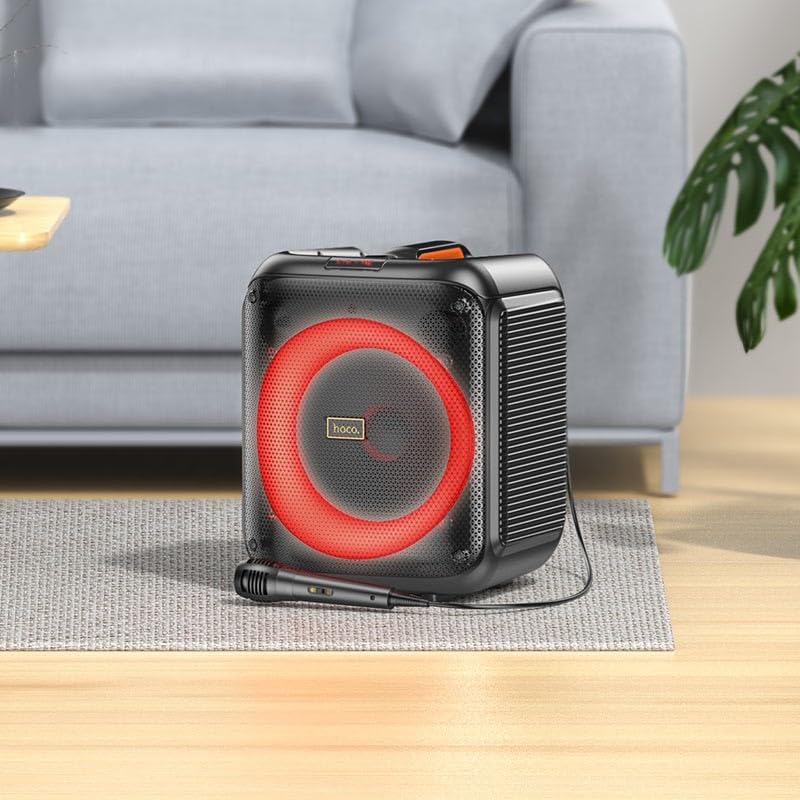
Image: The HOCO HA1 speaker set up with its wired microphone, demonstrating its readiness for karaoke or vocal use.
5. Instrucións de funcionamento
5.1 Encendido/apagado
Manteña premido o Botón de encendido no panel de control durante aproximadamente 3 segundos para activar ou desactivar o altofalante.
5.2 Emparejamento Bluetooth
- Acenda o altofalante. Entrará automaticamente no modo de emparellamento Bluetooth, o que se indicará cun LED intermitente.
- No teu dispositivo móbil, activa o Bluetooth e busca os dispositivos dispoñibles.
- Select "HOCO HA1" from the list of devices.
- Unha vez emparellado, o altofalante emitirá un son de confirmación e o LED deixará de parpadear.
- Agora podes reproducir audio desde o teu dispositivo a través do altofalante.
Reprodución por USB 5.3
- Inserir unha unidade flash USB que conteña son MP3 files into the USB port on the rear of the speaker.
- Preme o Botón de modo until "USB" mode is selected.
- The speaker will automatically begin playing audio from the USB drive.
- Usa o Reproducir/Pausa e Pista anterior / seguinte botóns para controlar a reprodución.
5.4 Entrada AUX
- Connect an external audio device (e.g., smartphone, MP3 player) to the AUX Input port using a 3.5mm audio cable (not included).
- Preme o Botón de modo until "AUX" mode is selected.
- Play audio from your connected device. The speaker will output the sound.
5.5 Radio FM
- Preme o Botón de modo until "FM" mode is selected.
- To auto-scan and save available stations, press and hold the Botón Reproducir/PausaO altofalante explorará e almacenará emisoras.
- Usa o Botóns de pista anterior/seguinte to navigate between saved FM stations.
5.6 Karaoke Function (Microphone Use)
Once the microphone is connected (as described in Section 4.2), simply speak or sing into it. The microphone audio will be mixed with any music playing through the speaker (Bluetooth, USB, AUX). Adjust the master volume using the Botón de volume.
5.7 Efectos de luz LED
Preme o Botón de modo de luz on the control panel to cycle through various LED light effects. Pressing it repeatedly will change the pattern or turn the lights off.

Image: The HOCO HA1 speaker showcasing its dynamic, multi-colored LED lighting feature, enhancing the party atmosphere.
6. Mantemento
6.1 Limpeza
- Asegúrate de que o altofalante estea apagado e desconectado antes de limpalo.
- Use un pano suave e seco para limpar as superficies exteriores.
- Non empregue produtos de limpeza abrasivos, ceras nin solventes.
6.2 Almacenamento
- Garde o altofalante nun lugar fresco e seco, lonxe da luz solar directa e de temperaturas extremas.
- Se a gardas durante un período prolongado, cárgaa periodicamente (por exemplo, cada 3 meses) para mantelo en bo estado.
7 Solución de problemas
| Problema | Causa posible | Solución |
|---|---|---|
| O altofalante non se acende. | A batería está esgotada. | Cargue o altofalante durante polo menos 30 minutos. |
| Non se escoita son do altofalante. | Volume is too low; incorrect mode selected; device not paired (Bluetooth). | Increase volume; press Mode button to select correct input; re-pair Bluetooth device. |
| O dispositivo Bluetooth non se pode emparellar. | O altofalante non está en modo de emparellamento; o dispositivo está demasiado lonxe; interferencias. | Ensure speaker is in Bluetooth mode and flashing; move device closer; turn off other Bluetooth devices. |
| O micrófono non funciona. | Microphone not properly connected; microphone switch off (if applicable). | Ensure microphone is fully plugged into the correct port; check if microphone has an On/Off switch. |
| A recepción da radio FM é deficiente. | Sinal débil; interferencias ambientais. | Relocate the speaker; try auto-scanning again. |
8. Especificacións
| Número de modelo | HA1 (20000463) |
| Marca | HOCO |
| Potencia de saída do altofalante | 45 vatios (máx.) |
| Conectividade | Bluetooth, USB, AUX (3.5mm), FM Radio |
| Entrada de micrófono | Si (6.35 mm) |
| Tipo de batería | Ión de litio (1 incluída) |
| Peso do elemento | 3.6 quilogramos |
| Tipo de montaxe | Soporte de mesa |
9. Garantía e soporte
The HOCO HA1 Portable Party Speaker comes with a standard manufacturer's warranty. For detailed warranty terms and conditions, please refer to the warranty card included with your purchase or visit the official HOCO websitio.
For technical support, troubleshooting assistance beyond this manual, or service inquiries, please contact HOCO customer support through their official channels. Contact information can typically be found on the product packaging or the HOCO official websitio.