
1. Introdución
This manual provides essential information for the safe and efficient use of your XIAOMI Vacuum Cleaner G20 Max. Please read it thoroughly before first use and retain it for future reference. The G20 Max features 180AW strong suction power, an LED display, a specialized pet hair brush, and a 60-minute run time for comprehensive cleaning.

Image: The main unit of the XIAOMI Vacuum Cleaner G20 Max, showcasing o seu elegante deseño.
2. Instrucións de seguridade importantes
Para reducir o risco de incendio, descarga eléctrica ou lesións, siga sempre as precaucións de seguridade básicas ao usar un aparello eléctrico, incluíndo as seguintes:
- Le todas as instrucións antes de usar o aparello.
- Non deixe o aparello cando estea enchufado. Desenchufe da toma de corrente cando non estea en uso e antes de realizar o mantemento.
- Non use ao aire libre nin en superficies húmidas.
- Non permita que se use como xoguete. É necesario prestar moita atención cando o usen ou preto dos nenos.
- Use só como se describe neste manual. Use só os anexos recomendados polo fabricante.
- Non o use con cable ou enchufe danados. Se o aparello non funciona como debería, caeu, estrañouse, deixouse ao aire libre ou caeu á auga, devólveo a un centro de servizo.
- Non tire ou transporte co cable, non use o cable como asa, non peche unha porta sobre o cable nin tire do cable por bordos ou esquinas afiadas. Non pase o aparello sobre o cable. Manteña o cable lonxe de superficies quentes.
- Non desconecte tirando do cable. Para desenchufar, agarre o enchufe, non o cable.
- Non manipule o enchufe ou o aparello coas mans molladas.
- Non coloque ningún obxecto nas aberturas. Non use con ningunha abertura bloqueada; manteña libre de po, pelusa, cabelos e calquera cousa que poida reducir o fluxo de aire.
- Manteña o cabelo, a roupa solta, os dedos e todas as partes do corpo lonxe das aberturas e das partes móbiles.
- Non coller nada que arde ou fume, como cigarros, mistos ou cinzas quentes.
- Non o use para recoller líquidos inflamables ou combustibles, como a gasolina, nin o use en áreas onde poidan estar presentes.
- Non recolla materiais tóxicos (por exemplo, lixivia con cloro, limpador de amoníaco, desatascador de sumidoiros).
- Non use sen bolsa de po e/ou filtros colocados.
- Desactiva todos os controis antes de desconectar.
- Teña coidado extra ao limpar as escaleiras.
- Non o empregue para recoller obxectos duros ou afiados como vidro, cravos, parafusos, moedas, etc.
3. Compoñentes e accesorios do produto
The XIAOMI Vacuum Cleaner G20 Max comes with a comprehensive set of accessories designed for versatile cleaning tasks. Familiarize yourself with each component:
- Unidade de baleiro principal: The core device housing the motor, dustbin, and controls.
- Motorised Brush with LED Lights: For general floor cleaning, illuminating hidden dust.
- Ferramenta para tecidos e colchóns: Designed for upholstery and bedding.
- Combination Crevice Tool: A versatile tool for narrow spaces and dusting.
- Mangueira de extensión: Provides extended reach for cleaning high or awkward areas.
- Pet Groom Tool: Specifically designed for grooming pets and collecting loose hair.
- Wall Dock with Charging Station: Para un almacenamento e carga cómodos.
- Kit de accesorios: Additional small parts and brushes.
- Adaptador: Power supply for charging.

Image: A comparison table highlighting features and accessories across different Xiaomi vacuum models, including the G20 Max.

Image: The 2-in-1 nozzle attachment, useful for cleaning crevices and surfaces.
4. Configuración e uso inicial
4.1 Asemblea
- Desembale todos os compoñentes e asegúrese de que estean presentes todas as pezas.
- Connect the main vacuum unit to the extension wand until it clicks into place.
- Attach the desired cleaning head (e.g., motorised brush) to the end of the extension wand.
- Para o uso na man, conecte os accesorios directamente á unidade principal.
4.2 Carga da batería
Before first use, fully charge the vacuum cleaner. The battery provides up to 60 minutes of runtime in Eco mode.
- Mount the wall dock in a suitable location near a power outlet.
- Connect the adapter to the charging station and plug it into a power outlet.
- Place the vacuum cleaner onto the charging station. The LED display will indicate charging status.
- Unha carga completa adoita tardar aproximadamente 3.5 horas.

Image: The wall-mounted charging dock, providing a convenient storage and charging solution for the vacuum.
5. Funcionamento da aspiradora
5.1 Acendido/apagado e selección de modo
Press the power button on the handle to turn the vacuum on or off. Use the mode selection button to cycle through the three power modes: Eco, Standard, and High Power.
- Modo Eco: Para unha limpeza lixeira e unha maior duración da batería (ata 60 minutos).
- Modo estándar: For daily cleaning of small particles and general floor surfaces.
- Modo de alta potencia: For stubborn dirt and large debris, providing maximum suction.

Image: The LED display on the vacuum cleaner, indicating battery level and current operating mode.
5.2 Usando anexos
Selecciona o accesorio axeitado para a túa tarefa de limpeza:
- Motorised Brush with LED Lights: Ideal for all floor types. The built-in LED lamp reveals hidden dust for a more thorough clean.
- Pet Groom Tool: Use this tool to gently groom your pet and simultaneously vacuum loose hair. Ensure your pet is comfortable with the tool before use.
- Combination Crevice Tool: Perfect for reaching into tight corners, between sofa cushions, or for dusting delicate surfaces.
- Mangueira de extensión: Connect this to the main unit or extension wand with an accessory for increased flexibility and reach, useful for cleaning high shelves or inside vehicles.
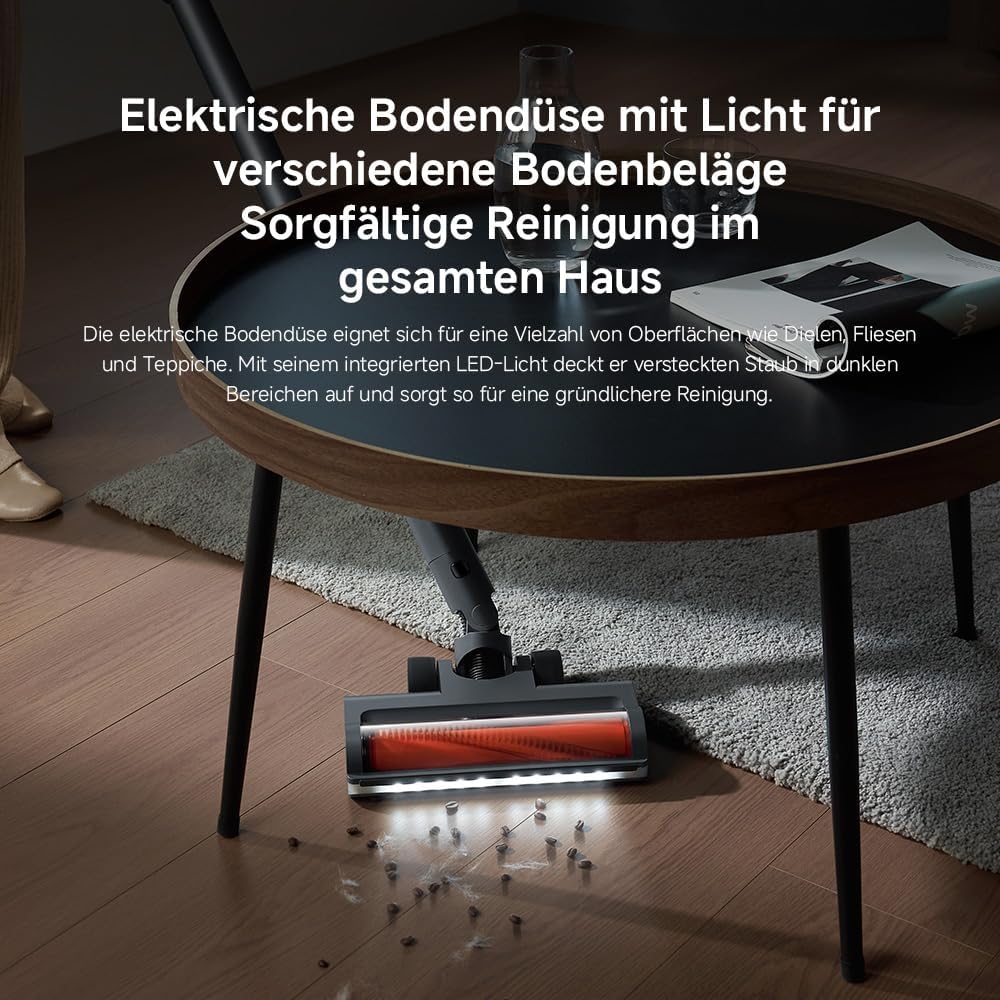
Image: The motorised floor nozzle with LED lights, highlighting its ability to reveal dust on a hard floor surface.
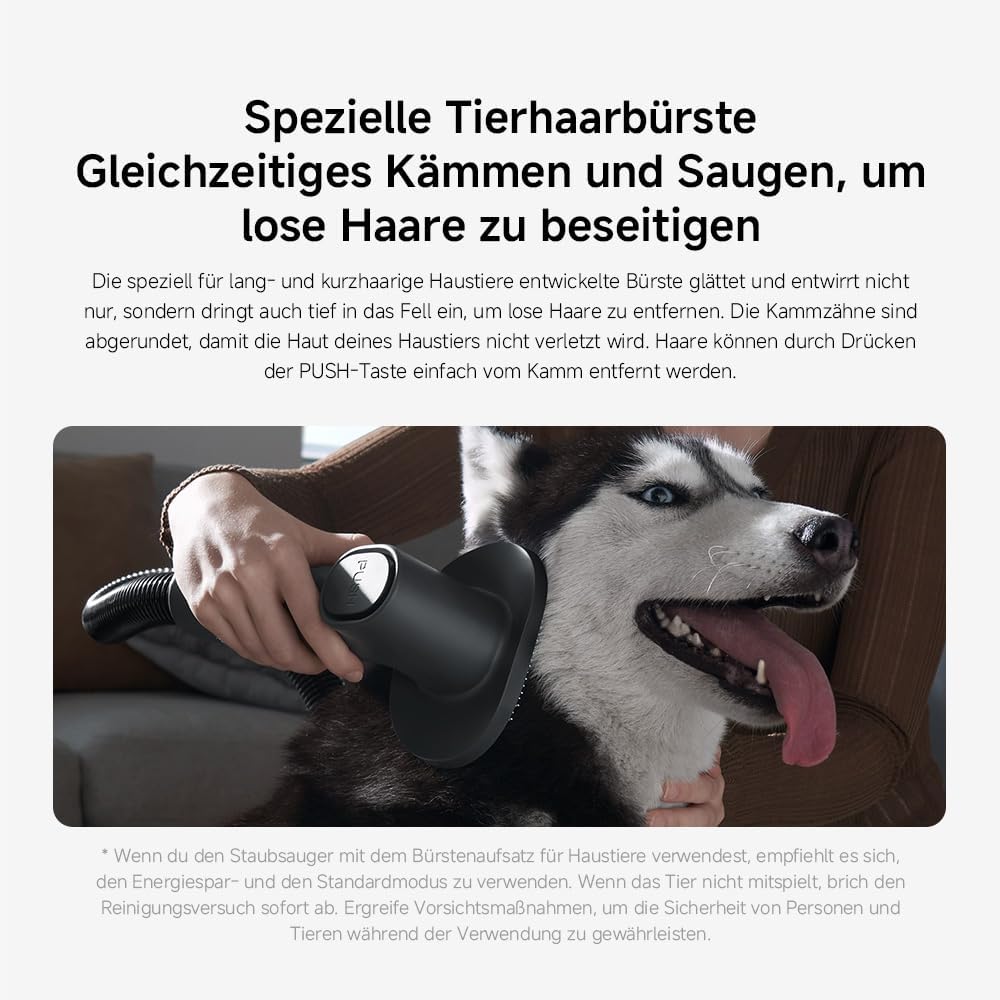
Image: The specialized pet hair brush attachment in use, demonstrating its function for grooming and vacuuming pet fur.

Image: The vacuum cleaner equipped with the extension hose and a crevice tool, reaching a high surface for cleaning.
6. Mantemento e coidados
Un mantemento regular garante un rendemento óptimo e prolonga a vida útil do teu aspirador.
6.1 Baleirar o colector de lixo
The 0.6-liter dustbin should be emptied regularly, especially when the MAX line is reached.
- Asegúrate de que a aspiradora estea apagada e desconectada do cargador.
- Prema o botón de liberación do colector de po para separalo da unidade principal.
- Position the dustbin over a waste bin and press the bottom release button to open the flap and empty the contents.
- Peche a solapa e volva colocar o colector de po na unidade principal ata que oia un clic de forma segura.

Image: A hand demonstrating the process of emptying the vacuum cleaner's dustbin.
6.2 Limpeza dos filtros
The G20 Max features a 5-stage precision filtration system with washable components, including a HEPA filter. Clean filters regularly to maintain suction power.
- Retire o colector de po como se describe arriba.
- Xire e tire o conxunto do filtro do colector de po.
- Separate the individual filter components.
- Rinse all washable filter parts under running water until clean. Do not use detergents.
- Allow all filter components to air dry completely for at least 24 hours before reassembling and placing back into the vacuum. Ensure they are completely dry to prevent mold or damage.

Image: Various washable filter components being cleaned under running water, illustrating the ease of maintenance.
6.3 Limpeza do rolo de cepillo
Periodically check the brush roll for tangled hair or debris. Use scissors to cut away any tangled hair and remove it. The brush roll can often be removed for easier cleaning.
7 Solución de problemas
If you encounter issues with your XIAOMI Vacuum Cleaner G20 Max, refer to the following common problems and solutions:
| Problema | Causa posible | Solución |
|---|---|---|
| O baleiro non se acende | A batería está esgotada O botón de acendido non se preme correctamente | Cargue a batería completamente Asegúrese de que o botón de acendido estea presionado firmemente |
| Perda de potencia de succión | O lixo está cheo Os filtros están obstruídos A mangueira ou o cabezal do cepillo están bloqueados | Baleirar o colector de lixo Limpar ou substituír os filtros Comproba e elimina calquera bloqueo |
| A batería non se está cargando | O cargador non está conectado correctamente Faulty adapter or charging dock | Ensure adapter is securely plugged into both the dock and power outlet Póñase en contacto co servizo de atención ao cliente se os problemas persisten |
| O rolo de pincel non xira | Hair or debris tangled in brush Brush head attachment not properly connected | Clean the brush roll, removing any obstructions Volva colocar a cabeza do cepillo de forma segura |
If the problem persists after attempting these solutions, please contact XIAOMI customer support for further assistance.
8. Especificacións do produto
| Característica | Detalle |
|---|---|
| Marca | XIAOMI |
| Número de modelo | Xiaomi Vacuum Cleaner G20 Max EU 57805 |
| Cor | Gris Titanio |
| Dimensións do produto | 12.4 x 22.6 x 34 cm |
| Peso do elemento | 3.7 kg |
| Capacidade | 0.6 litros |
| Potencia/Wattage | 450 vatios |
| Número de velocidades | 3 |
| Nivel de ruído | 72 decibeis |
| Tempo de execución | Up to 1 hour (in Eco mode) |
| Características especiais | Bagless, Cordless, HEPA, Lightweight, Spotless Cleaning |
| Tipo de filtro | Filtro HEPA |
| Compoñentes incluídos | Accessory Kit, Adapter, Charging Dock, Crevice Tool, Dusting Brush |
| É sen fíos? | Si |
9. Garantía e atención ao cliente
Your XIAOMI Vacuum Cleaner G20 Max is covered by a manufacturer's warranty. Please refer to the warranty card included in your product packaging for specific terms and conditions, including the warranty period and coverage details.
For technical support, service, or warranty claims, please contact XIAOMI customer service through their official website or the contact information provided in your product documentation. When contacting support, please have your model number (BHR8828EU) and purchase date ready.
You can find more information and support resources on the official XIAOMI websitio: www.mi.com/global/support