
Introdución
Thank you for choosing the ANDELI MONER LED PRO Welding Helmet. This manual provides essential information for the safe and effective operation, maintenance, and troubleshooting of your welding helmet. Please read this manual thoroughly before use and retain it for future reference.
Información de seguridade
Always prioritize safety when welding. This helmet is designed to protect your eyes and face from sparks, spatter, and harmful radiation under normal welding conditions. However, it is not a substitute for other personal protective equipment (PPE).
- Protección ocular: Always wear appropriate primary eye protection (safety glasses) under the welding helmet.
- Ventilación: Ensure adequate ventilation in your work area to avoid inhaling hazardous fumes.
- Inspección: Antes de cada uso, inspeccione o casco para detectar calquera dano, fenda ou pezas soltas. Non use un casco danado.
- Temperatura: Do not expose the helmet to extreme temperatures or direct sunlight for prolonged periods.
- Limpeza: Clean the helmet and lens according to the maintenance instructions to ensure optimal performance and visibility.
- Modificacións: Do not modify the helmet or its components. Unauthorized modifications can compromise safety and void the warranty.
- Sensores de arco: Ensure the arc sensors are clean and unobstructed for proper auto-darkening function.
Características do produto
- Panoramic Large ViewPantalla de visualización: Features a 3.94" x 3.74" main viewing area with an additional 3.72" x 1.76" side view (DIN4, non-auto-darkening) for an expanded field of vision.
- Luces LED integradas: Equipped with 4 LED lights providing up to 400 lumens for enhanced visibility in low-light conditions.
- Cor verdadeira View: Offers 1/1/1/2 optical clarity for a natural and clear view of the weld puddle and surrounding area.
- Protección UV/IR: Provides constant UV/IR protection up to Shade DIN16, safeguarding eyes from harmful radiation.
- Advanced Auto-Darkening: Utilizes 4 premium arc sensors for rapid switching from light to dark in 1/25000 seconds, protecting eyes instantly upon arc strike.
- Supresión de interferencias: Designed to minimize false triggers from sunlight or workshop lighting, ensuring consistent auto-darkening performance.
- Carga tipo C: Features a Type-C charging port for convenient and fast recharging of the internal battery, offering 3 to 6 hours of continuous LED operation.
- Controis dixitais: Microprocessor-controlled settings for precise adjustment of delay, shade, and sensitivity.
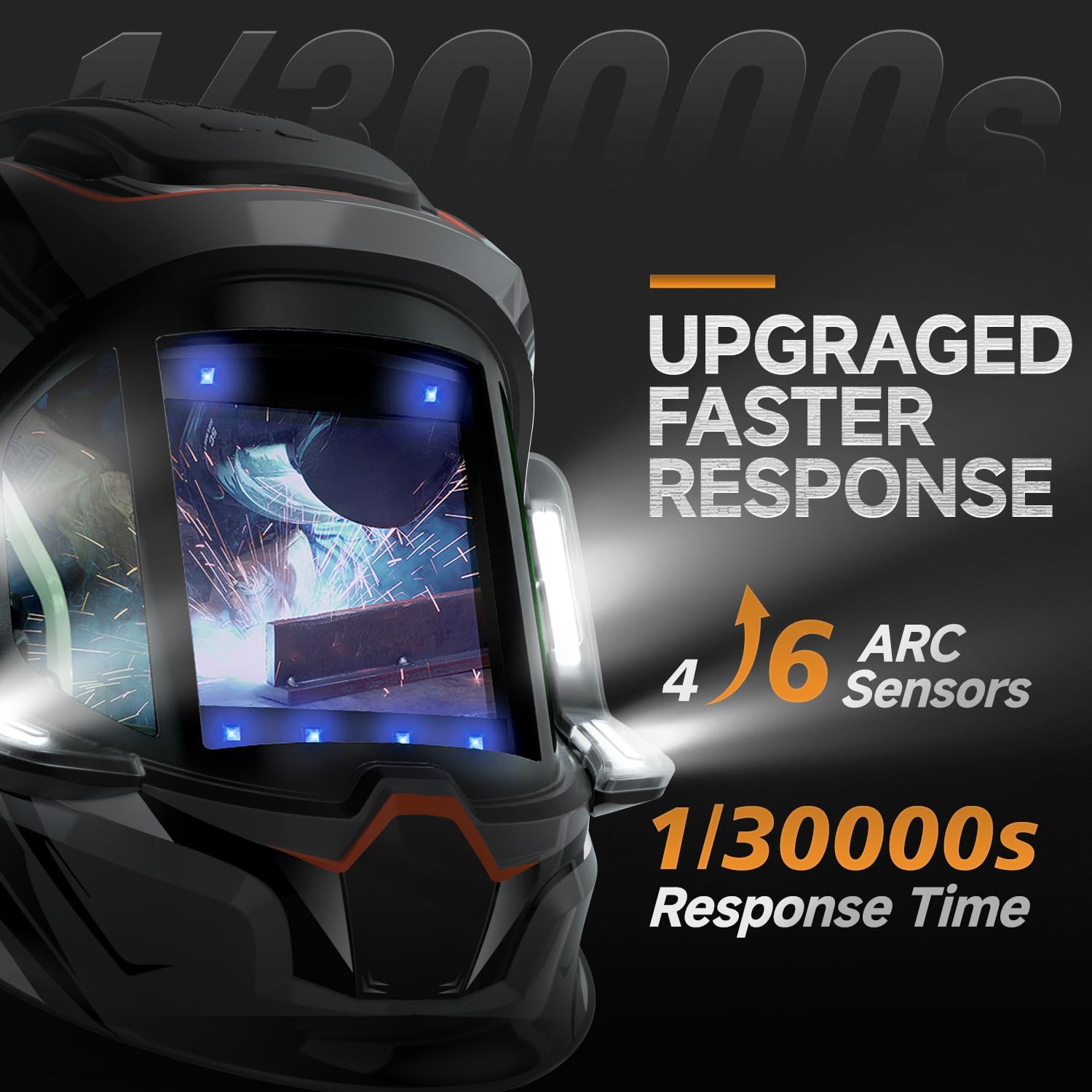
Imaxe: Illustration of the helmet's 4 arc sensors and fast response time of 1/30000 seconds for quick auto-darkening.
Configuración
- Desembalaxe: Carefully remove the welding helmet and all accessories from the packaging. Inspect for any shipping damage.
- Headgear Assembly and Adjustment: Attach the headgear to the helmet shell if not already assembled. Adjust the headgear for a comfortable and secure fit on your head. This includes adjusting the angle, tightness, and distance from your face.

Imaxe: Headgear adjustment points including angle, tightness, distance, and comfort cushion for optimal fit and stability.
- Cargando a batería: Before first use, fully charge the helmet's internal battery using the provided Type-C charging cable. The charging port is typically located on the side or bottom of the helmet. A full charge provides 3 to 6 hours of continuous LED operation.

Imaxe: Acabadoview of the welding helmet, highlighting the Type-C rechargeable battery and digital lens assembly.
- Protective Films: Remove any protective films from the inner and outer lenses before use.
- Proba de funcionamento inicial: Perform a function test as described in the "Operating Instructions" section to ensure the auto-darkening feature is working correctly.
Instrucións de funcionamento
The ANDELI MONER LED PRO welding helmet features digital controls for precise adjustment of welding parameters.
- Encendido/apagado: The helmet typically powers on automatically when exposed to light or an arc. Some models may have a manual power button.
- Axuste de sombra: Select the appropriate shade level (DIN) for your welding process and amperage. Refer to welding safety standards for recommended shade levels. The helmet supports shades 4/5-9/9-13.
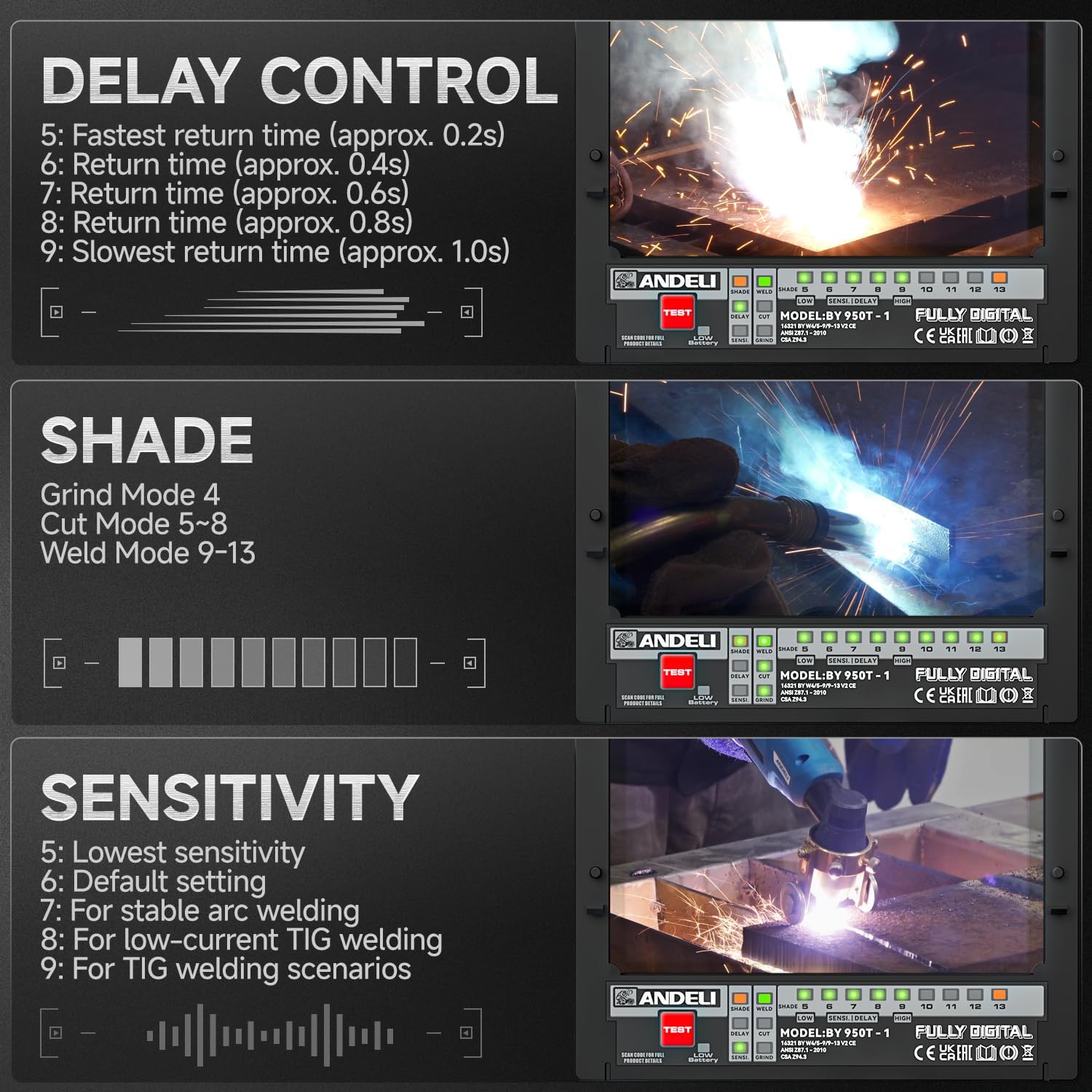
Imaxe: Digital controls for adjusting shade, delay, and sensitivity settings on the welding helmet.
- Axuste de sensibilidade: Adjust the sensitivity to detect the welding arc. Higher sensitivity is suitable for low amperage TIG welding, while lower sensitivity helps prevent false darkening from ambient light.
- Configuración 5: Sensibilidade máis baixa
- Configuración 6: Configuración predeterminada
- Configuración 7: For stable arc welding
- Configuración 8: For low-current TIG welding
- Configuración 9: For TIG welding scenarios
- Control de atraso: Set the delay time for the lens to return from dark to light after the arc stops. A longer delay is useful for high amperage welding to prevent eye fatigue from afterglow.
- Configuración 5: Fastest return time (approx. 0.2s)
- Configuración 6: Return time (approx. 0.4s)
- Configuración 7: Return time (approx. 0.6s)
- Configuración 8: Return time (approx. 0.8s)
- Configuración 9: Slowest return time (approx. 1.0s)
- Modo de moenda: Activate grind mode (typically Shade 4) when grinding to prevent the lens from darkening. Ensure you switch back to weld mode before striking an arc.
- Luces LED: Activate the integrated LED lights for improved visibility in dark work environments. The lights provide up to 400 lumens.
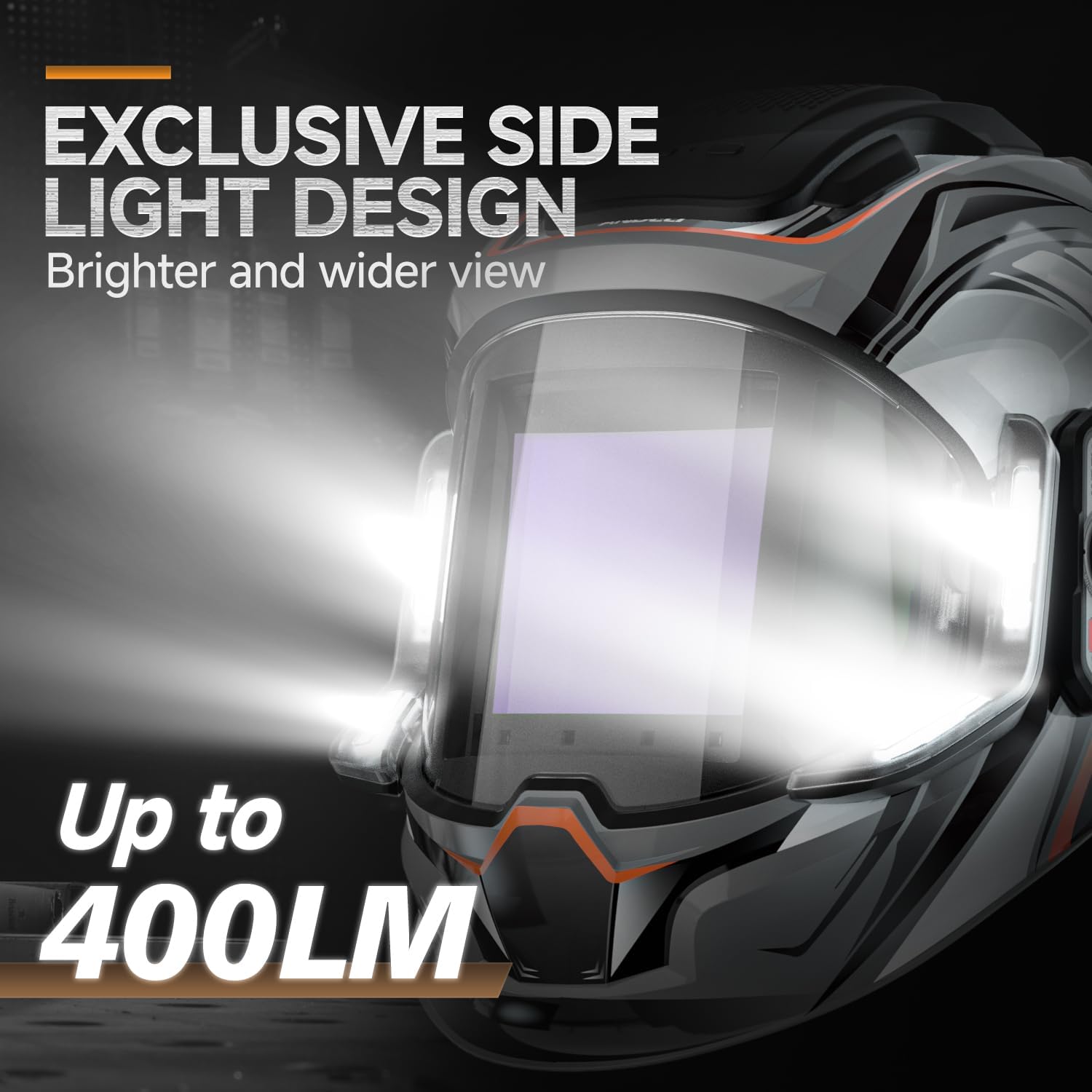
Imaxe: Primeiro plano view of the helmet's side light design, illustrating the 400 lumen output for enhanced visibility.
- Cor verdadeira View: The helmet's true color technology provides a clearer and more natural view do charco de soldadura.

Imaxe: Examples of the true color enhancement feature, showing improved clarity and natural color perception during welding.
Mantemento
Un mantemento regular garante a lonxevidade e o rendemento óptimo do seu casco de soldadura.
- Limpeza da lente: Clean the outer and inner protective lenses regularly with a soft, clean cloth and a mild cleaning solution. Do not use abrasive cleaners or solvents.
- Cleaning the Helmet Shell: Limpar a carcasa do casco con anunciosamp pano. Evite produtos químicos agresivos.
- Sensores de arco: Keep the arc sensors clean and free from dust, dirt, and spatter to ensure proper auto-darkening function.
- Carga da batería: Recharge the internal battery as needed. Avoid fully discharging the battery frequently to prolong its lifespan.
- Almacenamento: Store the helmet in a dry, clean place away from direct sunlight and extreme temperatures.
- Inspección: Periodically inspect the headgear, lenses, and helmet shell for any signs of wear, damage, or cracks. Replace damaged parts immediately.
Resolución de problemas
| Problema | Causa posible | Solución |
|---|---|---|
| A lente non se escurece cando se acende o arco. |
|
|
| Lens darkens intermittently or falsely. |
|
|
| Mala visibilidade a través da lente. |
|
|
| As luces LED non funcionan. |
|
|
Especificacións
| Característica | Detalle |
|---|---|
| Modelo | MONER LED PRO |
| Marca | ANDELI |
| Principal Viewing Screen Size | 3.94" x 3.74" (100 mm x 95 mm) |
| Lado View Tamaño da pantalla | 3.72" x 1.76" (DIN4, non-auto-darkening) |
| Claridade óptica | 1/1/1/2 |
| Protección UV/IR | Ata sombra DIN16 |
| Sensores de arco | 4 |
| Estado de luz | DIN 4 |
| Estado escuro | Variable Shade 5-9 / 9-13 |
| Tempo de cambio | 1/25000 seconds (Light to Dark) |
| Tempo de atraso | Adjustable (0.2s - 1.0s) |
| Fonte de alimentación | Rechargeable Lithium Battery (Type-C Charging) |
| Saída de luz LED | Ata 400 Lumens |
| LED Light Operating Time | 3 to 6 hours (continuous) |
| Material | PP |
| Peso do elemento | 771 g |
Garantía e Soporte
For warranty information and technical support, please refer to the documentation provided with your purchase or contact ANDELI customer service. Keep your purchase receipt as proof of purchase.