
1. Introdución
This manual provides essential information for the safe and efficient operation of your ASHAPOWER NEON 70 Solar MPPT Charge Controller. Please read these instructions carefully before installation and use. Retain this manual for future reference.
The ASHAPOWER NEON 70 is a high-efficiency Maximum Power Point Tracking (MPPT) solar charge controller designed for various battery bank voltages (12V, 24V, 36V, 48V). It features advanced charging algorithms to optimize battery life and performance.
2. Información de seguridade
AVISO: Improper installation or operation can lead to serious injury or damage to the equipment. Always follow safety guidelines.
- Asegúrese de que todas as conexións estean seguras e correctas antes de aplicar a alimentación.
- Do not attempt to disassemble or repair the unit yourself. Contact qualified personnel.
- Instale o controlador nunha zona ben ventilada, lonxe de materiais inflamables e da luz solar directa.
- Usar equipos de protección individual (EPI) axeitados durante a instalación, incluíndo luvas illantes e protección ocular.
- Vol. Altotages can be present at the solar panel input terminals. Exercise extreme caution.
3. Configuración e instalación
The ASHAPOWER NEON 70 controller is designed for easy and flexible installation. Follow these steps for proper setup:
- Montaxe: Select a suitable location for mounting the controller. It should be indoors, protected from weather, and have adequate ventilation. Ensure the mounting surface is stable.
- Conexión da batería: Connect the battery bank to the controller's battery terminals first. Ensure correct polarity (+ to + and - to -). The controller will auto-detect the battery voltage (12 V/24 V/36 V/48 V).
- Conexión do panel solar: Connect the solar panel array to the controller's PV input terminals. Observe correct polarity. Ensure the total open-circuit voltage (Voc) of your solar array does not exceed 210V and the total power does not exceed 5100W.
- Load/Inverter Connection (Optional): If connecting a DC load or inverter directly to the controller's load terminals (if available), ensure the load current does not exceed the controller's rating. For AC loads, connect an inverter to the battery bank.
Importante: Always connect the battery first, then the solar panels. Disconnect in reverse order: solar panels first, then battery.

Imaxe: Traseira view of the ASHAPOWER NEON 70 MPPT Charge Controller showing the battery and solar panel terminal connections.

Imaxe: Máis deview of key features including input/output current and watts display, 4-stage charging, high tracking efficiency, intelligent current limiting, auto disconnection of PV panel at night, easy installation, factory settings restoration, and auto/forced grid to solar shifting.
Diagramas de cableado:
Refer to the following diagrams for typical off-grid solar power plant configurations:

Image: Wiring diagram illustrating a 2800W/24V off-grid solar power plant setup. It shows 3 series strings of 475W PV panels (total 47 Voc, 2850W), connected to the ASHAPOWER Charge Controller, which then connects to a 24V battery bank (2 x 12V batteries) and an inverter for load and grid power.
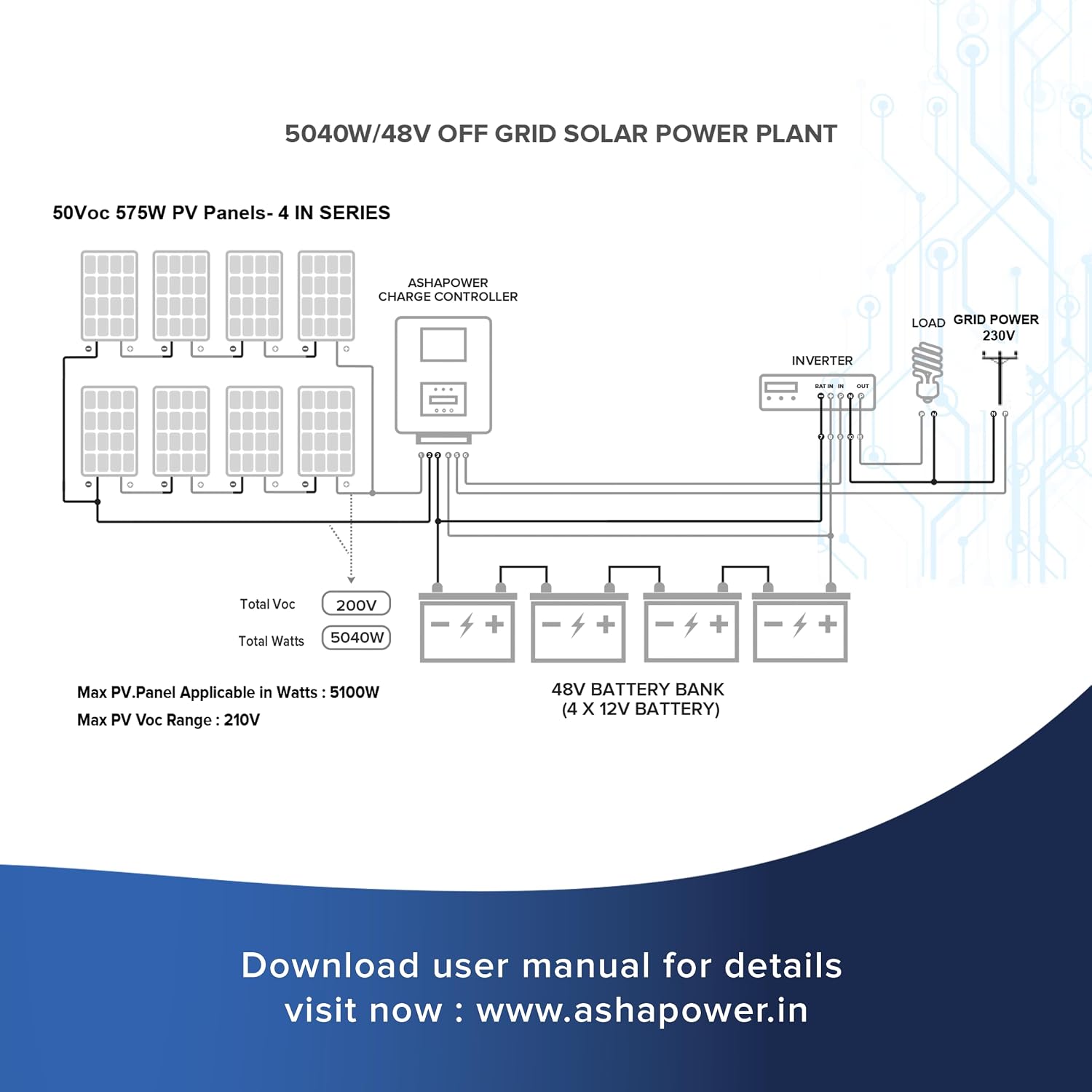
Image: Wiring diagram illustrating a 5040W/48V off-grid solar power plant setup. It shows 4 series strings of 575W PV panels (total 50 Voc, 5040W), connected to the ASHAPOWER Charge Controller, which then connects to a 48V battery bank (4 x 12V batteries) and an inverter for load and grid power.
4. Instrucións de funcionamento
Once installed, the ASHAPOWER NEON 70 operates largely automatically. Key operational aspects include:
- Automatic Battery Voltage Detección: The controller automatically detects and sets the battery bank voltage (12V/24V/36V/48V) upon initial connection.
- 4-StagCarga intelixente electrónica: O controlador emprega un sistema de 4 segundostage charging process (Bulk, Absorption, Float, Equalization) to optimize battery health and extend lifespan.
- Programmable Initial Limited Ampere Charging: This feature allows for controlled initial charging, protecting batteries.
- Ultra-fast & Efficient Power Point Tracking: Ensures maximum power harvest from solar panels under varying conditions.
- Auto Disconnection of PV Panel at Night: Prevents reverse current flow from the battery to the solar panels during nighttime.
Display and Button Operations:
The controller features a display (LED or LCD) and buttons for monitoring and adjusting certain settings. The MPPT is in AUTO BYPASS ON mode by default.

Image: Operational guidelines for the display buttons on the ASHAPOWER NEON 70. It details actions like pressing and holding the DOWN button for 2 seconds to turn off solar to grid/grid to solar shifting (INV MODE OFF, AUTO BYPASS OFF), pressing and holding the UP button for 2 seconds to turn on shifting (INV MODE ON, AUTO BYPASS ON), and pressing and holding the ENTER button for 3 seconds to change grid mode to solar forcefully (FORCED SHIFTING).
| Finalidade | Acción | Mostrar | Función |
|---|---|---|---|
| To turn off (disable) automatic solar to grid/grid to solar shifting function | Press & Hold DOWN Button (2 Seconds) | INV MODE OFF AUTO BYPASS OFF | MPPT reconnects grid power to the connected inverter. |
| To turn on (enable) automatic solar to grid/grid to solar shifting function | Press & Hold UP Button (2 Seconds) | INV MODE ON AUTO BYPASS ON | MPPT disconnects grid power to inverter if the battery terminal voltage is above GRID-SOL set voltage. |
| To change grid mode to solar forcefully (Forced Shifting) | Press & Hold ENTER Button (3 Seconds) | — | MPPT connects grid power to inverter if the battery terminal voltage is above SOL - GRID set voltage. |
Note: To change default function settings, download and refer to user manuals for concerned models & versions from the ASHAPOWER websitio.
5. Mantemento
Regular maintenance ensures optimal performance and longevity of your ASHAPOWER NEON 70 controller:
- Limpeza: Keep the controller clean and free from dust and debris. Use a dry cloth for cleaning. Do not use liquid cleaners.
- Conexións: Periodically check all electrical connections for tightness and corrosion. Loose connections can cause overheating and damage.
- Ventilación: Asegúrate de que as aberturas de ventilación non estean bloqueadas. Un fluxo de aire axeitado é crucial para a disipación da calor.
- Condicións ambientais: Verifique que o ambiente de funcionamento se manteña dentro dos rangos de temperatura e humidade especificados.
6 Solución de problemas
Esta sección ofrece solucións para problemas comúns. Para problemas que non aparecen na lista, póñase en contacto co servizo de atención ao cliente.
| Problema | Causa posible | Solución |
|---|---|---|
| Sen pantalla/Sen alimentación | Batería non conectada ou de baixo volumetage; reversed polarity; blown fuse. | Comprobe as conexións da batería e o voltage. Ensure correct polarity. Check for internal fuse (contact support if suspected). |
| Sen carga desde paneis solares | Solar panels not connected; reversed polarity; insufficient sunlight; PV voltage demasiado baixo/alto. | Verify solar panel connections and polarity. Check sunlight conditions. Ensure PV Voc is within 210V range. |
| A batería non está completamente cargada | Insufficient solar input; battery capacity too large for array; battery issues. | Increase solar panel capacity or reduce load. Check battery health. |
| Sobrequecemento | Mala ventilación; carga excesiva; temperatura ambiente elevada. | Ensure adequate ventilation. Reduce load if possible. Relocate to a cooler environment. |
7. Especificacións
| Característica | Detalle |
|---|---|
| Modelo | NEON70 |
| Marca | ASHAPOWER |
| Batería Voltage Compatibilidade | 12V / 24V / 36V / 48V (Auto-detection) |
| Corrente de carga máxima | 70A |
| Vol. máximo de circuíto aberto fotovoltaicotage (Voc) | 210 V |
| Potencia máxima de entrada PV | 5100 W |
| Max PV Input Power by Battery Voltage | 12V: 1500W, 24V: 2800W, 36V: 3900W, 48V: 5100W |
| Max PV Voc by Battery Voltage | 12V: 120V, 24V: 165V, 36V: 180V, 48V: 210V |
| Cargando Stages | 4-stage (Bulk, Absorption, Float, Equalization) |
| Tipo de visualización | LED ou LCD |
| Material | Metal |
| Cor | Azul |
| Dimensións do produto (L x W x H) | 34.5L x 21.3W x 14.2H Centímetros |
| Peso do elemento | 4.5 quilogramos |
| País de Orixe | India |

Imaxe: Fronte view of the ASHAPOWER NEON 70 MPPT Charge Controller, showcasing its compact design and display area.
8. Información da garantía
The ASHAPOWER NEON 70 Solar MPPT Charge Controller comes with a 2 anos de garantía on manufacturing defects. Please retain your purchase receipt as proof of purchase for warranty claims.

Image: ASHAPOWER NEON 70 MPPT Charge Controller with a visible "2 Years Warranty" badge, indicating the product's warranty period.
9. Atención ao cliente
For technical assistance, warranty claims, or any other inquiries, please contact ASHAPOWER customer support:
- Correo electrónico: contacto@ashapower.in
- Teléfono: +91-7594 82 1007
- Websitio: For detailed user manuals and further information, visit www.ashapower.in


