
Yosoo Yosoo2ktrdga8cw-12
Yosoo Electronic Pet Game Machine
Manual de usuario
Introdución
Grazas pola compraasing the Yosoo Electronic Pet Game Machine. This portable virtual digital pet toy provides an interactive experience, allowing children to care for their own digital companion. This manual will guide you through the setup, operation, and maintenance of your new electronic pet.
Información de seguridade
- This product is intended for children aged 3 years and older.
- Keep small parts away from infants to prevent choking hazards.
- Non expoñas o dispositivo a temperaturas extremas, á luz solar directa nin á humidade.
- Do not attempt to disassemble or modify the device, as this may cause damage or injury.
- Use only the specified battery type (if applicable) and ensure correct polarity during installation.
- Desfágase das baterías de forma responsable segundo a normativa local.
Produto rematadoview
The Yosoo Electronic Pet Game Machine comes in an adorable egg-shaped case, designed for portability and protection. The device itself features a digital screen and four function buttons for interaction.

Image: The Yosoo Electronic Pet Game Machine (blue) alongside its matching egg-shaped protective case.
- Egg-Shaped Case: Provides protection and portability for the electronic pet.
- Electronic Pet Device: The main unit with a screen and control buttons.
- Botóns de función: Four buttons for navigation and interaction (Reset, Select, Decide, Cancel).
Configuración
Follow these steps to prepare your electronic pet for play:
- Open the Egg Case: Gently separate the two halves of the egg-shaped case to access the electronic pet device inside.
- Eliminar o dispositivo: Carefully take the electronic pet device out of its case.
- Battery Installation (if required): Locate the battery compartment on the back of the device. Use a small screwdriver (not included) to open the compartment. Insert the required batteries (e.g., button cell batteries, type AG13/LR44) ensuring correct polarity (+/-). Close the compartment securely.
- Encendido inicial: The device should power on automatically once batteries are installed. If not, press the 'Reset' button.
- Configuración inicial: Follow the on-screen prompts to set the time, date, and select your first virtual pet.
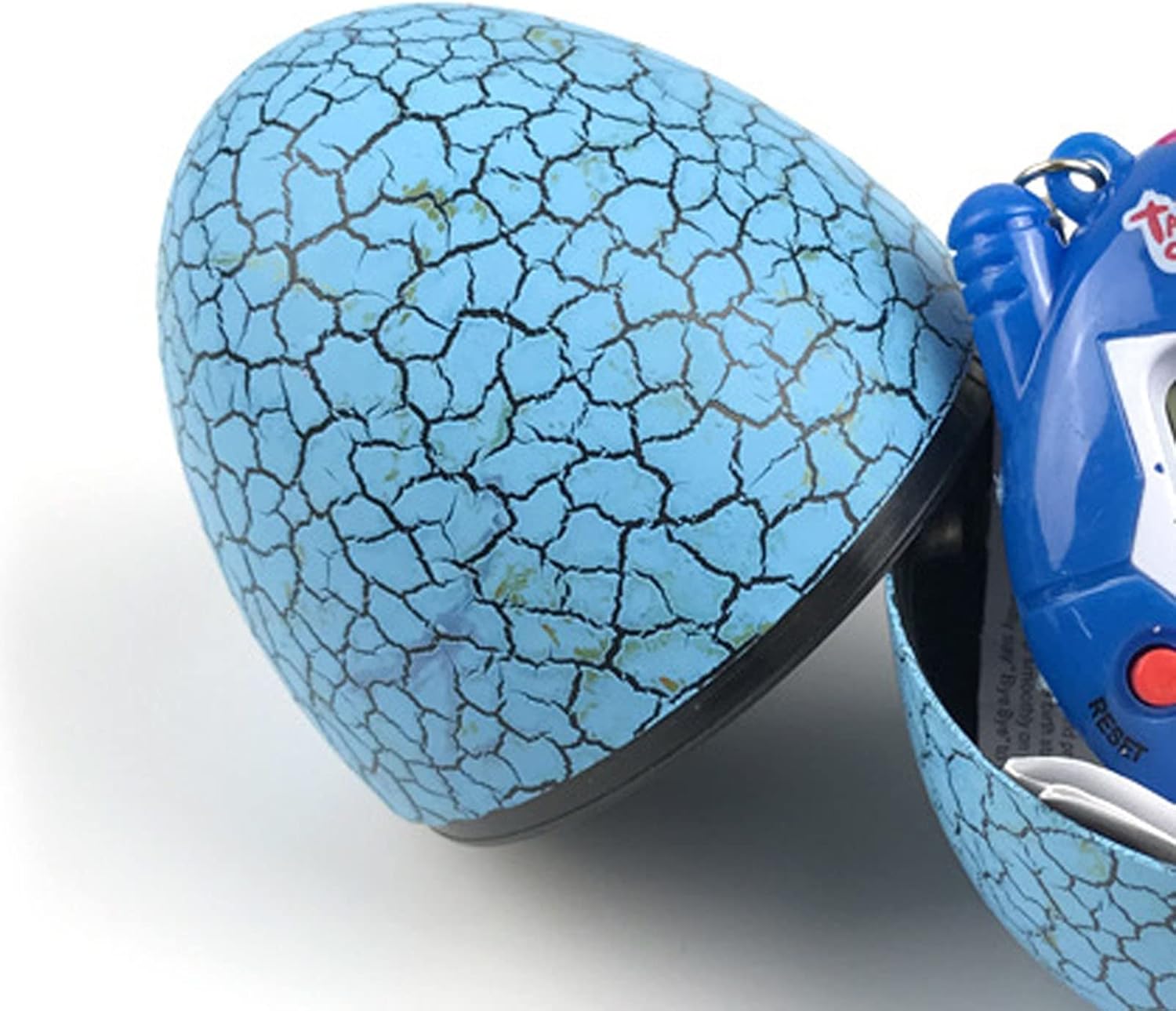
Image: The blue egg case is shown partially open, revealing the electronic pet device nestled within.
Instrucións de funcionamento
Interact with your virtual pet using the four function buttons:

Imaxe: Primeiro plano view of the blue electronic pet device, clearly showing the screen and the four red control buttons labeled 'Reset', 'Select', 'Decide', and 'Cancel'.
- Botón de reinicio: Typically used to restart the game or reset the device. Pressing this button may erase current progress.
- Botón Seleccionar: Used to cycle through different menu options or actions.
- Decide Button: Confirms a selection or performs an action.
- Botón Cancelar: Volve á pantalla anterior ou cancela unha acción.
Basic Pet Care Functions:
- Alimentación: Navigate to the 'Feed' option to provide food for your pet. Different food types may affect your pet's stats.
- Playing/Exercising: Engage your pet in games or exercises to keep it happy and healthy. This may involve mini-games or simple interactions.
- Limpeza: Your pet may require cleaning after a certain period. Select the 'Clean' option to maintain hygiene.
- Medical Care: If your pet becomes sick, use the 'Medicine' or 'Doctor' option to administer care.
- Disciplina: Guide your pet's behavior through discipline options when necessary.
- Comprobación de estado: Regularly check your pet's status (hunger, happiness, health, discipline) to ensure its well-being.
Mantemento
- Limpeza: Wipe the device and egg case with a soft, dry cloth. Do not use abrasive cleaners or immerse in water.
- Almacenamento: When not in use, store the electronic pet inside its egg case to protect it from dust and damage. Keep it in a cool, dry place.
- Substitución da batería: Replace batteries when the screen dims or the device stops responding. Refer to the 'Setup' section for battery installation instructions.
Resolución de problemas
| Problema | Causa posible | Solución |
|---|---|---|
| O dispositivo non se acende. | Sen baterías, baterías descargadas ou polaridade incorrecta da batería. | Check battery installation, replace with new batteries, ensure correct +/- orientation. |
| Screen is dim or flickering. | Batería baixa. | Substitúe as pilas. |
| Os botóns non responden. | Device frozen or low battery. | Press the 'Reset' button. If issue persists, replace batteries. |
| Pet is not growing or evolving. | Insufficient care or specific conditions not met. | Ensure consistent feeding, playing, and cleaning. Some pets require specific conditions to evolve. |
| O son non funciona. | Sound is turned off or device malfunction. | Check in-game settings for sound options. If no option, device may have a fault. |
Especificacións
| Característica | Detalle |
|---|---|
| Nome do produto | Yosoo Electronic Pet Game Machine |
| Número de modelo | Yosoo2ktrdga8cw-12 |
| Material | Plástico |
| Dimensións (aprox.) | 5 x 6 cm (2 x 2.4 polgadas) |
| Peso (aprox.) | 1.94 onzas |
| Fonte de enerxía | Button Cell Batteries (e.g., AG13/LR44, not included) |
| Cor | Azul |
| País de Orixe | China |
Garantía e Soporte
Please refer to the product packaging or your point of purchase for specific warranty information. For technical support or inquiries, please contact the retailer or manufacturer directly. Keep your purchase receipt as proof of purchase.
Ask a question about this manual
Ask about setup, troubleshooting, compatibility, parts, safety, or missing instructions. Manuals+ will review the question and use this page’s manual context to help answer it.