
JZAQ BT40
JZAQ BT40 Motorcycle Helmet Bluetooth Headset User Manual
Modelo: BT40
Introdución
Thank you for choosing the JZAQ BT40 Motorcycle Helmet Bluetooth Headset. This manual provides detailed instructions for the proper installation, operation, and maintenance of your device. Please read this manual thoroughly before use to ensure optimal performance and safety.
Contido do paquete
Verifique que todos os elementos que se indican a continuación estean incluídos no seu paquete:
- 1 x Helmet Headset (BT40)
- 6 x Headphone VELCRO (Adhesive Pads)
- 1 x cable de carga USB
- 1 x Manual de usuario
- 2 x Noise Reducing Sponge Heads (Microphone Covers)

Image: The JZAQ BT40 Helmet Bluetooth Headset, including the main unit with speakers and microphone, USB charging cable, and various adhesive pads and microphone covers.
Especificacións
| Nome do modelo | BT40 |
| Versión Bluetooth | V5.0+EDR |
| Distancia Bluetooth | Ata 10 metros (33 pés) |
| Tipo de batería | 3.7V/600mA Lithium Battery |
| Tempo de carga | Aproximadamente 2 horas |
| Tempo de espera | Ata 500 horas |
| Working Time (Playtime/Talk Time) | Ata 90 horas |
| Resistencia á auga | IP67 Deep Waterproof Technology |
| Headphone Thickness | 0.35 polgadas (aprox. 9 mm) |
| Control de ruído | DSP Noise Cancelling Technology |
| Dispositivos compatibles | Smartphones, MP3 Players, GPS Devices |

Image: A diagram illustrating the dimensions of the headset's earpieces, speaker, microphone, and control unit, highlighting the 0.35-inch thickness of the earpieces.
Configuración e instalación
Follow these steps to properly install the BT40 headset into your helmet:
- Prepare Earphones: Take the helmet headphones from the box. Attach the "Magic Tape" (Velcro adhesive pads) to the back of both earphones.
- Position Earphones: Remove the protective tape paper from the Velcro on the earphones. Carefully position and stick the earphones into the helmet's ear recesses on both sides. Ensure proper alignment before pressing firmly.
- Secure Headset: Once the Velcro is attached to the helmet, secure the headset earphones to these Velcro pads.
- Colocación do micrófono: Position the microphone arm so that the microphone is close to your mouth for clear communication.
- Verificación final: Ensure all components are securely attached and comfortable within the helmet.
Nota importante: Before ordering, please check the inner size of your helmet to ensure a comfortable fit for the headset. The headset's ultra-thin design (0.35 inches) is suitable for most helmets without causing discomfort.

Image: The BT40 headset featuring its ultra-thin speakers, designed to fit comfortably within helmet ear spaces without squeezing the ears.

Image: A motorcycle helmet with the JZAQ BT40 headset microphone arm visible, demonstrating typical installation.
Instrucións de funcionamento
Encender/apagar e emparellar
- Encendido: Press and hold the Power button (usually the middle button on the control unit) until the indicator light illuminates.
- Apagado: Manteña premido o botón de acendido/apagado ata que o indicador luminoso se apague.
- Emparejamento: When powered on for the first time or when entering pairing mode, the headset will automatically search for Bluetooth devices. On your smartphone or other Bluetooth-enabled device, search for "BT40" in the Bluetooth settings and select it to connect.
- Conexión automática: After initial pairing, the headset will automatically connect to the last paired device when powered on, if the device is within range.
Xestión de chamadas
- Responder chamada: The headset supports automatic answering of incoming calls.
- Finalizar a chamada: Press the Power button once to end an active call.
- Rexeitar a chamada: Press and hold the Power button for approximately 2 seconds to reject an incoming call.
Reprodución de música
- Reproducir/Pausa: Press the Power button once to play or pause music.
- Subir volume: Press the "+" button to increase volume.
- Baixar volume: Press the "-" button to decrease volume.
- Próxima canción: Press and hold the "+" button for approximately 2 seconds to skip to the next track.
- Canción anterior: Press and hold the "-" button for approximately 2 seconds to go to the previous track.
Asistente de voz
- Activar o asistente de voz: Double-click the Power button to activate your smartphone's voice assistant (e.g., Siri, Google Assistant).

Imaxe: Unha detallada view of the headset's control unit, showing the volume up (+), power/play/pause, and volume down (-) buttons, along with the microphone.
Vídeo: Un overview of the JZAQ Motorcycle Helmet Bluetooth Headset BT40, demonstrating its components and basic features.
Mantemento
- Limpeza: Usa un pano suave e seco para limpar os auriculares. Evita o uso de produtos químicos agresivos ou materiais abrasivos.
- Exposición á auga: While the headset is IP67 waterproof, prolonged submersion or exposure to high-pressure water jets should be avoided. Ensure the charging port cover is securely closed when not charging.
- Almacenamento: Garde os auriculares nun lugar fresco e seco, lonxe da luz solar directa e de temperaturas extremas.
- Coidado da batería: Para prolongar a duración da batería, evite descargala completamente con frecuencia. Cargue os auriculares con regularidade, mesmo se non os usa durante períodos prolongados.
- Microphone Sponge: Replace the noise-reducing sponge head on the microphone if it becomes worn or damaged to maintain optimal voice clarity.
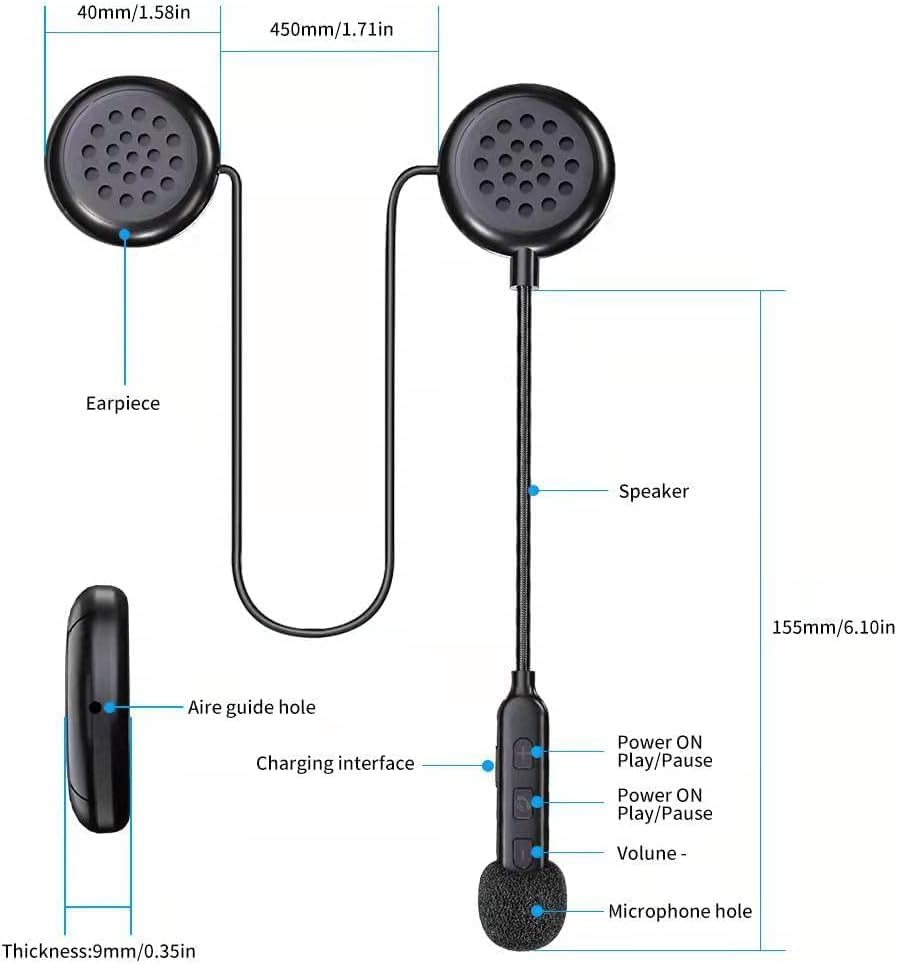
Image: The BT40 headset with water droplets, demonstrating its IP67 deep waterproof capability, suitable for use in rainy or snowy conditions.
Resolución de problemas
| Problema | Causa posible | Solución |
|---|---|---|
| Os auriculares non se acende. | Batería baixa. | Charge the headset for at least 2 hours using the provided USB cable. |
| Non se pode emparellar co dispositivo. | Bluetooth is off on the device; headset is not in pairing mode; too far from device. | Ensure Bluetooth is enabled on your device. Make sure the headset is powered on and in pairing mode. Move the headset closer to the device (within 10 meters). Try restarting both devices. |
| Sen son ou volume baixo. | Volume too low on headset or connected device; improper connection. | Increase volume using the "+" button on the headset and on your connected device. Re-pair the headset with your device. |
| O micrófono non capta a voz con claridade. | Microphone not positioned correctly; damaged sponge cover. | Adjust the microphone arm so the microphone is close to your mouth. Replace the noise-reducing sponge head if it is worn. |
| Conexión intermitente. | Interferencia; dispositivo demasiado lonxe; batería baixa. | Move away from sources of strong electromagnetic interference. Ensure the headset is within 10 meters of the connected device. Charge the headset. |
Garantía e Soporte
For warranty information or technical support, please refer to the contact details provided with your purchase or visit the official JZAQ website. If you experience any dissatisfaction or issues, please contact customer service for assistance.
Contacto: Please refer to your purchase documentation or the seller's information on the platform where you purchased the product.
Ask a question about this manual
Ask about setup, troubleshooting, compatibility, parts, safety, or missing instructions. Manuals+ will review the question and use this page’s manual context to help answer it.