
1. Introdución
Grazas pola compraasing the Audizio Genua DAB Radio. This manual provides essential information for the safe and efficient operation of your device. Please read it thoroughly before use and retain it for future reference. The Audizio Genua is a versatile DAB+/FM stereo radio featuring Bluetooth connectivity, USB playback, and an alarm function, designed for both home and portable use.
2. Información de seguridade
- Fonte de enerxía: Empregue só o adaptador de corrente fornecido. Asegúrese de que o volumetage coincide cos requisitos da súa rexión.
- Auga e humidade: Non expoña a unidade á choiva, á humidade nin a líquidos que goteen/salpiquen. Non coloque obxectos cheos de líquido, como vasos, enriba do aparello.
- Ventilación: Asegúrese de que haxa unha ventilación axeitada. Non bloquee as aberturas de ventilación.
- Calor: Manteña a unidade lonxe de fontes de calor como radiadores, rexistros de calor, estufas ou outros aparellos (incluídos amplificadores) que producen calor.
- Limpeza: Limpar só cun pano seco.
- Servizo: Non intente atender este produto vostede mesmo. Remita todo o servizo a persoal de servizo cualificado.
- Antena: Do not bend or force the antenna.
3. Contido do paquete
Ao desembalar, comprobe que todos os artigos estean presentes e en bo estado:
- Audizio Genua DAB Radio
- Control remoto
- Adaptador de alimentación
- Quick Start Guide (language not guaranteed)
4. Produto rematadoview
4.1 Controis e pantalla do panel frontal

Figura 4.1: Fronte view of the Audizio Genua DAB Radio.
The front panel features a clear color TFT display, two speaker grilles, and an array of control buttons and a central rotary knob. The display shows station information, track details, time, and menu options. Buttons include Menu, Preset, Scan, Dimmer, Alarm, and playback controls (Play/Pause, Skip). The central knob is used for volume adjustment, tuning, and selection.
4.2 Conexións do panel traseiro
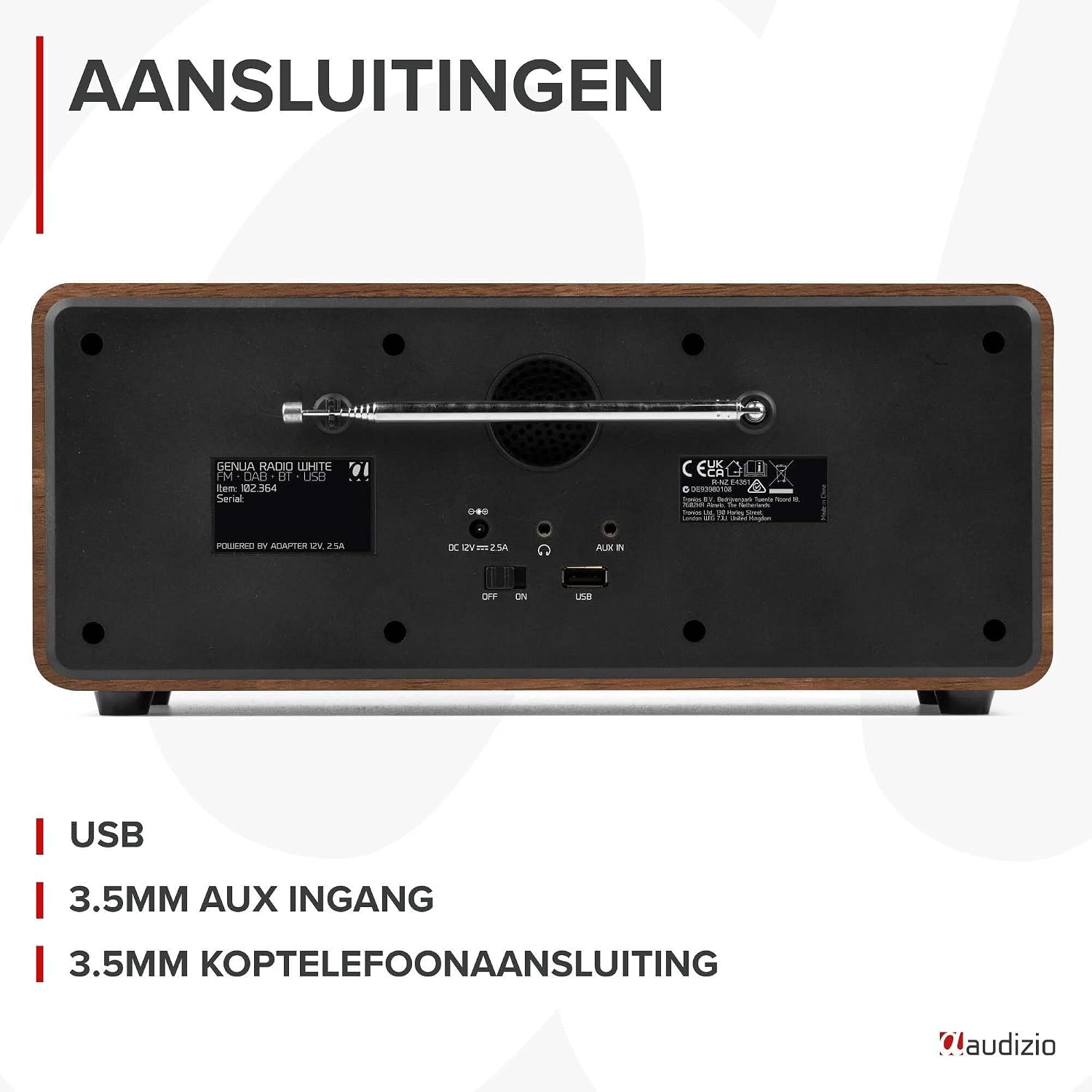
Figura 4.2: Traseira view of the Audizio Genua DAB Radio with connections.
The rear panel includes the telescopic antenna for radio reception, a USB port for media playback, a 3.5mm AUX input for external audio devices, a 3.5mm headphone output, a DC 12V power input, and a main power ON/OFF switch.
4.3 Control remoto

Figure 4.3: Remote control for the Audizio Genua DAB Radio.
The included remote control provides full functionality, allowing you to power on/off, adjust volume, change modes, navigate menus, set alarms, and control playback from a distance.
5. Configuración
5.1 Conexión de alimentación
- Connect the power adapter to the DC 12V input on the rear of the radio.
- Conecta o adaptador de corrente a unha toma de corrente axeitada.
- Flip the main power switch on the rear panel to the 'ON' position.
5.2 Axuste da antena
Estenda a antena telescópica completamente para unha recepción óptima de radio DAB+ e FM. Axuste a súa posición para obter a mellor calidade de sinal.
5.3 Initial Setup and Auto Scan
- Upon first power-on, the radio may prompt you to perform an auto-scan for DAB+ stations. Select 'Yes' or press the 'Scan' button.
- The radio will scan for available DAB+ stations and store them. This process may take a few minutes.
- Unha vez finalizada a busca, a radio sintonizará a primeira emisora dispoñible.
6. Instrucións de funcionamento
6.1 Selección de modo
Press the 'Mode' button on the remote control or the 'Menu' button on the unit to cycle through available modes: DAB+, FM, Bluetooth, USB, and AUX In.
6.2 Funcionamento da radio DAB+
- Select DAB+ mode.
- If no stations are found or you wish to rescan, press the 'Scan' button to perform a full scan.
- Use the 'Tune/Select' knob or the navigation buttons on the remote to browse through the list of available stations.
- Press the 'OK' button (on remote) or push the 'Tune/Select' knob to select a station.
- Almacenamento de preajustes: To store a favorite station, press and hold the 'Preset' button until the preset menu appears. Use the knob/navigation to select a preset number (1-30) and press 'OK' to confirm.
- Recordando presets: Briefly press the 'Preset' button, then use the knob/navigation to select the desired preset and press 'OK'.
6.3 Funcionamento da radio FM
- Seleccione o modo FM.
- Escaneo automático: Press the 'Scan' button to automatically scan for and store available FM stations.
- Sintonización manual: Use the 'Tune/Select' knob to manually tune to a specific frequency.
- Almacenamento de preajustes: Similar to DAB+ mode, press and hold 'Preset', select a number, and confirm.
- Recordando presets: Briefly press 'Preset', select the desired preset, and confirm.
6.4 Conectividade Bluetooth
- Select Bluetooth mode. The display will show "Pairing" or "Waiting for connection".
- No teu teléfono intelixente ou noutro dispositivo con Bluetooth, activa Bluetooth e busca os dispositivos dispoñibles.
- Select "Audizio Genua" from the list of devices.
- Once paired, the radio will confirm the connection, and you can start playing audio from your device.
Reprodución por USB 6.5
- Insira unha unidade flash USB que conteña MP3 files no porto USB do panel traseiro.
- Select USB mode. The radio will automatically detect the USB drive and begin playing the first compatible audio file.
- Use the playback control buttons (Play/Pause, Skip Forward/Backward) on the unit or remote to manage your music.
6.6 Entrada AUX
- Connect an external audio device (e.g., MP3 player, smartphone) to the 3.5mm AUX IN port on the rear panel using an audio cable (not included).
- Seleccione o modo AUX.
- Controla a reprodución e o volume desde o teu dispositivo externo.
6.7 Alarma e temporizador de sono
- Configuración da alarma: Press the 'Alarm' button on the unit or remote. Follow the on-screen prompts to set Alarm 1 and Alarm 2, including time, source (DAB/FM/Buzzer), and volume.
- Función de Snooze: When the alarm sounds, press any button (except Power) to activate snooze. The alarm will sound again after a set interval.
- Temporizador de sono: Press the 'Sleep' button on the remote to set a sleep timer (e.g., 15, 30, 60 minutes). The radio will automatically turn off after the selected time.
6.8 Atenuador de pantalla
Press the 'Dimmer' button on the unit or remote to adjust the brightness of the display. This is useful for different lighting conditions or for use in a bedroom.
7. Mantemento
- Limpeza: Usa un pano suave e seco para limpar o exterior da radio. Non empregues produtos de limpeza abrasivos, ceras nin disolventes.
- Antena: Manexe a antena telescópica con coidado para evitar danos.
- Almacenamento: If storing the radio for an extended period, disconnect it from the power supply.
8 Solución de problemas
| Problema | Causa posible | Solución |
|---|---|---|
| Sen poder | Power adapter not connected; Main power switch off | Ensure power adapter is securely connected and plugged in; Turn main power switch to 'ON' |
| Mala recepción de radio (DAB+/FM) | Antena non estendida; Zona de sinal débil; Interferencia | Fully extend and adjust the telescopic antenna; Try repositioning the radio; Move away from other electronic devices |
| Bluetooth non se sincroniza | Radio not in Bluetooth mode; Device not discoverable; Already paired with another device | Select Bluetooth mode on the radio; Ensure Bluetooth is enabled on your device and it's in pairing mode; Disconnect from other Bluetooth devices |
| A reprodución USB non funciona | Unidade USB non inserida correctamente; Incompatible file format; USB drive corrupted | Ensure USB drive is fully inserted; Check if files are in MP3 format; Try a different USB drive |
| Sen son | Volume demasiado baixo; Silenciamento activado; Fonte incorrecta seleccionada | Increase volume; Check if mute is active; Ensure correct input source (DAB/FM/BT/USB/AUX) is selected |
9. Especificacións

Figure 9.1: Audizio Genua DAB Radio dimensions.
- Marca: Audizio
- Número de modelo: Xénova
- Cor: Branco
- Característica especial: Bluetooth Connectivity, DAB+ Radio
- Tecnoloxía de conectividade: Aux, Bluetooth, USB
- Dimensións do produto (L x W x H): 13.5 x 31 x 13.3 cm
- Tecnoloxía do sintonizador: DAB+
- Estilo: Moderno
- Fonte de enerxía: Eléctrico con cable
- Bandas de radio admitidas: FM, DAB+
- Dispositivos compatibles: Smartphone, Tablet, Laptop, MP3 Player, Headphones, Speaker
- Voltage: 220 voltios
- Potencia máxima de saída do altofalante: 50 vatios
- Número de baterías: 1 Non-standard battery (Type of battery required)
- Tipo de pantalla: TFT
- Peso do artigo: 2.25 quilogramos
10. Garantía e soporte
This product is covered by a standard manufacturer's warranty. For detailed warranty terms and conditions, please refer to the documentation provided at the time of purchase or contact your retailer. For technical support or service inquiries, please contact the Audizio customer support team through their official websitio web ou o seu punto de venda.


