
Andesfit A02-SEB
Andesfit Bluetooth Blood Pressure Monitor User Manual
Model: A02-SEB
1. Introdución
The Andesfit Bluetooth Blood Pressure Monitor is designed for accurate and convenient blood pressure measurement at home. This device combines advanced technology with user-friendly features, allowing you to monitor your health effectively and share data with healthcare professionals. It is FDA Cleared and CE Certified, ensuring high quality and safety standards.

Figure 1: Andesfit Blood Pressure Monitor with included cuffs and companion app.
2. Que está incluído
Your Andesfit Blood Pressure Monitor package includes the following components:
- Andesfit Blood Pressure Monitor Unit
- Large Blood Pressure Cuff (9-17 inches arm circumference)
- Extra Large Blood Pressure Cuff (13-21 inches arm circumference)
- 4 pilas AA (incluídas)
- USB Type-C Cable (for power, not charging batteries)
- Bolsa de almacenamento
- Manual de usuario (este documento)

Figure 2: All components included in the Andesfit Blood Pressure Monitor package.
3. Configuración
3.1 Alimentación do dispositivo
The monitor can be powered using the included AA batteries or via the USB Type-C cable. USB power is prioritized if both are connected.
- Instalación da batería: Open the battery compartment on the back of the monitor. Insert the 4 AA batteries, ensuring correct polarity (+/-). Close the compartment.
- Potencia USB: Connect the provided USB Type-C cable to the monitor's USB port and plug the other end into a compatible USB power source (e.g., wall adapter, power bank). Note: The USB port is for power supply only and does not charge the batteries.

Figure 3: Dual power mode options for the monitor.
3.2 Colocación do manguito
Select the appropriate cuff size (Large or Extra Large) for your arm. Connect the cuff's air tube securely into the air jack on the side of the monitor unit.

Figure 4: The two included cuff sizes for optimal fit.
3.3 App Installation (Optional but Recommended)
For enhanced tracking and data management, download the "ANDESFITBP" app from your smartphone's app store (Apple App Store or Google Play Store). The app allows for unlimited data storage and easy sharing.
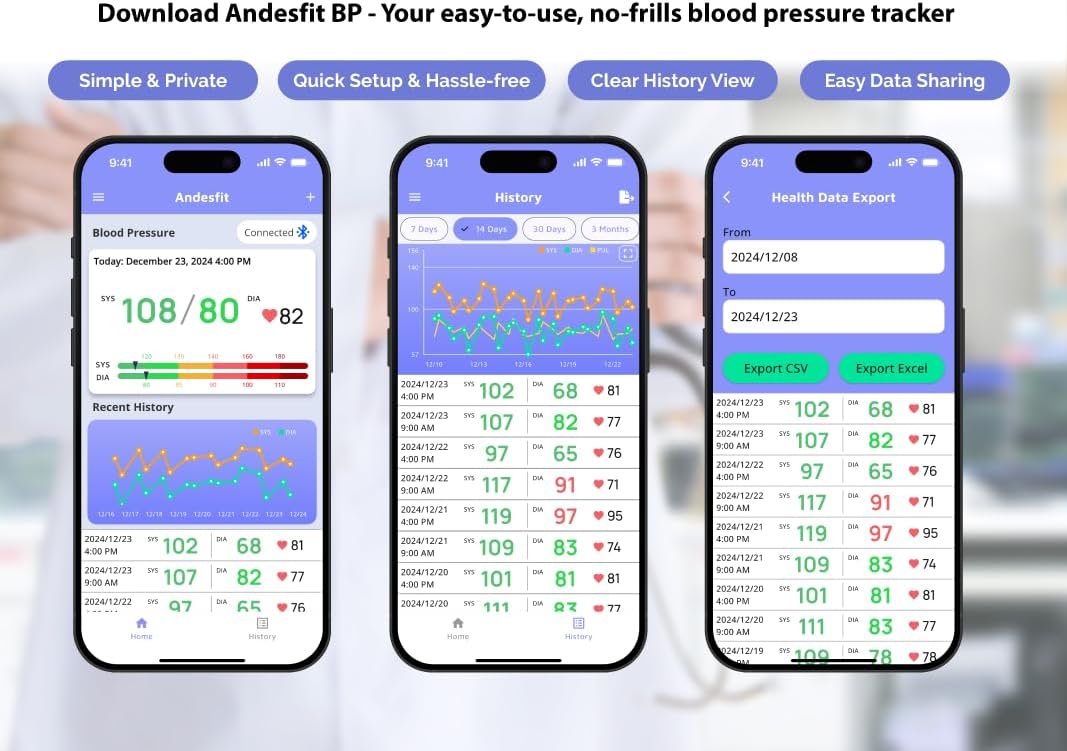
Figura 5: Máisview of the Andesfit BP app features.
Nota: The app does not require personal data input or login, ensuring your privacy. Data is stored locally on your device and can be synced with Apple Health or Google Fit.
4. Instrucións de funcionamento
4.1 Tomar unha medida
- Preparación para a medición: Sit comfortably with your back supported and feet flat on the floor. Rest your arm on a table so the cuff is at heart level. Avoid talking or moving during the measurement.
- Apply the Cuff: Wrap the cuff around your bare upper arm, ensuring the air tube is positioned correctly (usually aligned with your middle finger). The cuff should be snug but not too tight.
- Iniciar medición: Press the "START/STOP" button on the monitor. The cuff will automatically inflate and then slowly deflate as it measures your blood pressure.
- Ler resultados: Your Systolic (SYS), Diastolic (DIA), and Pulse (PUL) readings will be displayed on the large 6-inch color LED screen. The screen also features a WHO color-coded indicator for easy interpretation of your blood pressure level.
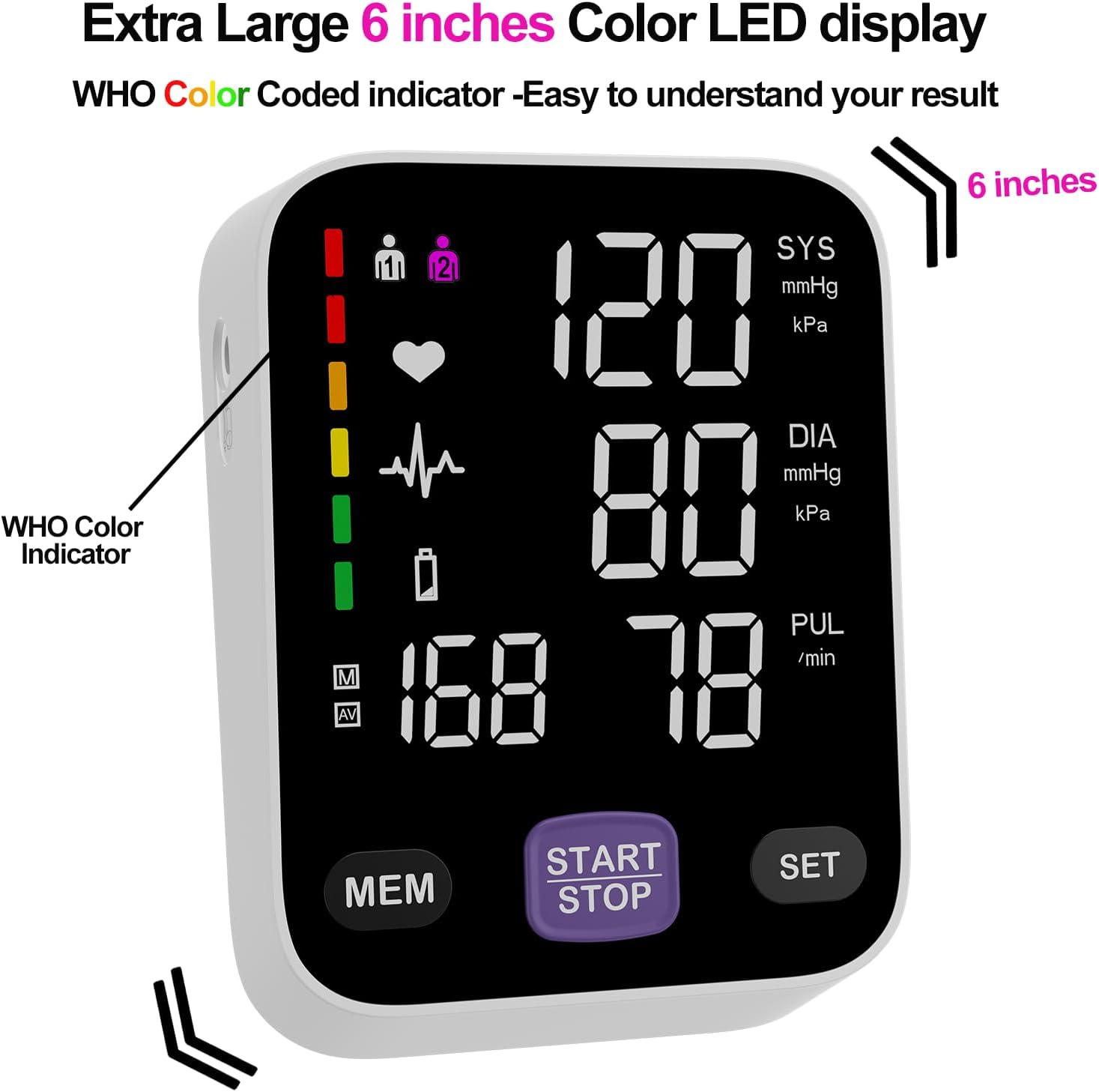
Figure 6: The monitor's large color LED display with WHO color indicator.
4.2 Using the App with the Monitor
Once the app is installed and Bluetooth is enabled on your smartphone, simply switch on your blood pressure monitor and open the app. The app will automatically connect to the device. Your measurement readings will be synced and stored in the app, providing a comprehensive history of your blood pressure trends.
You can export your data as CSV files to share with your doctor or for personal record-keeping.
Video 1: Official Andesfit video demonstrating the Bluetooth blood pressure monitor and app connectivity.
5. Mantemento
- Limpeza: Limpe o monitor e o manguito cun pano suave e seco. Non empregue produtos de limpeza abrasivos nin mergulle o dispositivo en auga.
- Almacenamento: Garde o dispositivo na bolsa de almacenamento proporcionada nun lugar fresco e seco, lonxe da luz solar directa e de temperaturas extremas.
- Substitución da batería: Replace all 4 AA batteries when the low battery indicator appears on the display.
6 Solución de problemas
If you encounter issues with your Andesfit Blood Pressure Monitor, please refer to the following common solutions:
| Problema | Causa posible | Solución |
|---|---|---|
| Sen pantalla/o dispositivo non se acende | Batteries are low or incorrectly installed; USB cable not connected properly. | Replace batteries or ensure correct polarity. Check USB cable connection. |
| Lecturas inexactas | Improper cuff placement; movement or talking during measurement; incorrect posture. | Ensure cuff is correctly applied and snug. Remain still and silent during measurement. Sit upright with feet flat. |
| A aplicación non se conecta por Bluetooth | Bluetooth is off on phone/monitor; app permissions not granted. | Ensure Bluetooth is enabled on both devices. Check app permissions in phone settings. Restart app/monitor. |
7. Especificacións
| Característica | Detalle |
|---|---|
| Dimensións do produto | 4.5 cm de longo x 4.2 cm de ancho x 1.9 cm de grosor |
| Número de modelo do artigo | A02-SEB |
| Baterías | 4 pilas AA (incluídas) |
| Fabricante | Shenzhen GoodlyMed Technology Co., Ltd. |
| Fonte de enerxía | Alimentado por batería / USB tipo C |
| Tipo de visualización | LED Color Display (6 inches) |
| Tamaños de puños | 9-17 inches (Large), 13-21 inches (Extra Large) |
| Almacenamento de datos | 2 users * 199 readings (device), Unlimited (app) |
| Certificacións | FDA Cleared & CE Certified |
8. Garantía e soporte
Andesfit products are designed for reliability and performance. For information regarding warranty coverage and technical support, please contact Andesfit directly. You can find contact details on the official Andesfit websitio web ou a través da túa plataforma de compra.
Política de devolución: This product typically has a 30-day return policy for refund or replacement, as per standard retail terms.
Ask a question about this manual
Ask about setup, troubleshooting, compatibility, parts, safety, or missing instructions. Manuals+ will review the question and use this page’s manual context to help answer it.