
CAPXSNOB ST-542S EU(CE)
Magician1 Mini 5-in-1 Coffee Machine User Manual
Brand: CAPXSNOB | Model: ST-542S EU(CE)
This manual provides detailed instructions for the safe and efficient use of your Magician1 Mini 5-in-1 Coffee Machine. Please read it thoroughly before first use and keep it for future reference.
Instrucións de seguridade importantes
Cando se utilicen aparellos eléctricos, deben seguirse sempre as precaucións básicas de seguridade para reducir o risco de incendio, descarga eléctrica e/ou lesións ás persoas, incluíndo as seguintes:
- Le todas as instrucións.
- Non toque superficies quentes. Use asas ou botóns.
- To protect against fire, electric shock, and injury to persons, do not immerse cord, plugs, or coffee machine in water or other liquid.
- É necesaria unha estreita supervisión cando calquera aparello é usado por nenos ou preto de eles.
- Desenchufe da toma cando non estea en uso e antes de limpalo. Deixar arrefriar antes de poñer ou quitar pezas e antes de limpar o aparello.
- Non faga funcionar ningún aparello cun cable ou enchufe danados ou despois de que o aparello teña un mal funcionamento ou que estea danado de calquera xeito. Devolve o aparello ao centro de servizo autorizado máis próximo para o seu exame, reparación ou axuste.
- O uso de accesorios non recomendados polo fabricante do aparello pode provocar incendios, descargas eléctricas ou lesións ás persoas.
- Non use ao aire libre.
- Non deixes que o cable colgue do bordo da mesa ou do mostrador nin toque superficies quentes.
- Non o coloque sobre ou preto dun queimador eléctrico ou de gas quente, nin nun forno quente.
- Conecte sempre primeiro o enchufe ao electrodoméstico e, a seguir, o cable á toma de corrente. Para desconectalo, poña calquera control na posición de apagado e, a seguir, retire o enchufe da toma de corrente.
- Non use o aparello para outros usos que os previstos.
- Exercise extreme caution when dispensing hot water or steam.
- Este aparello está pensado só para uso doméstico.
Produto rematadoview
The Magician1 Mini is a versatile 5-in-1 coffee machine designed to accommodate various coffee formats, including Nespresso Original, Dolce Gusto, Lavazza A Modo Mio, ESE 44mm pods, and ground coffee. It features a 20-bar pump, 1450W power, and an LED display for easy operation.

Figura 1: Fronte view of the Magician1 Mini Coffee Machine with various coffee types it supports.
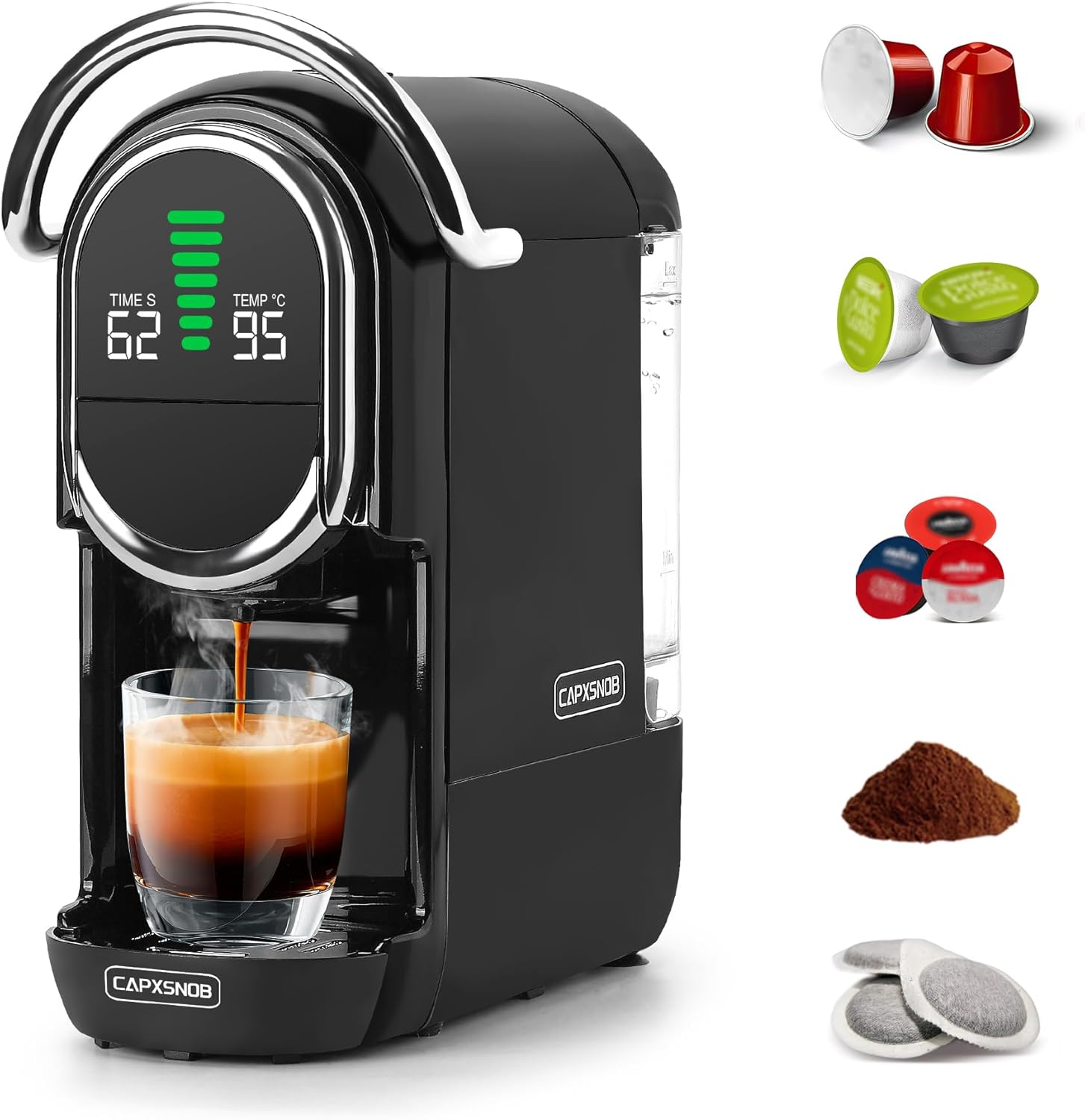
Figura 2: Lateral view of the Magician1 Mini Coffee Machine, highlighting the removable water tank.
Características principais:
- Compatibilidade 5 en 1: Supports Nespresso Original, Dolce Gusto, Lavazza A Modo Mio, ESE 44mm pods, and ground coffee.
- Bomba de alta presión: 20 Bar pump for optimal extraction (15-19 Bar stable extraction).
- Quecemento rápido: Pre-heats in just 25 seconds.
- Control de temperatura: Adjustable brewing temperature from 85°C to 97°C.
- Personalización do volume: 7 adjustable water volume levels for various cup sizes.
- Preparación en quente e en frío: Capable of preparing both hot and cold coffee.
- Pantalla LED: Clear display showing temperature, water volume, and time.
- Deseño compacto: Space-saving dimensions (27.4D x 14.4W x 28.5H cm) with a 600ml removable water tank.
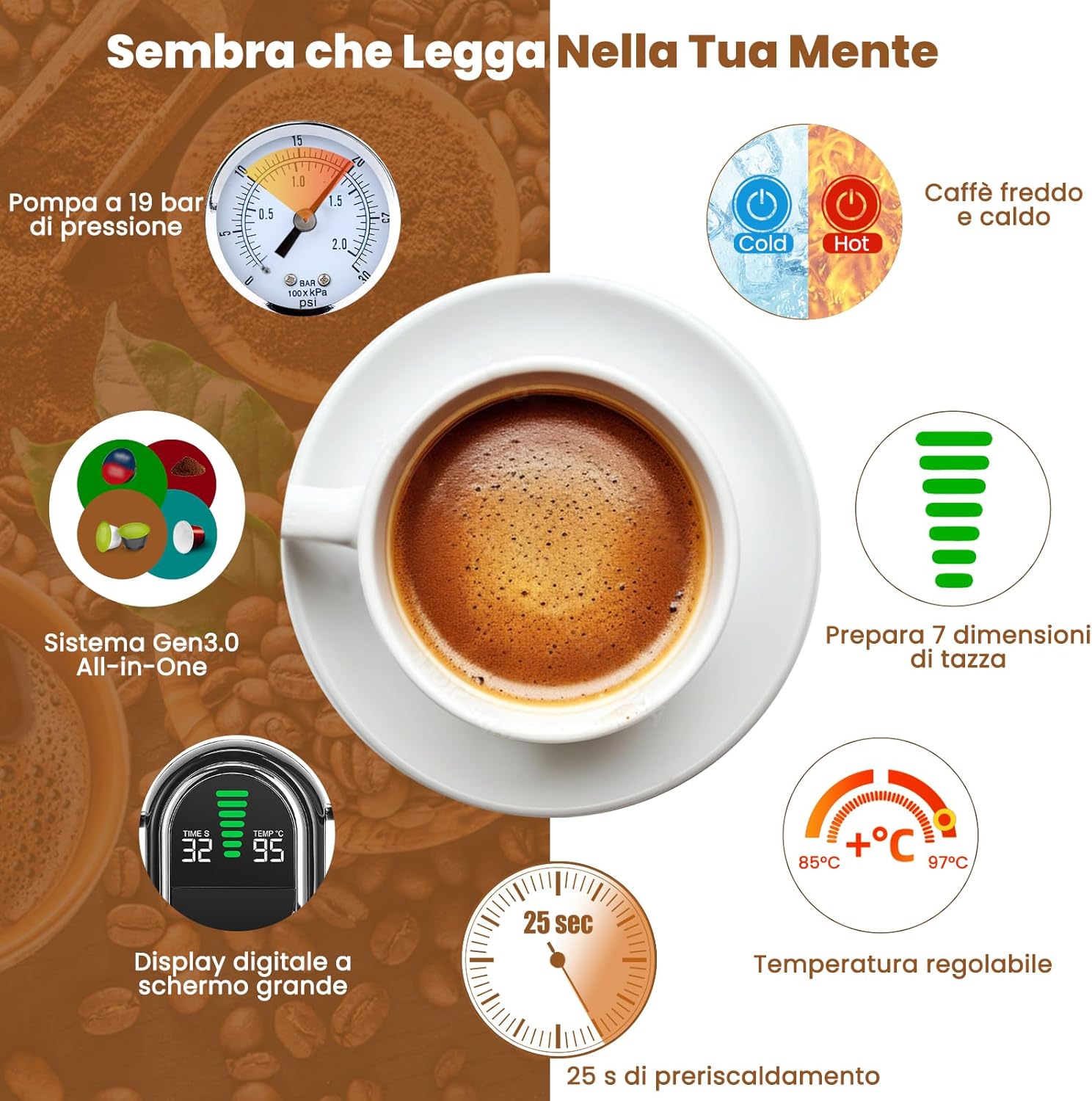
Figura 3: Máisview of the Magician1 Mini's advanced features.
Configuración
1. Desembalaxe
Carefully remove all packaging materials and the coffee machine from the box. Ensure all components are present: main unit, water tank, drip tray, and various capsule adapters.
2. First Use and Initial Cleaning
Before first use, clean all removable parts (water tank, drip tray, capsule adapters) with warm, soapy water. Rinse thoroughly and dry. Perform a pre-rinse cycle without coffee:
- Enche o depósito de auga con auga doce.
- Coloque unha cunca baleira na bandexa de goteo.
- Insert an empty adapter (e.g., the ground coffee adapter without coffee) into the machine.
- Press the brew button to run a full cycle of hot water through the machine. Repeat this process 2-3 times to ensure the internal system is clean.
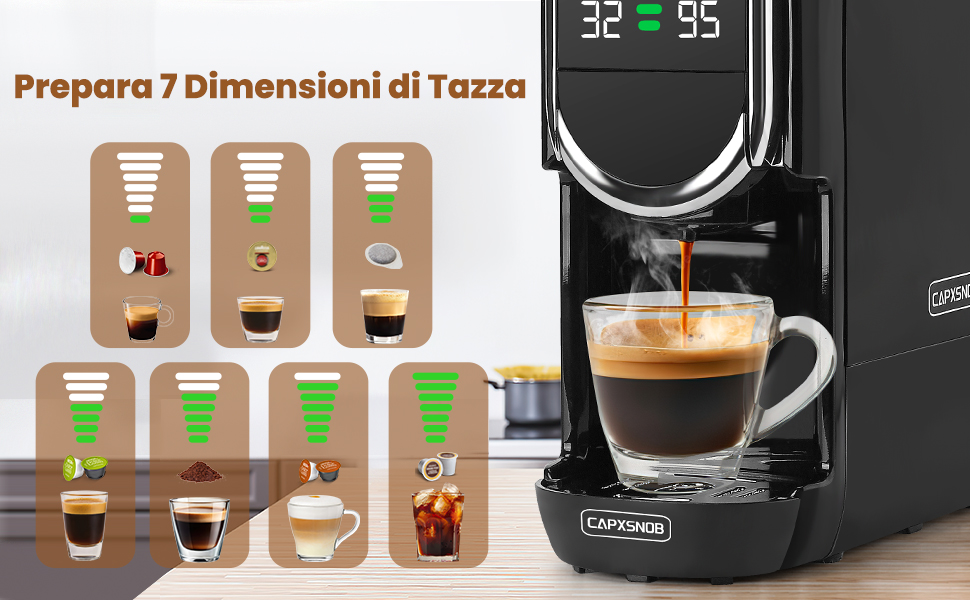
Figure 4: Useful tips, including the importance of pre-rinsing.
3. Enchendo o depósito de auga
- Retire o depósito de auga da parte traseira da máquina.
- Fill the tank with fresh, cold drinking water up to the MAX fill line.
- Volva colocar o depósito de auga na máquina, asegurándose de que estea ben asentado.
Instrucións de funcionamento
1. Acendido/apagado
- Conecte a máquina a unha toma eléctrica conectada a terra.
- Press the power button to turn on the machine. The LED display will light up.
- The machine will begin pre-heating, which takes approximately 25 seconds. The display will show the temperature.
- To turn off, press the power button again. The machine also features programmable automatic shut-off.
2. Brewing Coffee (Hot)
The Magician1 Mini supports various coffee formats. Ensure you use the correct adapter for your chosen coffee type.

Figura 5: Máisview of compatible capsule types and their respective adapters.
- Select and Insert Adapter: Choose the appropriate adapter for your capsule/pod/ground coffee.
- For Nespresso Original, Dolce Gusto, Lavazza A Modo Mio: Insert the capsule into its dedicated adapter.
- For ESE 44mm Pods: Place the ESE pod into the ground coffee adapter.
- For Ground Coffee: Fill the ground coffee adapter with 12-14g of fine ground coffee and tamp lixeiramente.
- Place Adapter in Machine: Insert the filled adapter firmly into the machine's brewing chamber.
- Mango inferior: Close the handle securely.
- Copa de lugar: Position your cup on the drip tray. Note: The machine supports cups between 8.5-9.8 cm in height.
- Seleccionar volume de auga: Use the volume selection buttons to choose one of the 7 available levels, ranging from Ristretto (25ml) to Americano (240ml). The LED display will show the selected volume.
- Axustar a temperatura (opcional): To adjust the brewing temperature (85°C to 97°C):
- Press and hold the temperature button for 5 seconds until the temperature flashes on the screen.
- Use the volume buttons to adjust the temperature.
- A configuración gardarase automaticamente despois de 3 segundos.
- Comezar a elaborar cervexa: Press the brew button. The machine will start dispensing coffee.
- Deixar de facer cervexa: The machine will stop automatically once the selected volume is reached. You can also manually stop brewing by pressing the brew button again.

Figure 6: Simple three-step brewing process.
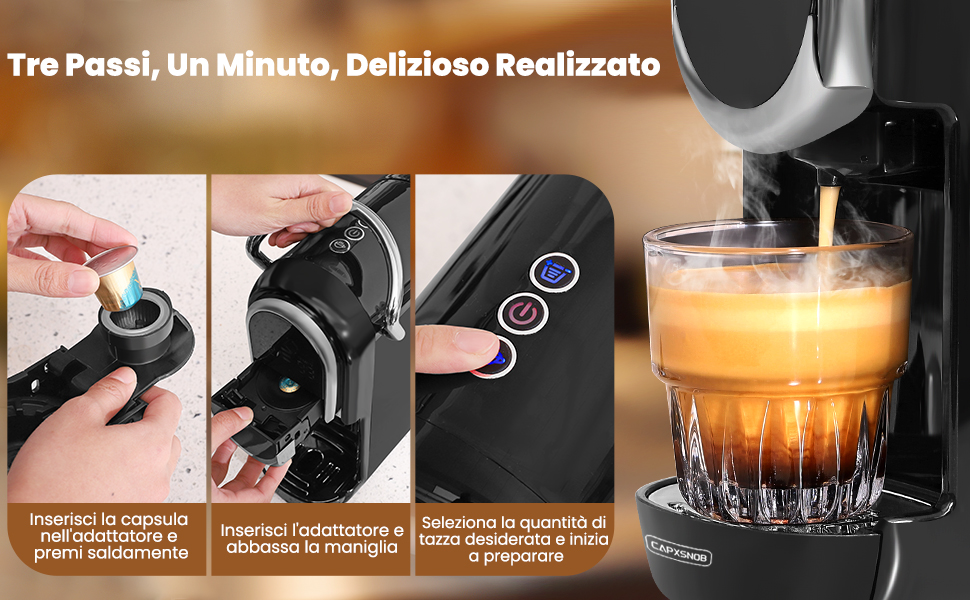
Figure 7: Seven cup size options for different coffee types.
3. Hot and Cold Brewing
The machine supports both hot and cold brewing. Cold brew refers to preparation with room temperature water. This machine does not support ice production.
- To switch between hot and cold modes, press and hold the power button for 5 seconds until the power light changes. The display will show "CO" for cold mode.
- Follow the same brewing steps as above, ensuring the water tank is filled with room temperature water for cold brewing.
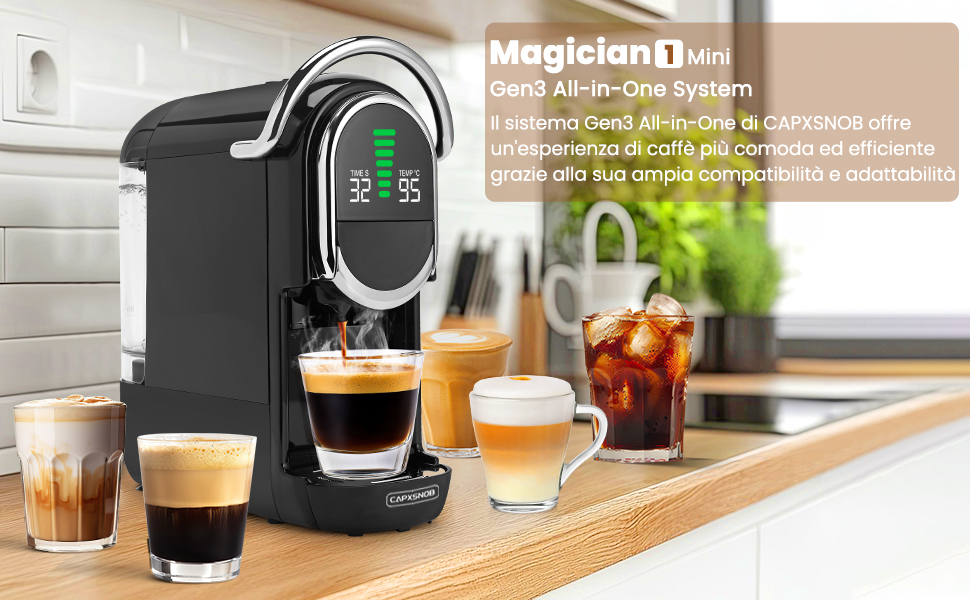
Figure 8: Hot and Cold brewing options.
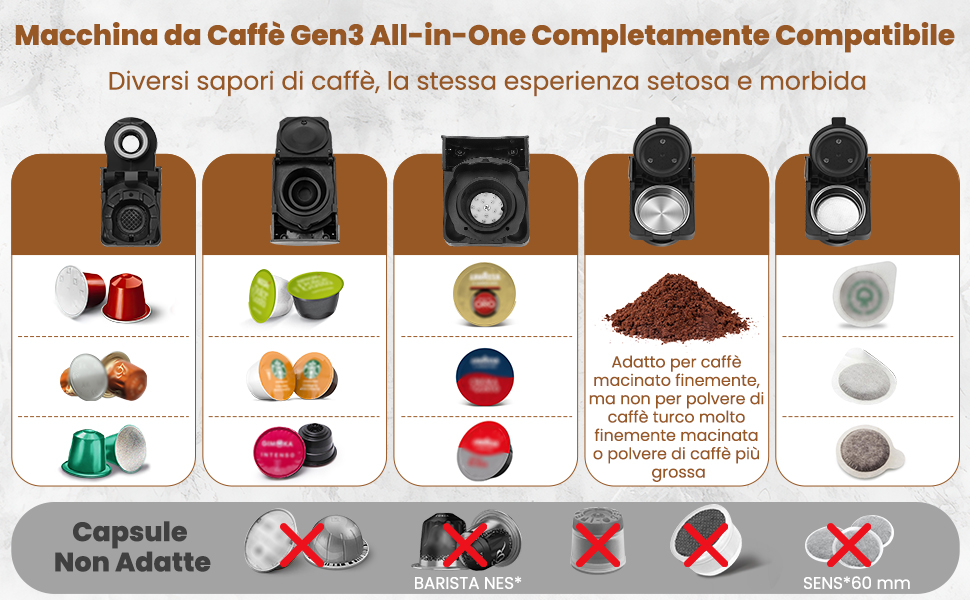
Figure 9: Customizing temperature settings.
Mantemento e Limpeza
1. Limpeza diaria
- Bandexa de goteo: Baleira e enxágua a bandexa de goteo despois de cada uso ou cando o indicador mostre que está chea.
- Capsule Container: Remove and empty the used capsule container after each use. Rinse with warm water.
- Depósito de auga: Enxágüe o depósito de auga diariamente e énchao con auga fresca.
- Exterior: Limpe o exterior da máquina cun suave, damp pano. Non empregue produtos de limpeza abrasivos nin mergulle a máquina en auga.
2. Ground Coffee Adapter Care
Proper care of the ground coffee adapter is crucial for optimal performance and to prevent blockages.
- After each use, remove the ground coffee adapter.
- Desbota os posos de café usados.
- Rinse the plastic holes and stainless steel filters thoroughly. Blockages can prevent coffee from dispensing or cause leaks.
- For thorough cleaning, the adapter can be disassembled and reassembled as shown in Figure 10.
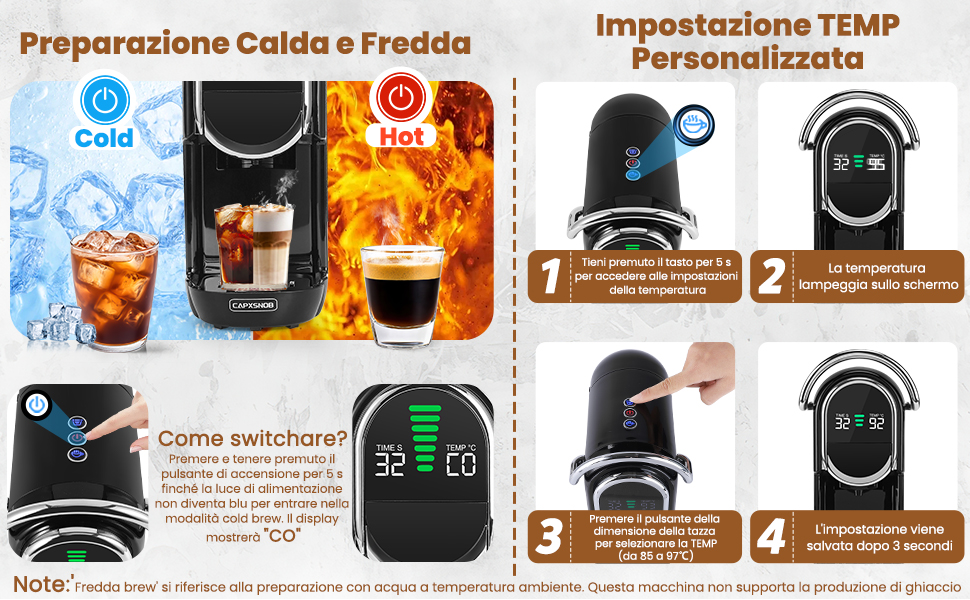
Figure 10: Maintenance and care of the ground coffee adapter.
3. Descalcificación
Regular descaling is essential to maintain the machine's performance and extend its lifespan, especially in areas with hard water. Descale every 3-6 months depending on water hardness and usage.
- Empty the water tank and fill it with a descaling solution (follow the descaler manufacturer's instructions for dilution).
- Coloque un recipiente grande debaixo da boquilla do café.
- Execute varios ciclos de preparación sen café ata que o depósito de auga estea baleiro.
- Enxágüe ben o depósito de auga e énchao con auga fresca.
- Fai que a máquina pase varios ciclos con auga limpa para enxaugar calquera residuo da solución descalcificadora.
Resolución de problemas
If you encounter any issues with your coffee machine, please refer to the table below for common problems and their solutions.
| Problema | Causa posible | Solución |
|---|---|---|
| A máquina non se acende. | Not plugged in; power outlet malfunction; machine fault. | Check power cord connection; try another outlet; contact customer support. |
| No coffee dispenses or only a few drops. | Water tank empty; air in the system; clogged adapter/filter; machine needs descaling. | Fill water tank; run a few cycles without coffee to prime; clean adapter/filter; descale the machine. |
| O café é demasiado débil ou acuoso. | Incorrect water volume selected; coffee grounds too coarse (for ground coffee); capsule/pod not properly inserted. | Adjust water volume setting; use finer ground coffee; ensure capsule/pod is seated correctly. |
| A máquina está filtrando. | Water tank not properly seated; drip tray full; adapter not correctly inserted; internal seal issue. | Ensure water tank is secure; empty drip tray; re-insert adapter; contact customer support if problem persists. |
| O café non está o suficientemente quente. | Temperature setting too low; machine needs descaling. | Adjust temperature setting (see Operating Instructions); descale the machine. |
| A máquina fai un ruído inusual. | Normal pump operation; air in the system; blockage. | Some noise is normal during brewing. If excessive, run a few cycles without coffee to clear air; check for blockages. |
Especificacións técnicas
- Marca: CAPXSNOB
- Modelo: ST-542S EU(CE)
- Cor: Negro
- Dimensións do produto: 27.5 x 14.4 x 28.5 cm (Pr. x An. x Al.)
- Peso do artigo: 3.3 kg
- Voltage: 230 voltios (CA)
- Potencia: 1450 W
- Presión da bomba: 20 bar
- Capacidade do depósito de auga: 600 ml
- Características especiais: Automatic cleaning function, Programmable, Single cup brew, Removable tank, Adjustable brew strength, LED Display.
- Apagado automático: Si
Garantía e Soporte
Your Magician1 Mini Coffee Machine comes with a comprehensive warranty and support package for your peace of mind.
- Garantía de devolución de diñeiro de 60 días: If you are not completely satisfied with your purchase, you may be eligible for a refund within 60 days.
- 2-Year Limited Manufacturer's Warranty: The product is covered by a 2-year limited warranty from the manufacturer against defects in materials and workmanship.
- Free Replacement Service: By registering your product on the official CAPXSNOB website, you may receive a free replacement service for 2 years. Please visit the official CAPXSNOB website for registration details and full warranty terms and conditions.
For further assistance, troubleshooting, or warranty claims, please contact CAPXSNOB customer support through their official websitio web ou o vendedor onde compraches o produto.
Documentos relacionadosST-542S EU(CE)


Ask a question about this manual
Ask about setup, troubleshooting, compatibility, parts, safety, or missing instructions. Manuals+ will review the question and use this page’s manual context to help answer it.