
Introdución
Welcome to the DOOGEE Blade10 Power user manual. This guide provides essential information for setting up, operating, maintaining, and troubleshooting your new rugged smartphone. The Blade10 Power is designed for durability and high performance, featuring a large battery, advanced camera, and robust protection against environmental elements.
O que hai na caixa
Carefully unpack your DOOGEE Blade10 Power and ensure all items are present:
- 1 x DOOGEE Blade10 Power Smartphone
- 1 x cable USB tipo C
- 1 x adaptador de alimentación
- 1 x Pre-applied Screen Protector Film
- 1 x Thickened Screen Protector Film
- 1 x Caixa de embalaxe
- 1 x Manual de usuario (este documento)

Image: Package contents for the DOOGEE Blade10 Power.
Configuración
1. Instalación da tarxeta SIM e da tarxeta TF
The DOOGEE Blade10 Power supports dual SIM cards and one TF (microSD) card for expanded storage. Locate the SIM card tray on the side of the device. Use the provided SIM ejector tool to open the tray. Insert your Nano-SIM cards and TF card into the designated slots as shown in the diagram. Ensure the tray is securely closed to maintain water and dust resistance.
2. Carga inicial e acendido
Before first use, fully charge your device using the provided USB Type-C cable and power adapter. Connect the adapter to a power outlet and the cable to the phone's USB-C port. The charging indicator will show the charging status. Once charged, press and hold the Power button (usually on the side) until the DOOGEE logo appears to power on the device.
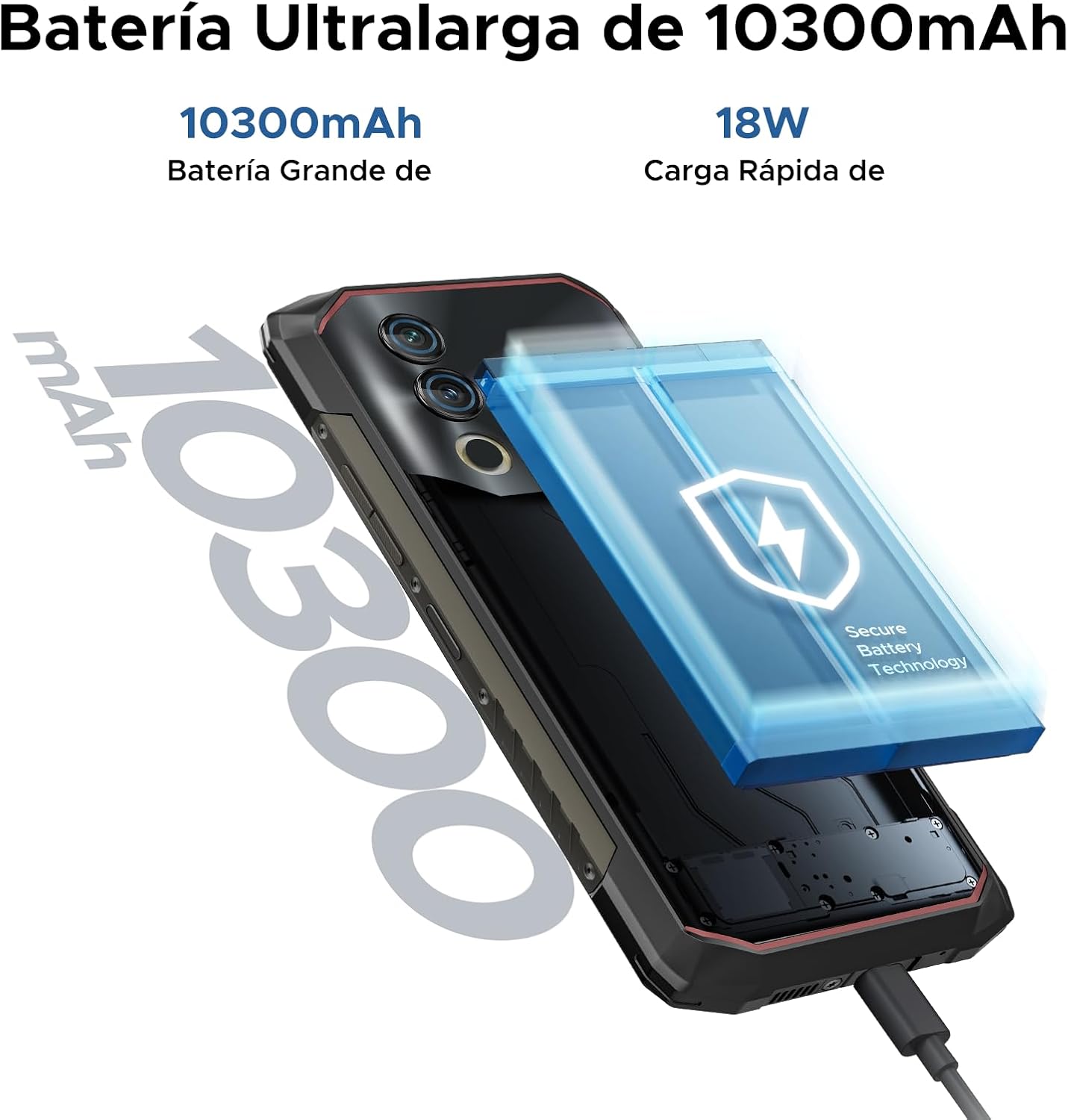
Image: The 10300mAh battery and 18W fast charging feature of the Blade10 Power.
Instrucións de funcionamento
Navegación básica
Your DOOGEE Blade10 Power runs on Android 14, offering an intuitive user experience. Use gestures for navigation: swipe up from the bottom for the app drawer, swipe down from the top for notifications and quick settings, and tap icons to open applications.
Security Features: Fingerprint and Face ID
For enhanced security and quick access, set up Fingerprint Recognition and Face ID. The fingerprint sensor is located on the side of the device. Navigate to Configuración > Seguridade > Desbloqueo por impresión dixital or Desbloqueo facial to register your biometrics. The device offers ultra-fast unlocking in approximately 0.19 seconds.

Image: Facial Recognition and Side Fingerprint Sensor.
Funcionalidade NFC
The integrated NFC (Near Field Communication) allows for quick and secure mobile payments with Google Pay and easy data transfer with compatible devices. Enable NFC in Configuración > Dispositivos conectados > NFC.
Precise Navigation
The device supports multiple global navigation satellite systems including GPS, Glonass, Galileo, and Beidou, ensuring accurate positioning for navigation and location-based services.
Customizable Button and Gesture Control
Utilize the customizable button for quick access to frequently used functions or apps. Explore Smart Gesture Controls in settings for additional convenient interactions.
Modo luva
For users who need to operate the phone while wearing gloves, the Glove Mode feature ensures precise recognition of finger movements, providing a fluid and uninterrupted user experience. Activate this mode in Settings > Smart Assistant > Glove Mode.

Image: Glove Mode in action, allowing touch interaction while wearing gloves.
Características da cámara
The DOOGEE Blade10 Power is equipped with a 50MP AI main camera and an 8MP front camera, designed to capture clear and vibrant images and videos.
Cámara traseira
The 50MP main camera, enhanced with AI, delivers high-resolution photos with rich detail and accurate colors. It supports various modes including HDR and Panorama for diverse photographic scenarios. Rear flashes provide illumination in low-light conditions.
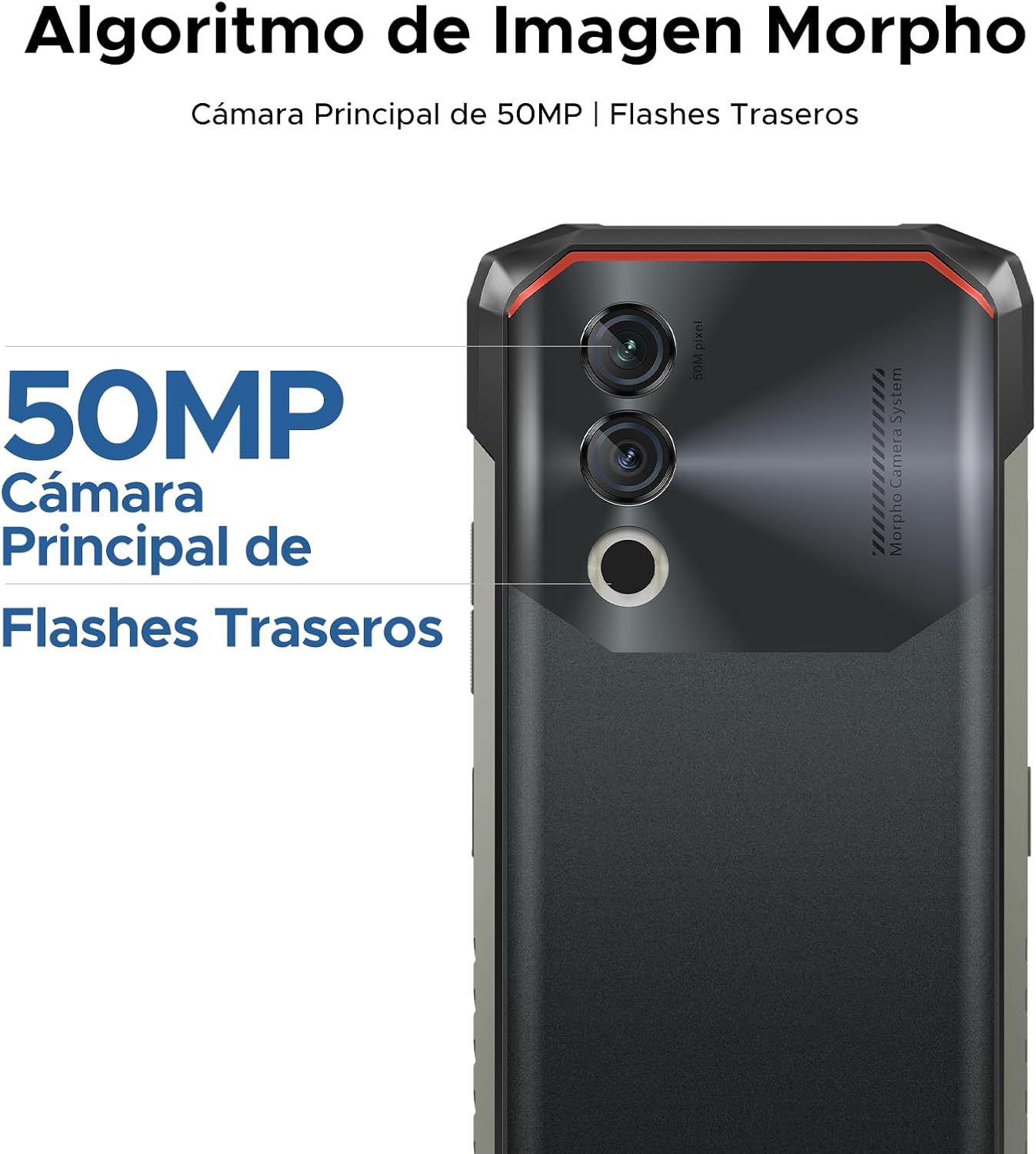
Image: 50MP Main Camera and Rear Flashes.
Cámara frontal
The 8MP front camera is ideal for selfies and video calls, capturing clear images.

Imaxe: Examples of photos taken with the 8MP Ultra Sharp Front Camera.
Modos de fotografía
Explore various photography modes to enhance your shots:
- panorama: Capture wide landscapes.
- Modo retrato: Crea fotos de aspecto profesional con fondos desenfocados.
- Modo profesional: Control manual da configuración da cámara para usuarios avanzados.
- Modo HDR: Improve dynamic range in challenging lighting conditions.

Image: Photography modes: Panorama, Portrait, Pro, and HDR.
Gravación de vídeo
Record videos in 1080P at 30 frames per second, ensuring smooth and detailed footage.
Mostrar características
The DOOGEE Blade10 Power features a 6.6-inch HD+ IPS display for a clear and immersive visual experience.
- Tamaño: Pantalla completa de 6.6 polgadasview Mostrar
- Resolución: 720*1612 HD+
- Frecuencia de actualización: 90 Hz para un desprazamento e xogos fluidos
- Cores: 16.7 millóns de cores
- Brillo: 380cd/m² for visibility in various lighting conditions
- Relación de contraste: 1500:1
- Relación pantalla-corpo: 84 %

Image: 6.6-inch Ultra Sharp Notch-less Screen with 90Hz refresh rate.
Soporte Widevine L1
With Widevine L1 certification, you can enjoy high-quality streaming content from platforms like Netflix and Amazon Prime Video in full HD resolution, without restrictions.

Image: Real 90Hz Smoothness and Widevine L1 Support.
Rendemento e almacenamento
The Blade10 Power is engineered for smooth performance and ample capacidade de almacenamento.
Procesador
Powered by an Octa-Core T615 processor, the device offers improved performance for multitasking and gaming. This processor provides a 19% improvement in single-core CPU performance, 5% in multi-core CPU performance, and 35% in GPU performance.

Image: Powerful Octa-core T615 Processor.
RAM and Storage
The phone features up to 24GB of RAM (6GB physical + 18GB expanded virtual RAM) and 256GB of internal storage. This ample memory ensures smooth operation across multiple applications. Storage can be further expanded up to 2TB using a TF (microSD) card, allowing you to store a vast amount of photos, videos, and files.
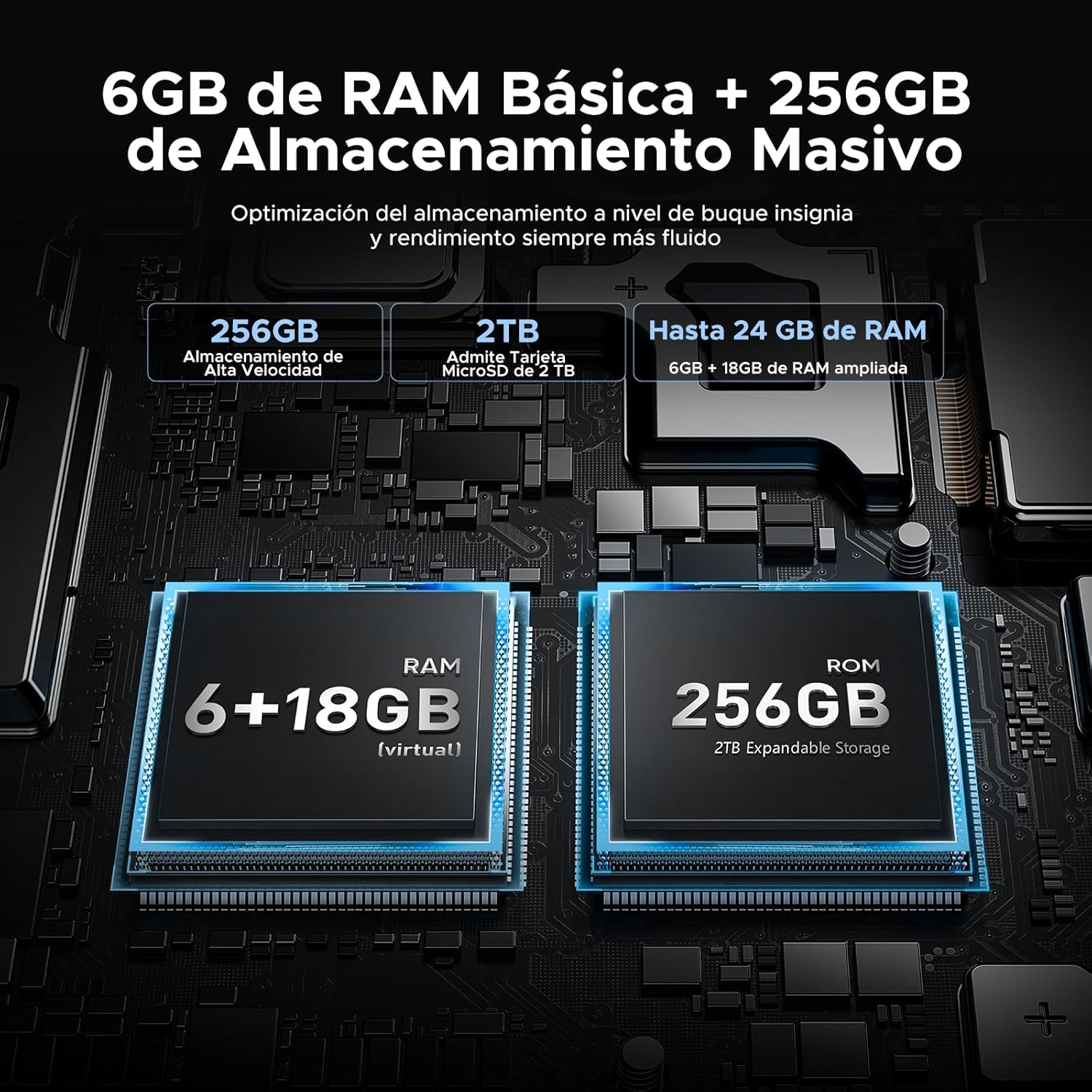
Image: 24GB RAM + 256GB Massive Storage with 2TB Expansion.
Durabilidade e protección
The DOOGEE Blade10 Power is built to withstand harsh environments, featuring IP68/IP69K and MIL-STD-810H certifications.
- IP68: Water and dust resistant, capable of immersion in water up to 1.5 meters for 30 minutes.
- IP69K: Resistente a chorros de auga a alta presión e alta temperatura.
- Norma MIL-STD-810H: Military-grade durability against drops, shocks, and extreme temperatures. Withstands drops from up to 1.5 meters.
Its 360° comprehensive protection ensures reliable performance even in challenging outdoor or work environments.

Image: IP68, IP69K, and MIL-STD-810H certifications for drop, dust, and water resistance.
Construción Robusta
The phone's construction includes a high-resistance cover, aviation-grade titanium alloy, aviation-grade alloy material, TPU protection, and a composite board, all contributing to its exceptional durability.

Imaxe: Detallada view of the phone's layered construction for enhanced durability.
Android 14 Features
The DOOGEE Blade10 Power runs on the latest Android 14 operating system, offering enhanced stability, fluidity, and overall performance compared to previous versions.
- Modo de enfoque: Helps you concentrate by pausing distracting apps.
- Superportapapeis: Advanced clipboard features for managing copied content.
- Lift to Wake: Automatically wakes the screen when you lift the phone.
- Modo de sistema dual: Run two separate environments for work and personal use.
- Screen Enhancement: Optimized display settings for better viewing.
- Pocket Mode: Prevents accidental touches when the phone is in your pocket.
- Screen Sensors: Improved sensor management for various functionalities.
- Control de privacidade: Enhanced privacy settings to manage app permissions and data access.
- Pantalla dividida: Multitask efficiently by using two apps simultaneously.

Image: More Information About Android 14 features.
Mantemento
To ensure the longevity and optimal performance of your DOOGEE Blade10 Power, follow these maintenance guidelines:
- Limpeza: Limpe regularmente a pantalla e o corpo cun pano suave eamp cloth. For stubborn dirt, use a mild soap solution. Ensure all ports are dry before charging or connecting accessories.
- Exposición á auga: While the phone is waterproof, avoid prolonged immersion in saltwater or chlorinated water. If exposed, rinse with fresh water and dry thoroughly. Ensure all port covers are sealed before water exposure.
- Temperatura: Evita expoñer o teléfono a temperaturas extremas (moi quente ou moi frío) durante períodos prolongados, xa que isto pode afectar a duración da batería e aos compoñentes internos.
- Actualizacións de software: Keep your phone's software updated to the latest version to benefit from performance improvements, security patches, and new features. Check for updates in Configuración > Sistema > Actualización do sistema.
- Coidado da batería: Evita esgotar completamente a batería con frecuencia. Para un estado óptimo da batería, tenta manter a carga entre o 20 % e o 80 %.
Resolución de problemas
If you encounter issues with your DOOGEE Blade10 Power, refer to the following common troubleshooting steps:
O dispositivo non se acende
- Ensure the battery is charged. Connect the phone to the charger for at least 30 minutes.
- Mantén premido o botón de acendido/apagado durante 10-15 segundos para forzar un reinicio.
A pantalla non responde
- Reinicia o dispositivo mantendo premido o botón de acendido/apagado.
- If the screen is physically damaged, contact customer support.
Poor Call Quality / Low Speaker Volume
- Check the volume settings during a call.
- Ensure the speaker and microphone are not obstructed by dirt or debris. Clean gently if necessary.
- Test with headphones to determine if the issue is with the phone's speaker/mic or the network.
As aplicacións fallan ou conxélanse
- Pecha e volve abrir a aplicación problemática.
- Limpar a caché e os datos da aplicación en Configuración > Aplicacións > [Nome da aplicación] > Almacenamento > Borrar caché/Borrar datos.
- Asegúrate de que a aplicación estea actualizada á súa última versión.
- Se o problema persiste, desinstala e reinstala a aplicación.
Network Connectivity Issues (Wi-Fi/Mobile Data)
- Toggle Wi-Fi or mobile data off and on.
- Restart your router for Wi-Fi issues.
- Check your SIM card insertion and ensure it's active with your carrier.
- Restablecer a configuración de rede en Configuración > Sistema > Opcións de restablecemento > Restablecer Wi-Fi, móbil e Bluetooth.
Restablecemento de fábrica (último recurso)
If other troubleshooting steps fail, you may consider a factory reset. This will erase all data on your phone, so ensure you back up important information first. Go to Configuración > Sistema > Opcións de restablecemento > Borrar todos os datos (restablecemento de fábrica).
Especificacións
Below are the detailed technical specifications for the DOOGEE Blade10 Power smartphone:
| Característica | Especificación |
|---|---|
| Número de modelo | Blade 10 Power |
| Dimensións | 17.85 x 8.31 x 1.79 cm |
| Peso | 560 g |
| Sistema Operativo | Android 14 |
| Procesador | Octa-Core T615 (1.8 GHz) |
| RAM | 24 GB (6 GB físico + 18 GB virtual) |
| Almacenamento interno | 256 GB |
| Almacenamento ampliable | Ata 2 TB (tarxeta TF) |
| Tamaño de visualización | 6.6 polgadas |
| Tipo de visualización | HD+ IPS |
| Resolución de visualización | 720 x 1612 píxeles |
| Taxa de actualización | 90 Hz |
| Cámara principal | 50 MP |
| Cámara frontal | 8 MP |
| Gravación de vídeo | 1080p @ 30 fps |
| Capacidade da batería | 10300 mAh (Li-Ion) |
| Cargando | 18W Fast Charging, USB Type-C, OTG Support |
| Tecnoloxía de rede | 4G LTE |
| Ranuras para tarxetas SIM | SIM dual |
| Conectividade | NFC, GPS (Glonass, Galileo, Beidou) |
| Seguridade | Face ID, Side Fingerprint Sensor |
| Durabilidade | IP68, IP69K, MIL-STD-810H (Waterproof, Dustproof, Shockproof) |
Garantía e Soporte
DOOGEE is committed to providing quality products and customer satisfaction.
- Garantía de devolución do diñeiro de 30 días: Se non estás satisfeito coa túa compra, podes optar a un reembolso dentro de 30 días.
- Garantía limitada de 2 ano: Your DOOGEE Blade10 Power comes with a 2-year limited warranty covering manufacturing defects. Please retain your proof of purchase.
- Asistencia en liña 24/7: For any technical assistance or inquiries, DOOGEE offers 24/7 online support. Please visit the official DOOGEE websitio web con información de contacto e recursos de apoio.

Image: After-sales Support details.
Vídeos oficiais de produtos
Non se atoparon vídeos oficiais relevantes do produto do vendedor para incluílos neste manual.