
1. Introdución
This manual provides essential instructions for setting up, operating, and maintaining your GOBOULT Mirage Smart Watch. Please read this manual thoroughly to ensure proper use and to maximize the features of your device.
2. Que hai na caixa
- GOBOULT Mirage Smart Watch (Inox Steel)
- Cable de carga
- Manual de usuario
- Tarxeta de garantía
3. Configuración
3.1 Carga inicial
Before first use, fully charge your GOBOULT Mirage Smart Watch. Connect the provided charging cable to the charging port on the back of the watch and to a standard USB power adapter (not included).
3.2 Instalación e emparellamento da aplicación
- Scan the QR code in the user manual or search for the companion app (e.g., 'BoultFit' or similar, as per your watch's specific app) on your smartphone's app store (Android or iOS).
- Instala e abre a aplicación.
- Activa o Bluetooth no teu smartphone.
- Follow the in-app instructions to search for and pair with your GOBOULT Mirage Smart Watch. Ensure the watch is powered on and discoverable.
3.3 Bluetooth Calling Setup
To enable Bluetooth calling functionality:
- After initial pairing, open your phone's Bluetooth settings.
- Look for a second Bluetooth device named 'GOBOULT Mirage_CALL' or similar and pair with it. This separate connection handles the call audio.
- Once connected, you can make and receive calls directly from your watch.

Image: The GOBOULT Mirage Smart Watch displaying an incoming call, highlighting its Bluetooth calling capabilities with a dedicated speaker and microphone.
4. Instrucións de funcionamento
4.1 Pantalla e navegación
The GOBOULT Mirage features a 1.39-inch HD display with 360x360 pixel resolution and up to 500 nits brightness for clear visibility. Navigate the watch using the touchscreen and the digital crown.
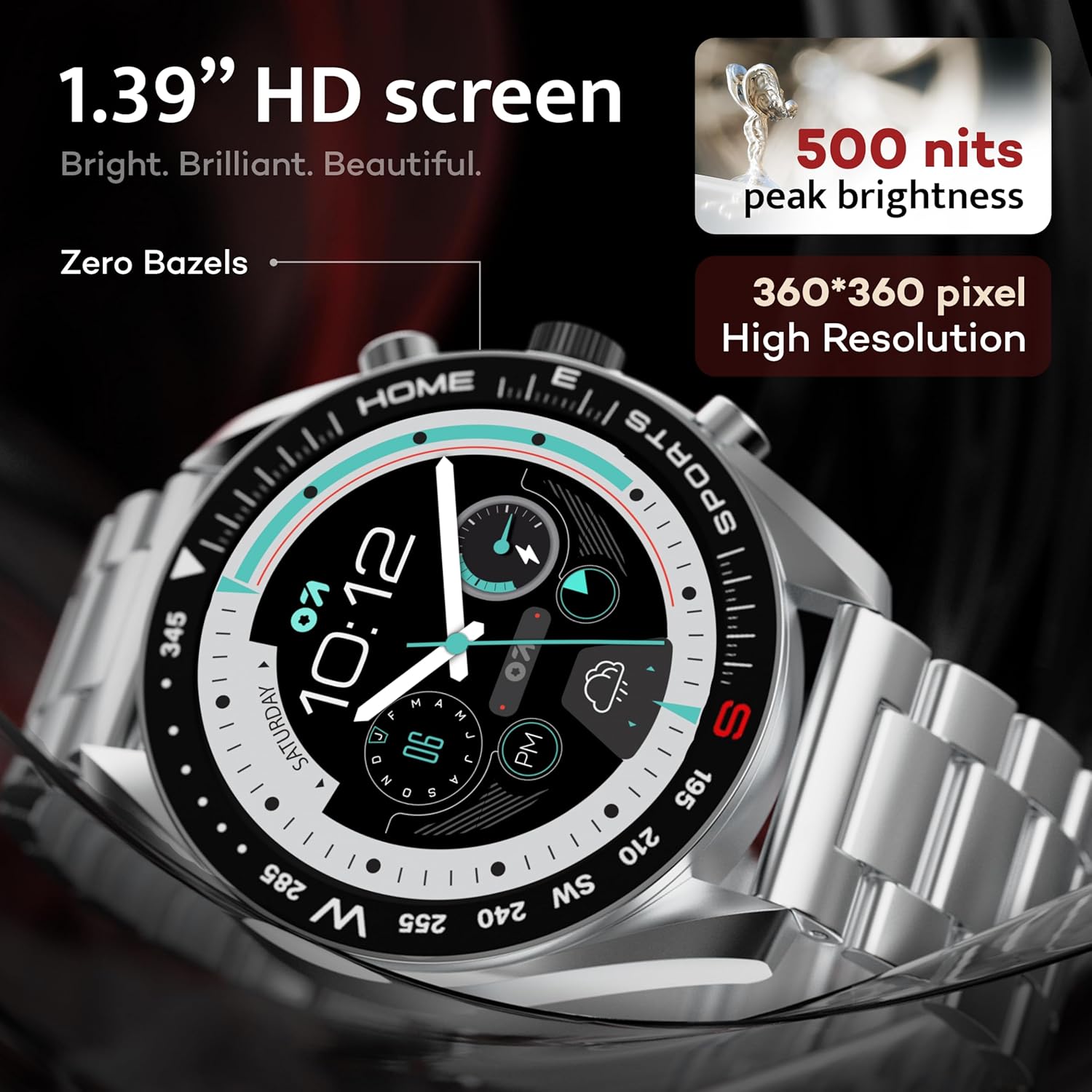
Image: Close-up of the GOBOULT Mirage Smart Watch display, showcasing its 1.39-inch HD screen with 500 nits peak brightness and 360x360 pixel resolution.
4.2 Digital Crown Functions
The digital crown provides intuitive control:
- Mantén premido: Power On/Off, Sleep-wake.
- Xirar: Scroll through menus, adjust settings.
- Prensa individual: Return to home screen, select items.
- Prema por dobre: Switch UI or launch specific functions.

Image: The GOBOULT Mirage Smart Watch highlighting the digital crown and its associated functions like power control, voice assistant access, UI switching, and sports mode launch.
4.3 Esferas do reloxo
Customize your watch's appearance with over 300 cloud-based watch faces. Access and change watch faces through the companion app or directly on the watch by long-pressing the home screen.
4.4 modos deportivos
The watch supports over 120 sports modes to track various physical activities. Access sports modes from the main menu or via shortcut buttons for quick launch. Track metrics such as calories burned, distance, and heart rate during your workouts.

Image: The GOBOULT Mirage Smart Watch displaying various sports modes, including running, cycling, yoga, cricket, and badminton, indicating quick access via shortcut buttons.
4.5 Vixilancia da saúde
The GOBOULT Mirage Smart Watch offers comprehensive health tracking features:
- SpO2 Blood Oxygen Monitor: Mide os niveis de osíxeno no sangue.
- Monitor de frecuencia cardíaca: Seguimento da frecuencia cardíaca 24/7.
- Monitor de sono: Rexistra os patróns e a calidade do sono.
- Monitor de presión arterial: Ofrece lecturas de presión arterial.
- Breath Training Mode: Guides through breathing exercises.
- Recordatorio de beber auga: Prompts you to stay hydrated.
- Recordatorio de sedentarismo: Alerts you after periods of inactivity.
- Seguimento da actividade: Rexistra os pasos, a distancia e as calorías queimadas.
- Seguimento do ciclo menstrual: Helps monitor menstrual cycles.

Image: The back of the GOBOULT Mirage Smart Watch showing its sensors, alongside a list of health monitoring features including SpO2, heart rate, sleep, and activity tracking.
4.6 Notificacións intelixentes
Receive SMS and other smart notifications directly on your watch when connected to your smartphone. Manage notification settings through the companion app.
4.7 AI Voice Assistant & Find My Phone
- Asistente de voz AI: Long press the side button to activate the intelligent AI voice assistant (compatible with Google Assistant and Siri) for hands-free control.
- Atopar o meu teléfono: If your paired phone is misplaced, use the 'Find Phone' feature on your watch. Navigate to the watch menu, select 'Find Phone', and your connected phone will ring or vibrate.

Image: The GOBOULT Mirage Smart Watch displaying the 'Find' screen, illustrating how to locate a connected smartphone by making it ring or vibrate.
4.8 Minixogos
The watch includes mini-games for entertainment. Access them through the watch's application menu.

Image: The GOBOULT Mirage Smart Watch displaying a selection of mini-games, including '2048', 'Battleship', 'Hamster', and 'Young Bird'.
5. Mantemento
5.1 Resistencia á auga (IP67)
The GOBOULT Mirage Smart Watch is IP67 water-resistant, meaning it is protected against dust ingress and can withstand immersion in water up to 1 meter for 30 minutes. It is suitable for daily wear and activities like hand washing or light rain. Avoid prolonged immersion, hot water, or use during swimming/diving.

Image: The GOBOULT Mirage Smart Watch submerged in water, illustrating its IP67 water resistance for protection against water and dust.
5.2 Limpeza
Limpa o reloxo e a correa regularmente cun pano suave e seco. Para a sucidade persistente, usa un pano lixeiramente seco.amp un pano e despois secar completamente. Evitar produtos químicos agresivos ou materiais abrasivos.
5.3 Coidado da correa
The watch comes with a stainless steel strap. Ensure the strap is clean and dry to prevent skin irritation. Use the provided metallic strap adjustment tool if you need to resize the strap.
6 Solución de problemas
- O reloxo non se acende: Asegúrate de que o reloxo estea completamente cargado.
- Non se pode emparellar co teléfono: Ensure Bluetooth is enabled on both devices, the app is open, and the watch is discoverable. Try restarting both the watch and phone.
- Bluetooth calling not working: Confirm that both 'GOBOULT Mirage' and 'GOBOULT Mirage_CALL' (or similar) are paired in your phone's Bluetooth settings.
- Datos sanitarios inexactos: Asegúrate de levar o reloxo ben axustado ao pulso, nin demasiado axustado nin demasiado solto. Limpa os sensores con regularidade.
- Autonomía curta da batería: Reduce o brillo da pantalla, desactiva as notificacións innecesarias e limita a monitorización continua da frecuencia cardíaca se non é necesario.
7. Especificacións
| Característica | Especificación |
|---|---|
| Nome do modelo | Miraxe 8906133853457 |
| Mostrar | 1.39" HD Display, 360 x 360 Resolution, 500 Nits Brightness |
| Conectividade | Bluetooth 5.3, App |
| Resistencia á auga | IP67 (Water Resistant up to 1 meter) |
| Material do marco | Aliaxe de zinc |
| Material da correa | Aceiro inoxidable |
| Tipo de batería | Polímero de litio |
| Vixilancia da Saúde | SpO2, Heart Rate, Sleep, Blood Pressure, Menstrual Cycle Tracking |
| Modos deportivos | 120+ (Badminton, Cricket, Cycling, Football, Running, etc.) |
| Asistente de voz | AI Voice Assistant (Google Assistant, Siri) |
| Dimensións (D x W x H) | 12P x 28L x 46H milímetros |
| Peso do elemento | 106 gramos |
8. Garantía e soporte
8.1 Información da garantía
Your GOBOULT Mirage Smart Watch comes with a 1-year manufacturer's warranty from the date of purchase. Please refer to the included Warranty Card for detailed terms and conditions.
8.2 Contacto co fabricante
For support, service, or warranty claims, please contact the manufacturer:
Exotic Mile Private Limited, Boult Audio
B-67 Wazirpur Industrial Area, New Delhi 110052