
Introdución
The SHOKZ OpenRun Pro 2 Mini headphones are designed for sports enthusiasts, offering a unique open-ear listening experience. Utilizing advanced bone conduction technology, these headphones deliver high-quality audio while allowing you to remain aware of your surroundings. The comfortable and secure fit, combined with long battery life and clear call quality, makes them ideal for active lifestyles.
O que hai na caixa
- SHOKZ OpenRun Pro 2 Mini Headphones
- Cable de carga magnética
- Maletín de transporte
- Manual de usuario
- Tarxeta de Atención ao Cliente

Image: All items included in the SHOKZ OpenRun Pro 2 Mini package.
Configuración
Cargando os teus auriculares
Before first use, fully charge your OpenRun Pro 2 Mini headphones. Use the provided magnetic charging cable. Connect the magnetic end to the charging port on the headphones and the USB-A end to a compatible USB power adapter (0.5-2.5W recommended, not included).
- Duración da batería: Up to 12 hours of continuous audio playback.
- Carga rápida: Unha carga de 5 minutos proporciona aproximadamente 1.5 horas de escoita.

Image: Detail of the magnetic charging port on the headphones.
Encendido/apagado
- Para acender: Press and hold the Volume+ button until the LED indicator flashes blue and the voice prompt says "Welcome to Shokz."
- Para apagar: Press and hold the Volume+ button until the LED indicator flashes red and the voice prompt says "Power off."
Emparejamento Bluetooth
- Start with the headphones powered off.
- Press and hold the Volume+ button for 5-7 seconds until the LED indicator flashes red and blue alternately, and the voice prompt says "Pairing."
- Open the Bluetooth settings on your device (smartphone, tablet, etc.) and select "OpenRun Pro 2 Mini" from the list of available devices.
- Once connected, the LED indicator will flash blue once, and the voice prompt will say "Connected."
Emparejamento multipunto: The OpenRun Pro 2 Mini supports multipoint pairing, allowing you to connect to two devices simultaneously. Refer to the Shokz App or the full user guide for detailed instructions on enabling and managing multipoint pairing.
Instrucións de funcionamento
Usando os auriculares
Place the headphones with the transducers resting on your cheekbones, just in front of your ears. The neckband should rest comfortably behind your head. Ensure the transducers are in full contact with your skin for optimal sound quality.
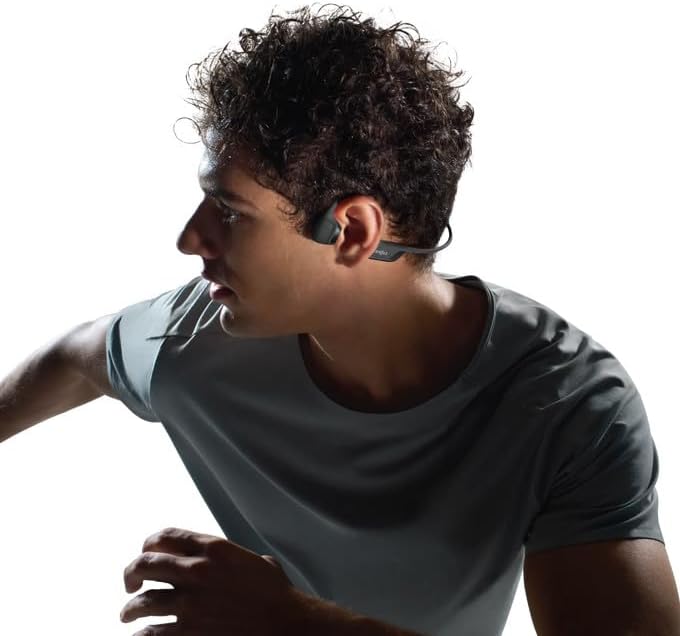
Image: Proper wearing position of the OpenRun Pro 2 Mini headphones.
The open-ear design ensures you remain aware of your surroundings, enhancing safety during outdoor activities.
Controis
- Subir/Baixar o volume: Use the Volume+ and Volume- buttons located on the right side of the neckband.
- Reproducir/Pausa: Press the Multifunction button (on the left transducer) once.
- Saltar pista adiante: Prema dúas veces o botón multifunción.
- Saltar a pista cara atrás: Prema tres veces o botón multifunción.
- Responder/Finalizar chamada: Press the Multifunction button once during an incoming call or active call.
- Activar o asistente de voz: Manteña premido o botón multifunción durante 2 segundos.
Modos de ecualización
Customize your audio experience using the Shokz App. Available EQ modes include:
- Modo estándar: For balanced daily listening.
- Modo Vocal: Enhances vocals for podcasts and audiobooks.
- Modo de aumento de graves: Increases bass for a more powerful sound.
- Treble Boost Mode: Enhances high frequencies for clearer details.
- Modo personalizado: Allows manual adjustment of the 5-band EQ.
Chama a Calidade
The headphones feature strategically positioned dual wind-resistant microphones and an AI noise reduction algorithm. This technology filters out up to 96.5% of background noise, including wind at speeds up to 15 miles per hour, ensuring crystal-clear phone calls.
Mantemento
Limpeza
Limpe os auriculares cun suave, damp pano. Evita o uso de produtos químicos agresivos ou materiais abrasivos. Asegúrate de que o porto de carga estea seco antes de cargalo.
Resistencia á auga
The OpenRun Pro 2 Mini headphones have an IP55 water resistance rating, making them resistant to sweat, light rain, and dust. They are not designed for submersion in water. Always ensure the charging port cover is securely closed to maintain water resistance.
Resolución de problemas
- Sen enerxía: Asegúrate de que os auriculares estean completamente cargados.
- Sen son: Check Bluetooth connection, device volume, and headphone volume. Ensure transducers are correctly placed on cheekbones.
- Mala calidade de son: Adjust EQ settings in the Shokz App. Ensure transducers are clean and properly positioned.
- Problemas de conectividade: Tenta desvincular e volver vincular os auriculares co teu dispositivo. Asegúrate de que ningún outro dispositivo estea a interferir co sinal Bluetooth.
Especificacións
| Nome do modelo | OpenRun Pro 2 Mini |
| Número de modelo | SZ-HEA-0120 |
| Tecnoloxía de conectividade | Bluetooth 5.3 |
| Tipo de controlador de audio | Bone Conduction Driver (DualPitch™ Technology) |
| Duración da batería | Ata 12 horas |
| Tempo de carga | Approx. 1 hour (for full charge) |
| Nivel de resistencia á auga | IP55 (Sweat and water resistant) |
| Peso do elemento | 10.9 onzas (0.31 quilogramos) |
| Material | Nickel-titanium alloy, plastic/silicone |
| Colocación do oído | Orella aberta |

Image: Size comparison between Standard and Mini versions.
Garantía e soporte
SHOKZ OpenRun Pro 2 Mini headphones come with a 2-year warranty. For detailed warranty information, product support, or to register your product, please refer to the included Customer Service Card or visit the official SHOKZ websitio.