
1. Introdución
This manual provides detailed instructions for the safe and effective use of your Berrcom FC-BP120 Upper Arm Blood Pressure Monitor. Please read this manual thoroughly before using the device and keep it for future reference. This monitor is designed for home use to measure systolic and diastolic blood pressure and pulse rate.
2. Que hai na caixa
Ao abrir o paquete, comprobe que estean incluídos todos os seguintes compoñentes:
- 1 x Berrcom Blood Pressure Monitor
- 1 x Adjustable Arm Cuff (8.66"-16.53" / 22-42cm)
- 1 x Manual de usuario
- 1 x cable de carga tipo C
- 4 x pilas AAA
- 1 x bolsa de almacenamento

Image: All components included in the Berrcom Blood Pressure Monitor package.
3. Produto rematadoview
The Berrcom FC-BP120 is an automatic digital blood pressure monitor designed for accurate and convenient home use. Key features include:
- Accurate & Easy-to-Use: Provides precise readings with a simple one-touch operation.
- Dual-User Mode with 198 Memory Storage: Supports two users, each with 99 reading memory, allowing for effective tracking of blood pressure trends.
- Large LED Backlit Display with Color Indicators: Ensures clear visibility in various lighting conditions. The display uses a three-color system (Green, Yellow, Red) to instantly categorize blood pressure levels.
- Adjustable Large Cuff: The cuff (8.66"-16.53" / 22-42cm) is designed for comfort and a secure fit across a wide range of arm sizes.
- Opcións de alimentación dual: Can be powered by 4 AAA batteries or via the included Type-C charging cable.

Image: Berrcom FC-BP120 Blood Pressure Monitor.
4. Configuración
4.1. Alimentando o dispositivo
Your monitor can be powered by batteries or the Type-C cable.
- Instalación da batería: Open the battery compartment cover on the back of the monitor. Insert 4 AAA batteries, ensuring correct polarity (+/-). Close the cover securely.
- Cable tipo C: Alternatively, connect the provided Type-C cable to the monitor's port and a compatible USB power source.

Image: Two power options for the Berrcom Blood Pressure Monitor.
4.2. Conexión do manguito
Insira firmemente o conector do tubo de aire do manguito na toma de aire do lateral do monitor.
Video: Official Berrcom product video demonstrating battery installation and cuff connection.
5. Instrucións de funcionamento
5.1. Wearing the Arm Cuff
- Spread the armband and wear it on your left upper arm.
- Ensure the cuff is positioned approximately 1-2 fingers above your elbow.
- The cuff should fit snugly, allowing one finger to fit comfortably between your arm and the cuff.
5.2. Facer unha medida
Once the cuff is correctly positioned, press the 'START/STOP' button to begin the measurement. The cuff will inflate, and the monitor will automatically measure your blood pressure and pulse rate. Remain still and silent during the measurement.

Image: Step-by-step guide for wearing the cuff and starting a measurement.
5.3. Voice Guidance
The monitor features an English voice broadcast for convenience. To adjust the voice setting:
- Prema o botón "CONFIGURAR".
- Press 'SET' again until the 'SP ON' or 'SP OFF' icon appears and flashes.
- Press the 'MEM' button to toggle the voice sound on or off.
5.4. Dual-User Mode
The monitor supports two users, each with 99 memory slots. To switch between User 1 and User 2:
- When the monitor is powered off, long press the 'SET' button for 5 seconds.
- When the user icon flashes, press the 'MEM' button to switch between User 1 and User 2.
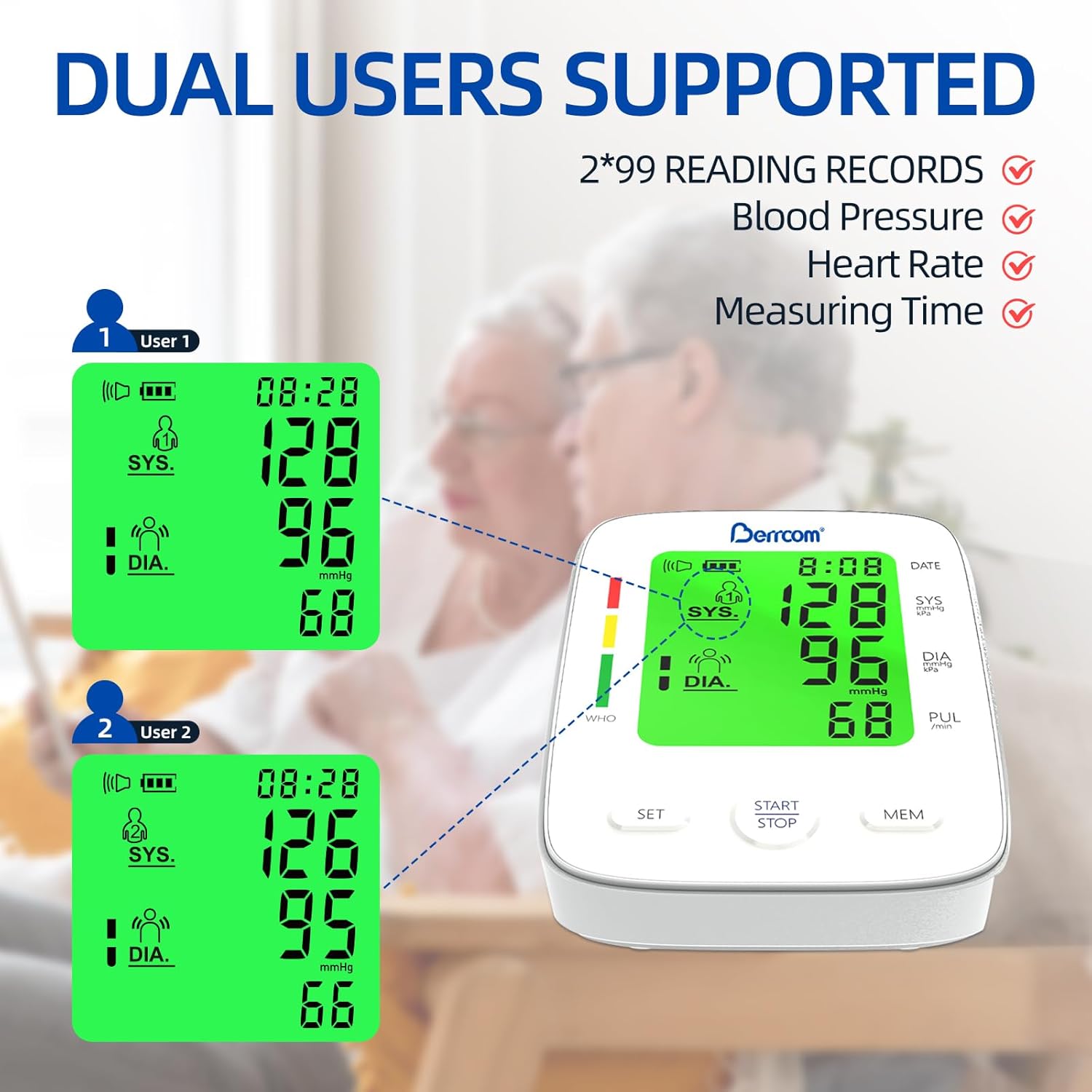
Image: Dual-user mode display.
6. Comprender as túas lecturas
The large LED backlit display provides clear readings and uses a color indicator bar to help you interpret your blood pressure levels according to World Health Organization (WHO) standards.
- Verde: Indicates optimal/normal blood pressure.
- amarelo: Indicates normal-high or Hypertension Type 1.
- Vermello: Indicates Hypertension Type 2 or Type 3 (serious high blood pressure).

Image: Large LED screen with color indicator bar.

Image: Blood Pressure Classification Chart (WHO Standards).
7. Consellos de uso
For accurate and consistent measurements, please follow these guidelines:
- Sentarse polo menos 5 minutos antes da medición.
- Agarde polo menos 3 minutos entre medicións.
- Mídese polo menos 30 minutos despois de comer, bañarse ou facer exercicio.
- Do not measure within 30 minutes after eating, exercising, smoking, or drinking alcohol.
- Do not wear thick clothes; it is better to wear short sleeves (thickness < 5mm) during measurement.
- Non comprima nin restrinxa a mangueira de aire nin o manguito ao tomar medidas.

Image: Important tips for using your blood pressure monitor.
8. Mantemento
To ensure the longevity and accuracy of your Berrcom Blood Pressure Monitor, follow these maintenance guidelines:
- Clean the monitor and cuff with a soft, dry cloth. Do not use abrasive cleaners or immerse the device in water.
- Garde o dispositivo na bolsa de almacenamento proporcionada nun lugar fresco e seco, lonxe da luz solar directa e de temperaturas extremas.
- Retire as pilas se non vai usar o dispositivo durante un período prolongado para evitar fugas.
9 Solución de problemas
If you encounter any issues with your blood pressure monitor, please refer to the following common troubleshooting steps:
- Sen alimentación/pantalla: Check if batteries are inserted correctly and have sufficient charge. If using the Type-C cable, ensure it is properly connected to a power source.
- Lecturas inexactas: Ensure the cuff is correctly positioned and snugly fitted. Avoid talking or moving during measurement. Rest for 5 minutes before taking a reading.
- Mensaxes de erro: Refer to the specific error codes in the full user manual for detailed explanations and solutions. Common errors relate to cuff pressure or movement during measurement.
- Voice Not Working: Check the voice setting as described in section 5.3 to ensure it is enabled.
If problems persist, please consult the comprehensive user manual included with your product or contact Berrcom customer support.
10. Especificacións
| Característica | Especificación |
|---|---|
| Dimensións do produto | 3.16 x 2.57 x 0.94 polgadas |
| Peso | 1.01 libras |
| Fonte de enerxía | 4 AAA batteries (included) or Type-C Cable |
| Tipo de visualización | Pantalla LED retroiluminada |
| Tamaño do puño | Adjustable (8.66"-16.53" / 22-42cm) |
| Almacenamento de memoria | 2 users x 99 readings (198 total) |
| Número de modelo | FC-BP120 |
| Uso obxectivo Parte do corpo | Brazo |
11. Garantía e soporte
For detailed warranty information and customer support, please refer to the full user manual included in your product package. Berrcom is committed to providing reliable products and assistance.