
1. Introdución
This manual provides detailed instructions for the safe and effective use of the SEQURE HT140 2-IN-1 Portable Hot Tweezers Soldering Iron Kit. The HT140 is designed for precision soldering and desoldering tasks, particularly for Surface Mount Devices (SMD). Please read this manual thoroughly before operating the device.
2. Información de seguridade
- Always wear appropriate eye protection when soldering.
- Asegúrate de ventilar axeitadamente o teu espazo de traballo para evitar a inhalación de fumes de soldadura.
- The soldering tips reach high temperatures. Avoid direct contact with skin to prevent burns.
- Place the device on the provided stand when not in use to prevent accidental contact or damage.
- Do not use the device near flammable materials or liquids.
- Disconnect power when changing tips or performing maintenance.
- Manter fóra do alcance dos nenos.
3. Contido do paquete
Verifique que todos os elementos que se indican a continuación estean incluídos no seu paquete:
- HT140 Host (Main Unit) x 1
- Hot Tweezers Desoldering Tip (IS type) x 2
- HT Station (Stand with cleaning sponge) x 1
- Accessory Package (Hex keys, spare screws) x 1
- Bolsa de almacenamento x 1
- 1.5m PD 240W Silicone Wire (USB-C to USB-C) x 1
- PD 65W Fast Charging Adapter (US + EU plug) x 1

4. Produto rematadoview
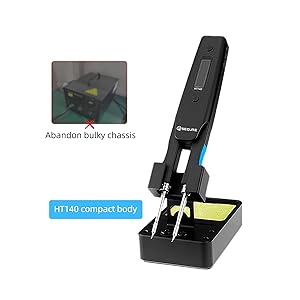
The SEQURE HT140 is an innovative 2-in-1 tool that functions as both a soldering iron and hot tweezers. It features rapid heating, precise temperature control, and a compact design suitable for various electronic repair and SMD work.
4.1 Características principais
- Funcionalidade 2 en 1: Operates as a single-sided soldering iron or double-sided hot tweezers.
- Quecemento rápido: Melts solder in approximately 2 seconds.
- Amplio intervalo de temperatura: Axustable de 50 °C a 500 °C (de 122 °F a 932 °F).
- Temperaturas predefinidas: Three customizable temperature settings for efficiency.
- Sistema de control intelixente: Features temperature calibration, compensation, auto sleep, and auto standby.
- Pantalla OLED: High-definition display for clear temperature and status indication.
- Entrada de alimentación dual: Supports Type-C (PD3.1/3.0/2.0, QC3.0/2.0) and DC5525 (5V-28V, max 140W).
- Compacto e portátil: Deseñado para facilitar o transporte e o uso en diversos entornos.

4.2 Funcionalidade 2 en 1
The HT140 can be configured for two primary modes of operation:
- Soldering Iron Mode: Utilizes single-sided heating for precise soldering of individual components.
- Hot Tweezers Mode: Employs double-sided heating for efficient desoldering and removal of SMD components.

5. Configuración
5.1 Installing Soldering Tips
- Ensure the HT140 is powered off and cool.
- Loosen the small set screws on the tip holders using the provided hex key.
- Carefully insert the desired C120 hot tweezers cartridge tips into the holders. Ensure they are fully seated.
- Tighten the set screws to secure the tips. Do not overtighten.
5.2 Conexión de enerxía
The HT140 supports both Type-C (USB-C) and DC5525 power inputs.
- Using Type-C: Connect the provided 1.5m PD 240W Silicone Wire to the Type-C port on the HT140 and to a compatible PD (Power Delivery) charger (e.g., the included 65W adapter).
- Using DC5525: Connect a compatible DC power adapter (5V-28V) to the DC5525 port.
Note: For optimal performance and rapid heating, use a power source capable of delivering at least 65W, ideally up to 140W.
6. Funcionamento
6.1 Encendido/apagado
Connect the device to a power source. The OLED display will illuminate. To power off, disconnect the power source.
Pantalla OLED 6.2
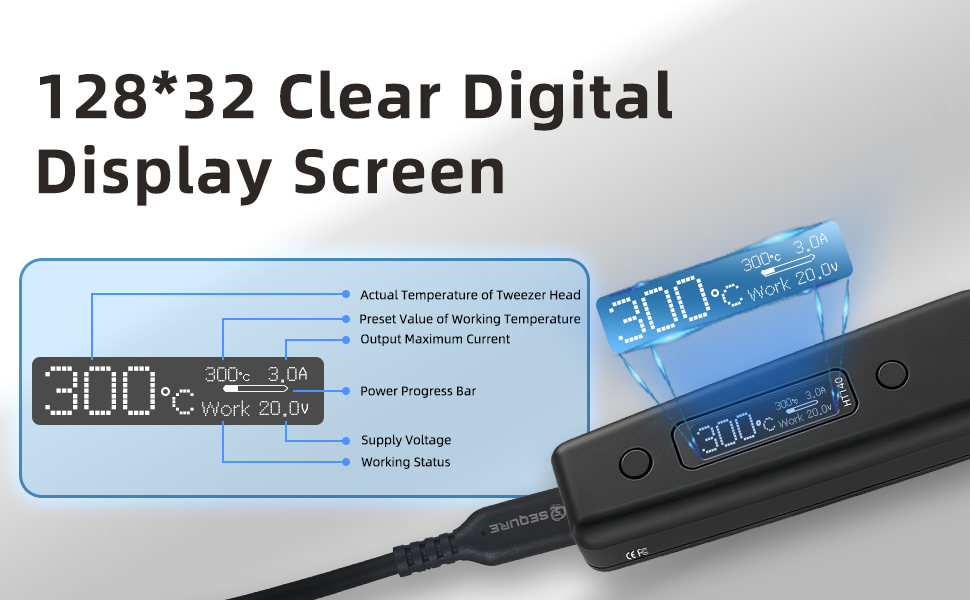
The OLED display provides real-time information about the device's status:
- Actual Temperature of Tweezer Head
- Preset Value of Working Temperature
- Corrente máxima de saída
- Barra de progreso de potencia
- Vol. Subministracióntage
- Estado de traballo
6.3 Axuste de temperatura
The temperature can be adjusted from 50°C to 500°C. Use the control buttons on the device to increase or decrease the target temperature. The display will show the current and target temperatures.

6.4 Preset Temperatures (TurboSet Mode)
The HT140 supports three groups of default heating temperatures for quick access:
- SetTemp 1: 280°C (Adjustable)
- SetTemp 2: 320°C (Adjustable)
- SetTemp 3: 380°C (Adjustable)
Refer to the device's menu for instructions on how to select and customize these preset temperatures.
6.5 Auto Sleep & Standby
To conserve energy and reduce tip wear, the HT140 features adjustable auto sleep and standby modes:
- Adjustable Sleep Time: Configurable from 5s to 360s of inactivity.
- Adjustable Sleep Temperature: Set between 50°C and 500°C.
- Espera automática: Enters standby mode after a default of 5 minutes following sleep mode (adjustable).

6.6 Power Input Compatibility
The HT140 is compatible with a wide range of power sources, supporting 5V-28V DC input with a maximum power of 140W. This includes PD chargers, power adapters, and 3S-6S LiPo batteries.

6.7 Actualización de firmware
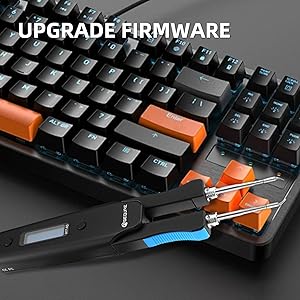
The HT140 supports firmware upgrades to enhance functionality and performance. Connect the device to a computer via the USB-C port and follow the instructions provided on the SEQURE official website for the upgrade process.
7. Mantemento
7.1 Tip Cleaning
Regularly clean the soldering tips to ensure optimal performance and longevity. Use the included cleaning sponge (dampened, not wet) or brass wool to wipe off excess solder and oxidation.
7.2 Estañado de puntas
After cleaning and before storage, always tin the tips with a thin layer of fresh solder. This prevents oxidation and prolongs tip life.
7.3 Almacenamento
When not in use, store the HT140 in its provided storage bag to protect it from dust and physical damage.
8 Solución de problemas
- O dispositivo non se acende: Ensure the power cable is securely connected and the power source is functioning correctly and providing sufficient wattage.
- Tips not heating: Check if the tips are correctly installed and the set screws are tightened. Verify the power input.
- Lectura de temperatura incorrecta: Perform a temperature calibration as described in the device's menu settings.
- Poor solder wetting: Clean and re-tin the tips. Ensure the correct temperature is set for the solder type being used.
9. Especificacións
| Característica | Especificación |
|---|---|
| Modelo | HT140 |
| Entrada de enerxía | Type-C (PD3.1/3.0/2.0, QC3.0/2.0), DC5525 |
| Voltage Alcance | 5V-28V DC |
| Potencia máxima | 140 W |
| Rango de temperatura | 50 °C - 500 °C (122 °F - 932 °F) |
| Heating Time (30°C to 300°C) | As fast as 2 seconds (with 140W input) |
| Mostrar | HD OLED |
| Consellos compatibles | C120 Hot Tweezers Cartridge Tips |
| Auto Sleep | Adjustable (5s-360s) |
| Auto Standby | Adjustable (default 5 minutes after sleep) |
| Material | Metal, Plástico |
| Lonxitude do elemento | 6.3 polgadas |
| Peso do elemento | 1.76 onzas |

10. Garantía e soporte
For warranty information and technical support, please refer to the official SEQURE websitio web ou póñase en contacto co seu vendedor. Garde o recibo da compra como proba de compra.