
1. Introdución
Thank you for choosing the GEARit Portable Bluetooth Wireless Speaker. This manual provides essential information for setting up, operating, and maintaining your speaker. Designed for versatility, this 40W speaker delivers crystal clear sound with deep bass, features IPX6 water resistance, and offers multiple connectivity options, making it ideal for both indoor and outdoor use.

Image: The GEARit Portable Bluetooth Speaker highlighting its powerful sound and IPX6 water resistance.
2. Contido do paquete
- GEARit Portable Bluetooth Wireless Speaker
- Cable de carga USB-C a USB-A
- Cable AUX de 3.5 mm
- Manual de usuario

Image: The GEARit speaker shown with its USB-C charging cable and AUX cable, illustrating the complete package.
3. Produto rematadoview
3.1 Controis e portos
Familiarize yourself with the speaker's buttons and connection ports for optimal use.
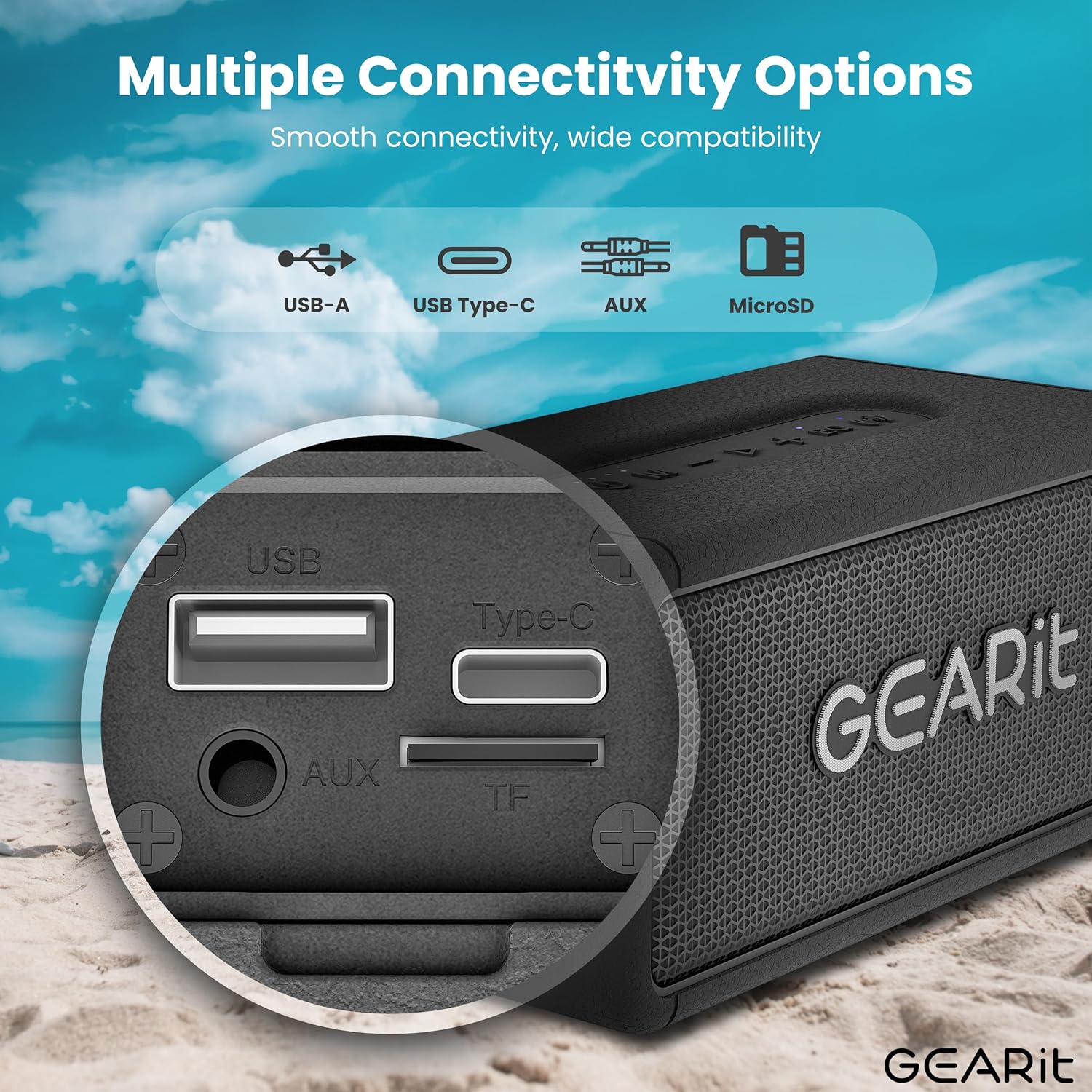
Imaxe: Unha detallada view of the speaker's connectivity panel, showing the USB-A, USB Type-C, AUX, and MicroSD card slots.
- Botón de encendido: Manter premido para acender/apagar. Premer brevemente para comprobar o estado da batería.
- Botón de modo (M): Short press to switch between Bluetooth, AUX, and MicroSD modes.
- Baixar o volume (-): Prema curta para baixar o volume. Prema longa para volver á pista anterior.
- Botón Reproducir/Pausa (>): Presión curta para reproducir/pausar música. Presión curta para responder/finalizar chamadas. Presión longa para rexeitar chamadas.
- Subir volume (+): Prema curta para aumentar o volume. Prema longa para a seguinte pista.
- EQ Button (EQ): Short press to cycle through EQ modes (Indoor/Outdoor).
- TWS Button (Wireless Icon): Short press to initiate TWS pairing.
- Porto USB-C: Para cargar o altofalante.
- Porto de entrada auxiliar: Para conexión de audio con cable.
- MicroSD Card Slot (TF): Para reproducir música directamente desde unha tarxeta MicroSD.
- Porto USB-A: Para reprodución por USB.
4. Configuración
4.1 Carga do altofalante
- Conecta o cable de carga USB-C fornecido ao porto USB-C do altofalante.
- Conecta o outro extremo do cable a un adaptador de corrente USB (non incluído) ou ao porto USB dun ordenador.
- O indicador LED mostrará o estado de carga. Unha carga completa adoita tardar aproximadamente de 3 a 4 horas.
4.2 Acendido/Apagado
- Para acender o dispositivo, manteña premido o botón de acendido ata que escoite unha indicación audible.
- Para apagar, manteña premido o botón de acendido/apagado de novo ata que o altofalante se apague.
4.3 Emparejamento Bluetooth
O altofalante entrará automaticamente no modo de emparellamento Bluetooth ao acendelo por primeira vez ou se non hai ningún dispositivo conectado.
- Ensure the speaker is powered on and in Bluetooth mode (blue LED blinking).
- No teu dispositivo (teléfono intelixente, tableta, etc.), activa o Bluetooth e busca os dispositivos dispoñibles.
- Select "GEARit Speaker" from the list.
- Once connected, the blue LED will remain solid, and you will hear a confirmation tone.

Image: An illustration of the Bluetooth 5.3 chip, emphasizing stable and fast connectivity.
4.4 Emparellamento estéreo sen fíos verdadeiro (TWS)
For an enhanced stereo experience, you can pair two GEARit Portable Bluetooth Wireless Speakers together.
- Asegúrate de que ambos altofalantes estean acendidos e non conectados a ningún outro dispositivo Bluetooth.
- On one speaker (this will be the primary speaker), short press the TWS button (wireless icon). It will emit a pairing tone.
- O altofalante principal buscará e conectará automaticamente o altofalante secundario.
- Once paired, both speakers will emit a confirmation tone, and the TWS indicator on both speakers will light up.
- Agora, conecta o dispositivo ao altofalante principal a través de Bluetooth como se describe na sección 4.3.

Image: Two GEARit speakers set up for True Wireless Stereo (TWS) pairing, providing an immersive audio experience for a group.
4.5 Outras opcións de conectividade
- Entrada AUX: Connect an audio device using the 3.5mm AUX cable to the AUX-in port. The speaker will automatically switch to AUX mode.
- Tarxeta MicroSD: Insert a MicroSD card with music files into the TF slot. The speaker will automatically switch to MicroSD mode and begin playback.
- Reprodución USB: Insira unha unidade USB con música files into the USB-A port. The speaker will automatically switch to USB mode and begin playback.

Image: The speaker's versatile input options, including USB-A, USB Type-C, MicroSD, and AUX, for broad compatibility.
5. Instrucións de funcionamento
5.1 Reprodución básica
- Reproducir/Pausa: Prema brevemente o botón Reproducir/Pausa.
- Axuste de volume: Prema brevemente os botóns para subir o volume (+) ou baixar o volume (-).
- Seguimento / Seguimento anterior: Long press the Volume Up (+) for the next track or Volume Down (-) for the previous track.
5.2 modos de ecualización
The speaker features two Equalizer (EQ) modes to optimize sound for different environments.
- Short press the EQ button to switch between Interior e Ao aire libre modos.
- Modo interior: Ofrece un son equilibrado profesionalfile suitable for enclosed spaces.
- Modo ao aire libre: Enhances bass and volume for better projection in open environments.

Image: Visual representation of DSP Technology, highlighting 40W peak power and the two EQ modes (Indoor & Outdoor).
5.3 Chamadas mans libres
When connected via Bluetooth, you can manage phone calls directly from the speaker.
- Responder/Finalizar chamada: Prema brevemente o botón Reproducir/Pausa.
- Rexeitar a chamada: Prema e manteña premido o botón Reproducir/Pausa.
5.4 Resistencia á auga (IPX6)
The GEARit speaker is IPX6 water-resistant, meaning it can withstand powerful water jets. It is suitable for use outdoors, by the pool, or at the beach. Non mergullo o altofalante na auga. Ensure the port cover is securely closed before exposure to water.

Image: The GEARit speaker being splashed with water, showcasing its IPX6 water-resistant design.

Image: A graphic emphasizing the IPX6 water-resistant feature of the speaker, suitable for wet environments.
5.5 Duración da batería
The speaker provides up to 20 hours of playtime on a single charge, depending on volume level and audio content.

Image: The GEARit speaker in a natural outdoor environment, symbolizing its long-lasting battery for extended use.
6. Mantemento
- Limpeza: Limpe o altofalante cun suave, damp pano. Non use produtos químicos agresivos ou produtos de limpeza abrasivos.
- Almacenamento: Garde o altofalante nun lugar fresco e seco, lonxe da luz solar directa e de temperaturas extremas.
- Coidado da batería: To prolong battery life, fully charge the speaker before long periods of inactivity. Avoid completely draining the battery frequently.
- Cuberta do porto: Always ensure the port cover is securely closed to maintain water resistance.
7 Solución de problemas
- O altofalante non se acende: Asegúrate de que a batería estea cargada. Conecta o altofalante a unha fonte de alimentación mediante o cable USB-C.
- Non se pode emparellar por Bluetooth:
- Ensure the speaker is in Bluetooth pairing mode (blue LED blinking).
- Make sure Bluetooth is enabled on your device and it is within range (up to 33 feet/10 meters).
- Forget "GEARit Speaker" from your device's Bluetooth list and try pairing again.
- Se hai varios dispositivos Bluetooth preto, desactívaos para evitar interferencias.
- Sen son:
- Comprobe os niveis de volume tanto no altofalante como no dispositivo conectado.
- Ensure the correct input mode (Bluetooth, AUX, MicroSD, USB) is selected.
- Se usa AUX, asegúrese de que o cable estea completamente inserido e funcione.
- Fallou o emparellamento de TWS:
- Asegúrate de que ambos altofalantes non estean conectados a ningún outro dispositivo Bluetooth antes de iniciar o emparellamento TWS.
- Coloque os altofalantes preto uns dos outros durante o emparellamento.
- Tenta restablecer ambos altofalantes e repetir o proceso de emparellamento TWS.
8. Especificacións
| Característica | Especificación |
|---|---|
| Nome do modelo | Portable Bluetooth Speakers Wireless |
| Número de modelo do artigo | GI-SPKR-BT-IN-BK |
| Marca | GEARit |
| Tipo de altofalante | Ao aire libre |
| Potencia de saída máxima do altofalante | 40 vatios |
| Tecnoloxía de conectividade | Auxiliar, Bluetooth |
| Tecnoloxía de comunicación sen fíos | Bluetooth |
| Modo de saída de audio | Estéreo |
| Método de control | App (referring to general Bluetooth control) |
| Clasificación impermeable | IPX6 |
| Fonte de enerxía | Funciona con batería (requírese 1 batería de polímero de litio) |
| Peso do elemento | 1.61 libras |
| Dimensións do produto | 2.95" D x 6.61" W x 3.39" H |
| Compoñentes incluídos | Power Cable (USB-C to USB-A), AUX Cable |

Image: The GEARit Portable Bluetooth Wireless Speaker, showcasing o seu deseño compacto e duradeiro.

Image: The GEARit speaker conveniently attached to a backpack, highlighting its portability for outdoor activities.
9. Vídeo oficial do produto
Vídeo: Presentación oficial dun produto en vídeoasing the GEARit Portable Bluetooth Speaker, highlighting its IPX6 water resistance and 40W loud audio output.
10. Garantía e soporte
The GEARit Portable Bluetooth Wireless Speaker comes with a Limited Warranty. For detailed warranty information, please refer to the warranty card included in your package or visit the official GEARit websitio.
For technical support, troubleshooting assistance, or any product-related inquiries, please contact GEARit customer service through their official websitio web ou a información de contacto proporcionada na documentación do produto.
Soporte en liña: Visit the GEARit Store on Amazon