
1. Introdución e finalview
Thank you for choosing the Hagibis 380W USB C Charger 8-Port GaN PD 3.1 Charging Station. This device is designed to provide efficient and fast charging for multiple electronic devices simultaneously. Featuring advanced GaN (Gallium Nitride) technology and PD 3.1 support, it offers high power output in a compact form factor. This manual provides essential information for safe and optimal use of your charging station.
2. Características do produto
- 8-Port Charging Station: Supports charging up to 8 devices concurrently, including 6 USB-C ports and 2 USB-A ports.
- Saída de alta potencia: Delivers a total of 380W. Single USB-C ports (C1/C2) can provide up to 140W, suitable for high-power laptops.
- Tecnoloxía GaN: Utilizes 3rd generation Gallium Nitride materials for efficient power delivery, reduced heat, and a compact design.
- Sistema de refrigeración avanzado: Features a built-in AI chip for intelligent temperature control and a cooling fan, along with bottom and side cooling holes, to ensure safe operation.
- Múltiples protocolos de carga rápida: Compatible with PD3.1, PPS, QC4+, QC3.0, FCP, SCP, AFC, and more, ensuring broad compatibility with various devices.
- Protección integral: Equipped with temperature protection, over-current protection, over-voltage protection, overcharge protection, overload protection, overheat protection, and short circuit protection.
- Ampla compatibilidade: Supports a vast range of devices including MacBook Pro/Air, iPad Pro, iPhone 15/16 series, Dell XPS, Samsung Galaxy devices, and other USB-C and USB-A powered electronics.
3. Contido do paquete
Verifique que todos os elementos estean presentes no seu paquete:

Image: Contents of the Hagibis 380W GaN Charger package, showing the charger, power cable, and manual.
- Hagibis 380W GaN Charger Unit
- Manual de instrucións
- Power Cable (Type A - 2 pin, North American)
- Caixa de venda polo miúdo
4. Instrucións de configuración
- Desempaquetar o cargador: Carefully remove the Hagibis 380W USB C Charger and all accessories from the packaging.
- Conecte o cable de alimentación: Insert the included power cable into the AC input port on the back of the charging station. Ensure it is firmly seated.
- Conectar á toma de corrente: Plug the other end of the power cable into a standard 110V AC wall outlet. The charging station is now ready for use.
- Coloque o cargador: Place the charging station on a stable, flat surface with adequate ventilation to allow for proper heat dissipation.
5. Instrucións de funcionamento
The Hagibis 380W charging station is designed for ease of use. Follow these steps to charge your devices:
- Identificar portos: The charging station features 6 USB-C ports (C1-C6) and 2 USB-A ports (A1-A2). Refer to the port labels on the device.
- Conecta os teus dispositivos: Use appropriate charging cables (not included) to connect your devices to the desired ports on the charging station. For optimal fast charging, use high-quality USB-C to USB-C cables for USB-C devices and USB-A to device-specific cables for USB-A devices.
- Distribución automática de enerxía: The charging station intelligently detects the connected devices and automatically adjusts the power output to provide the fastest and safest charge.
- Carga do monitor: The LED indicators on the charger will illuminate to show active charging.

Image: The Hagibis 380W charger simultaneously charging a laptop, smartphone, and wireless earbuds.

Image: The Hagibis 380W charger providing simultaneous fast charging to four laptops.
6. Power Output Configurations
The Hagibis 380W charging station dynamically allocates power based on the number and type of connected devices. Below are common output configurations:
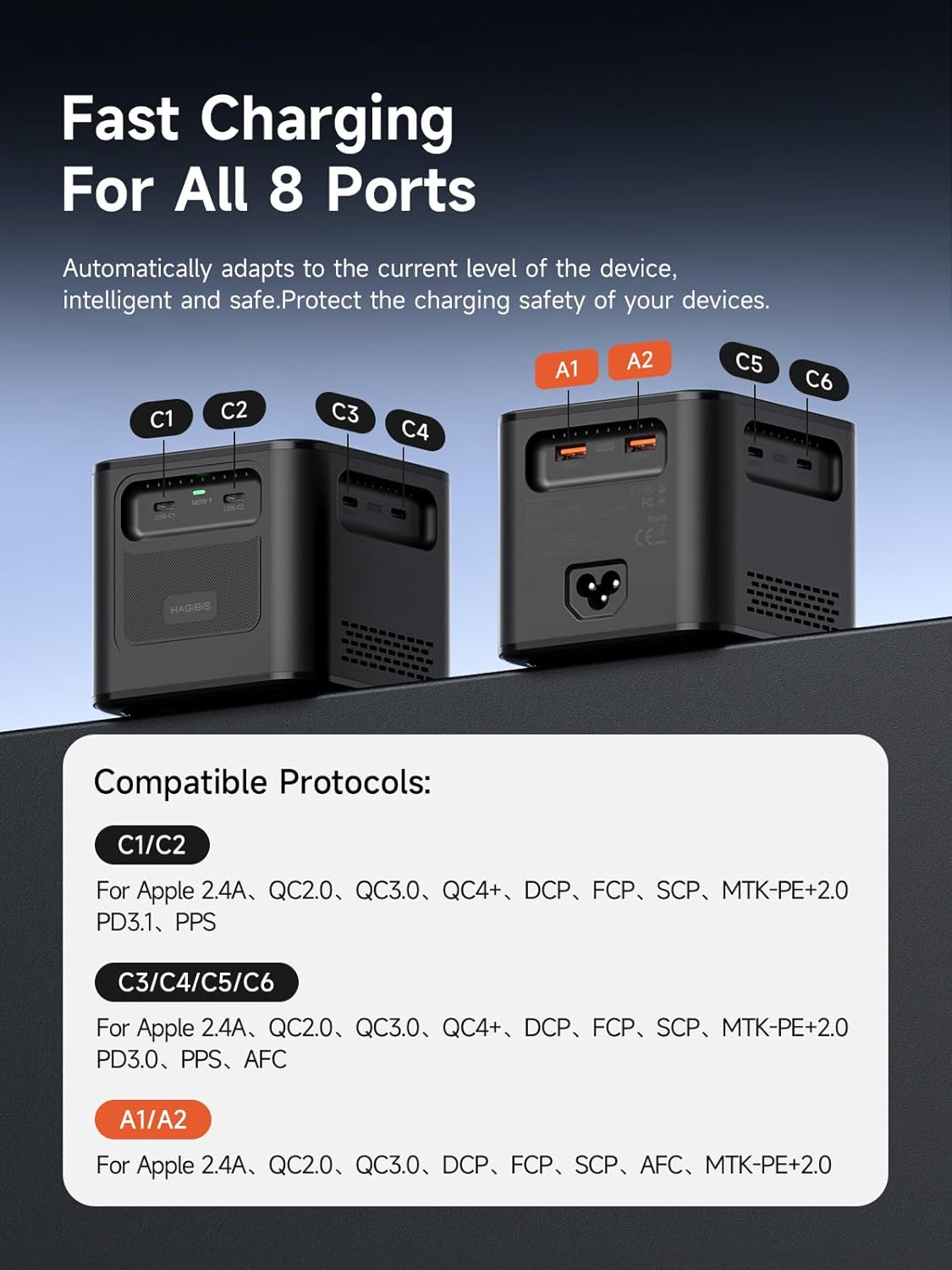
Image: Port identification and compatible charging protocols for C1/C2, C3/C4/C5/C6, and A1/A2 ports.
Compatible Protocols:
- C1/C2 Ports: Apple 2.4A, QC2.0, QC3.0, QC4+, DCP, FCP, SCP, MTK+PE+2.0, PD3.1, PPS
- C3/C4/C5/C6 Ports: Apple 2.4A, QC2.0, QC3.0, QC4+, DCP, FCP, SCP, MTK+PE+2.0, PD3.1, PPS, PD3.0, AFC
- A1/A2 Ports: Apple 2.4A, QC2.0, QC3.0, DCP, FCP, SCP, AFC, MTK+PE+2.0
Combinacións de saída:
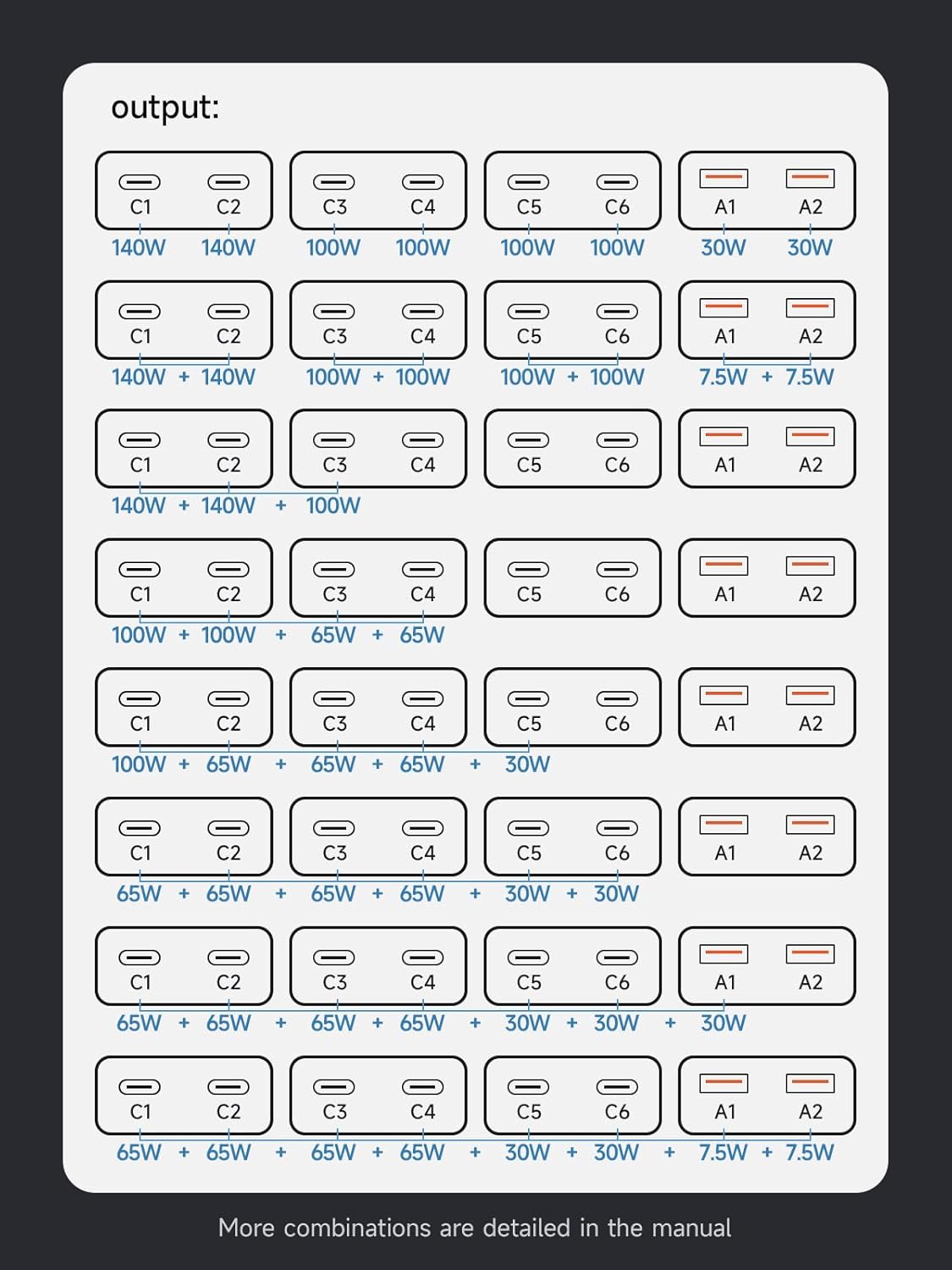
Image: Visual representation of power distribution across multiple ports.
- Single Port Max Output: C1/C2 up to 140W (28V/5A); C3/C4/C5/C6 up to 100W (20V/5A); A1/A2 up to 7.5W.
- Saída de dobre porto:
- C1+C2 = 140W+140W
- C3+C4 = 100W+100W
- C5+C6 = 100W+100W
- A1+A2 = 7.5W+7.5W
- Multiple Port Output Examples:
- C1+C2+C3 = 140W+140W+100W
- C1+C2+C3+C4 = 100W+100W+65W+65W
- C1+C2+C3+C4+C5 = 100W+65W+65W+65W+30W
- C1+C2+C3+C4+C5+C6 = 65W+65W+65W+65W+30W+30W
- C1+C2+C3+C4+C5+C6+A1 = 65W+65W+65W+65W+30W+30W+30W
- C1+C2+C3+C4+C5+C6+A1+A2 = 65W+65W+65W+65W+30W+30W+7.5W+7.5W
7. Mantemento
Proper maintenance ensures the longevity and optimal performance of your charging station.
- Limpeza: Disconnect the charger from the power outlet before cleaning. Use a soft, dry cloth to wipe the exterior. Do not use liquid cleaners or aerosols.
- Almacenamento: Cando non o use durante períodos prolongados, garde o cargador nun lugar fresco e seco, lonxe da luz solar directa e de temperaturas extremas.
- Ventilación: Ensure the cooling vents are not obstructed during operation to prevent overheating.
- Coidado do cable: Avoid bending or crimping charging cables excessively, as this can damage them and affect charging performance.
8 Solución de problemas
If you encounter issues with your Hagibis charging station, please refer to the following common problems and solutions:
| Problema | Causa posible | Solución |
|---|---|---|
| O dispositivo non se está cargando | Loose connection, faulty cable, power outlet issue, device compatibility. | Ensure power cable is securely plugged in. Try a different charging cable. Test the power outlet with another device. Verify device compatibility with the charger's output specifications. |
| Carga lenta | Cable not supporting fast charging, too many devices connected, device not supporting fast charging protocol. | Use a high-quality cable that supports fast charging. Refer to the 'Power Output Configurations' section to ensure sufficient wattage for your device. Check if your device supports the charger's fast charging protocols. |
| Charger feels hot | Heavy load, obstructed ventilation. | This is normal under heavy load due to high power output. Ensure the charger is placed in a well-ventilated area and vents are not blocked. The built-in cooling system will manage temperature. If it becomes excessively hot or shuts down, disconnect devices and power, then allow it to cool. |
| O cargador non se acende | No power from outlet, faulty power cable. | Check if the power outlet is functional. Ensure the power cable is fully inserted into both the charger and the wall outlet. |
9. Especificacións
Detailed technical specifications for the Hagibis 380W USB C Charger:

Image: Product dimensions and key technical parameters.
| Marca | Hagibis |
| Número de modelo | PD380 |
| Total de portos USB | 8 (6 USB-C, 2 USB-A) |
| Wat totaltage | 380 W |
| Vol. De entradatage | 110-120V~50/60Hz 5.0A Max (US) |
| Output (C1/C2) | 3.3V~21V=5A, 5V=3A, 9V=3A, 12V=3A, 15V=3A, 20V=5A (100W Max), 28V=5A (140W Max), PPS: 3.3-21V=5A (105W Max) |
| Output (C3/C4/C5/C6) | 3.3V~21V=5A, 5V=3A, 9V=3A, 12V=3A, 15V=3A, 20V=5A (100W Max), PPS: 3.3-21V=5A (105W Max) |
| Output (A1/A2) | 4.5V=5A, 5V=4.5A, 9V=3A, 12V=2.5A, 20V=1.5A (30W máx.) |
| Tipo de conector | USB tipo A, USB tipo C |
| Material | Policarbonato |
| Cor | Negro |
| Peso do elemento | 23 onzas (aprox. 650 g) |
| Dimensións | Aprox. 95 mm x 88 mm x 95 mm |
| Fonte de enerxía | Eléctrico con cable |
| Certificación de seguridade | Conforme UL |
10. Información de seguridade
Para garantir un funcionamento seguro e evitar danos ao dispositivo ou lesións, observe as seguintes pautas de seguridade:
- Non expoñas o cargador á auga, á humidade nin a temperaturas extremas.
- Evite deixar caer o cargador nin someterlo a impactos fortes.
- Do not disassemble, modify, or attempt to repair the charger. This will void the warranty and may cause hazards.
- Manteña o cargador lonxe de materiais inflamables.
- Ensure proper ventilation around the charger during use. Do not cover it with cloths or other materials.
- Use only the provided power cable or a certified replacement.
- Desconecte o cargador da toma de corrente cando non o use ou durante tormentas eléctricas.
- This device is equipped with multiple protection functions including temperature, over-current, over-voltage, overcharge, overload, overheat, and short circuit protection to ensure safe charging.
11. Garantía e soporte
The Hagibis 380W USB C Charger (Model PD380) comes with a 1 ano de garantía desde a data de compra, cubrindo defectos de fabricación.
For technical support, warranty claims, or any questions regarding your product, please contact the retailer where you purchased the item or visit the official Hagibis websitio web para obter información de atención ao cliente.
Fabricante: Shanghai Xinxie Industrial Co., Ltd.