
1. Introdución
This manual provides detailed instructions for the CRKD NEO S Controller Purple Wave, Model 24-NS-FC. This versatile controller is designed for an immersive gaming experience across multiple platforms, including PC, iPhone, iPad, Android, Nintendo Switch/Switch 2, and Smart TV. It features a detachable 5-fret attachment, Hall Effect thumbsticks, and customizable controls via the CRKD Companion app.
Que está incluído:
- CRKD NEO S Purple Wave Edition Controller
- 5-Fret Guitar Grip Attachment
- Microfiber String Bag
- Velcro Wrist Strap
- Cable de carga USB-C a USB-A
2. Información de seguridade
Please read all safety instructions before using the CRKD NEO S Controller. Failure to follow these instructions may result in injury or damage to the device.
- Do not expose the controller to extreme temperatures, direct sunlight, or high humidity.
- Evite deixar caer o controlador nin someterlo a impactos fortes.
- Non intente desmontar nin modificar o controlador. Isto anulará a garantía.
- Manteña o controlador e os seus accesorios fóra do alcance dos nenos pequenos.
- Use only the provided USB-C to USB-A cable for charging.
- If the controller becomes hot, emits smoke, or shows any signs of malfunction, discontinue use immediately and contact support.
3. Produto rematadoview
Familiarize yourself with the components and features of your CRKD NEO S Controller.

Figura 3.1: Fronte view of the CRKD NEO S Controller Purple Wave, showing the D-pad, action buttons, Hall Effect thumbsticks, and central function buttons.
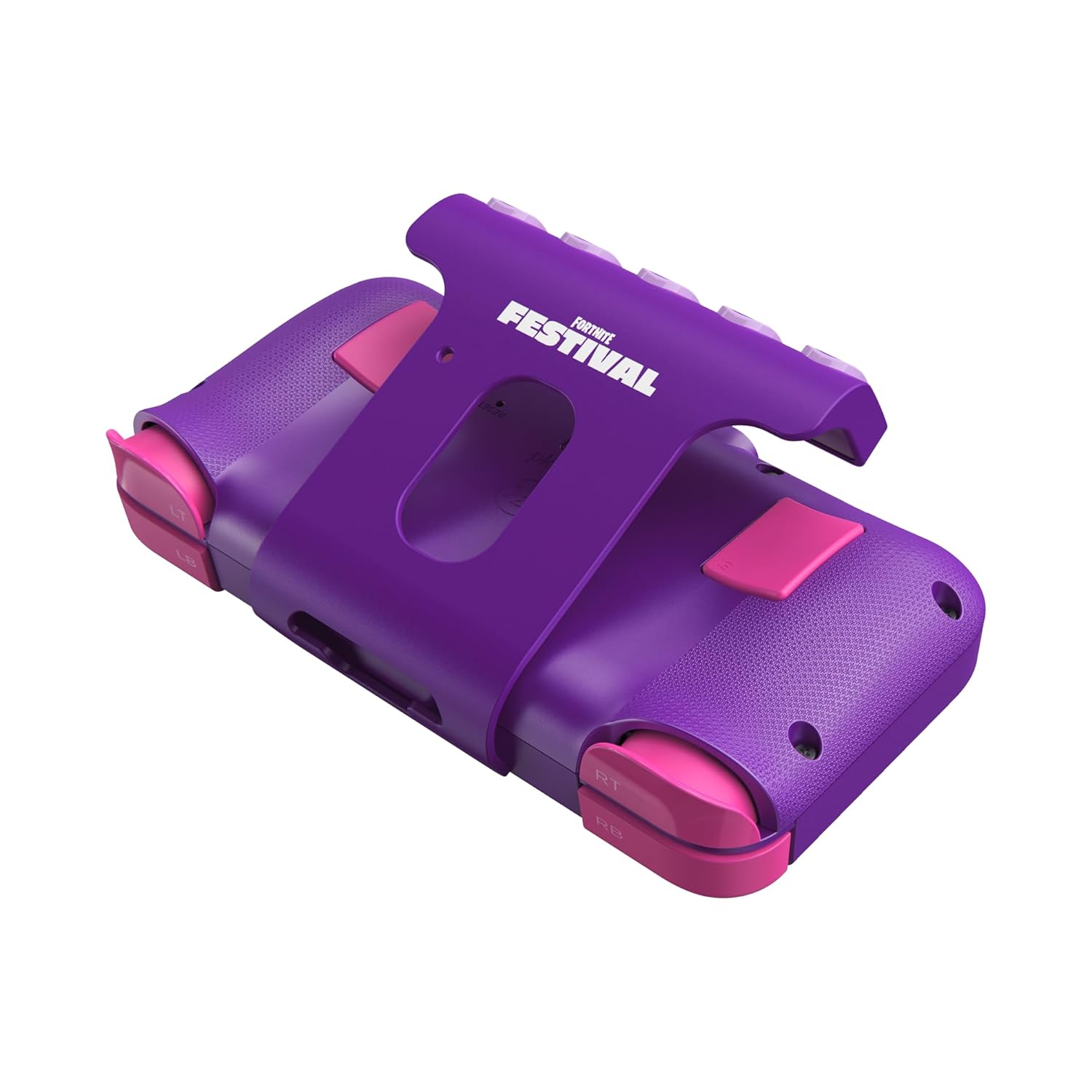
Figura 3.2: Traseira view of the CRKD NEO S Controller with the 5-fret guitar grip attachment installed, highlighting the shoulder buttons and back paddles.

Figure 3.3: The CRKD NEO S Controller being held, demonstrating its ergonomic design and compact size.
Características principais:
- Hall Effect Thumbsticks: Provides zero stick drift and precise control.
- Deseño ergonómico: Comfortable for extended gaming sessions.
- Conectividade sen fíos Bluetooth: Seamless pairing with various devices.
- Conexión por cable: Optional USB-C wired mode for low-latency gaming.
- No Deadzone Mode: Enhances thumbstick responsiveness.
- Swappable Stick Tops: Customize the feel of your thumbsticks.
- Adjustable Trigger Actuation Points: Axuste fino da sensibilidade do disparador.
- Vibración axustable: Customize haptic feedback.
- Re-mappable Back Buttons: Assign single inputs or sequences for added versatility.
- Controis de movemento: Supported for Nintendo Switch only.
- Rumble Support: Provides immersive feedback.
- Función Turbo: Enables rapid input for specific buttons.
- CRKD Companion App: Connects to the app for advanced customization and firmware updates.
4. Configuración
4.1 Carga inicial
Before first use, fully charge your CRKD NEO S Controller. Connect the provided USB-C to USB-A charging cable to the controller's USB-C port and the other end to a compatible USB-A power source (e.g., computer, wall adapter).
4.2 Attaching the 5-Fret Guitar Grip
The 5-fret attachment is designed for rhythm games like Fortnite Festival. To attach:
- Align the attachment with the bottom edge of the controller.
- Gently slide the attachment onto the controller until it clicks securely into place.
To detach, press the release buttons (if present) or gently slide the attachment off.

Figure 4.2.1: The 5-fret attachment connected to the CRKD NEO S Controller.
4.3 Emparejamento sen fíos
The CRKD NEO S Controller supports Bluetooth wireless connectivity. Follow these steps to pair with your device:
- Nintendo Switch: Go to 'Controllers' > 'Change Grip/Order' on your Switch. Press and hold the Home button on the NEO S Controller for several seconds until the indicator lights flash, then release. The controller will appear on the Switch screen.
- PC (Windows), Android, Steam Deck, Legion Go, Rog Ally: Ensure Bluetooth is enabled on your device. On the NEO S Controller, press and hold the Home button and the Up directional button simultaneously for several seconds until the indicator lights flash rapidly. This puts the controller into Xbox/PC pairing mode. Select 'CRKD NEO S' from your device's Bluetooth settings.
- iPhone/iPad: Ensure Bluetooth is enabled on your iOS device. Press and hold the Home button on the NEO S Controller for several seconds until the indicator lights flash. Select 'CRKD NEO S' from your device's Bluetooth settings.
- Smart TV: Refer to your Smart TV's manual for Bluetooth pairing instructions. Generally, enable Bluetooth on the TV and put the controller into the appropriate pairing mode (Home button for general Bluetooth, Home + Up for Xbox/PC mode if supported).

Figure 4.3.1: Illustration of the wireless connection capability of the CRKD NEO S Controller.
5. Instrucións de funcionamento
5.1 Controis básicos
The CRKD NEO S Controller features standard gaming controls:
- D-Pad: Entrada direccional.
- Botóns de acción (A, B, X, Y): Accións principais do xogo.
- Controles de polgar: Entrada analóxica para control de movemento e cámara.
- Botóns de ombreiro (LB, RB) e gatillos (LT, RT): Secondary actions and analog input.
- Back Buttons: Programmable for custom inputs.
5.2 Using the 5-Fret Attachment
When the 5-fret attachment is connected, it functions as dedicated input for rhythm games. The five frets correspond to specific notes or actions within compatible games. Ensure the attachment is securely connected for optimal performance.

Figura 5.2.1: Primeiro plano view of the 5-fret attachment, showing the individual fret buttons.
5.3 CRKD Companion App
The CRKD Companion app (available for mobile devices) allows for advanced customization and management of your controller. Features include:
- Reasignación de botóns: Customize the function of any button, including the back buttons.
- Trigger Sensitivity Adjustment: Fine-tune the actuation points of the LT/RT triggers.
- Thumbstick Deadzone Adjustment: Optimize thumbstick responsiveness.
- Intensidade de vibración: Adjust rumble feedback.
- Actualizacións de firmware: Manteña o software do seu controlador actualizado.
- Rexistro do produto: Register your controller and view its unique product number and rarity ranking.

Figure 5.3.1: The CRKD CTRL Dashboard within the companion app, showing various customization options.

Figure 5.3.2: The 'Configure Attachment' screen in the CRKD Companion app, allowing customization of the 5-fret attachment buttons.

Figure 5.3.3: Adjusting trigger sensitivity within the CRKD Companion app.

Figure 5.3.4: The 'Deadzone Adjustment' interface for thumbsticks in the CRKD Companion app.
6. Mantemento
6.1 Limpeza
Para limpar o controlador, use un pano suave e seco. Para a sucidade persistente, dóreo lixeiramente.ampen the cloth with water. Do not use harsh chemicals, solvents, or abrasive cleaners, as these can damage the controller's finish or internal components.
6.2 Almacenamento
Store the controller in a cool, dry place away from direct sunlight and extreme temperatures. Use the provided microfiber string bag for protection when not in use or during transport.
7 Solución de problemas
If you encounter issues with your CRKD NEO S Controller, refer to the following common solutions:
| Problema | Posible Solución |
|---|---|
| O controlador non se acende. | Asegúrate de que o controlador estea completamente cargado. Conéctao a unha fonte de alimentación mediante o cable USB-C. |
| Non se pode emparellalo por Bluetooth. |
|
| Os botóns ou as palancas de control non responden. |
|
| 5-Fret attachment not working correctly. | Ensure the attachment is securely connected. Check the CRKD Companion app for specific settings related to the attachment. |
| O controlador desconéctase con frecuencia. |
|
8. Especificacións
| Característica | Detalle |
|---|---|
| Número de modelo | 24-NS-FC |
| Conectividade | Bluetooth Wireless, USB-C Wired |
| Compatibilidade | PC, iPhone, iPad, Android, Nintendo Switch/Switch 2, Smart TV |
| Palillos | Sensores de efecto Hall |
| Batería | 1 batería LR44 (incluída) |
| Dimensións | 8.86 x 5.63 x 2.24 polgadas (aproximado) |
| Peso | 1.04 libras (aproximadamente) |
| Fabricante | CRKD |
9. Garantía e soporte
For warranty information, technical support, or further assistance, please visit the official CRKD websitio web ou póñase en contacto co servizo de atención ao cliente. Garde o comprobante de compra para reclamacións de garantía.
CRKD Official Websitio: Visit the CRKD Store on Amazon


