
1. Produto rematadoview
This manual provides comprehensive instructions for the HP Pavilion 15.6" FHD Laptop. This device is designed for general computing tasks, offering a balance of performance and portability. It features an Intel Core i3-N305 processor, 16GB of DDR4 RAM, and a 1TB storage solution comprising a 512GB PCIe SSD and an additional 500GB HP P500 Portable SSD. The laptop includes a 15.6-inch Full HD anti-glare display, Wi-Fi 6 connectivity, and runs on Windows 11.

Figure 1: HP Pavilion 15.6" FHD Laptop with included HP P500 Portable SSD.
Características principais:
- Procesador: Intel Core i3-N305 (8 Cores, 8 Threads, up to 3.80 GHz)
- Gráficos: Gráficos Intel UHD
- Visualización: 15.6" Full HD (1920x1080) IPS Anti-glare
- Memoria: 16 GB de RAM DDR4
- Almacenamento: 512GB PCIe SSD + 500GB HP P500 Portable SSD (1TB total)
- Sistema operativo: Windows 11
- Conectividade: Wi-Fi 6, Bluetooth 5.3
- Portos: USB-C, USB Type-A (x2), HDMI, Headphone/Microphone Combo
- Seguridade: Built-in Fingerprint Reader
- Webleva: HD 720p con obturador de privacidade
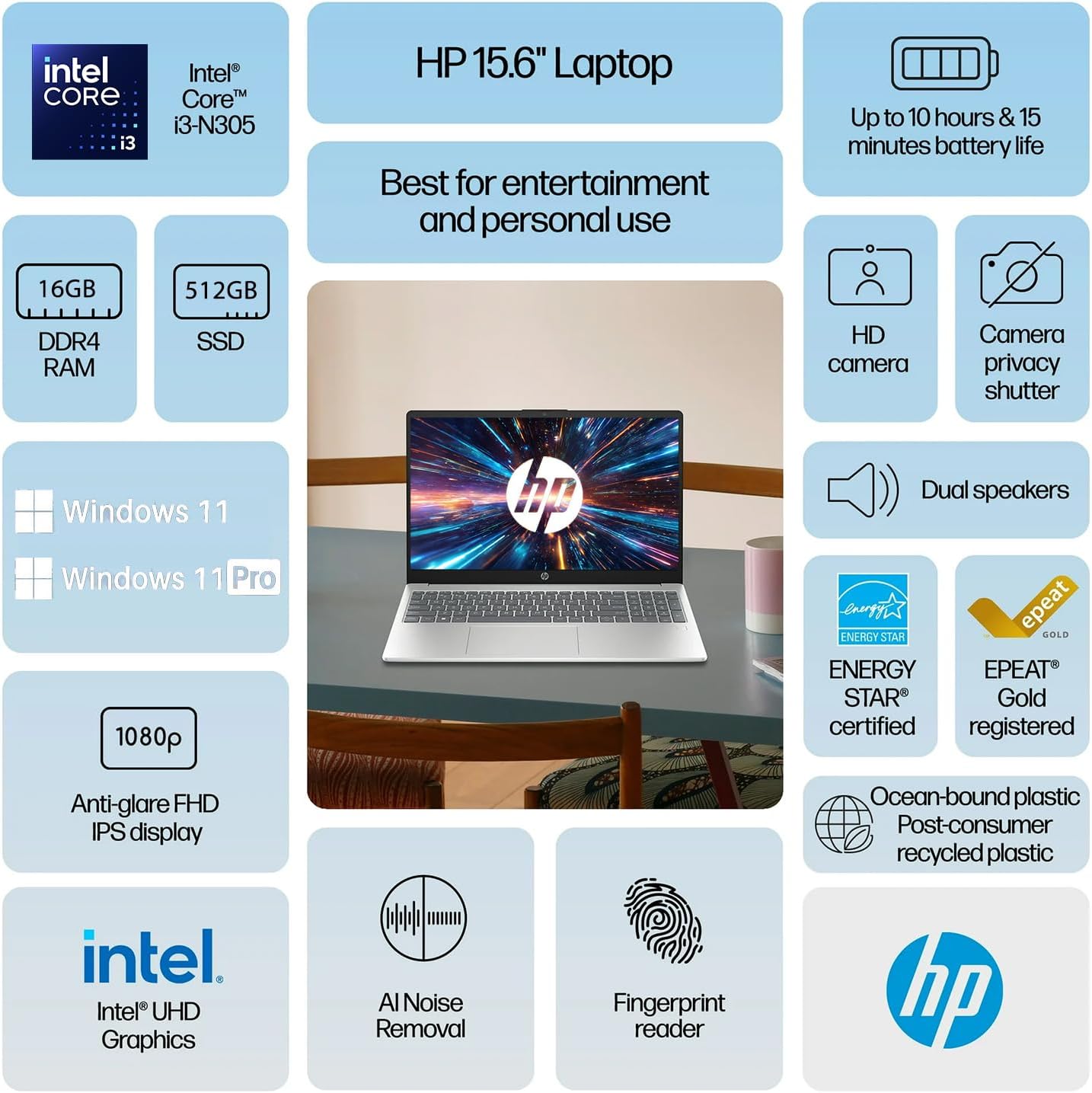
Figura 2: Máisview of HP Pavilion 15.6" Laptop features.
2. Configuración inicial
2.1 Desembalaxe e primeiro acendido
- Retire con coidado o portátil e todos os accesorios da embalaxe.
- Connect the power adapter to the laptop's power connector and then to a power outlet.
- Abre a tapa do portátil. É posible que o portátil se acenda automaticamente ou que teñas que premer o botón de acendido situado no teclado.
- Siga as instrucións en pantalla para completar a configuración inicial de Windows 11, incluíndo a selección do idioma, a conexión de rede e a creación da conta de usuario.
2.2 Connecting the HP P500 Portable SSD
The HP P500 Portable SSD is an external storage device included with your laptop. To connect it:
- Locate the USB-C cable provided with the portable SSD.
- Connect one end of the USB-C cable to the HP P500 Portable SSD.
- Connect the other end of the USB-C cable to an available USB-C port on your HP Pavilion laptop.
- The operating system will automatically detect and configure the drive. You can access it through File Explorador.

Figure 3: HP P500 Portable SSD and its connection cable.
3. Manexo do portátil
3.1 Teclado e panel táctil
The laptop features a full-size English (US) keyboard and a multi-touch touchpad. Refer to the Soporte HP websitio for detailed information on keyboard shortcuts and touchpad gestures.
3.2 Lector de pegadas dixitais
The built-in fingerprint reader allows for secure and quick login. To set up your fingerprint:
- Ir a Configuración > Contas > Opcións de inicio de sesión.
- Under "Ways to sign in," select Recoñecemento de impresións dixitais (Windows Hello) e siga as instrucións en pantalla para rexistrar as súas impresións dixitais.

Figure 4: Fingerprint reader for secure access.
3.3 Connectivity (Wi-Fi 6 and Bluetooth 5.3)
Your laptop supports Wi-Fi 6 for high-speed wireless internet and Bluetooth 5.3 for connecting wireless peripherals.
- Wi-Fi: Click the Wi-Fi icon in the taskbar, select your desired network, and enter the password if prompted.
- Bluetooth: Ir a Configuración > Bluetooth e dispositivos to pair new Bluetooth devices.

Figure 5: Laptop demonstrating Wi-Fi 6 and audio capabilities during a video call.
3.4 External Ports
O portátil está equipado con varios portos para conectar dispositivos externos:
- USB-C (1x): For data transfer and connecting USB-C compatible devices.
- USB Tipo A (2x): Para conectar dispositivos USB estándar como ratos, teclados ou unidades externas.
- HDMI (1x): Para conectar a pantallas ou proxectores externos.
- Headphone / microphone combo jack (1x): For connecting headphones or a headset with a microphone.
- Power connector (1x): Para conectar o adaptador de CA.
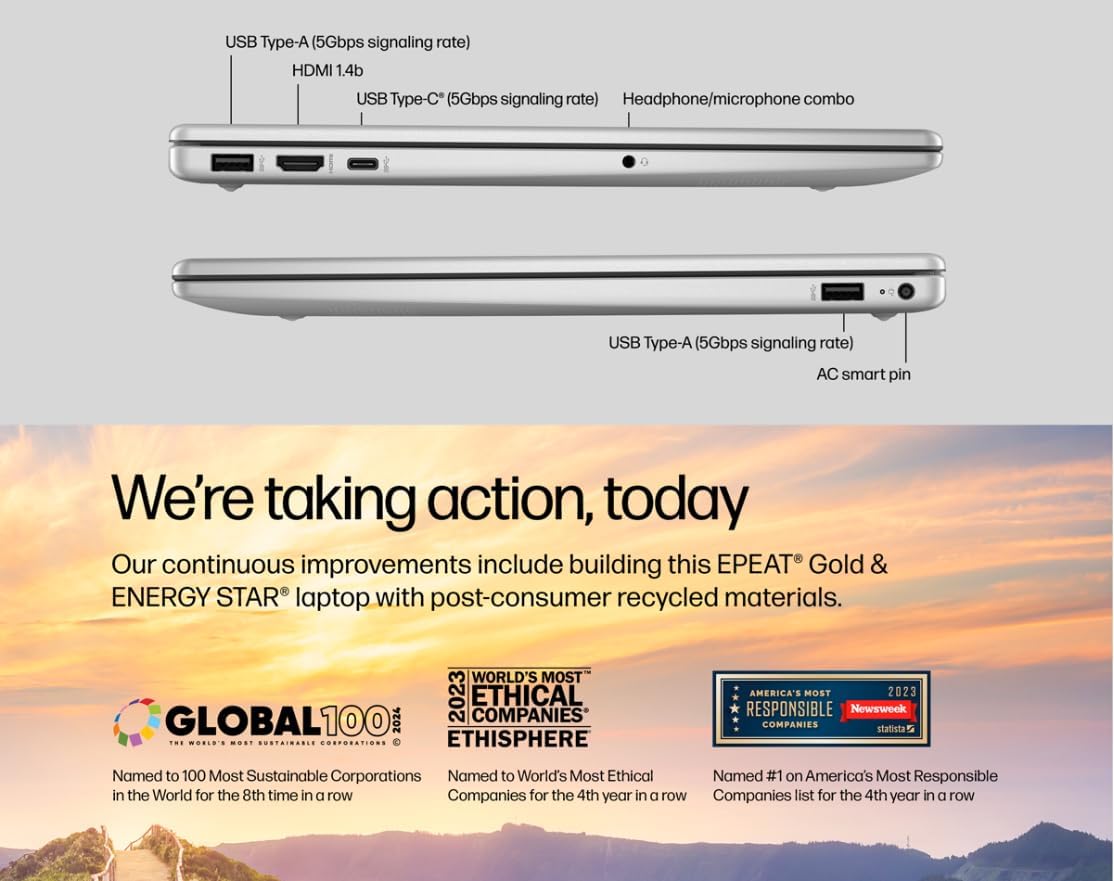
Figure 6: Laptop ports for external connections.
4. Mantemento e coidados
4.1 Coidado coa batería
- Para maximizar a duración da batería, evite temperaturas extremas.
- For optimal performance, allow the battery to discharge partially before recharging.
- The laptop supports HP Fast Charge, allowing it to charge 0 to 50% in approximately 45 minutes.
4.2 Limpeza do portátil
- Use un pano suave e sen pelusa lixeiramente dampenxugado con auga ou cun limpador de pantallas para limpar a pantalla.
- Para o teclado e o chasis, use un pano suave e seco. Evite produtos químicos agresivos.
- Asegúrate de que o portátil estea apagado e desconectado antes de limpalo.
4.3 Actualizacións de software
Regularly update your Windows 11 operating system and drivers to ensure optimal performance and security.
- Actualizacións de Windows: Ir a Configuración > Actualización de Windows e comprobar se hai actualizacións.
- Actualizacións de controladores: HP ofrece actualizacións de controladores a través do seu servizo de asistencia websitio web ou o software HP Support Assistant.
5. Solución de problemas comúns
5.1 Problemas de enerxía
- O portátil non se acende: Asegúrate de que o adaptador de corrente estea conectado correctamente tanto ao portátil como a unha toma de corrente que funcione. Proba cunha toma diferente.
- A batería non se carga: Verify the power adapter is functioning correctly. Check for any physical damage to the adapter or charging port.
5.2 Problemas de visualización
- Sen visualización na pantalla: Connect an external monitor via HDMI to check if the issue is with the laptop's internal display. If the external monitor works, the internal display may require service.
- Pantalla parpadeante ou distorsionada: Update your graphics drivers. Adjust display resolution in Windows settings.
5.3 Problemas de conectividade
- Wi-Fi sen conexión: Ensure Wi-Fi is enabled. Restart your router and modem. Forget the network and reconnect.
- Dispositivo Bluetooth sen emparellamento: Ensure the Bluetooth device is in pairing mode and within range. Restart the laptop and the Bluetooth device.
5.4 Problemas de rendemento
- Rendemento lento: Close unnecessary applications. Check Task Manager for high CPU/RAM usage. Ensure sufficient free space on the primary SSD.
- O sistema conxélase: Perform a system restart. Check for recent software installations or updates that might be causing conflicts.
6. Especificacións técnicas
| Característica | Especificación |
|---|---|
| Procesador | Intel Core i3-N305 (8 Cores, 8 Threads, up to 3.80 GHz, 6 MB Intel Smart Cache) |
| Gráficos | Gráficos Intel UHD |
| Sistema Operativo | Windows 11 Home |
| Memoria (RAM) | 16 GB DDR4 |
| Almacenamento interno | Unidade de estado sólido (SSD) M.2 NVMe PCIe de 512 GB |
| Almacenamento externo | HP P500 500GB Portable SSD (Red) |
| Mostrar | 15.6" FHD (1920x1080) IPS Anti-glare |
| Audio | Altofalantes estéreo |
| Teclado | English (US) with Numeric Keypad |
| Lector de pegadas dixitais | Integrado |
| Webleva | HD 720p con obturador de privacidade |
| Duración da batería | Ata 10 horas |
| Conectividade sen fíos | Wi-Fi 6 (802.11ax), Bluetooth 5.3 |
| Portos | 1x USB-C, 2x USB Type-A, 1x HDMI, 1x Headphone / microphone combo jack, 1x Power connector |
| Cor | Prata Natural |
| Dimensións (L x W x H) | 14.2 x 9.51 x 0.7 polgadas |
| Peso | 3.59 libras |

Figure 7: The laptop's 15.6-inch anti-glare display.
7. Garantía e soporte
For warranty information, technical support, and driver downloads, please visit the official HP Support website. It is recommended to register your product to receive updates and support notifications.
- Soporte HP Websitio: support.hp.com
- Rexistro do produto: Register your HP product online to access personalized support and warranty details.
Please have your product model number (HP Pavilion 15.6" Laptop) and serial number ready when contacting support.