
1. Introdución
This manual provides essential information for the HP 15.6 inch FHD Laptop, model 15-FD0131WM. It covers initial setup, operational guidelines, maintenance tips, and troubleshooting steps to ensure optimal performance and longevity of your device. Your laptop is equipped with an Intel i3-N305 processor, 8GB DDR4 RAM, and a 256GB PCIe NVMe M.2 solid-state drive, designed for reliable everyday computing.
Key features include a 15.6-inch micro-edge Full HD IPS anti-glare display, Windows 11 Home operating system, Intel UHD Graphics, a fingerprint reader for secure access, a camera privacy shutter, and a mic mute key for enhanced privacy. The HP True Vision HD camera facilitates clear video communication.
2. Configuración
2.1 Desembalaxe
Retire con coidado todos os compoñentes da embalaxe. Asegúrese de que estean presentes os seguintes elementos:
- HP 15.6 inch FHD Laptop
- Adaptador de alimentación de CA.
- Documentación (incluído este manual)
2.2 Conexión de enerxía
Connect the AC power adapter to the laptop's power port and then plug it into a wall outlet. It is recommended to fully charge the battery before initial use.
2.3 Arranque inicial e configuración de Windows
Press the power button to turn on the laptop. Follow the on-screen instructions to complete the Windows 11 Home setup process. This includes selecting your region, connecting to a Wi-Fi network, creating a user account, and accepting the license agreement.
3. Manexo do portátil
3.1 Visualización
Your laptop features a 15.6-inch Full HD (1920 x 1080) IPS anti-glare display. Adjust brightness using the function keys (usually F2/F3 or similar icons) on the keyboard.
3.2 Teclado e panel táctil
The laptop includes a full-size keyboard and a precision touchpad. Use the touchpad for navigation and gestures. External mice can be connected via USB ports.
3.3 Camera and Privacy Features
The HP True Vision HD camera is located at the top of the display. For privacy, slide the camera privacy shutter to cover the lens when not in use. A dedicated mic mute key is available on the keyboard to quickly disable the microphone.
3.4 Lector de pegadas dixitais
For enhanced security and quick login, configure the integrated fingerprint reader through Windows Settings > Accounts > Sign-in options.
3.5 Portos e conectividade
O teu portátil está equipado con varios portos para conectar periféricos:
- Portos USB 3.0: Two ports are available for high-speed data transfer with compatible devices.
- Porto HDMI: Para conectar a pantallas ou proxectores externos.
- Conector de audio: Para auriculares ou altofalantes externos.
- Conector de alimentación: For the AC adapter.

Figure 1: HP 15.6 inch Laptop with screen and keyboard visible.
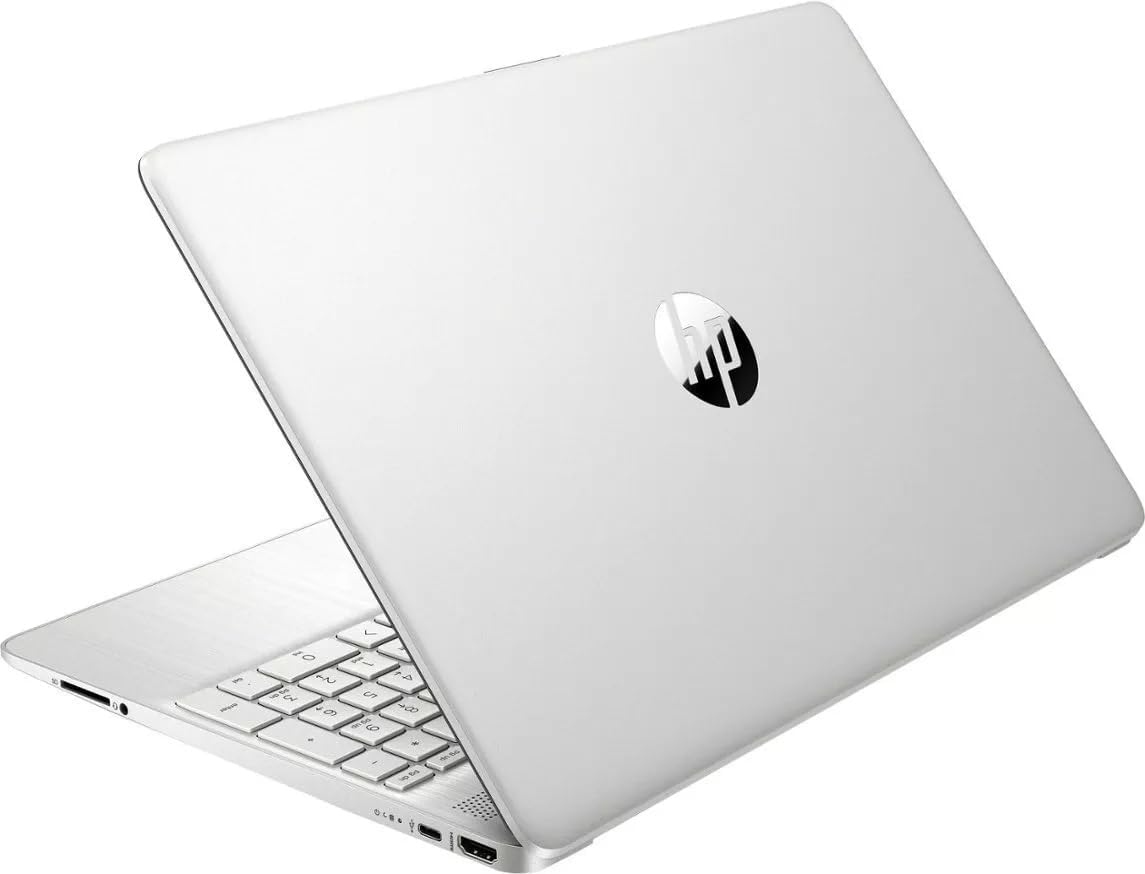
Figure 2: HP 15.6 inch Laptop closed, displaying the top cover.
4. Mantemento
4.1 Limpeza do portátil
To clean the display, use a soft, lint-free cloth lightly dampened with water or a screen cleaner. For the keyboard and chassis, use a soft, dry cloth. Avoid harsh chemicals or abrasive materials.
4.2 Coidado coa batería
The laptop features a long-lasting battery with HP Fast Charge capability. To maximize battery lifespan:
- Evita temperaturas extremas.
- Non descargues completamente a batería con frecuencia.
- Garda o portátil cunha carga parcial (arredor do 50 %) se non o usas durante períodos prolongados.
4.3 Actualizacións de software
Regularly update your Windows operating system and drivers to ensure optimal performance, security, and compatibility. Windows Update can be accessed via Settings > Windows Update.
5 Solución de problemas
If you encounter issues with your laptop, try the following basic troubleshooting steps:
- Sen enerxía: Asegúrate de que o adaptador de CA estea conectado correctamente tanto ao portátil como a unha toma de corrente que funcione. Proba cunha toma diferente.
- Problemas de pantalla: If the screen is blank, try adjusting the brightness. If an external monitor is connected, ensure it is properly configured.
- O sistema non responde: Press and hold the power button for 10-15 seconds to force a shutdown, then restart the laptop.
- Problemas de conectividade: For Wi-Fi issues, restart your router and check network settings on the laptop.
Para problemas máis complexos, consulte o soporte de HP websitio web ou póñase en contacto co servizo de atención ao cliente de HP.
6. Especificacións
- Nome do modelo:
- 15-FD0131WM
- Tamaño da pantalla:
- 15.6 polgadas
- Resolución da pantalla:
- 1920 x 1080 píxeles (Full HD)
- Procesador:
- Intel Core i3-N305
- RAM:
- 8 GB DDR4 SDRAM
- Almacenamento:
- 256 GB PCIe NVMe M.2 Solid-State Drive
- Gráficos:
- Gráficos Intel UHD (integrados)
- Sistema operativo:
- Windows 11 Home
- Tipo sen fíos:
- 802.11bgn
- Portos USB:
- 2 x portos USB 3.0
- Duración media da batería:
- 8 horas
- Peso do artigo:
- 3.5 libras
- Dimensións do produto (LxWxH):
- 12.82 x 8.42 x 0.65 polgadas
7. Garantía e soporte
Your HP laptop comes with a standard manufacturer's warranty. For detailed information regarding warranty terms, coverage, and duration, please refer to the warranty card included in your product packaging or visit the official HP support websitio. Garda o comprobante de compra para reclamacións de garantía.
For technical assistance, driver downloads, or further support, please visit the official HP support portal. You can typically find support contact information and resources by searching for your specific model number (15-FD0131WM) on the HP websitio.