1. Introdución
This manual provides comprehensive instructions for the installation, operation, and maintenance of the DS-2CE19H8T-AIT3ZF TurboHD 5MP Outdoor Ultra Low-Light Bullet Analog Camera. This high-performance surveillance camera is designed for outdoor use, offering superior image quality and advanced features for various security applications.
Key features include a 5MP High-Performance CMOS sensor, up to 2560 x 1944 resolution, a 2.7 mm to 13.5 mm motorized varifocal lens for flexible viewing angles, and EXIR 2.0 technology providing an infrared range of up to 260 feet (80 meters) for clear night vision. The camera also boasts 130dB True WDR (Wide Dynamic Range) and 3D Digital Noise Reduction (DNR) for optimal image capture in challenging lighting conditions, and is IP67 rated for weather resistance.
2. Información de seguridade
- Lea atentamente todas as instrucións antes da instalación e operación.
- Ensure the power supply meets the camera's requirements to prevent damage.
- Non intente desmontar nin modificar a cámara. Encargue calquera mantemento a persoal cualificado.
- Install the camera in a secure location to prevent unauthorized access or tampering.
- Avoid pointing the camera directly at strong light sources, as this may affect image quality and potentially damage the sensor.
- Clean the camera lens with a soft, dry cloth. Do not use harsh chemicals or abrasive cleaners.
3. Contido do paquete
Comprobe o contido do paquete ao desembalar. Se falta algún elemento ou está danado, póñase en contacto co seu provedor inmediatamente.
- DS-2CE19H8T-AIT3ZF Bullet Analog Camera (1 unit)
- Parafusos de montaxe e tacos de parede
- Modelo de instalación (se está incluído)
- Quick Start Guide (this document serves as the full manual)
- Power Adapter (may be sold separately)
4. Configuración e instalación
The DS-2CE19H8T-AIT3ZF camera is designed for outdoor use and features an IP67 weather resistance rating, making it suitable for various environmental conditions.
4.1 Cámara encimaview
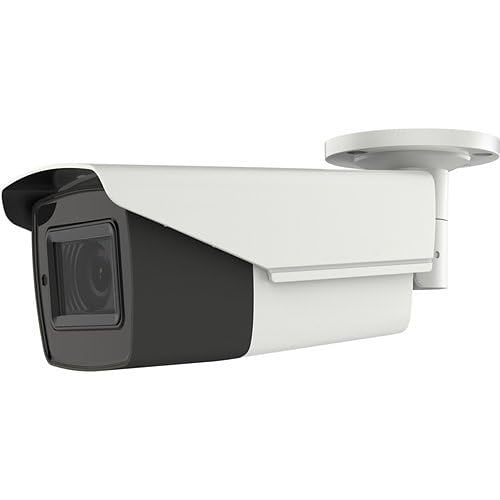
An image showing the DS-2CE19H8T-AIT3ZF 5MP Outdoor Ultra Low-Light Bullet Analog Camera. The camera is white and black, with a cylindrical body and an integrated mounting bracket. The lens is visible at the front.
4.2 Localización de montaxe
Escolla unha localización de montaxe axeitada que proporcione o resultado desexado viewing angle and coverage. The camera supports ceiling mount installation. Ensure the mounting surface is strong enough to support the camera's weight. Consider factors such as lighting conditions, potential obstructions, and proximity to power and video cables.
4.3 Pasos da instalación
- Prepare a superficie de montaxe: Use the provided installation template (if available) to mark the drilling holes on the wall or ceiling.
- Perforación: Drill pilot holes at the marked positions. Insert wall plugs if mounting on masonry.
- Fixar a base da cámara: Fixe a base de montaxe da cámara á superficie cos parafusos subministrados.
- Cables de conexión:
- Connect the coaxial video cable from the camera to your Digital Video Recorder (DVR). The camera supports TVI/AHD/CVI/CVBS multiprotocol output.
- Connect the power cable to the camera's power input and to a suitable power source.
- Axustar o ángulo da cámara: Loosen the adjustment screws on the camera bracket to position the camera for the desired field of view. Tighten the screws once the angle is set.
- Focus and Zoom (Varifocal Lens): The 2.7 mm to 13.5 mm motorized varifocal lens allows for remote adjustment of zoom and focus. This can typically be done through the DVR's OSD (On-Screen Display) menu via Up-the-Coax control.
5. Funcionamento da cámara
Once installed and connected to a compatible DVR, the DS-2CE19H8T-AIT3ZF camera will begin transmitting video.
5.1 Video Output and Recording
The camera provides a 5MP high-definition analog output. Ensure your DVR supports 5MP resolution for optimal viewing and recording quality. Refer to your DVR's manual for instructions on viewing live feeds, configuring recording schedules, and playing back recorded footage.
5.2 Funcións avanzadas
- Motorized Varifocal Lens: Adjust the focal length (zoom) and focus remotely via the DVR's OSD menu. This allows for fine-tuning the field of view without physically accessing the camera.
- EXIR 2.0 Technology & Smart IR: The camera's EXIR 2.0 technology provides powerful infrared illumination up to 260 ft (80 m) for clear night vision. Smart IR automatically adjusts the intensity of the infrared LEDs to prevent overexposure of objects closer to the camera.
- 130dB True WDR: Wide Dynamic Range technology balances extremely bright and dark areas in the same scene, ensuring clear images even in high-contrast lighting conditions.
- 3D Digital Noise Reduction (DNR): Reduces image noise, especially in low-light conditions, resulting in clearer and sharper video.
- Multiprotocol Output: The camera supports TVI, AHD, CVI, and CVBS video formats, making it compatible with a wide range of DVRs. The output format can typically be switched via the OSD menu or a physical switch on the camera/cable (refer to specific product documentation).
6. Mantemento
Un mantemento regular axuda a garantir a lonxevidade e o rendemento óptimo da túa cámara.
- Limpeza: Periodically clean the camera's lens and housing with a soft, lint-free cloth. For stubborn dirt, a slightly damp cloth can be used, followed by a dry cloth. Do not use abrasive cleaners, solvents, or strong detergents.
- Inspección de cables: Regularly inspect all cables for signs of wear, damage, or corrosion. Ensure connections are secure.
- Actualizacións de firmware: Consulte o do fabricante website for any available firmware updates. Firmware updates can improve performance, add new features, or fix bugs. Follow the update instructions carefully.
- Comprobacións ambientais: Ensure the camera's mounting remains secure and that no new obstructions are blocking its field of view.
7 Solución de problemas
Se tes problemas coa túa cámara, consulta os seguintes problemas e solucións comúns.
| Problema | Causa posible | Solución |
|---|---|---|
| Sen saída de vídeo | No power; Loose video cable; Incorrect video format; DVR incompatibility | Check power connection; Secure video cable; Ensure camera output matches DVR input (TVI/AHD/CVI/CVBS); Verify DVR supports 5MP resolution. |
| Mala calidade de imaxe (borrosa/granulada) | Lens dirty; Incorrect focus; Low light conditions; Interference | Clean lens; Adjust focus using OSD; Ensure adequate lighting or rely on IR; Check cable quality and connections. |
| A visión nocturna non funciona | IR LEDs faulty; Insufficient power; Smart IR settings | Check power supply; Verify IR settings in OSD; Contact support if LEDs are not illuminating. |
| Motorized lens not responding | No Up-the-Coax control; DVR incompatibility; Cable issue | Ensure DVR supports Up-the-Coax control; Check coaxial cable for damage; Refer to DVR manual for OSD access. |
8. Especificacións
Detailed technical specifications for the DS-2CE19H8T-AIT3ZF camera:
- Nome do modelo: HX-BL19H8TA3
- Sensor: 5MP High-Performance CMOS
- Resolución de captura de vídeo: Ata 2560 x 1944
- Lente: 2.7 mm to 13.5 mm Motorized Varifocal Lens
- Rango IR: Up to 260 ft (80 m) with EXIR 2.0 technology
- Rango dinámico: WDR verdadeiro de 130 dB
- Redución de ruído: 3D Digital Noise Reduction (DNR)
- Tecnoloxía de conectividade: Cableado (coaxial)
- Output Protocols: TVI/AHD/CVI/CVBS (Multiprotocol Output)
- Control: Up-the-Coax control capability
- Uso interior/exterior: Ao aire libre
- Resistencia á intemperie: Clasificación IP67
- Tipo de montaxe: Montaxe no teito
- Potencia: DC 12V (Power adapter typically sold separately; check product label for exact requirements)
- Dimensións: Aproximadamente 6 x 6 x 6 polgadas
- Fabricante: Hikvision
9. Garantía e soporte
For specific warranty information, please refer to the warranty card included with your product or contact the retailer from whom you purchased the camera. Warranty terms and conditions may vary by region and seller.
For technical support, troubleshooting assistance beyond this manual, or inquiries about replacement parts, please contact your product supplier or the manufacturer's official support channels.


