1. Introdución
This manual provides comprehensive instructions for the installation, operation, and maintenance of the DS-2FP2020 Hi-Fi External Security Microphone. Please read this manual thoroughly before using the product to ensure proper functionality and safety.
The DS-2FP2020 is an external microphone engineered for high-fidelity audio capture in various surveillance and recording applications. Its omnidirectional pickup pattern and robust design make it suitable for environments requiring clear and wide-area sound monitoring.
2. Características clave
- High sensitivity omnidirectional capacitor microphone for effective sound capture.
- Clear and natural sound pickup from all directions, covering an area of 70m² with a 360° pickup pattern.
- Built-in protection against lightning, reverse polarity, and electrostatic discharge for enhanced durability.
- Compliant with EU CE standards and US FCC certification for safety and performance.
- RoHS compliant, ensuring adherence to environmental standards.
3. Contido do paquete
Ao abrir o paquete, comprobe que todos os artigos estean presentes e en bo estado:
- 1 x DS-2FP2020 Hi-Fi External Security Microphone
If any components are missing or damaged, please contact your supplier immediately.
4. Produto rematadoview
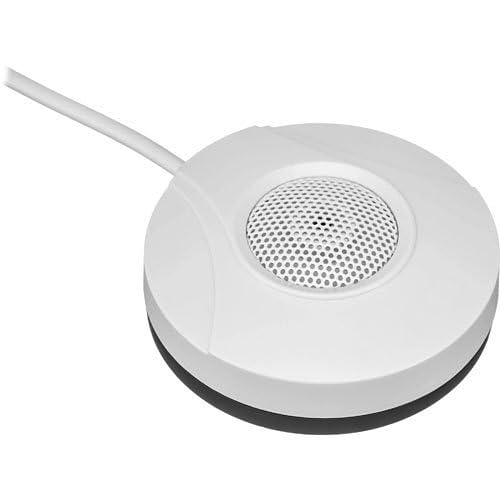
Figure 1: DS-2FP2020 Hi-Fi External Security Microphone. This image shows the compact, white, circular microphone unit with a central perforated grille for audio input and an attached cable for connectivity.
5. Configuración e instalación
Follow these steps for proper installation of the DS-2FP2020 microphone:
- Fonte de alimentación: Connect the microphone to a stable 12VDC power source. Ensure the power supply meets the microphone's requirements (25mA consumption).
- Saída de audio: Connect the audio output of the microphone to the audio input of your recording device, CCTV system, or amplifier. The microphone features a 600W output.
- Colocación: Position the microphone in the desired area for audio capture. Due to its omnidirectional pickup pattern, central placement within the target area (up to 70m²) is recommended for optimal sound coverage. Avoid placing it near sources of excessive noise or vibration.
- Xestión de cables Securely route the microphone cable to prevent accidental disconnections or damage.
6. Instrucións de funcionamento
Once installed, the DS-2FP2020 microphone operates automatically when powered on. It is designed for continuous audio monitoring.
- Monitorización de audio: Ensure your connected recording device or CCTV system is configured to receive and record audio from the microphone's input.
- Calidade do son: The microphone provides a signal-to-noise ratio of 60dB, delivering clear audio. Adjust the input sensitivity on your recording device if necessary to optimize sound levels.
- Consideracións ambientais: While the microphone has built-in protections, avoid exposing it to extreme temperatures, direct water, or corrosive substances to maintain performance.
7. Mantemento
The DS-2FP2020 microphone requires minimal maintenance to ensure long-term performance.
- Limpeza: Gently wipe the exterior of the microphone with a soft, dry cloth. Do not use liquid cleaners or abrasive materials.
- Inspección de cables: Periodically check the power and audio cables for any signs of wear, cuts, or damage. Replace damaged cables immediately.
- Protección ambiental: Ensure the microphone is not exposed to conditions beyond its operating specifications, such as excessive humidity or dust, which could affect internal components.
8 Solución de problemas
If you encounter issues with your DS-2FP2020 microphone, refer to the following common problems and solutions:
| Problema | Causa posible | Solución |
|---|---|---|
| Sen saída de audio | No power; Incorrect connection; Recording device issue | Verify 12VDC power supply is connected and active. Check audio cable connections to both microphone and recording device. Ensure recording device input is selected and functioning. |
| Low or distorted audio | Microphone too far from sound source; Incorrect input sensitivity on recording device; Environmental noise | Relocate microphone closer to the sound source. Adjust input gain/sensitivity on your recording device. Minimize background noise in the environment. |
| Audio intermitente | Loose cable connection; Faulty cable | Check all cable connections for tightness. Replace audio or power cables if they appear damaged. |
Se o problema persiste despois de intentar estas solucións, póñase en contacto co servizo de atención ao cliente.
9. Especificacións
| Parámetro | Valor |
|---|---|
| Modelo | DS-2FP2020 |
| Marca | Xenérico |
| Fabricante | Hikvision |
| Usos recomendados | Video Recording, Speech |
| Área de cobertura | 70 m² |
| Patrón de recollida | 360° Omnidirectional |
| Relación sinal-ruído (SNR) | 60 dB |
| Saída | 600 W |
| Fonte de alimentación | 12VDC |
| Consumo de enerxía | 25 mA |
| Certificacións | EU CE, US FCC, RoHS Compliant |
| Proteccións | Lightning, Reverse Polarity, Electrostatic Discharge |
10. Garantía e soporte
For warranty information and technical support, please refer to the documentation provided by your retailer or contact the manufacturer, Hikvision, directly. Keep your purchase receipt as proof of purchase for any warranty claims.
For further assistance or inquiries, please visit the official website of the brand or contact their customer service department.


