
1. Introdución
This manual provides essential information for the safe and efficient operation of your Meizu mblu 21 smartphone. Please read it thoroughly before using the device.
The Meizu mblu 21 features a Prism Edge Design with a radiant gradient and a large immersive 6.79-inch HD display. It is equipped with a 13MP main camera and an 8MP front camera, powered by Android 14. The device includes a 4900mAh battery for extended use and supports 4G LTE connectivity, Dual-Band Wi-Fi, and Bluetooth 5.0.
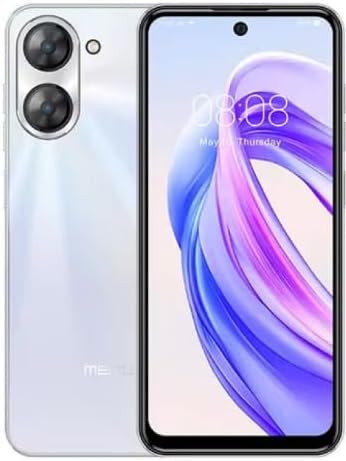
Figura 1.1: Parte dianteira e traseira view of the Meizu mblu 21 smartphone in White Diamond color.
2. Que hai na caixa
Verifica que todos os elementos estean presentes no paquete:
- Meizu mblu 21 Smartphone
- Adaptador de alimentación
- Cable USB
- Ferramenta de expulsión de SIM
- Guía de inicio rápido

Figure 2.1: Meizu mblu 21 smartphone alongside its power adapter.
3. Configuración
3.1. Inserción de tarxetas SIM e tarxetas MicroSD
The Meizu mblu 21 supports Dual Nano SIM cards and a MicroSD card for expandable storage. Locate the SIM tray on the side of the device.
- Power off the device before inserting or removing SIM/MicroSD cards.
- Use the provided SIM ejector tool to open the SIM tray.
- Carefully place the Nano SIM cards and/or MicroSD card into the designated slots on the tray, ensuring correct orientation.
- Empurre suavemente a bandexa de volta no dispositivo ata que quede nivelada.
3.2. Asistente de acendido inicial e configuración
- Press and hold the Power button until the Meizu logo appears.
- Follow the on-screen instructions to complete the initial setup, including selecting your language, connecting to a Wi-Fi network, and setting up your Google account.
4. Funcionamento do teu dispositivo
4.1. Pantalla e navegación
The 6.79-inch HD display features a 90Hz adaptive refresh rate for smooth visuals. Navigate the interface using touch gestures: tap, swipe, pinch-to-zoom.
4.2. Funcións da cámara
The device is equipped with a 13MP main camera and an 8MP front camera. Open the Camera application to capture photos and videos.
- 13MP Smart Camera: Ideal for capturing everyday moments with sharpness and true-to-life colors.
- Cámara frontal de 8 MP: Designed for clear selfies and video calls.
4.3. Características de seguridade
- Side Unlock: A fast and secure fingerprint sensor integrated into the side power button for instant access.
- Smart Face Unlock: Use the front camera to unlock your device quickly and conveniently.
4.4. Conectividade
Your mblu 21 supports various connectivity options:
- 4G LTE: For mobile data connectivity. In the USA, this device is compatible with T-Mobile. Outside the USA, it works with any carrier worldwide.
- Wi-Fi de banda dual: Supports both 2.4GHz and 5GHz bands for seamless internet access.
- Bluetooth 5.0: For connecting wireless accessories with improved energy efficiency.
- VoLTE HD Calls: Enjoy sharper, clearer voice calls over LTE networks.

Figure 4.1: Key technology features of the Meizu mblu 21, including Android 14, Dual-Band Wi-Fi, Bluetooth 5.0, and VoLTE.
5. Mantemento
5.1. Coidado da batería
The mblu 21 is equipped with a 4900mAh battery. To maximize battery lifespan:
- Evita temperaturas extremas.
- Use only the provided power adapter or certified compatible chargers.
- Evite descargar completamente a batería con frecuencia.

Figura 5.1: Interno view of the Meizu mblu 21, showcasing the 4900mAh battery and internal components.
5.2. Limpeza do dispositivo
Usa un pano suave e sen pelusa para limpar a pantalla e a carcasa do teléfono. Evita o uso de produtos químicos agresivos ou materiais abrasivos.
5.3. Actualizacións de software
Regularly check for and install software updates to ensure optimal performance and security. Updates can be found in the device's settings menu.
6 Solución de problemas
If you encounter issues with your Meizu mblu 21, try the following solutions:
- O dispositivo non responde: Mantén premido o botón de acendido/apagado durante uns 10-15 segundos para forzar un reinicio.
- Problemas de conectividade de rede:
- Ensure SIM card is properly inserted.
- Activar e desactivar o modo avión.
- Check network settings (APN, preferred network type).
- Esgotando a batería rapidamente:
- Pecha as aplicacións non utilizadas que se executan en segundo plano.
- Reduce o brillo da pantalla.
- Disable unnecessary features like GPS or Bluetooth when not in use.
- Problemas de rendemento:
- Clear cache and data of problematic apps.
- Free up storage space.
- Consider a factory reset (Note: This will erase all data on your device. Back up important data first.).
7. Especificacións
| Característica | Detalle |
|---|---|
| Nome do modelo | mblu 21 |
| Número de modelo | M416L |
| Sistema Operativo | Android 14 |
| Tamaño da pantalla | 6.79 polgadas |
| Capacidade de almacenamento da memoria | 64 GB |
| Tamaño da memoria RAM instalada | 4 GB |
| Capacidade da batería | 4900 millónsamp Horario |
| Cámara principal | 13 MP |
| Cámara frontal | 8 MP |
| Wireless Carrier (USA) | T-Mobile |
| Tecnoloxía Celular | 4G LTE |
| Tecnoloxías de Conectividade | 4G, Dual-Band Wi-Fi, Bluetooth 5.0 |
| Peso do elemento | 14 onzas |
| Dimensións do paquete | 7 x 4 x 2 polgadas |
| Cor | White Diamond |
8. Garantía e soporte
Your Meizu mblu 21 smartphone comes with a manufacturer's warranty. Please refer to the warranty card included in your product packaging for specific terms and conditions.
For technical support, service, or further inquiries, please contact Meizu customer support through their official channels. Contact information can typically be found on the manufacturer's websitio ou na documentación do produto.