
1. Introdución
This manual provides essential information for the proper setup, operation, maintenance, and troubleshooting of your Meizu mblu 21 4G LTE smartphone. Please read this manual thoroughly before using your device to ensure optimal performance and longevity.
The Meizu mblu 21 features a 6.79-inch HD display, a 13MP dual camera system, and runs on Android 14. It is designed for efficient performance and reliable connectivity.
2. Configuración
2.1 Contido do paquete
Verifique que o seu paquete conteña os seguintes elementos:
- Meizu mblu 21 Smartphone
- Adaptador de alimentación
- Guía de inicio rápido (se se inclúe)
2.2 Instalación da tarxeta SIM e da tarxeta MicroSD
The Meizu mblu 21 supports Dual Nano SIM cards and a MicroSD card for expandable storage.
- Localiza a bandexa da tarxeta SIM no lateral do teu dispositivo.
- Insert the SIM ejector tool (not included, use a thin pin if necessary) into the small hole on the SIM tray to eject it.
- Place your Nano SIM card(s) and/or MicroSD card into the designated slots on the tray, ensuring proper orientation.
- Volva inserir a bandexa da tarxeta SIM no teléfono con coidado ata que encaixe no seu lugar.
2.3 Initial Power On and Network Configuration
- Press and hold the power button until the Meizu logo appears.
- Siga as instrucións na pantalla para completar a configuración inicial, incluíndo a selección do idioma, a conexión wifi e a configuración da conta de Google.
- For cellular connectivity, ensure your SIM card is active. This device is an international version and in the USA market, it operates exclusively on T-Mobile's 4G LTE network. Outside the USA, it is compatible with various carriers worldwide.
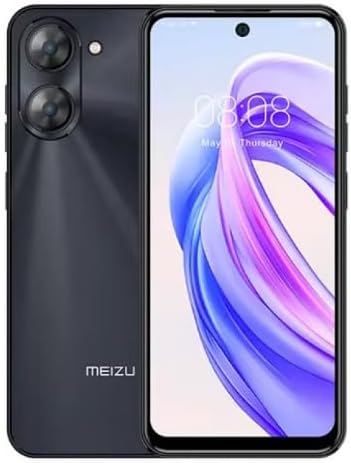
Imaxe 2.3.1: Fronte e traseiro view of the Meizu mblu 21 smartphone. The front displays the screen with a punch-hole camera, while the rear shows the dual camera module and the Meizu branding.
3. Instrucións de funcionamento
3.1 Navegación básica (Android 14)
Your Meizu mblu 21 runs on Android 14, offering an intuitive user experience. Use gestures or on-screen navigation buttons to move between apps, access settings, and manage notifications.
3.2 Uso da cámara
The device features a 13MP Smart Camera on the rear and an 8MP front camera. Open the Camera app to capture photos and videos. Utilize various modes and settings for optimal results.
3.3 Características de seguridade
Unlock your device using the side-mounted fingerprint sensor for instant access or the 8MP front camera for Smart Face Unlock.
3.4 Conectividade
- Wi-Fi: Supports Dual-Band Wi-Fi (2.4GHz and 5GHz) for stable internet access.
- Bluetooth: Bluetooth 5.0 for connecting to wireless accessories.
- VoLTE: Enjoy clearer voice calls with VoLTE HD Calls.

Imaxe 3.4.1: Visual representation of key connectivity and operating system features, including Android 14, Dual-Band Wi-Fi, Bluetooth 5.0, and VoLTE HD Calls.
4. Mantemento
4.1 Coidados xerais
- Manteña o dispositivo seco e afastado de temperaturas extremas.
- Limpa a pantalla e a carcasa cun pano suave e sen fiapos. Evita produtos químicos agresivos.
- Protect the screen with a screen protector and the body with a protective case to prevent scratches and damage.
4.2 Xestión da batería
The 4900mAh battery is designed for all-day performance. To prolong battery life:
- Evite descargar completamente a batería con frecuencia.
- Use o adaptador de corrente fornecido para cargar.
- Optimize background app usage and screen brightness in settings.

Imaxe 4.2.1: Unha interna view of the Meizu mblu 21 smartphone highlighting the 4900mAh battery, emphasizing its capacity for extended use.
5 Solución de problemas
5.1 Problemas comúns e solucións
- O dispositivo non se acende: Asegúrate de que a batería estea cargada. Conéctaa ao adaptador de corrente e téntao de novo.
- Problemas de conectividade de rede: Check if your SIM card is properly inserted and active. Verify network settings and ensure you are within T-Mobile's coverage area in the USA.
- Rendemento lento: Pecha as aplicacións en segundo plano innecesarias. Borra a caché e as aplicacións temporais files. Restart the device.
- A batería esgotando rapidamente: Reduce screen brightness, disable unused features like Bluetooth or GPS, and check for power-intensive apps.
Se os problemas persisten, considere realizar un restablecemento de fábrica (faga primeiro unha copia de seguridade dos seus datos) ou contactar co servizo de atención ao cliente.
6. Especificacións
| Número de modelo | M416L |
| Sistema Operativo | Android 14 |
| Mostrar | 6.79 Inches HD, 2340 x 1080 Resolution, 90Hz Adaptive Refresh Rate |
| Procesador | Octa Core 1.6GHz ARM Mali-G57 |
| Memoria | 64 GB Internal Storage, 4 GB RAM |
| Batería | 4900mAh (4.9E+3 Milliamp Hours) Lithium Polymer |
| Cámara traseira | 13MP Smart Camera, 5P Precision Lens |
| Cámara frontal | 8 MP |
| Tecnoloxía Celular | 4G LTE FDD: 2,3,4,5,7,8,12,17,26,28,66; 3G WCDMA: 2/4/5/8; 2G Quad Band |
| Tipo de SIM | Dual Nano SIM + MicroSD |
| Wi-Fi | Dobre banda (2.4 GHz e 5 GHz) |
| Bluetooth | 5.0 |
| Jack de audio | USB tipo C |
| Peso do elemento | 14 onzas |
| ID FCC | 2ANQ6-M416L |

Imaxe 6.1: The Meizu mblu 21 smartphone presented in its Titan Black color variant, showcasino seu deseño.
7. Garantía e soporte
For warranty information, please refer to the warranty card included with your product or consult the retailer where the device was purchased. Meizu provides support for its products. For further assistance, please visit the official Meizu websitio ou póñase en contacto co seu servizo de atención ao cliente.