
1. Introdución
Grazas pola compraasing the WVCLTVJA 318C Digital Microscope Camera. This device is designed for detailed observation and analysis, featuring a 12MP camera, up to 1600X magnification, and a 7-inch IPS touch screen for intuitive control. This manual provides essential information for the safe and effective use of your microscope. Please read it thoroughly before operation and retain it for future reference.
2. Información de seguridade
To ensure safe operation and prolong the lifespan of your device, please observe the following precautions:
- Do not expose the microscope to extreme temperatures, humidity, or corrosive substances.
- Evite a exposición directa da lente a fontes de luz intensas, xa que isto podería danar o sensor.
- Emprega só o adaptador de corrente fornecido. Empregar un adaptador incorrecto pode danar o dispositivo ou supoñer un perigo de incendio.
- Manteña o dispositivo lonxe dos nenos para evitar accidentes.
- Non intente desmontar nin modificar o microscopio. Encargue calquera mantemento a persoal cualificado.
- Clean the device with a soft, dry cloth. Avoid liquid cleaners directly on the screen or lens.
3. Contido do paquete
Please check the package contents upon receipt. If any items are missing or damaged, contact your retailer immediately.
- WVCLTVJA 318C Digital Microscope Camera
- Ordinary Lens
- Soporte Axustable
- Cable de alimentación USB
- Adaptador de alimentación
- Regla de calibración
- Manual de usuario (este documento)
4. Produto rematadoview
Familiarize yourself with the main components and controls of your WVCLTVJA 318C Digital Microscope.
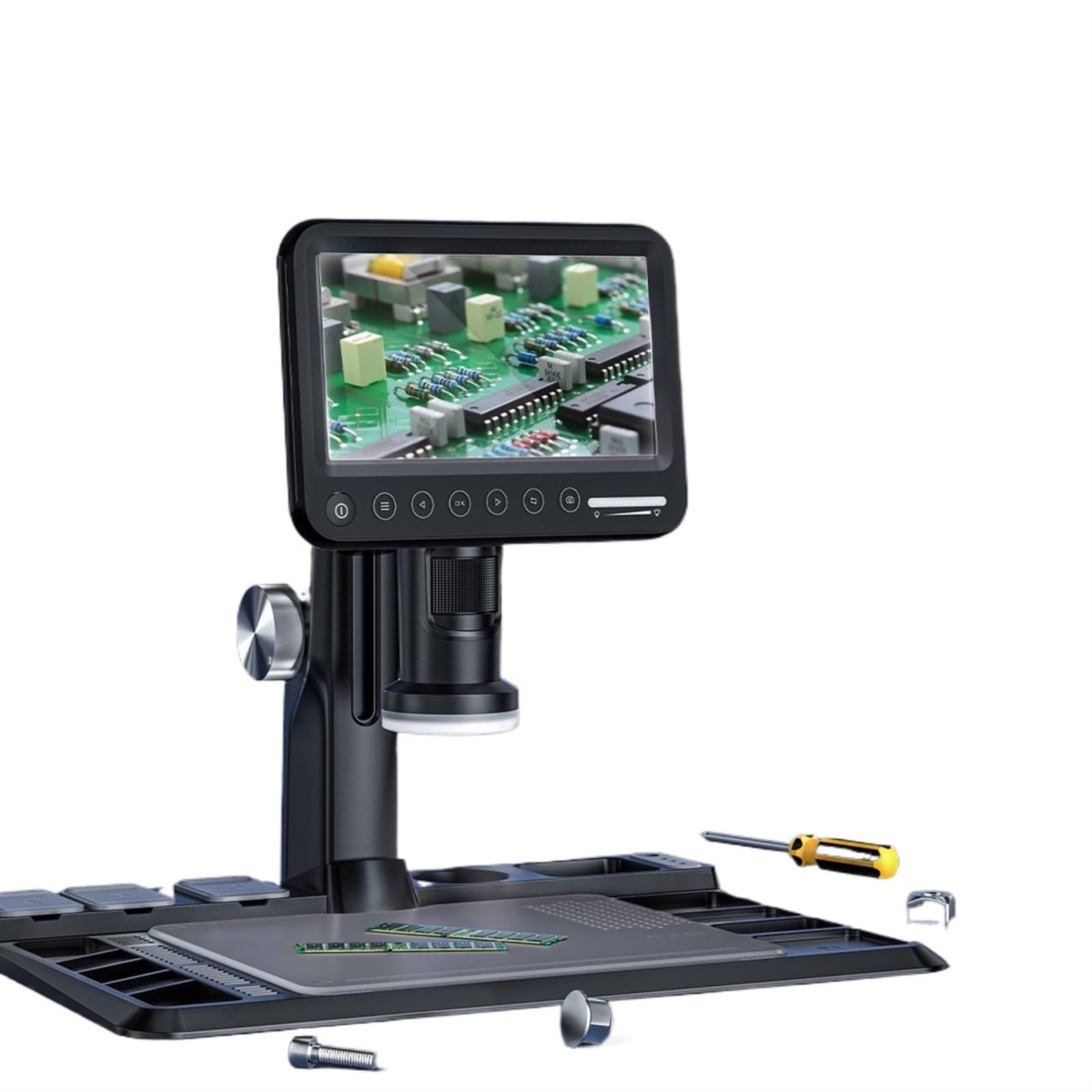
Figura 4.1: WVCLTVJA 318C Digital Microscope Camera. This image illustrates the main unit, including the 7-inch IPS touch screen, the adjustable stand, and the attached ordinary lens. Key components include the screen, focus wheel, magnification adjustment, and power input port.
Compoñentes clave:
- Pantalla táctil IPS de 7 polgadas: Para viewing live images, navigating menus, and adjusting settings.
- Ordinary Lens: The primary lens for standard magnification.
- Roda de enfoque: Adjusts the focus for clear images.
- Axuste de ampliación: Controls the optical magnification level.
- Iluminación LED: Built-in lights to illuminate the specimen.
- Botón de encendido: Acende e apaga o dispositivo.
- Porto USB: Para a entrada de enerxía e a transferencia de datos.
- Ranura para tarxetas MicroSD: For storing captured images and videos.
5. Configuración
5.1 Desembalaxe e montaxe
- Retire coidadosamente todos os compoñentes da embalaxe.
- Place the adjustable stand on a stable, flat surface.
- Attach the microscope main unit to the stand, ensuring it is securely fastened.
5.2 Lens Installation
- Gently screw the ordinary lens onto the microscope body until it is firm. Do not overtighten.
- Ensure the lens is clean and free of dust before use.
5.3 Conexión de alimentación
- Connect the USB power cable to the microscope's USB port.
- Conecta o outro extremo do cable USB ao adaptador de corrente fornecido.
- Insira o adaptador de corrente nunha toma de corrente estándar.
5.4 Encendido inicial
- Press and hold the Power button on the microscope for a few seconds until the screen illuminates.
- The device will boot up and display the live view dende a cámara.
6. Instrucións de funcionamento
6.1 Encendido/apagado
- Para acender: Manteña premido o botón de acendido/apagado ata que a pantalla se acenda.
- Para apagar: Press and hold the Power button until a shutdown prompt appears on the screen. Confirm to power off.
6.2 Placing a Specimen
Place the object you wish to observe directly on the stage beneath the lens. Ensure it is stable and centered.
6.3 Axuste do foco
- Adjust the distance between the lens and the specimen using the stand's height adjustment mechanism.
- Rotate the Focus Wheel slowly until the image on the screen becomes clear and sharp.
6.4 Axuste da ampliación
The 318C offers digital magnification up to 1600X. Optical magnification is adjusted by rotating the lens barrel or by changing the distance between the lens and the object. Digital zoom can be controlled via the touch screen interface.
6.5 Captura de imaxe e vídeo
The 318C allows you to capture high-resolution images and videos directly to a MicroSD card (not included).
- Ensure a MicroSD card (Class 10 or higher, up to 32GB recommended) is inserted into the card slot.
- Do directo view, tap the camera icon on the touch screen to take a photo.
- Tap the video camera icon to start recording. Tap again to stop recording.
- Capturado files pode ser reviewed in the gallery mode, accessible via the main menu.
6.6 Menu Navigation (Touch Control)
The 7-inch IPS screen supports touch control for navigating the microscope's settings and features.
- Toca: Select an option or icon.
- Pasar o dedo: Scroll through lists or images in gallery mode.
- Pinch-to-Zoom: Adjust digital zoom in live view or gallery (if supported by software).
As opcións comúns do menú inclúen:
- Resolución: Adjust image/video capture resolution.
- Exposición: Control brightness.
- Balance de brancos: Axustar a temperatura da cor.
- Data/Hora: Establece a data e a hora do sistema.
- Idioma: Seleccione o idioma de visualización.
- Formato da tarxeta SD: Borra todos os datos da tarxeta MicroSD.
6.7 Transferencia de datos
Para transferir files a un ordenador:
- Conecta o microscopio ao teu ordenador mediante o cable USB.
- The microscope should appear as a removable storage device.
- Alternatively, remove the MicroSD card from the microscope and insert it into a card reader connected to your computer.
7. Mantemento
7.1 Limpeza
- Lente: Use a soft, lint-free lens cleaning cloth and specialized lens cleaning solution. Do not use abrasive materials.
- Pantalla: Wipe the touch screen gently with a microfiber cloth. For stubborn smudges, slightly dampLimpar o pano con auga ou cun limpador de pantallas.
- Corpo: Use a soft, dry cloth to wipe the microscope body. Avoid harsh chemicals.
7.2 Almacenamento
When not in use, store the microscope in a clean, dry, and dust-free environment. Use the original packaging or a protective case to prevent damage.
7.3 Coidado da batería (se corresponde)
If your model includes a rechargeable battery, ensure it is charged periodically even when not in use to maintain battery health. Avoid fully discharging the battery for extended periods.
8 Solución de problemas
If you encounter issues with your WVCLTVJA 318C Digital Microscope, refer to the following table for common problems and solutions.
| Problema | Causa posible | Solución |
|---|---|---|
| O dispositivo non se acende. | Sen alimentación, conexión solta ou batería descargada. | Check power adapter and cable connection. Ensure the power outlet is functional. Charge the device if it has an internal battery. |
| A imaxe está borrosa. | Out of focus, dirty lens, or incorrect working distance. | Adjust the focus wheel. Clean the lens. Adjust the height of the microscope relative to the specimen. |
| Cannot capture images/videos. | No MicroSD card, full card, or card error. | Insert a MicroSD card. Check if the card is full and delete unnecessary files or replace it. Format the MicroSD card (this will erase all data). |
| A pantalla non responde. | Fallo de software ou conxelación temporal. | Restart the device by holding the power button. If unresponsive, disconnect power and reconnect after a few seconds. |
| A imaxe é demasiado escura/brillante. | Incorrect LED illumination or exposure settings. | Adjust the brightness of the LED lights. Modify exposure settings in the menu. |
Se o problema persiste despois de probar estas solucións, póñase en contacto co servizo de atención ao cliente.
9. Especificacións
Technical specifications for the WVCLTVJA 318C Digital Microscope Camera:
| Característica | Detalle |
|---|---|
| Modelo | 318C |
| Resolución da cámara | 12 megapíxeles |
| Ampliación | Up to 1600X (Digital) |
| Mostrar | Pantalla táctil IPS de 7 polgadas |
| Almacenamento | MicroSD Card (up to 32GB, Class 10 recommended) |
| Conectividade | USB |
| Iluminación | Luces LED axustables |
| Entrada de enerxía | 5V DC via USB |
| Peso | Approximately 50 Grams (main unit) |
10. Garantía e soporte
The WVCLTVJA 318C Digital Microscope Camera comes with a standard manufacturer's warranty. Please refer to the warranty card included in your package for specific terms and conditions. For technical support, troubleshooting assistance, or warranty claims, please contact your retailer or the manufacturer directly using the contact information provided with your purchase.
Please have your model number (318C) and purchase date available when contacting support.