
Ollny NYD050A
Manual de instrucións da cadea de luces solares Ollny de 110 pés (modelo NYD050A)
Guía completa para a configuración, o funcionamento e o mantemento.
1. Introdución
Thank you for choosing the Ollny 110FT Solar String Lights. This manual provides detailed instructions for the safe and efficient use of your new lighting system. Please read this manual thoroughly before installation and operation.
Contido do paquete:
- 1x 110FT Solar String Lights with 50 G40 LED Bulbs
- 2x Spare Shatterproof G40 LED Bulbs
- 1x Solar Panel with Ground Stake
- 1x Remote Control (2 AAA batteries included)
- Mounting Hardware (clips, screws, wall anchors)
- 1x cable de carga USB
- 1x Manual de usuario (este documento)
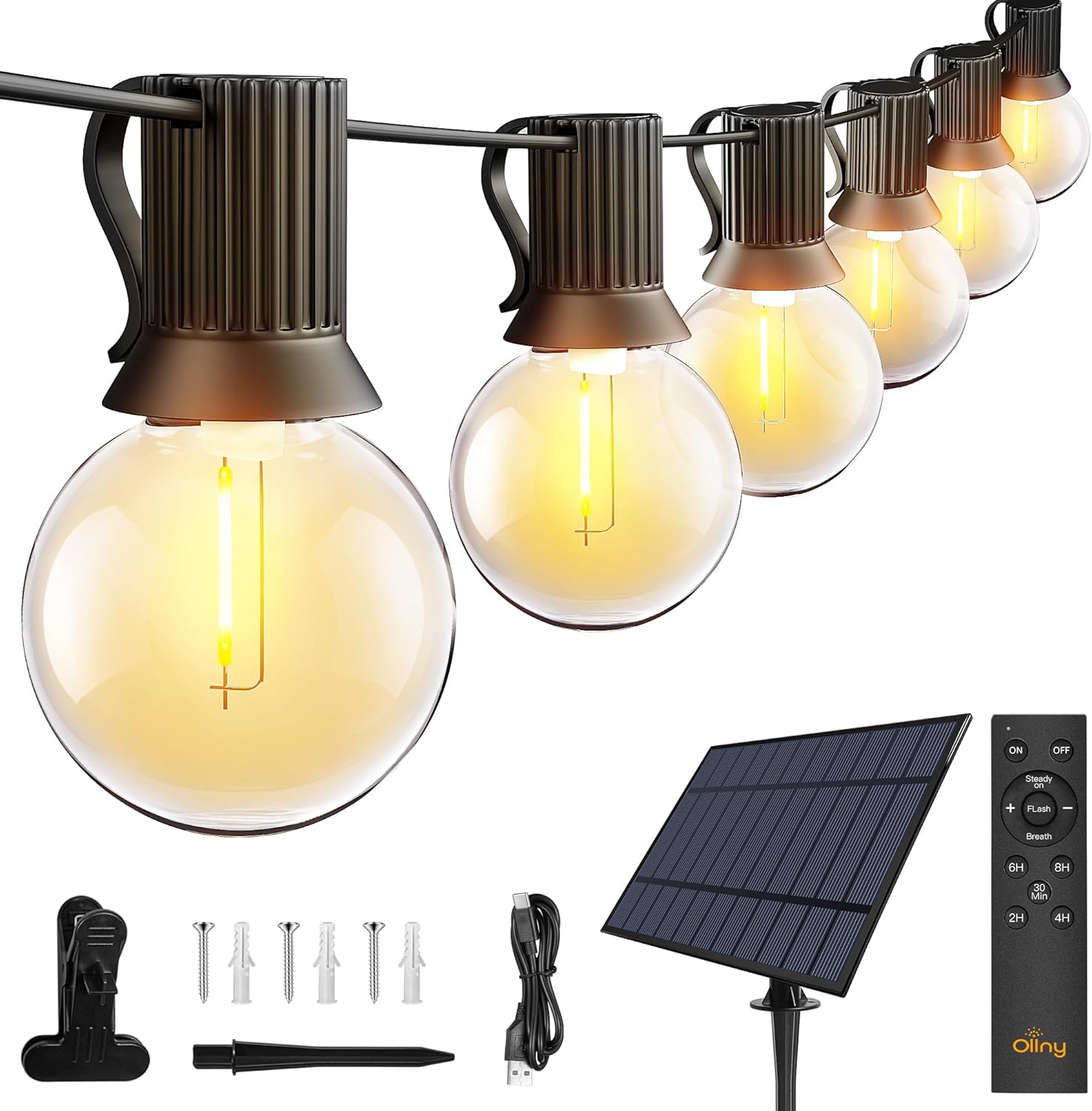
Imaxe: Máis deview of the Ollny 110FT Solar String Lights package contents, showing the string lights, solar panel, remote control, and various installation accessories.
2. Información de seguridade
- Asegúrese de que todos os compoñentes estean conectados de forma segura antes do uso.
- Non intente modificar nin reparar o produto. Póñase en contacto co servizo de atención ao cliente para obter axuda.
- Manteña o panel solar limpo para garantir unha eficiencia de carga óptima.
- Avoid submerging the string lights or solar panel in water, despite their water-resistant rating (IP65 for solar panel, IP45 for bulbs).
- Shatterproof bulbs are designed for durability, but handle with care.
3. Configuración e instalación
3.1 Colocación de paneis solares
The solar panel is crucial for charging the lights. Choose a location that receives at least 6-8 hours of direct sunlight daily. Avoid shaded areas.

Image: Close-up of the solar panel, highlighting the USB charging port and the 'MODE' and 'ON/OFF' buttons. It also shows the 4000mAh battery capacity and 10 hours of light duration.
3.2 Métodos de instalación
The solar panel offers multiple installation options:
- Estaca terrestre: Attach the stake to the solar panel and insert it firmly into the ground.
- Montaxe na parede: Use the provided screws and anchors to secure the panel to a wall or fence.
- Montaxe do clip: Attach the clip to the panel and secure it to a suitable edge or railing.

Image: Depicts three ways to install the solar panel: inserting it into the ground with a stake, nailing it to a wall, or clamping it to a board.
3.3 String Light Placement
Uncoil the string lights carefully. Hang them using the integrated clips on each bulb socket or other suitable fasteners. Ensure the solar panel is connected to the string lights.

Image: A diagram illustrating the total length of the 110FT solar outdoor string lights, the 2-foot spacing between bulbs, and the 11.5-foot lead cable from the solar panel to the first bulb. It also notes that the lights are not connectable.
3.4 Activación inicial
Before first use, press the ON button located behind the solar panel. Allow the solar panel to charge in direct sunlight for 4-6 hours, or use the USB cable for faster charging (approximately 4 hours).

Image: Illustrates two charging methods for the solar panel: solar power (6 hours charging) and USB charging (4 hours charging).
4. Instrucións de funcionamento
4.1 Automatic ON/OFF Function
The solar panel has a built-in light sensor. The lights will automatically turn on at dusk and turn off at dawn, provided the ON button on the solar panel is activated.
Nota: If you wish to use the lights during daylight hours, ensure the solar panel is covered to simulate darkness.

Image: Demonstrates the light sensor function of the solar panel, with lights automatically turning on at night and off during the day. A note advises covering the solar panel for daytime use.
4.2 Funcións de control remoto
The included remote control allows for convenient adjustment of light settings from up to 33 feet away.

Imaxe: Unha detallada view of the remote control, illustrating buttons for power (ON/OFF), brightness adjustment (+/-), three lighting modes (Steady ON, Flash, Breath), and timer settings (30 minutes, 2 hours, 4 hours, 6 hours, 8 hours).
- ON/OFF: Acende ou apaga as luces.
- Adormecer: Usa o + e - buttons to adjust brightness from 25% to 100% in Steady ON mode.
- Modos: Select from three lighting modes:
- Acendido constante: Iluminación continua.
- Flash: Efecto intermitente.
- respiración: Gradual dimming and brightening effect.
- Temporizadores: Set the lights to turn off automatically after a specified duration: 30 minutes, 2 hours, 4 hours, 6 hours, or 8 hours.
Video: An official product video demonstrating the Ollny G40 solar outdoor lights in various settings, showcasing their aesthetic appeal and functionality. This video is provided by the seller, Ollny Decor Lights.
5. Mantemento
- Limpeza: Limpe periodicamente o panel solar cun pano suave eamp cloth to remove dust and debris, ensuring maximum charging efficiency.
- Substitución da lámpada: The string lights include 2 spare bulbs. To replace a bulb, gently unscrew the old bulb and screw in a new one. Ensure the power is off before replacing bulbs.
- Almacenamento: If storing the lights for an extended period, ensure the solar panel is fully charged. Store in a cool, dry place.

Imaxe: Unha detallada view of one of the G40 LED bulbs, showing its clear shatterproof casing and the E12 screw base.
6 Solución de problemas
| Problema | Causa posible | Solución |
|---|---|---|
| As luces non se acenden pola noite. |
|
|
| As luces son tenues ou parpadean. |
|
|
| O control remoto non funciona. |
|
|
7. Especificacións do produto
| Característica | Detalle |
|---|---|
| Número de modelo | NYD050A |
| Lonxitude total | 110 pés |
| Número de lámpadas | 50 LED + 2 Spare |
| Tipo de bulbo | G40 Shatterproof LED |
| Base de bulbo | E12 |
| Cor clara | Branco cálido (2700 Kelvin) |
| Fonte de enerxía | Solar Powered (with USB charging option) |
| Batería de panel solar | 4000 mAh |
| Tempo de carga do panel solar | 4-6 horas (luz solar directa) |
| Tempo de carga USB | Aprox. 4 horas |
| Tempo de funcionamento | Ata 10 horas (completamente cargada) |
| Clasificación impermeable | Solar Panel: IP65, Bulbs: IP45 |
| Método de control | Remote Control (RF, 33ft range) |
| Baterías de control remoto | 2 AAA (incluído) |
| Características especiais | Dimmable (25%-100%), 3 Lighting Modes (Steady, Flash, Breath), Timers (30min/2H/4H/6H/8H), Auto ON/OFF Light Sensor |
| Material | Plástico |
| Peso do elemento | 3.85 libras (1.75 quilogramos) |
8. Garantía e soporte
Ollny products are designed for quality and durability. For any questions, concerns, or technical support, please contact Ollny customer service via Amazon. Our support team is available to assist you within 24 hours.
Consulta a documentación da túa compra para obter detalles específicos da garantía.
Ask a question about this manual
Ask about setup, troubleshooting, compatibility, parts, safety, or missing instructions. Manuals+ will review the question and use this page’s manual context to help answer it.