
1. Introdución
The ASUS Prime B860M-A WiFi-CSM is a micro-ATX motherboard designed to provide a stable and reliable foundation for your PC build. It supports the latest Intel Core Ultra Processors (Series 2) via the Intel LGA 1851 Socket and features DDR5 memory support, PCIe 5.0, two M.2 slots (one supporting PCIe 5.0), Wi-Fi 6E, 2.5Gb Ethernet, and USB Type-C connectivity. This manual provides detailed instructions for setting up, operating, and maintaining your motherboard.
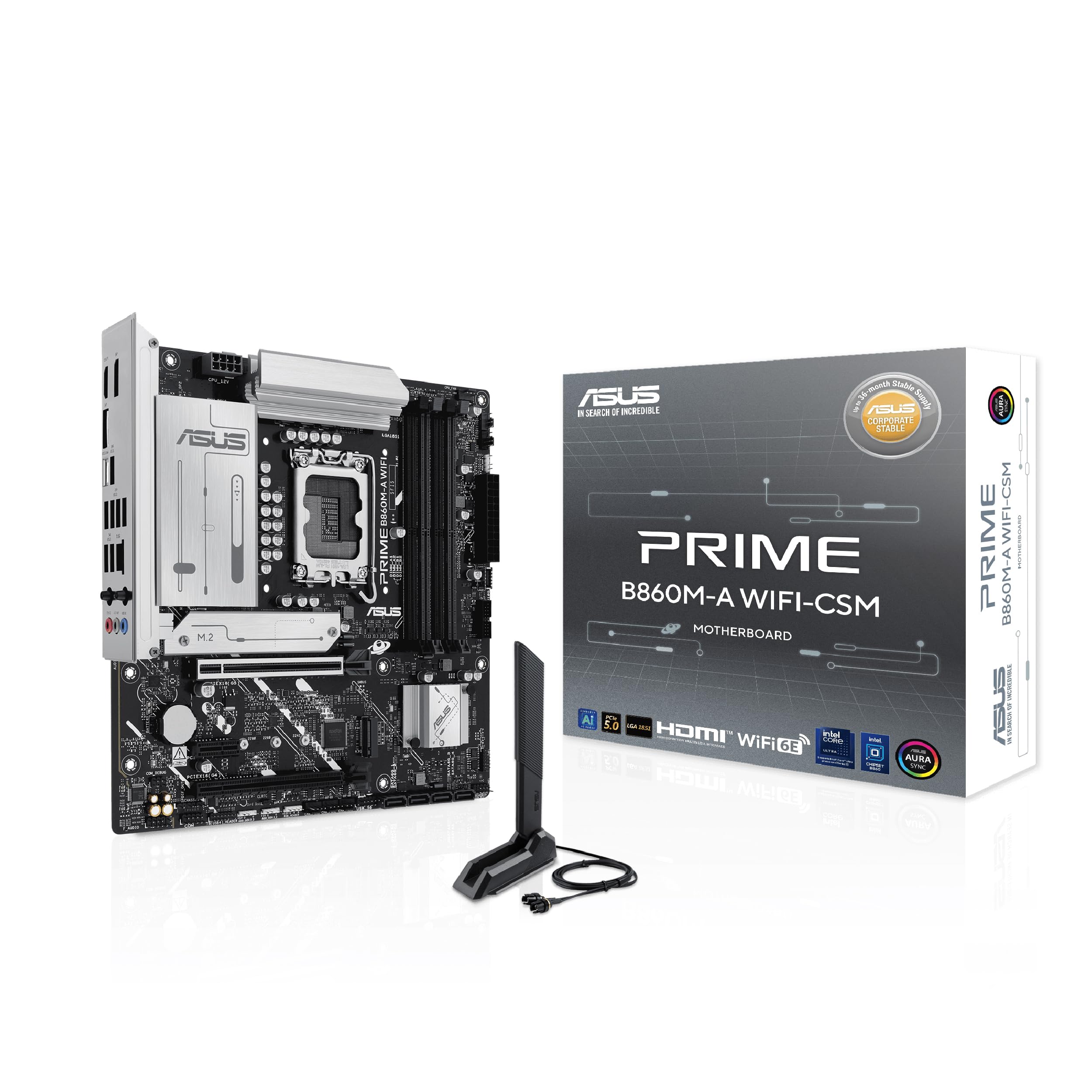
Figure 1: ASUS Prime B860M-A WiFi-CSM Motherboard Overview
Características clave
- Socket Intel LGA 1851: Ready for Intel Core Ultra Processors (Series 2).
- Soporte de memoria DDR5: Enhanced performance for demanding applications.
- PCIe 5.0: One PCIe 5.0 x16 slot for next-generation graphics cards and one PCIe 5.0 M.2 slot for high-speed storage.
- Ranuras M.2 duales: Two M.2 slots, including one with PCIe 5.0 support and an M.2 heatsink to prevent thermal throttling.
- Wi-Fi 6E & 2.5Gb Ethernet: Stable and low-latency network connectivity.
- Solución de enerxía robusta: 7+1+1+1 80A DrMOS power stages and 8-pin ProCool power connector for stable power delivery.
- USB tipo C: USB 20Gbps Type-C® port for fast data transfer.
- ASUS Corporate Stable Model (CSM): Designed for stable and reliable operation in commercial environments.

Figure 2: ASUS Corporate Stable Model (CSM) ensures long-term stability and reliability.
2. Contido do paquete
Verify that all items are present in your motherboard package. If any item is damaged or missing, contact your retailer.
- PRIME B860M-A WIFI-CSM Desktop Motherboard
- 2 x cables SATA 6 Gb/s
- 1 x Antena Q WiFi ASUS
- 1 x paquete de caucho M.2
- 1 x paquete de parafusos para SSD M.2
- 1 x tarxeta de chave de activación ACC Express
- 1 x Guía de inicio rápido

Figure 3: Motherboard and included accessories.
3. Deseño da placa base
Familiarize yourself with the various components and connectors on your ASUS Prime B860M-A WiFi-CSM motherboard.

Figura 4: De arriba abaixo view of the motherboard highlighting key areas.
Panel de E/S traseiro
The integrated I/O panel protects ports, enhances functionality, and provides a clean aesthetic. It includes a variety of ports for connecting peripherals and displays.

Figure 5: Rear I/O panel with diverse connectivity options including USB Type-C 20Gbps, USB Type-A 10Gbps, and USB Type-A 5Gbps ports.
4. Configuración e instalación
4.1 Instalación da CPU
Carefully align your Intel LGA 1851 processor with the socket on the motherboard. Ensure the notches on the CPU match the alignment keys on the socket. Gently lower the CPU into place and secure it with the retention arm.
4.2 Instalación da memoria (RAM)
This motherboard supports DDR5 memory modules. Open the retention clips on the DIMM slots. Align the notch on the DDR5 memory module with the key in the DIMM slot. Press down firmly on both ends of the memory module until the clips snap into place.

Figure 6: M.2 slots with varying length support (42mm, 60mm, 80mm) and an M.2 heatsink for optimal performance.
4.3 Instalación de almacenamento (SSD M.2, unidades SATA)
The motherboard features two M.2 slots. For M.2 SSDs, remove the M.2 heatsink (if present), insert the M.2 SSD into the slot, and secure it with the provided M.2 screw and rubber package. The heatsink protects the M.2 slot, preventing performance degradation (throttling) of M.2 storage due to heat generated during long data transfers. For SATA drives, connect the SATA data cables (included) to the SATA 6Gb/s ports on the motherboard and to your storage devices.
4.4 Expansion Cards (GPU, other PCIe cards)
Insert your graphics card or other PCIe expansion cards into the appropriate PCIe slots. The primary PCIe 5.0 x16 slot features a reinforced metal sheath (SafeSlot) to securely mount video cards and enable high-speed data transfer.

Figure 7: SafeSlot, a reinforced metal sheath, ensures secure mounting and high-speed data transfer for video cards.
4.5 Conexión de periféricos e panel frontal
Connect your USB devices, Ethernet cable, audio devices, and front panel connectors (power button, reset button, USB ports, audio jacks) to the corresponding headers on the motherboard. The ASUS WiFi Q-Antenna can be easily snapped into place without needing to turn fasteners, providing stable Wi-Fi connectivity.

Figure 8: The Q-Antenna offers easy installation for stable Wi-Fi connection.
5. Instrucións de funcionamento
5.1 Configuración da BIOS
The BIOS (Basic Input/Output System) is firmware that initializes your hardware during startup. To enter the BIOS setup utility, press the Eliminar key during the Power-On Self-Test (POST). Here you can configure system settings, boot order, and monitor hardware status. Refer to the detailed BIOS manual available on the ASUS support website for advanced settings.
5.2 Software e controladores
After installing your operating system, install the necessary drivers for your motherboard components (chipset, audio, LAN, Wi-Fi, etc.) from the included support DVD or the ASUS official website. Installing the correct drivers ensures optimal performance and stability.
5.3 Conectividade
The motherboard supports Wi-Fi 6E for stable wireless connections and 2.5Gb Ethernet for high-speed wired networking. It also features a USB Type-C 20Gbps port, a USB Type-A 10Gbps port, and two USB Type-A 5Gbps ports for diverse connectivity needs.

Figura 9: Máisview of connectivity (Wi-Fi 6E, 2.5Gb Ethernet, USB Type-C 20Gbps, PCIe 5.0) and cooling (ASUS Fan Xpert 2+) features.
6. Mantemento
6.1 Sistema de refrixeración
The motherboard is equipped with multiple heatsinks and hybrid fan headers controlled through ASUS Fan Xpert 2+ to manage temperatures effectively. Ensure proper airflow within your PC case and regularly clean dust from fans and heatsinks to maintain optimal cooling performance.
6.2 Actualizacións da BIOS
Consulta periodicamente o soporte técnico de ASUS website for BIOS updates. BIOS updates can improve system stability, add support for new hardware, and enhance performance. Follow the instructions provided by ASUS carefully when performing a BIOS update.
7 Solución de problemas
Se tes problemas coa túa placa base, consulta os seguintes pasos comúns para a resolución de problemas:
- Sen alimentación/Sen arranque: Ensure all power cables (24-pin ATX, 8-pin CPU) are securely connected. Check if the power supply is functioning correctly.
- Sen visualización: Verify that your monitor is connected to the correct display output (HDMI or DisplayPort) on your graphics card or motherboard. Reseat your graphics card and RAM modules.
- Inestabilidade/fallos do sistema: Check for loose connections. Ensure all drivers are up-to-date. Test memory modules individually. Monitor CPU and GPU temperatures.
- Problemas de conectividade de rede: Verify Ethernet cable connection or Wi-Fi antenna installation. Ensure network drivers are installed correctly.
- Problemas da BIOS: If you cannot enter BIOS or experience unexpected behavior, try clearing the CMOS (Complementary Metal-Oxide-Semiconductor) by removing the CMOS battery for a few minutes or using the Clear CMOS jumper (refer to the motherboard manual for location).
For more detailed troubleshooting, consult the comprehensive user manual available on the ASUS support websitio.
8. Especificacións
| Característica | Especificación |
|---|---|
| Marca | ASUS |
| Serie | PRIME B860M-A WIFI-CSM |
| Número de modelo do artigo | PRIME B860M-A WIFI-CSM |
| Socket CPU | LGA 1851 |
| Procesadores compatibles | Procesadores Intel Core Ultra (Serie 2) |
| Tipo de chipset | Intel B860 |
| Tecnoloxía de memoria RAM | DDR5 |
| Velocidade da memoria | 8400 MHz (OC) |
| Dimensións do produto | 9.6 x 9.6 x 1.9 polgadas (Micro-ATX) |
| Peso do elemento | 1.9 libras |
| Cor | NEGRO |
| Plataforma | Windows 10, Windows 11 |
9. Garantía e soporte
This ASUS motherboard comes with a manufacturer's warranty. For detailed warranty information, including terms, conditions, and registration, please refer to the warranty card included in your package or visit the official ASUS support website. ASUS also provides technical support and driver downloads through their websitio.
For AI-related features and software, you may find additional information and opportunities to unlock AI potential for your business by visiting the ASUS AI Potential websitio.