
Introdución
This manual provides instructions for setting up and using your ECONTROLLY BN59-01385B Voice Remote Control. This replacement remote is designed to be compatible with various Samsung Smart TV models, offering voice control functionality and direct access buttons for popular streaming services.

Fronte view of the ECONTROLLY BN59-01385B Voice Remote Control.
Guía de configuración
1. Instalación de baterías
The remote control requires two AAA alkaline batteries (not included).
- Abra a tapa do compartimento da batería na parte traseira do mando a distancia.
- Insira dúas pilas AAA, asegurándose de que os terminais positivo (+) e negativo (-) estean aliñados correctamente cos indicadores do interior do compartimento.
- Pecha a tapa do compartimento da batería de forma segura.
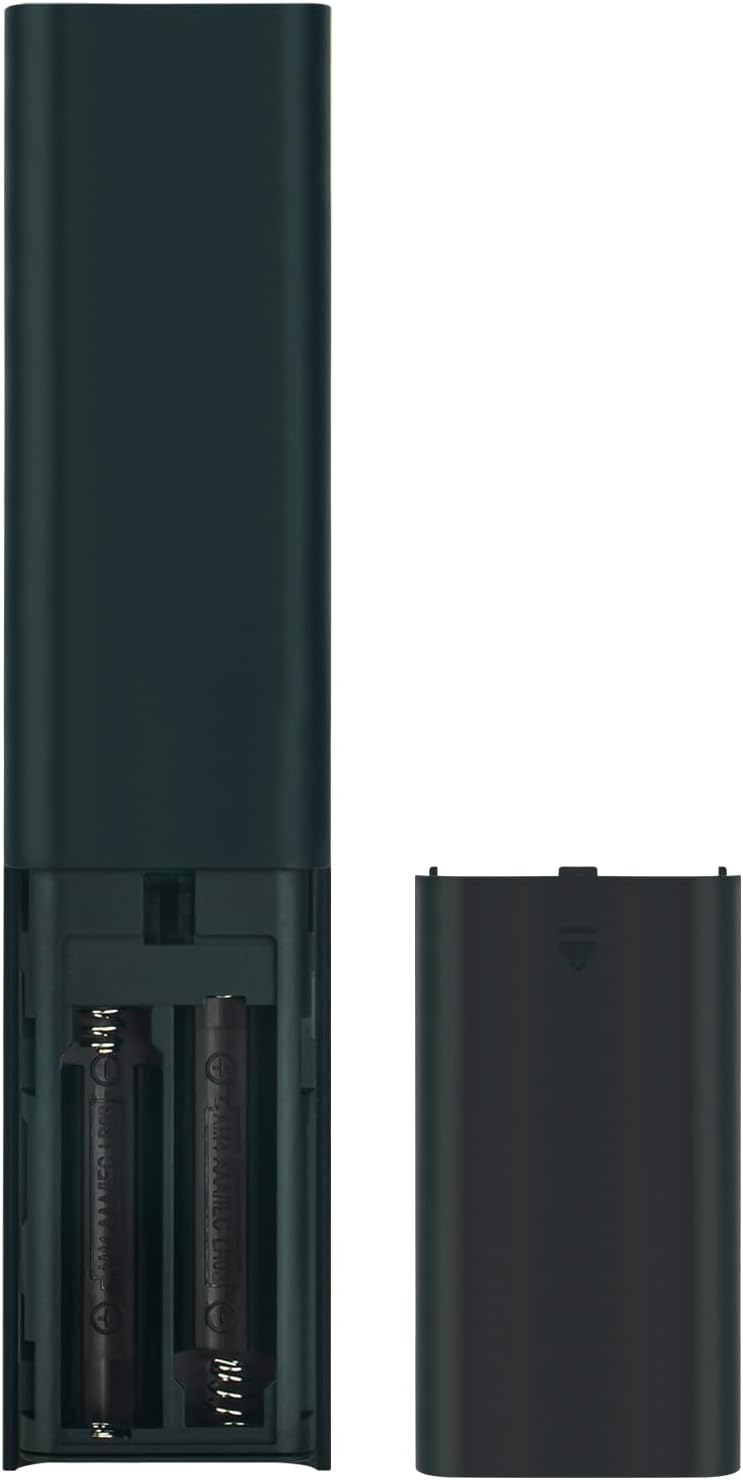
Image showing the battery compartment for AAA batteries.
2. Pairing the Remote Control with Your TV
This remote control uses Bluetooth connectivity and requires pairing with your Samsung TV before use. Follow these steps to pair:
- Ensure your Samsung TV is powered on.
- Apunte o mando a distancia cara ao televisor.
- Simultáneamente, mantén premido o botón Volver botón (frecha curva) e o Reproducir/Pausa durante 3 segundos ou máis.
- A pairing message should appear on your TV screen, indicating successful pairing.
If pairing is unsuccessful, ensure the batteries are correctly installed and try again. Move closer to the TV if necessary.
Instrucións de funcionamento
The ECONTROLLY BN59-01385B remote control provides intuitive navigation and voice command capabilities.
Funcións clave:
- Botón de encendido: Located at the top right, typically marked with a circle and a vertical line. Turns the TV on or off.
- Botón de control de voz (
 ): Located near the top, marked with a microphone icon. Press and hold to activate voice commands for searching content, changing settings, or controlling smart home devices.
 - Navigation Pad (Directional Buttons & Enter): The large circular pad in the center. Use to navigate menus and select items.
- Botón de retorno: Located below the navigation pad, marked with a curved arrow. Returns to the previous screen or menu.
- Botón de inicio: Located below the navigation pad, marked with a house icon. Accesses the Smart Hub or home screen.
- Botón Reproducir/Pausa: Located below the navigation pad, marked with a play/pause icon. Controls media playback.
- Botóns para subir/baixar o volume (+/-): Adjusts the TV volume.
- Botóns Arriba/Abaixo da canle (up/down arrows): Changes TV channels.
- Botóns de acceso rápido: Dedicated buttons for Netflix, Samsung TV Plus, Prime Video, and Disney+ for direct app launch.
The microphone button activates voice control for your Samsung TV.
Mantemento e coidados
- Keep the remote control dry. Moisture can damage the internal circuits.
- Avoid exposing the remote to extreme temperatures.
- Limpa o mando a distancia cun pano suave e seco. Non empregues produtos de limpeza abrasivos nin solventes.
- Se o mando a distancia non se vai usar durante un período prolongado, retire as pilas para evitar fugas.
- Handle the remote with care to prevent drops or impacts.
Resolución de problemas
| Problema | Solución |
|---|---|
| O mando a distancia non responde. |
|
| O control por voz non funciona. |
|
| Os botóns están pegañentos ou non responden. |
|
Especificacións
- Número de modelo: PT-BN59-01385B
- Marca: DE CONTROL
- Conectividade: Bluetooth
- Tipo de controlador: Control de voz
- Características especiais: Voice Search, Quick Access Buttons
- Dispositivos compatibles: Televisores Samsung
- Fonte de enerxía: 2 pilas alcalinas AAA (non incluídas)
- Rango máximo: 10 metros (33 pés)
- Material: ABS
- Cor: Negro
- Dimensións (L x W): Approximately 16.1 cm (6.33 in) x 3.5 cm (1.37 in)
- Peso: Aproximadamente 2 onzas (56.7 gramos)

Physical dimensions of the remote control.
Modelos de televisores compatibles
This remote control is compatible with various Samsung Smart TV models, including but not limited to:
- Serie QN85B: QA55QN85BA, QA65QN85BA, QA75QN85BA, QA85QN85BA, QA65QN85BAW, QA75QN85BAW, QA85QN85BAW, QA55QN85BAWXXY, QA65QN85BAWXXY, QA75QN85BAWXXY
- Q60B Series: QA55Q60BA, QA65Q60BA, QA75Q60BA, QA85Q60BA, QA55Q60BAW, QA65Q60BAW, QA75Q60BAW, QA85Q60BAW, QA55Q60BAWXXY, QA65Q60BAWXXY, QA75Q60BAWXXY, QA85Q60BAWXXY
- Q70B Series: QA55Q70BA, QA65Q70BA, QA75Q70BA, QA85Q70BA, QA55Q70BAW, QA65Q70BAW, QA75Q70BAW, QA85Q70BAW, QA55Q70BAWXXY, QA65Q70BAWXXY, QA75Q70BAWXXY, QA85Q70BAWXXY
- Q80B Series: QA55Q80BA, QA65Q80BA, QA75Q80BA, QA85Q80BA, QA55Q80BAW, QA65Q80BAW, QA75Q80BAW, QA85Q80BAW, QA55Q80BAWXXY, QA65Q80BAWXXY, QA75Q80BAWXXY, QA85Q80BAWXXY
- Serie QN90B: QA43QN90BA, QA50QN90BA, QA55QN90BA, QA65QN90BA, QA75QN90BA, QA85QN90BA, QA43QN90BAW, QA50QN90BAW, QA55QN90BAW, QA65QN90BAW, QA75QN90BAW, QA85QN90BAW, QA43QN90BAWXXY, QA50QN90BAWXXY, QA55QN90BAWXXY
This list is not exhaustive. If your TV model is not listed, please refer to your TV's user manual or contact ECONTROLLY support for compatibility information.

Visual comparison of the replacement remote with an original remote.
Soporte e Contacto
For further assistance or inquiries, please refer to the product listing on Amazon or contact ECONTROLLY customer support.