
1. Introdución
Welcome to the user manual for your new XIAOMI Redmi Note 14 Pro+ 5G Smartphone. This guide provides essential information on setting up, operating, and maintaining your device. Please read it carefully to ensure optimal performance and longevity of your smartphone.
2. Contido do paquete
Verifique que o seu paquete conteña os seguintes elementos:
- XIAOMI Redmi Note 14 Pro+ 5G Smartphone
- Cable USB
- Guía de inicio rápido (pode variar segundo a rexión)
- Ferramenta de expulsión da tarxeta SIM (pode variar segundo a rexión)
Note: A charger is not included in the package. Please use a compatible 120W HyperCharge adapter for optimal charging.
3. Dispositivo rematadoview
Familiarize yourself with the physical components of your Redmi Note 14 Pro+ 5G.
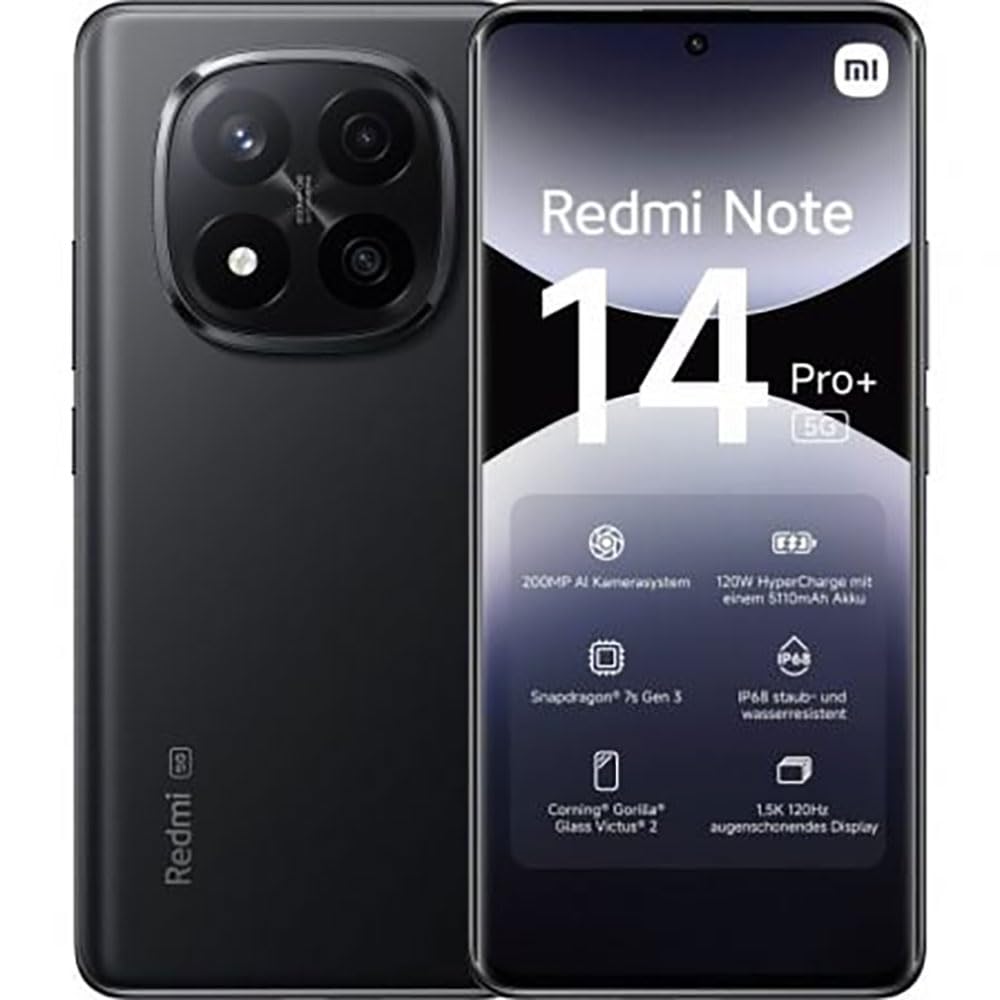
The image displays the front and back of the XIAOMI Redmi Note 14 Pro+ 5G smartphone. The front shows the display with 'Redmi Note 14 Pro+ 5G', '200 Megapixels', and '256 GB' text. The back features a prominent camera module with multiple lenses and the 'Redmi 5G' branding.
Compoñentes clave:
- Pantalla frontal: 6.67-inch 1.5K 120Hz AMOLED display with Corning Gorilla Glass Victus 2.
- Módulo de cámara traseira: Houses the 200MP Pro-Grade AI Camera system.
- Botón de encendido: Located on the side, used to power on/off and wake/sleep the device.
- Botóns de volume: Situado no lateral, úsase para axustar o volume dos contidos multimedia e das chamadas.
- Porto USB tipo C: Para carga e transferencia de datos.
- Ranura para tarxeta SIM: Supports Dual SIM Nano SIM cards.
- Relatores: Stereo speakers for audio output.
4. Configuración
4.1. Inserir a tarxeta SIM
- Localiza a bandexa da tarxeta SIM no lateral do teu dispositivo.
- Insert the SIM eject tool into the small hole next to the tray and press firmly until the tray pops out.
- Place your Nano SIM card(s) into the tray with the gold contacts facing down. Ensure proper orientation.
- Empurre suavemente a bandexa cara atrás na ranura ata que encaixe no seu lugar.
4.2. Acendido do dispositivo
Manteña premido o Botón de encendido on the side of the phone until the XIAOMI logo appears on the screen. Follow the on-screen instructions to complete the initial setup, including connecting to Wi-Fi, setting up your Google account, and configuring security features like fingerprint recognition.
4.3. Cargo inicial
It is recommended to fully charge your device before first use. Connect the USB Type-C cable to the phone and a compatible 120W HyperCharge adapter (not included) to a power outlet.
5. Uso do teléfono intelixente
5.1. Navegación básica
- Pantalla táctil: Toca para seleccionar, desliza para desprazarte, belisca para ampliar.
- Pantalla de inicio: O teu centro de datos para aplicacións e widgets.
- Panel de notificacións: Desliza o dedo cara abaixo desde a parte superior da pantalla para acceder ás notificacións e á configuración rápida.
- Caixón de aplicacións: Swipe up from the bottom of the screen (or tap the app drawer icon) to view todas as aplicacións instaladas.
5.2. Acender/Apagar e reiniciar
- Para Apagado: Press and hold the Power Button until the power menu appears, then select "Power off."
- Para Reiniciar: Press and hold the Power Button until the power menu appears, then select "Restart."
5.3. Características de seguridade
Your device supports various security options:
- Recoñecemento de pegadas dixitais: Rexistra as túas impresións dixitais para un desbloqueo rápido e seguro.
- Desbloqueo facial: Usa a túa cara para desbloquear o dispositivo.
- PIN/Patrón/Contrasinal: Standard security methods.
Access these settings via Configuración > Seguridade e privacidade.
6. Características da cámara
The Redmi Note 14 Pro+ 5G features a powerful 200MP Pro-Grade AI Camera system designed to enhance your photography experience.
- Cámara principal de 200 MP: Capture highly detailed images with optical image stabilization (OIS).
- Multiple Camera Modes: Includes automatic, scene, portrait, and manual modes for versatile shooting.
- Dual LED Flash: Provides enhanced lighting in low-light conditions.
- Cámara frontal: A 20MP front sensor for high-quality selfies and video calls.
- Gravación de vídeo: Supports up to 8K video capture at 120 fps.
7. Características da IA
Leverage the integrated AI functionalities for a smarter user experience:
- Borrado por IA Pro: Intelligently remove unwanted objects or people from your photos.
- Expansión de imaxes de IA: Expand the boundaries of your images using AI.
- Notas da IA: Smart note-taking capabilities.
- Subtítulos de IA: Generate subtitles for videos or audio in real-time.
- Gravador de IA: Enhanced voice recording with AI features.
- Intérprete de IA: Real-time language translation.
- Xemelgos: Integrated AI assistant.
- Rodea para buscar por Google: Busca información rapidamente rodeando obxectos na pantalla.
8. Cargando
Your Redmi Note 14 Pro+ 5G supports 120W HyperCharge technology for rapid charging.
- Capacidade da batería: 5110mAh Lithium-polymer battery.
- Cargando: Use the provided USB Type-C cable with a compatible 120W power adapter (sold separately) for optimal charging speeds.
- Duración da batería: Expect up to 20 hours of talk time. Actual battery life may vary based on usage.
Always use certified charging accessories to prevent damage to your device.
9. Mantemento
9.1. Resistencia á auga e ao po
The device features an Clasificación IP68 for dust and water resistance. This means it is protected against dust ingress and can withstand immersion in water up to 1.5 meters for 30 minutes. However, this resistance is not permanent and may decrease over time with normal wear. Avoid exposing the device to hot water, saltwater, or other liquids.
9.2. Limpeza do dispositivo
- Usa un pano suave e sen fiapos para limpar a pantalla e a carcasa.
- Evite o uso de produtos de limpeza abrasivos, solventes ou aerosois.
- If the device gets wet, wipe it thoroughly with a clean, dry cloth before charging or using ports.
9.3. Actualizacións de software
Comprobe e instale actualizacións de software regularmente para garantir que o seu dispositivo teña as últimas funcións, parches de seguridade e melloras de rendemento. Vaia a Configuración > Acerca do teléfono > Versión MIUI para comprobar as actualizacións.
10 Solución de problemas
Se tes problemas co teu dispositivo, proba as seguintes solucións habituais:
- O dispositivo non se acende: Asegúrate de que a batería estea cargada. Conéctaa a un cargador durante polo menos 15 minutos e despois tenta acender.
- As aplicacións fallan ou conxélanse: Close the problematic app and reopen it. If the issue persists, restart your phone.
- Conexión de rede deficiente: Check your SIM card is correctly inserted. Try toggling Airplane Mode on and off. If the issue persists, contact your network provider.
- A batería esgotando rapidamente: Reduce o brillo da pantalla, pecha as aplicacións que non uses e desactiva as funcións innecesarias como o GPS ou o Bluetooth cando non as uses.
- A pantalla non responde: Force restart your device by holding the Power Button for approximately 10-15 seconds.
Para problemas máis complexos, consulte o soporte oficial de XIAOMI. websitio ou póñase en contacto co servizo de atención ao cliente.
11. Especificacións
| Característica | Especificación |
|---|---|
| Marca | XIAOMI |
| Nome do modelo | Redmi Note 14 Pro+ 5G |
| Sistema Operativo | Android 14 |
| Modelo CPU | Snapdragon 7 Gen 3 |
| RAM | 8 GB |
| Capacidade de almacenamento | 256 GB |
| Tamaño da pantalla | 6.67 polgadas |
| Resolución de visualización | 2712 x 1220 píxeles |
| Taxa de actualización | 120 Hz |
| Resolución da cámara traseira | 200 Megapixels (with OIS) |
| Resolución cámara frontal | 20 megapíxeles |
| Capacidade da batería | 5110 mAh |
| Tecnoloxía de carga | Hipercarga de 120 W |
| Resistencia á auga | IP68 |
| Tecnoloxía Celular | 5G |
| Tipo de tarxeta SIM | Nano SIM (Dual SIM) |
| Conectividade | USB tipo C |
12. Garantía e soporte
12.1. Garantía do fabricante
Your XIAOMI Redmi Note 14 Pro+ 5G Smartphone comes with a 2 anos de garantía do fabricanteEsta garantía cobre defectos de materiais e fabricación en condicións normais de uso. Conserve o comprobante de compra para reclamacións de garantía.
The warranty does not cover damage caused by accidents, misuse, unauthorized modifications, or normal wear and tear.
12.2. Atención ao cliente
For technical assistance, warranty claims, or further information, please visit the official XIAOMI support website or contact their customer service department. Contact details can typically be found on the XIAOMI websitio web ou na tarxeta de garantía incluída co produto.