
1. Introdución
The AlienRider M12S Motorcycle Smart System is an advanced all-in-one solution designed to enhance motorcycle safety, connectivity, and recording capabilities. This manual provides detailed instructions for the proper installation, operation, and maintenance of your device, ensuring optimal performance and longevity.
2. Produto rematadoview e Compoñentes
The AlienRider M12S system integrates multiple features including a 77G millimeter-wave radar for blind spot detection, front and rear dash cameras, wireless CarPlay/Android Auto, and real-time Tire Pressure Monitoring System (TPMS).
2.1 Compoñentes incluídos
- Main Display Unit (Host)
- Cámara frontal
- Cámara traseira
- 77G Millimeter Wave Radar Sensor
- TPMS Sensors (2 units)
- Control remoto con cable
- Power Cables and Wiring Harness
- Soportes e adhesivos de montaxe
- Manual de usuario

3. Configuración e instalación
Proper installation is crucial for the system's performance. It is recommended to have this installed by a qualified technician if you are unsure about any steps.
3.1 Main Unit Mounting
Select a suitable location on your motorcycle's dashboard or handlebars for the main display unit. Use the provided mounting brackets and hardware to securely attach the unit. Ensure the unit is positioned for clear visibility and easy access to controls without obstructing your view of the road or motorcycle instruments.

3.2 Instalación da cámara
Install the front and rear cameras in positions that provide a clear, unobstructed view of the road. The cameras come with 3M adhesive for secure attachment. Ensure the lenses are clean and free from obstructions. The cameras support 1080P recording and night vision.
3.3 Radar Sensor Installation
Mount the 77G millimeter-wave radar sensor at the rear of the motorcycle, ensuring it has a clear line of sight to detect vehicles in your blind spots. Follow the specific instructions in the full manual for optimal angle and placement.
3.4 TPMS Sensor Installation
Attach the TPMS sensors to the valve stems of your motorcycle tires. Ensure they are securely fastened to provide accurate real-time tire pressure and temperature readings.

3.5 Wired Remote Control Installation
Install the wired remote control on your handlebars in a position that allows for easy and safe operation while riding. Use the provided adhesive to secure it.
3.6 Conexión de alimentación
Connect the main unit's power cable to your motorcycle's battery. The power supply has three wires: GND (ground, negative pole), Battery+ (constant power, positive pole), and ACC (switched power, positive pole). Ensure all connections are secure and correctly wired to prevent electrical issues.
4. Instrucións de funcionamento
Once installed, the AlienRider M12S system offers a range of functionalities accessible via its high-brightness touchscreen display.
4.1 Pantalla e interface
The 1200 nit high-brightness IPS touchscreen ensures clear visibility even under direct sunlight. The intuitive interface allows easy navigation through various functions.

4.2 CarPlay sen fíos e Android Auto
Connect your smartphone wirelessly to enable CarPlay or Android Auto. This allows for seamless navigation, music playback, and communication directly from the M12S display.

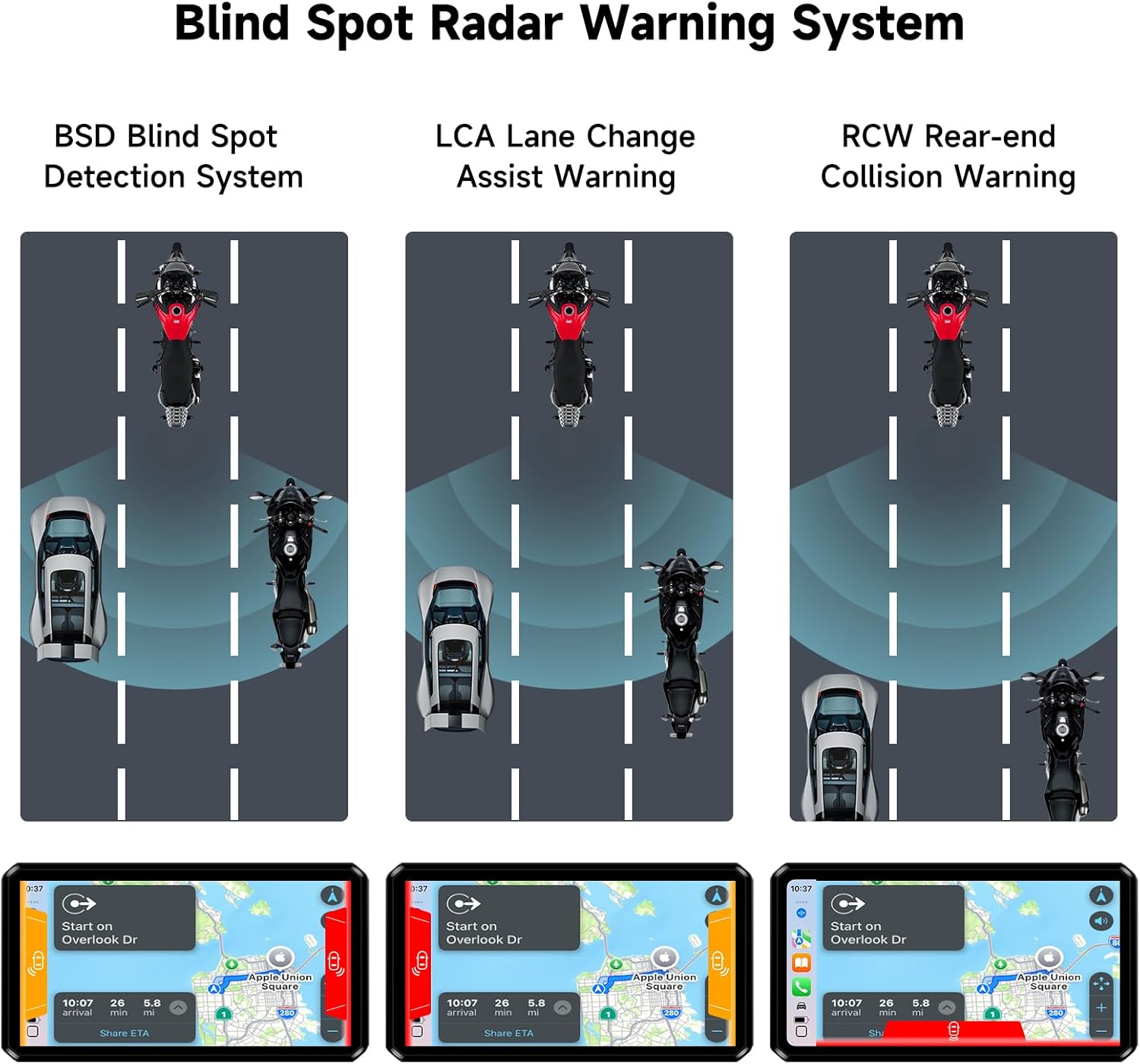
4.3 Blind Spot Warning System (BSD, LCA, RCW)
The 77G millimeter-wave radar provides real-time monitoring of blind spots. The system offers primary (yellow pop-up) and secondary (red pop-up with rear view switch) warnings for approaching vehicles, enhancing driving safety.

4.4 Dash Cam Recording
The system continuously records 1080P video from both front and rear cameras. Features include loop recording, night vision, and G-Sensor activated emergency accident video saving to prevent overwriting important footage.
5. Mantemento
To ensure the longevity and optimal performance of your AlienRider M12S system, follow these maintenance guidelines:
- Limpeza: Regularly clean the display screen, camera lenses, and radar sensor with a soft, damp pano. Evite produtos de limpeza abrasivos.
- Deseño impermeable: The unit features an IP68 waterproof design, making it resistant to harsh weather. However, avoid direct high-pressure water jets on sensitive areas.
- Actualizacións de firmware: Consulte o do fabricante website periodically for firmware updates to ensure you have the latest features and bug fixes.
- Inspección de cables: Periodically inspect all cables and connections for wear, damage, or loose fittings.
6 Solución de problemas
If you encounter issues with your AlienRider M12S system, refer to the following common troubleshooting steps:
- Sen enerxía: Check all power connections (GND, Battery+, ACC) to ensure they are secure and correctly wired. Verify your motorcycle battery voltage.
- Cámaras que non mostran: Ensure camera cables are securely connected to the main unit. Check camera settings in the system menu.
- CarPlay/Android Auto Connectivity Issues: Ensure Bluetooth and Wi-Fi are enabled on your smartphone and the M12S unit. Try restarting both devices.
- Inaccurate TPMS Readings: Verify TPMS sensors are correctly installed and tightened on the valve stems. Check for any physical damage to the sensors.
- Radar Warnings Not Functioning: Ensure the radar sensor is clean and has an unobstructed view. Check radar settings in the system menu.
7. Especificacións
| Característica | Especificación |
|---|---|
| Nome do modelo | M12S-Series |
| Mostrar | 1200 nit High-Brightness IPS Touchscreen |
| Resolución de vídeo | 1080p (Front & Rear Cameras) |
| Radar Technology | Radar de ondas milimétricas 77G |
| Conectividade | Wireless CarPlay, Android Auto, Bluetooth |
| Clasificación impermeable | IP68 |
| Características especiais | Night Vision, TPMS, G-Sensor, Loop Recording |
| Dimensións do produto | 1.18 x 5.31 x 3.07 polgadas |
| Peso do elemento | 4.07 libras (1.85 quilogramos) |
8. Garantía e soporte
For warranty information and technical support, please refer to the documentation included in your product packaging or visit the official AlienRider websitio. Ponte en contacto co servizo de atención ao cliente para obter axuda con calquera consulta ou problema relacionado co produto.