
AlienRider M12S-200 (Host+TPMS+Cameras)
AlienRider M12S-200 Motorcycle System User Manual
Model: M12S-200 (Host+TPMS+Cameras) | Brand: AlienRider
1. Introdución e finalview
The AlienRider M12S-200 is an advanced motorcycle system designed to enhance safety, connectivity, and recording capabilities for riders. This comprehensive unit integrates a high-definition dash cam system, real-time tire pressure monitoring (TPMS), and smart connectivity features like wireless CarPlay and Android Auto. It is built to withstand various weather conditions, ensuring reliable performance on the road.
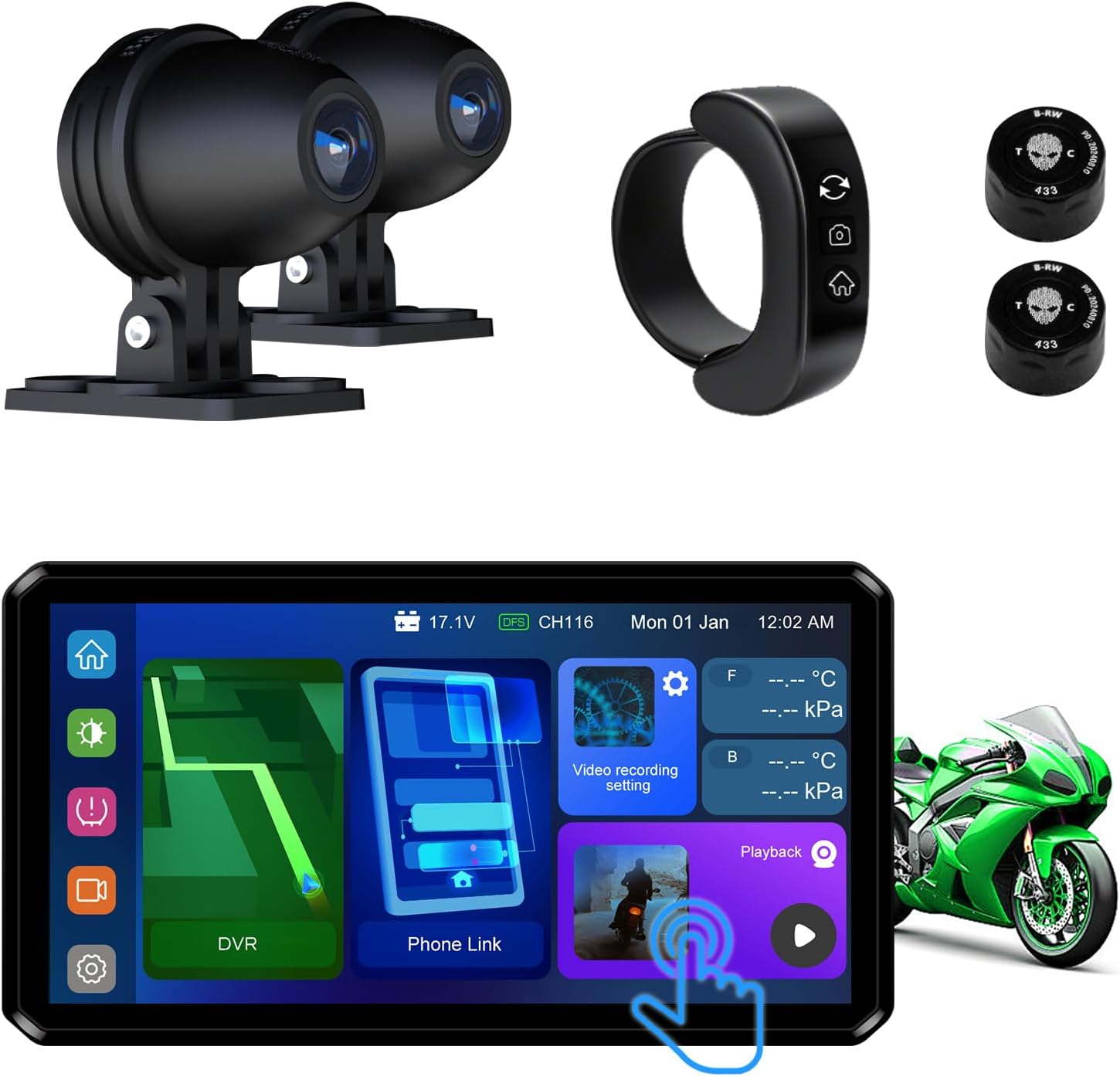
Figure 1.1: AlienRider M12S-200 Motorcycle System Components
2. Características do produto
The M12S-200 system offers a robust set of features for an improved riding experience:
- Comprehensive Blind Spot Warning and Safety Assurance: Equipped with 77G millimeter-wave radar, supporting BSD (Blind Spot Detection), LCA (Lane Change Assist), and RCW (Rear Collision Warning) systems. It monitors rear and side blind spot targets in real time, providing early warning of approaching vehicles to ensure driving safety. Accurate detection and warnings are provided regardless of day, fog, or rainy conditions.
- Smart Connectivity and Streaming Functionality: Supports wireless CarPlay and Android Auto, enabling seamless navigation and smart connectivity. Screen projection for navigation is supported in multiple modes, perfectly complementing your smart devices.
- High-Quality Driving Recording and Streaming Rearview Asistencia: Supports 1080P video recording and night vision for clear footage around the clock. The rearview streaming lane-change assistance system helps eliminate blind spots in the rearview mirror, ensuring safe driving. Features TS code stream technology for loop recording and emergency accident video saving.
- Real-Time Tire Pressure and Temperature Monitoring (TPMS): Provides comprehensive tire pressure and temperature monitoring functions, displaying tire data in real-time and alerting you in case of abnormalities to ensure driving safety. Multi-tire display is supported, making it suitable for motorcycles and various vehicle types.
- Ultra-High Brightness Display and Waterproof Design: Equipped with a 1200 nit high-brightness IPS touchscreen, it ensures clear display even under direct sunlight. The entire unit features an IP68 waterproof design, making it adaptable to harsh weather and high-temperature environments.

Figure 2.1: Blind Spot Radar Warning System in action

Figure 2.2: Wireless CarPlay and Android Auto integration

Figure 2.3: 1080P Recording and TS Code Stream Technology

Figure 2.4: Real-time TPMS Monitoring
Vídeo 2.1: Rematadoview of the Motorcycle Streaming System and Radar Blind Spot Warning features.
3. Lista de compoñentes
The AlienRider M12S-200 package includes the following components:
- M12S-200 Main Host Unit (Display)
- Cámara frontal (1080P)
- Cámara traseira (1080P)
- Control remoto por cable
- TPMS Sensors (2 for motorcycle tires)
- Cable de alimentación
- Mounting Hardware (for display and cameras)
- Manual de usuario
4. Guía de configuración e instalación
Proper installation is crucial for optimal performance and safety. It is recommended to have this system installed by a qualified professional if you are not familiar with motorcycle electrical systems.
4.1 Mounting the Main Host Unit
The main host unit can be mounted on the handlebars or other suitable locations using the provided mounting hardware. Ensure the unit is securely fastened and does not obstruct your view or control of the motorcycle.
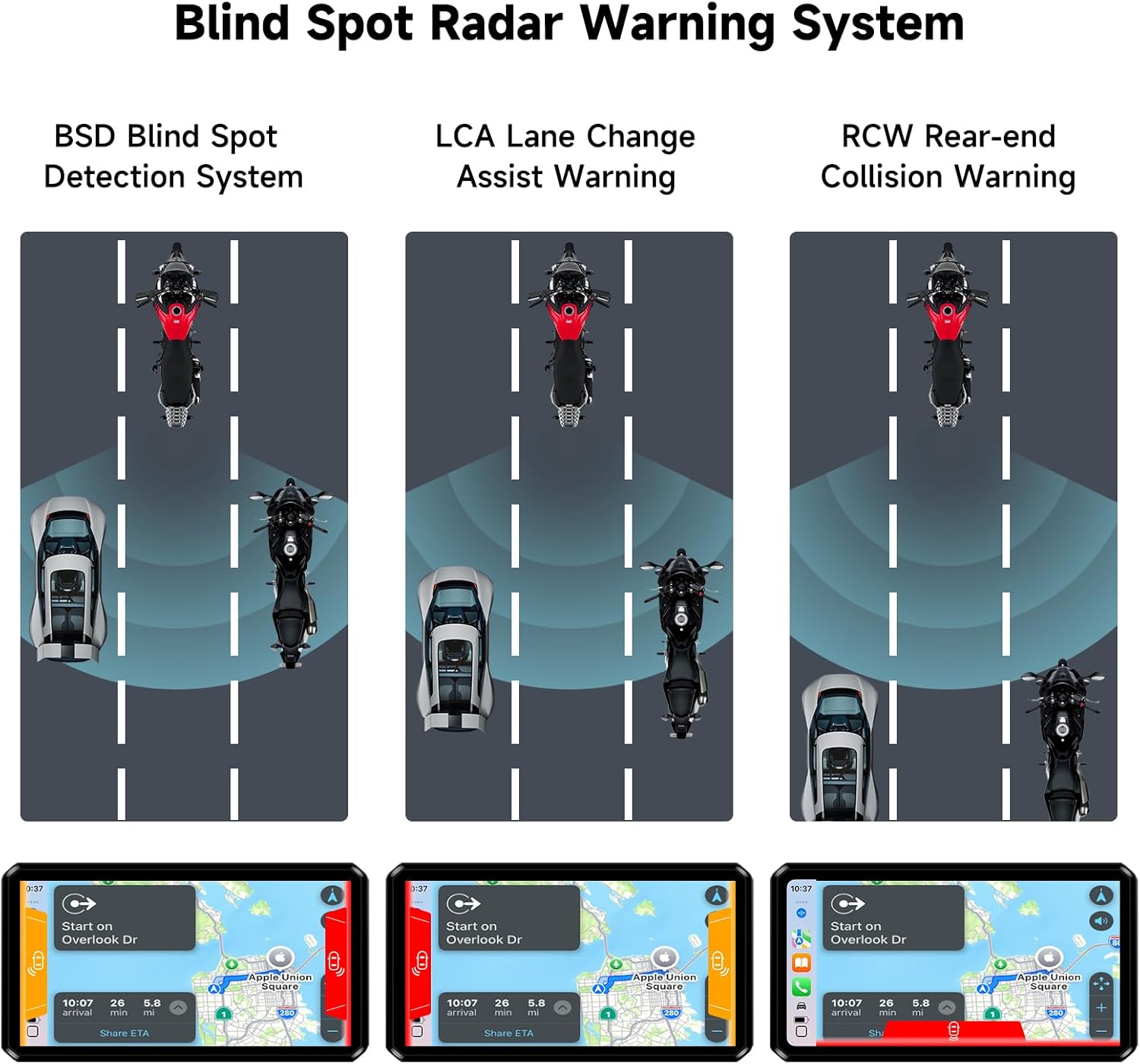
Figure 4.1: System Installation Diagram
4.2 Connecting Cameras and Wired Remote
Connect the front and rear cameras to their respective ports on the main unit. Position the cameras to capture clear views of the road ahead and behind. The wired remote controller should be mounted in an easily accessible location on your handlebars.
4.3 TPMS Sensor Installation
Install the TPMS sensors onto your tire valve stems. Ensure they are tightened securely to prevent air leakage. The system will automatically detect and display tire pressure and temperature once installed and the motorcycle is in motion.

Figure 4.2: TPMS Sensor Installation
4.4 Conexión de alimentación
Connect the power cable to your motorcycle's electrical system according to the wiring diagram provided. Ensure all connections are secure and properly insulated. The system is designed with an IP68 waterproof rating, but proper wiring is essential.
4.5 Xestión de cables
Due to the comprehensive nature of the system, there may be excess cabling. Carefully route and secure all cables to prevent interference with moving parts, heat sources, or potential snagging. Use zip ties or cable clips as needed.
5. Instrucións de funcionamento
5.1 Acendido/Apagado
The system typically powers on automatically with the motorcycle's ignition. To manually power off or restart, refer to the main unit's settings menu.
5.2 Navegando pola interface
The M12S-200 features an intuitive IPS touchscreen display. Navigate through menus and settings by tapping icons. The wired remote controller provides quick access to common functions such as switching between camera views, returning to the home screen, or accessing the current interface.

Figure 5.1: Wired Remote Controller Functions
CarPlay sen fíos 5.3 / Android Auto
To connect your smartphone, enable Bluetooth and Wi-Fi on your phone and select the M12S-200 from the available devices. Follow the on-screen prompts to establish a connection. Once connected, you can access navigation, music, calls, and other compatible apps directly on the display.
5.4 Dash Cam Operation
The system continuously records video from the front and rear cameras. Recordings are stored on a microSD card (not included). In case of an accident or sudden impact, the G-Sensor will automatically lock and save the relevant footage to prevent overwriting. You can review recorded videos directly on the display or by removing the microSD card and viewnun ordenador.
5.5 TPMS Monitoring
The TPMS data is displayed in real-time on the main screen. Monitor your tire pressure and temperature regularly. The system will provide visual and audible alerts if tire parameters fall outside safe ranges.
5.6 Radar Blind Spot Warning System
The 77G millimeter-wave radar actively monitors your blind spots. When a vehicle approaches quickly in your rear blind spot at a relatively long distance, a first-level warning (yellow pop-up window prompt) is triggered. If the target vehicle continues to approach quickly at a relatively close distance, a second-level warning (red pop-up window prompt + switch to rear view) is triggered.

Figure 5.2: Blind Spot Warning System Visuals
6. Mantemento
To ensure the longevity and optimal performance of your M12S-200 system, follow these maintenance guidelines:
- Limpeza: Regularly wipe the display screen and camera lenses with a soft, damp pano. Evite produtos de limpeza abrasivos ou solventes.
- Actualizacións de firmware: Consulte o do fabricante website periodically for firmware updates. Keeping your system updated ensures you have the latest features and bug fixes.
- Inspección de cables: Periodically inspect all cables and connections for wear, damage, or loose fittings. Secure or replace as necessary.
- Tarxeta MicroSD: Format the microSD card regularly (e.g., once a month) to maintain optimal recording performance and prevent data corruption. Replace the card if it shows signs of degradation.
7 Solución de problemas
If you encounter issues with your M12S-200 system, refer to the following common troubleshooting steps:
- O sistema non se acende: Check all power connections. Ensure the motorcycle's ignition is on. Verify the fuse in the power line.
- Pantalla non nítida á luz solar: The M12S-200 features a 1200 nit high-brightness IPS screen designed for visibility in strong light. Ensure the screen protector (if any) is clean and free of glare. Adjust screen brightness settings if available.
- Radar Warnings Seem Inaccurate: Ensure the radar unit is mounted correctly and is not obstructed. The radar sensor should be mounted upright; incorrect orientation can affect left/right blind spot warnings.
- Sen gravación de vídeo: Ensure a compatible microSD card (not included) is inserted correctly and formatted. Check recording settings in the menu.
- TPMS Not Displaying Data: Verify that the TPMS sensors are correctly installed and tightened on the valve stems. Ensure the system has had time to register the sensors (may require riding for a short period).
- Problemas de conexión de CarPlay/Android Auto: Ensure Bluetooth and Wi-Fi are enabled on your phone and the system. Try forgetting the device on both ends and re-pairing.
- Slow Boot Time: Acknowledge that the unit may have a slightly slower boot time. This is generally normal operation.
- Excess Wiring: While not a malfunction, the system includes generous cable lengths. Proper cable management (securing and hiding excess wire) is essential during installation to prevent issues.
If problems persist after attempting these steps, please contact AlienRider customer support for further assistance.
8. Especificacións
| Característica | Especificación |
|---|---|
| Nome do modelo | M12S-Series (Host+TPMS+Cameras) |
| Mostrar | IPS Touchscreen, 1200 nit brightness |
| Resolución de captura de vídeo | 1080p (Front and Rear) |
| Frecuencia de radar | 77GHz (for BSD, LCA, RCW) |
| Conectividade | Wireless CarPlay, Android Auto, Bluetooth |
| Clasificación impermeable | IP68 |
| Peso do elemento | 4.04 libras |
| Dimensións do paquete | 9.06 x 9.06 x 4.72 polgadas |
| Fabricante | AlienRider |
9. Garantía e soporte
The AlienRider M12S-200 system comes with a manufacturer's warranty. For specific warranty terms and conditions, please refer to the documentation included with your purchase or contact AlienRider customer support directly. Technical support and service inquiries can be directed to the official AlienRider support channels.
Ask a question about this manual
Ask about setup, troubleshooting, compatibility, parts, safety, or missing instructions. Manuals+ will review the question and use this page’s manual context to help answer it.