
1. Introdución
Welcome to the user manual for your new XIAOMI Poco X7 Pro 5G smartphone. This guide provides essential information on setting up, operating, maintaining, and troubleshooting your device. Please read this manual thoroughly to ensure optimal performance and longevity of your smartphone.
The Poco X7 Pro is a high-performance 5G smartphone featuring the MediaTek Dimensity 8400-Ultra chipset, built with a 4nm process technology and ARM Cortex-A725 CPU architecture. It is designed for speed and efficiency.
2. Contido do paquete
Upon unboxing your Poco X7 Pro, please verify that the following items are included:
- XIAOMI Poco X7 Pro 5G Smartphone
- Protective film (pre-applied or in box)
Note: Other accessories such as a power adapter, charging cable, or SIM ejector tool may be sold separately and are not always included in the standard package. Please check the product packaging for a complete list of included items.
3. Dispositivo rematadoview
Familiarize yourself with the physical components of your Poco X7 Pro 5G.

Figura 3.1: Fronte view of the Poco X7 Pro 5G smartphone, highlighting its storage capacity.
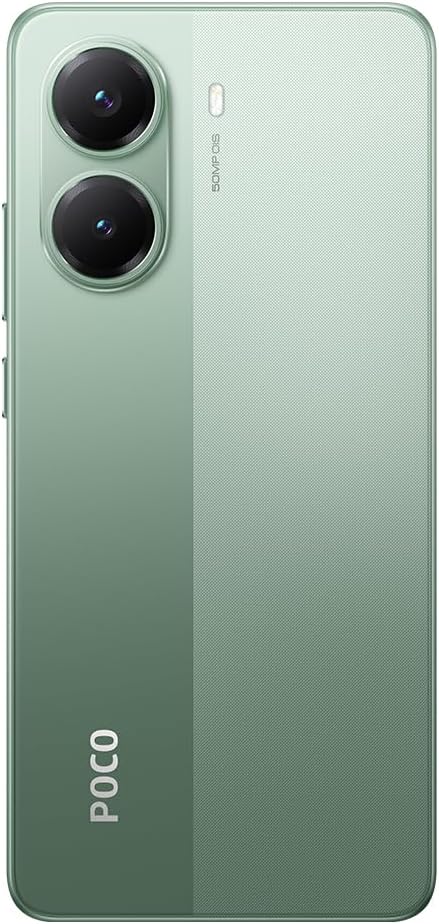
Figura 3.2: Traseira view of the Poco X7 Pro 5G, showcasing the camera setup and design.
3.1. Compoñentes físicos
- Visualización: 6.67-inch AMOLED screen with 2712x1220 resolution and 120Hz refresh rate. Protected by Gorilla Glass 7i.
- Cámara traseira: 50 MP main camera with OIS (Optical Image Stabilization) and f/1.5 aperture, utilizing a Sony IMX882 sensor. Supports 4K video recording at 60fps with dual OIS and EIS stabilization.
- Cámara frontal: (Specific MP not detailed in features, but typically located at the top center of the display).
- Botóns: Power button and volume rockers typically located on the side.
- Portos: Porto USB-C para carga e transferencia de datos.
- Bandexa da tarxeta SIM: Slot for inserting SIM cards.
4. Configuración inicial
4.1. Inserir a tarxeta SIM
- Localiza a bandexa da tarxeta SIM no lateral do teu dispositivo.
- Insert the SIM ejector tool (if available, otherwise a thin pin) into the small hole next to the tray to open it.
- Coloque a(s) tarxeta(s) nano-SIM na bandexa cos contactos dourados cara abaixo.
- Empurre con coidado a bandexa de volta na ranura ata que quede ao mesmo nivel que o dispositivo.
4.2. Acendido do dispositivo
- Press and hold the Power button (usually on the right side) until the XIAOMI logo appears on the screen.
- Follow the on-screen instructions to complete the initial setup, including selecting your language, connecting to Wi-Fi, and signing in to your Google account.
4.3. Cargando a batería
Your device comes with a 6,000 mAh battery. For optimal performance, fully charge the device before first use.

Figure 4.1: Illustration of the 6000 mAh battery and 90W HyperCharge capability, allowing a full charge in approximately 42 minutes.
- Connect a compatible USB-C charging cable to the device's charging port.
- Connect the other end of the cable to a compatible power adapter (sold separately) and plug it into a power outlet.
- The device supports 90W fast wired charging, capable of charging from 0% to 100% in approximately 42 minutes.
5. Funcionamento básico
5.1. Xestos na pantalla táctil
- Toca: Selecciona un elemento ou activa unha función.
- Mantén premido: Acceder a menús contextuais ou mover elementos.
- Pasar o dedo: Navigate through screens or lists.
- Beliscar: Achegar ou afastar imaxes e web páxinas.
5.2. Funcións da cámara
Your Poco X7 Pro features an advanced camera system.

Figure 5.1: Detail of the 50 MP main camera with OIS and the 20 MP front camera.
- Cámara traseira: The 50 MP main camera with OIS (Optical Image Stabilization) and f/1.5 aperture uses Sony's IMX882 sensor. It supports 4K video recording at 60fps with dual OIS and EIS stabilization for clear and steady footage.
- Cámara frontal: Capture high-quality selfies and video calls.
- Modos da cámara: Explore various modes such as Portrait, Night, Pro, and Panorama for diverse photographic experiences.
5.3. Características da pantalla
The device's display offers exceptional visual quality.

Figure 5.2: Key display specifications including brightness, refresh rate, and resolution.
- Brillo: Advertised to reach up to 3,200 nits of peak brightness for excellent visibility even in bright conditions.
- Frecuencia de actualización: Features a 120Hz refresh rate for smooth scrolling and fluid animations.
- Toca Samptaxa de ling: Offers a 2,560 Hz touch sampling rate for highly responsive touch input.
- Resolución: 2712 x 1220 pixels, providing sharp and detailed visuals.
6. Mantemento
6.1. Limpeza do dispositivo
- Usa un pano suave e sen fiapos para limpar con coidado a pantalla e a carcasa do teléfono.
- Evite o uso de produtos químicos agresivos, produtos de limpeza abrasivos ou aire comprimido.
- The Poco X7 Pro has an IP68 dust and water resistance rating, meaning it can withstand immersion in up to 1.5 meters of fresh water for up to 30 minutes. However, it is not recommended for use in water and water damage is not covered under warranty.
6.2. Actualizacións de software
Regularly check for and install software updates to ensure your device has the latest features, security patches, and performance improvements. Your device runs on Android 15.
- Ir a Configuración > Sobre o teléfono > MIUI version (or similar) to check for updates.
- Asegúrate de que o dispositivo estea conectado a unha rede wifi e de que a batería teña suficiente carga antes de iniciar unha actualización.
7 Solución de problemas
Se tes problemas co teu dispositivo, proba as seguintes solucións habituais:
- O dispositivo non se acende: Asegúrate de que a batería estea cargada. Conecta o dispositivo a un cargador durante polo menos 15 minutos e, a seguir, tenta acendelo de novo.
- As aplicacións fallan ou conxélanse: Close the problematic app and reopen it. If the issue persists, restart your phone. You can also clear the app's cache or reinstall it.
- Conectividade de rede deficiente: Check if your SIM card is properly inserted. Try toggling Airplane Mode on and off. If the issue persists, contact your network provider.
- A batería esgotando rapidamente: Reduce screen brightness, disable unnecessary background apps, and turn off features like Bluetooth or GPS when not in use. Check battery usage in settings to identify power-hungry apps.
- A pantalla táctil non responde: Restart your device. If the screen remains unresponsive, a factory reset might be necessary (back up your data first).
Para problemas máis complexos, consulte o soporte oficial de XIAOMI. websitio ou póñase en contacto co servizo de atención ao cliente.
8. Especificacións técnicas
Detailed specifications for the XIAOMI Poco X7 Pro 5G:
| Característica | Especificación |
|---|---|
| Marca | XIAOMI |
| Nome do modelo | POCO X7 PRO |
| Sistema Operativo | Android 15 |
| Tipo de procesador | Snapdragon (MediaTek Dimensity 8400-Ultra) |
| Velocidade do procesador | 3.25 GHz |
| Tamaño da RAM | 8 GB |
| Capacidade de almacenamento | 256 GB |
| Tamaño da pantalla | 6.67 polgadas |
| Tipo de visualización | AMOLED |
| Resolución | 2712 x 1220 |
| Taxa de actualización | 120 Hz |
| Capacidade da batería | 6000 mAh (Lithium-Ion) |
| Cargando | 90W Fast Wired Charging |
| Cámara traseira | 50 MP with OIS, f/1.5 aperture, Sony IMX882 sensor |
| Resolución de vídeo | 4K at 60fps (with dual OIS and EIS stabilization) |
| Conectividade | 5G, Bluetooth, NFC, USB, Wi-Fi |
| Resistencia á auga/po | IP68 |
| Peso | 400 g |
| Modelo do ano | 2025 |
9. Información de seguridade
Please observe the following safety precautions to prevent injury or damage to your device:
- Non expoñas o dispositivo a temperaturas extremas, luz solar directa nin chamas abertas.
- Evite deixar caer o dispositivo nin someterlo a impactos fortes.
- Empregue só cargadores e accesorios homologados.
- Non intente desmontar nin reparar o dispositivo vostede mesmo. Consulte o persoal de servizo autorizado.
- Manteña o dispositivo lonxe de dispositivos médicos, xa que pode interferir co seu funcionamento.
- Desfágase do dispositivo e da súa batería de forma responsable segundo a normativa local.
10. Garantía e soporte
Your XIAOMI Poco X7 Pro 5G is covered by a limited warranty. For specific warranty terms and conditions, please refer to the warranty card included with your product or visit the official XIAOMI websitio.
For technical support, service, or further assistance, please contact XIAOMI customer service or visit their official support channels. You can find contact information on the XIAOMI websitio.