
JONR VC08 PRO
JONR VC08 Pro Cordless Vacuum Cleaner User Manual
Model: VC08 PRO
Marca: JONR
Instrucións de seguridade importantes
Lea este manual atentamente antes de usar o aparello. Consérveo para futuras consultas.
- Non use a aspiradora ao aire libre nin en superficies molladas.
- Non permita que os nenos manexen o aspirador. É necesaria unha supervisión atenta cando se usa preto de nenos.
- Non colle líquidos inflamables ou combustibles, como gasolina, nin o use en zonas onde poidan estar presentes.
- Non coller nada que arde ou fume, como cigarros, mistos ou cinzas quentes.
- Non use sen bolsa de po e/ou filtros colocados.
- Turn off the appliance before connecting or disconnecting the battery pack, or before performing any maintenance.
- Use só como se describe neste manual. Empregue só os accesorios recomendados polo fabricante.
- Se o aparello non funciona como debería, caído, danado, deixado ao aire libre ou caído á auga, devólvelo a un centro de servizo.
Produto rematadoview
Familiarize yourself with the components of your JONR VC08 Pro Cordless Vacuum Cleaner and its Auto-Empty Station.
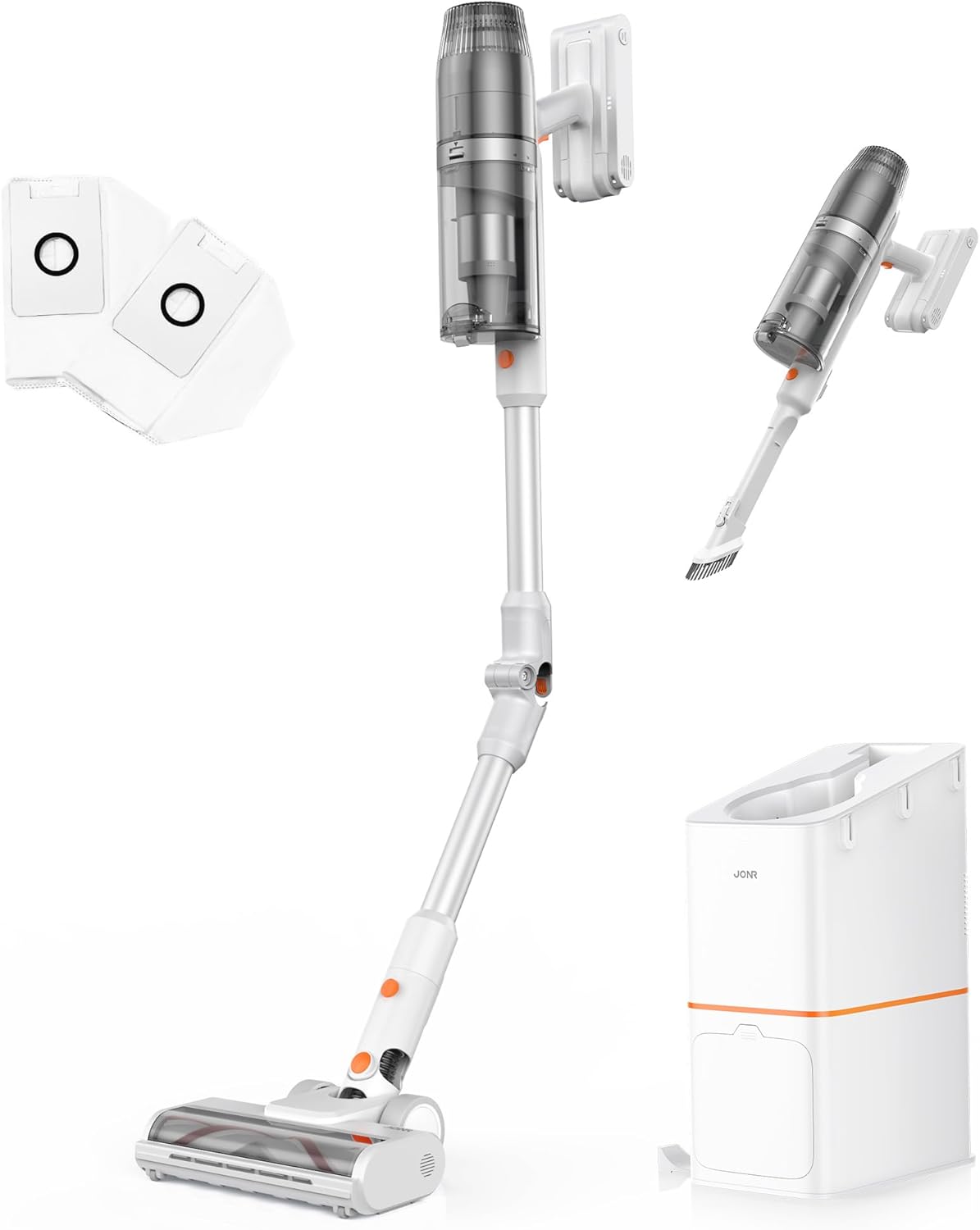
Figura 1: Máisview of the JONR VC08 Pro Cordless Vacuum Cleaner, including the main unit, extension wand, floor brush, and the auto-empty docking station with additional dust bags and filters.
Compoñentes principais:
- Vacuum Main Unit: Contén o motor, o depósito de po e a batería.
- Varita de extensión: Connects the main unit to the floor brush for upright cleaning. Features a 180° bendable joint for reaching under furniture.
- Cepillo de chan: Equipped with a tangle-free design for effective cleaning on carpets and hard floors.
- Estación de baleiro automático: A 3-in-1 clean station that automatically empties the vacuum's dust cup, charges the vacuum, and provides storage.
- Bolsas para o po: 2.5L capacity disposable bags for the auto-empty station, designed for hygienic dust disposal.
- Filtro HEPA: Advanced filtration system to capture fine dust and allergens.
- 2-in-1 Mini Handheld Brush: For cleaning smaller areas, upholstery, and tight spaces.

Figure 2: The All-in-one Docking Station provides fast dust emptying, automatic charging, and convenient one-stop storage for the vacuum cleaner.
Configuración e uso inicial
1. Montaxe
- Conecte a variña de extensión: Insira a vara de extensión na unidade de aspiración principal ata que encaixe firmemente no seu lugar.
- Conecta o cepillo para o chan: Attach the floor brush to the other end of the extension wand, ensuring it locks firmly.
- Prepare the Auto-Empty Station:
- Open the dust bag compartment on the auto-empty station.
- Insert one of the provided 2.5L dust bags into the compartment, ensuring it is properly seated.
- Pecha o compartimento de forma segura.
- Posicionar a estación: Place the auto-empty station on a flat, stable surface near a power outlet. Ensure there is enough space around it for the vacuum cleaner.
2. Carga inicial
Antes do primeiro uso, cargue completamente o aspirador.
- Plug the auto-empty station into a power outlet.
- Place the assembled vacuum cleaner onto the auto-empty station. The vacuum will automatically begin charging.
- The charging indicator lights on the vacuum or station will illuminate. A full charge typically takes approximately 4 hours.

Figure 3: The vacuum automatically charges when docked in the auto-empty station, ensuring it's always ready for the next cleaning session.
Instrucións de funcionamento
1. Acendido/apagado e selección de modo
- To turn on, press the power button on the main unit. The vacuum will start in Standard Mode.
- To switch to Powerful Mode, press the mode selection button. This provides increased suction for tougher messes.
- Para apagalo, preme de novo o botón de acendido.
2. Limpeza de diferentes superficies
The JONR VC08 Pro is designed for versatile cleaning across various floor types and surfaces.

Figure 4: The JONR VC08 Pro is suitable for cleaning short pile carpets, hardwood floors, and can be used as a handheld vacuum for furniture like sofas.
- Pisos duros: Use Standard Mode for daily cleaning. The soft roller brush is gentle on delicate surfaces.
- Alfombras: Switch to Powerful Mode for deeper cleaning on short pile carpets. The brush roll effectively agitates dirt and pet hair.
- En Mobles: Utilize the 180° bendable rod to easily reach under beds, tables, and sofas without excessive bending.

Figure 5: The flexible 180° bendable tube allows for easy cleaning in hard-to-reach areas like under sofas and beds.
- Limpeza manual: Detach the main unit from the extension wand and attach the 2-in-1 mini handheld brush for cleaning upholstery, car interiors, or tight corners.
3. Auto-Empty Function
When you return the vacuum cleaner to the auto-empty station after cleaning, it will automatically initiate the dust emptying process.
- Place the vacuum firmly into the docking port of the station.
- The station will automatically activate its suction to transfer dust and debris from the vacuum's dust cup into the sealed 2.5L dust bag. This process typically takes about 20 seconds.
- Once emptying is complete, the station will automatically begin charging the vacuum.

Figure 6: The auto-empty station quickly transfers dust from the vacuum's bin into a sealed bag, offering a hygienic disposal solution compared to manual emptying.
Mantemento
Regular maintenance ensures optimal performance and extends the lifespan of your JONR VC08 Pro.
1. Substitución da bolsa de po
The 2.5L dust bags in the auto-empty station can hold dust for up to 3 months, depending on usage.
- When the dust bag indicator on the station illuminates or you notice reduced emptying efficiency, it's time to replace the bag.
- Open the dust bag compartment on the auto-empty station.
- Carefully pull out the full dust bag. The bag is designed to seal automatically upon removal to prevent dust leakage.
- Dispose of the full dust bag in a trash bin.
- Insert a new 2.5L dust bag into the compartment, ensuring it is fully seated.
- Pecha o compartimento de forma segura.

Figure 7: Easily replace the large capacity dust bags in the auto-empty station for hygienic disposal of collected dust and debris.
2. Limpeza de filtros
The HEPA filter and other filters in the vacuum unit should be cleaned regularly to maintain suction power.
- Turn off the vacuum cleaner and remove it from the charging station.
- Separe o depósito de po da unidade principal.
- Remove the HEPA filter and foam filter from the dust cup.
- Golpea suavemente os filtros sobre unha papeleira para eliminar o po solto.
- If necessary, rinse the filters under cold running water. Ensure they are completely dry (allow 24-48 hours) before reinserting them. Do not use a dryer or direct heat.
- Reassemble the filters and dust cup onto the main unit.

Figure 8: The sealed dust collection system and HEPA filter in the auto-empty station help to lock away dust and allergens, promoting a cleaner home environment.
3. Limpeza do rolo de cepillo
Periodically check the floor brush for tangled hair or debris.
- Apague o aspirador e retire o cepillo para o chan.
- Use scissors or a cleaning tool to cut and remove any tangled hair or fibers from the brush roll.
- Ensure the brush roll spins freely before reattaching.
Resolución de problemas
Consulta esta sección para ver os problemas comúns e as súas solucións.
| Problema | Causa posible | Solución |
|---|---|---|
| A aspiradora non se acende. | A batería está baixa ou esgotada. | Place the vacuum on the auto-empty station to charge. Ensure the station is plugged in. |
| Potencia de succión reducida. | Dust cup full; Filters clogged; Brush roll tangled; Obstruction in nozzle/wand. | Empty the dust cup (via auto-empty station or manually). Clean or replace filters. Remove tangled hair/debris from brush roll. Check for and clear any obstructions. |
| Auto-empty station not emptying. | Dust bag full; Dust bag not installed correctly; Obstruction in station's suction path. | Replace the dust bag. Ensure the dust bag is correctly seated. Check the station's suction port for blockages. |
| O rolo do cepillo non xira. | Tangled debris; Brush roll jammed; Incorrect mode. | Clear any tangled hair or debris from the brush roll. Ensure the brush roll is properly installed. Check if the vacuum is in a mode that activates the brush roll (e.g., not handheld mode without the brush attachment). |
Especificacións
| Característica | Detalle |
|---|---|
| Marca | JONR |
| Nome do modelo | VC08 PRO |
| Característica especial | Auto-Empty, Cordless, Foldable, Headlight, Rechargeable |
| Tipo de filtro | Filtro HEPA |
| Compoñentes incluídos | VC08 Vacuum cleaner, Station, Dust Bag, User Manual, 2 in 1 Mini handheld brush |
| É sen fíos? | Si |
| Capacidade da copa de po | 650 mililitros |
| Capacidade da bolsa de po (estación) | 2.5 Liters (x2 included) |
| Wattage | 200 vatios |
| Tempo de carga | 4 horas |
| Factor de forma | Palo |
| Cor | While/Orange |
| Dimensións do produto | 10.2 cm de longo x 44 cm de ancho x 7.1 cm de alto |
| Nivel de ruído | 80 dB |
| Ampera | 0.8 Amps |
| Peso do elemento | 7.04 libras |
| Número de niveis de potencia | 2 (Standard, Powerful) |
Garantía e Soporte
For warranty information, technical support, or to purchase replacement parts and accessories, please contact JONR customer service.
- Soporte en liña: Visit the official JONR websitio web con preguntas frecuentes e recursos de asistencia.
- Atención ao cliente: Refer to the contact information provided on the product packaging or the official JONR websitio.
- Pezas de recambio: Genuine JONR dust bags and filters can be purchased from authorized retailers or the JONR official store.
Conserve o comprobante de compra para reclamacións de garantía.
Ask a question about this manual
Ask about setup, troubleshooting, compatibility, parts, safety, or missing instructions. Manuals+ will review the question and use this page’s manual context to help answer it.