
Introdución
This instruction manual provides essential information for the safe and effective installation, operation, and maintenance of your Technical Precision replacement light bulb, specifically designed for the Olympus BH2-RFC microscope. Please read this manual thoroughly before installation and retain it for future reference.
Información de seguridade
Observe the following safety precautions to prevent injury or damage to the product and equipment:
- Desconectar a enerxía: Always ensure the microscope is powered off and unplugged from the electrical outlet before attempting any installation or maintenance.
- Permitir arrefriamento: The old bulb can be extremely hot. Allow sufficient time for the bulb to cool completely before handling to prevent burns.
- Manipular con coidado: Avoid touching the glass part of the new bulb directly with bare hands. Oils from your skin can create hot spots, leading to premature bulb failure. Use a clean cloth or gloves.
- Eliminación axeitada: Desfágase das lámpadas vellas segundo a normativa local para residuos electrónicos.
- Voltage Compatibilidade: Asegúrese do volume da lámpada de substitucióntage (20 voltios) e augatage (100 Watts) match the requirements of your Olympus BH2-RFC microscope.
Contido do paquete
Verifique que todos os elementos estean presentes ao abrir o paquete:
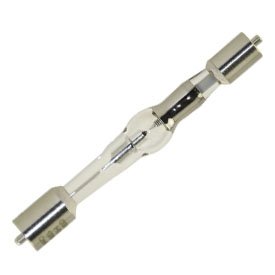
- 1 x Technical Precision Replacement Light Bulb (Part Number: BH2-RFC-AZ-3RKT-8)
Instrucións de instalación
Follow these steps to safely replace the light bulb in your Olympus BH2-RFC microscope:
- Apague e desenchufe: Turn off the microscope's power switch and unplug the power cord from the wall outlet.
- Permitir arrefriamento: Wait for at least 15-20 minutes for the old bulb to cool down completely.
- Localizar a carcasa da lámpada: Refer to your Olympus BH2-RFC microscope's original manual to locate the lamp housing or bulb access panel. This is typically found at the base or rear of the microscope.
- Panel de acceso aberto: Abra ou retire con coidado a lamp housing access panel. This may involve unscrewing a cover or releasing a latch.
- Eliminar a lámpada antiga: Gently grasp the old bulb (using a cloth or gloves if still warm) and pull it straight out from its socket. Avoid twisting if the socket design does not require it.
- Inserir lámpada nova: Using a clean cloth or gloves, carefully insert the new Technical Precision replacement bulb into the socket. Ensure it is fully seated and secure. Non force a lámpada.
- Vivenda segura: Pechar e asegurar a lamp housing access panel.
- Restaurar enerxía: Plug the microscope's power cord back into the electrical outlet.
Instrucións de funcionamento
After successful installation of the replacement bulb, operate your Olympus BH2-RFC microscope as follows:
- Encendido: Turn on the main power switch of your Olympus BH2-RFC microscope.
- Axustar o brillo: Use the microscope's built-in brightness control knob to adjust the illumination to your desired level.
- Observar: Proceed with your microscopic observations.
Mantemento
Proper maintenance ensures optimal performance and longevity of your replacement bulb:
- Limpeza: If the bulb's glass surface becomes dirty, gently wipe it with a clean, lint-free cloth moistened with isopropyl alcohol. Ensure the bulb is cool and the microscope is unplugged before cleaning.
- Frecuencia de substitución: The average life of this bulb is approximately 200 hours. Consider replacing the bulb when you notice a significant decrease in brightness or inconsistent illumination, even if it has not reached its full average lifespan.
Resolución de problemas
If you encounter issues after installing the new bulb, refer to the following common problems and solutions:
- A lámpada non se acende:
- Ensure the microscope is properly plugged into a working electrical outlet.
- Verify the microscope's power switch is in the 'ON' position.
- Comprobe se a lámpada está ben asentada no seu portalámpadas.
- Inspect the bulb for any visible damage or broken filaments. If damaged, replace the bulb.
- A lámpada ten pouca luz ou parpadea:
- Confirm the brightness control on the microscope is set to an appropriate level.
- The bulb may be nearing the end of its average lifespan (200 hours) and requires replacement.
- Ensure the bulb's glass surface is clean and free of smudges or debris.
If these steps do not resolve the issue, consult the original Olympus BH2-RFC microscope manual or contact Technical Precision customer support.
Especificacións
| Marca | Precisión técnica |
| Número de peza | BH2-RFC-AZ-3RKT-8 |
| Voltage | 20 voltios |
| Wattage | 100 vatios |
| Vida Media | 200 horas |
| Lonxitude do bulbo | 3.54 polgadas |
Garantía e Soporte
Technical Precision products are manufactured to high standards. For information regarding warranty coverage or technical assistance, please contact Technical Precision directly. Keep your purchase receipt as proof of purchase.
For support, please visit the Technical Precision websitio web ou consulte a información de contacto proporcionada coa súa compra.