
RAINPOINT HIC801W
RAINPOINT Sprinkler Controller 8 Zone User Manual
Model: HIC801W
1. Introdución
This manual provides comprehensive instructions for the installation, operation, and maintenance of your RAINPOINT 8-Zone Smart Irrigation Controller (Model HIC801W). This smart controller is designed to optimize your watering schedule based on local weather conditions, helping you maintain a healthy lawn and garden while conserving water.
Please read this manual thoroughly before installation and use to ensure proper functionality and to maximize the benefits of your new smart sprinkler system.
2. Contido do paquete
Verifica que todos os elementos estean presentes no paquete:
- Sprinkler controller x1
- Guía rápida x1
- User manual x1 (this document)
- Screws and expansion bolts x3
- Transformador x1
- Plantilla de montaxe x1
- Label sticker x1
3. Produto rematadoview
The RAINPOINT HIC801W Smart Sprinkler Controller features a user-friendly design with both physical controls and comprehensive app integration. It supports up to 8 watering zones.

Image: The RAINPOINT 8-Zone Sprinkler Controller (left) shown alongside its corresponding smartphone application interface (right). The controller features indicator lights for power, Wi-Fi, and 8 zones, along with manual control buttons. The app displays zone status, watering schedules, and manual trigger options.
The controller is designed for easy integration with existing 24VAC sprinkler systems and offers remote management capabilities via the RAINPOINT SMART+APP.

Image: An aerial perspective illustrating a property divided into 8 distinct watering zones, demonstrating the controller's capacity to manage large or complex irrigation layouts. Each zone is labeled with its number and an example of its next scheduled irrigation time.
4. Instalación
Installation of the RAINPOINT HIC801W is designed to be straightforward, typically taking 15-30 minutes. No special tools are required.
- Preparación para a substitución: Before removing your old controller, use the provided label stickers to clearly tag each wire according to its zone or common connection. This will simplify the wiring process for the new controller.
- Montar o controlador: Use the mounting template to mark the desired location on the wall. Secure the controller using the included screws and expansion bolts. Ensure the location is suitable for a 24VAC device and within Wi-Fi range.
- Conectar cableado:
- Connect the common wire(s) to the "C" terminal.
- Connect each zone wire to its corresponding numbered terminal (1-8).
- Connect the 24VAC power adapter to the "24V AC" terminals.
- Encendido: Plug the transformer into a power outlet. The controller will power on, and the Wi-Fi indicator will begin to flash, indicating it's ready for app setup.
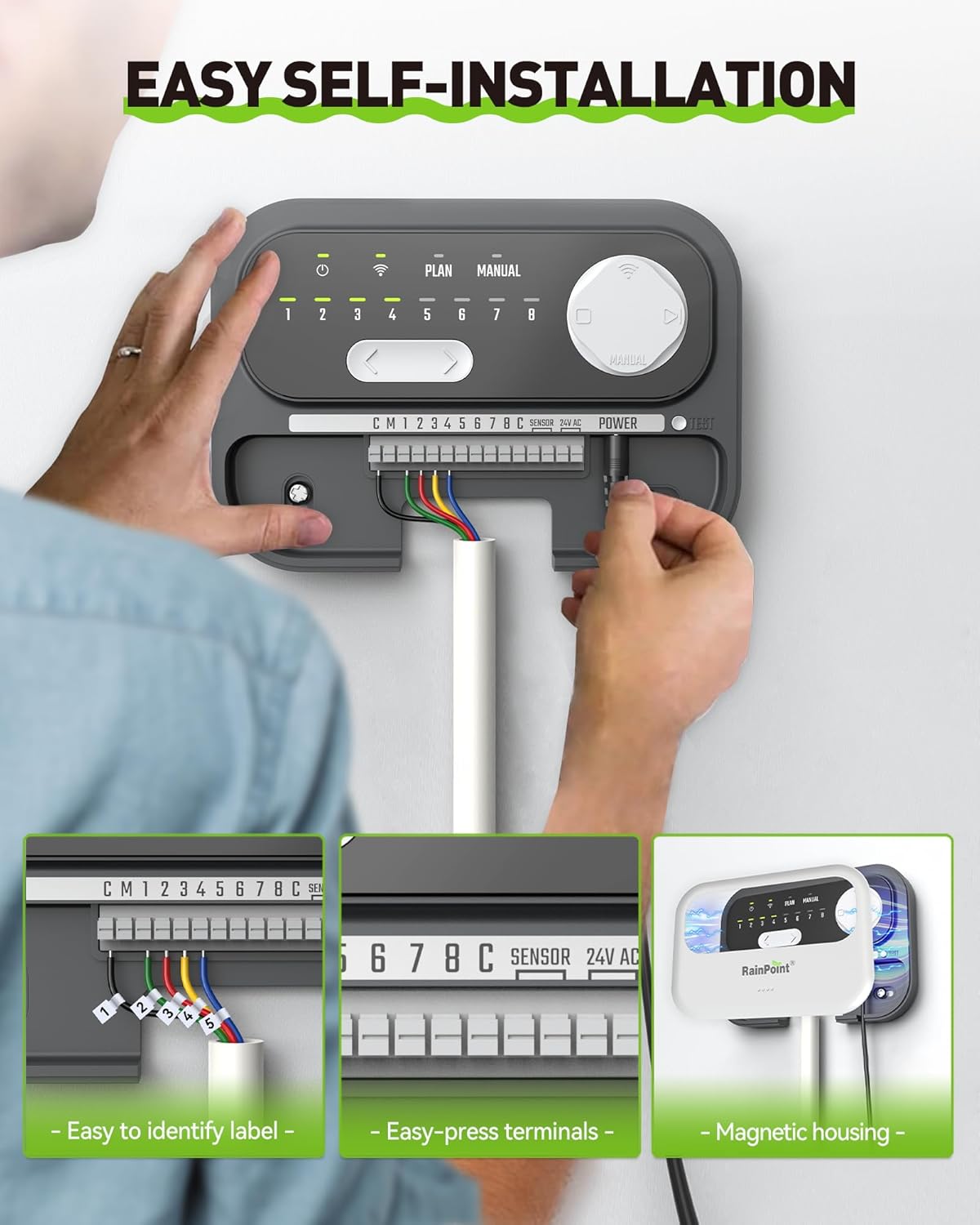
Image: A visual guide demonstrating the three key steps for self-installation: labeling and replacing the old controller, plugging in existing wires into the new controller's easy-press terminals, and setting up the device via the smartphone app.

Image: A detailed three-step illustration of the installation process: 1. Replacing the old controller with the new unit, emphasizing the use of label stickers for wire identification. 2. Plugging existing wires into the new controller's easy-press terminals. 3. Setting up the device and customizing watering schedules using the mobile application.
5. Configuración e conexión á aplicación
The RAINPOINT HIC801W requires connection to a 2.4GHz Wi-Fi network for smart functionality.
- Descarga a aplicación: Download the "RAINPOINT SMART+" app from your smartphone's app store (iOS or Android).
- Crear conta: Abre a aplicación e crea unha nova conta ou inicia sesión se xa tes unha.
- Engadir dispositivo: Follow the in-app instructions to add your new sprinkler controller. Ensure your phone is connected to a 2.4GHz Wi-Fi network during the pairing process.
- Emparejamento Wi-Fi: The app will guide you through connecting the controller to your home Wi-Fi network. The Wi-Fi indicator on the controller will become solid once successfully connected.

Imaxe: Unha serie de capturas de pantalla de teléfonos intelixentes mostranasing the RAINPOINT SMART+ app's interface for setting up and managing watering programs, including rain delay, seasonal adjustment, and individual zone control.
6. Funcionamento
6.1. Scheduling and Smart Watering
The RAINPOINT HIC801W offers flexible scheduling options and smart watering features to optimize water usage.
- Horarios personalizados: Create up to 8 custom watering schedules for each zone. You can define cycle and interval frequencies to match your landscape's specific needs.
- Weather-Based Watering: The controller utilizes local weather intelligence to automatically adjust watering. It can skip watering on rainy days to prevent overwatering and adjust duration based on seasonal changes (e.g., extending watering in hot summer months).
- Axuste estacional: Manually adjust watering duration for different months to ensure optimal hydration throughout the year.
- Soil Moisture Integration: (Optional, requires separate soil sensor) When a compatible RAINPOINT soil sensor (HC5021FRF) is connected, the system can water based on actual soil moisture levels, further reducing water waste.

Image: An illustration depicting the smart weather-based watering system, showing how it integrates data such as temperature, moisture percentage, sunny conditions, wind direction, and rainfall probability to create an optimized watering schedule.

Image: A graphic overlaying a weather forecast (temperature, cloud cover, rain probability) onto a green lawn being watered, demonstrating the controller's ability to adjust watering based on upcoming weather conditions.

Image: A visual representation of soil moisture-based watering, showing a graph of humidity levels over time and a RAINPOINT soil moisture sensor in the ground. This feature helps save up to 50% water by watering only when needed.
6.2. Control manual
You can manually trigger watering cycles directly from the controller or through the app.
- Control manual da aplicación: Use the "Manual" tab in the RAINPOINT SMART+ app to select specific zones and set custom watering durations for immediate irrigation.
- Controller Manual Control: The physical buttons on the controller allow for basic manual operation of zones.

Image: A woman on a couch using her smartphone to control the sprinkler system, with a voice assistant speaker nearby, illustrating the convenience of Wi-Fi and voice control from anywhere.

Imaxe: Examples of instant watering scenarios, such as expelling animals or for cooling and dust removal, demonstrating the flexibility of manual control via the app.
6.3. Notifications and History
The app provides real-time notifications and allows you to monitor irrigation history.
- Notificacións en tempo real: Receive alerts for important events, such as valve abnormalities, directly on your smartphone.
- Irrigation History: Review past watering activities to refine future schedules and track water usage.
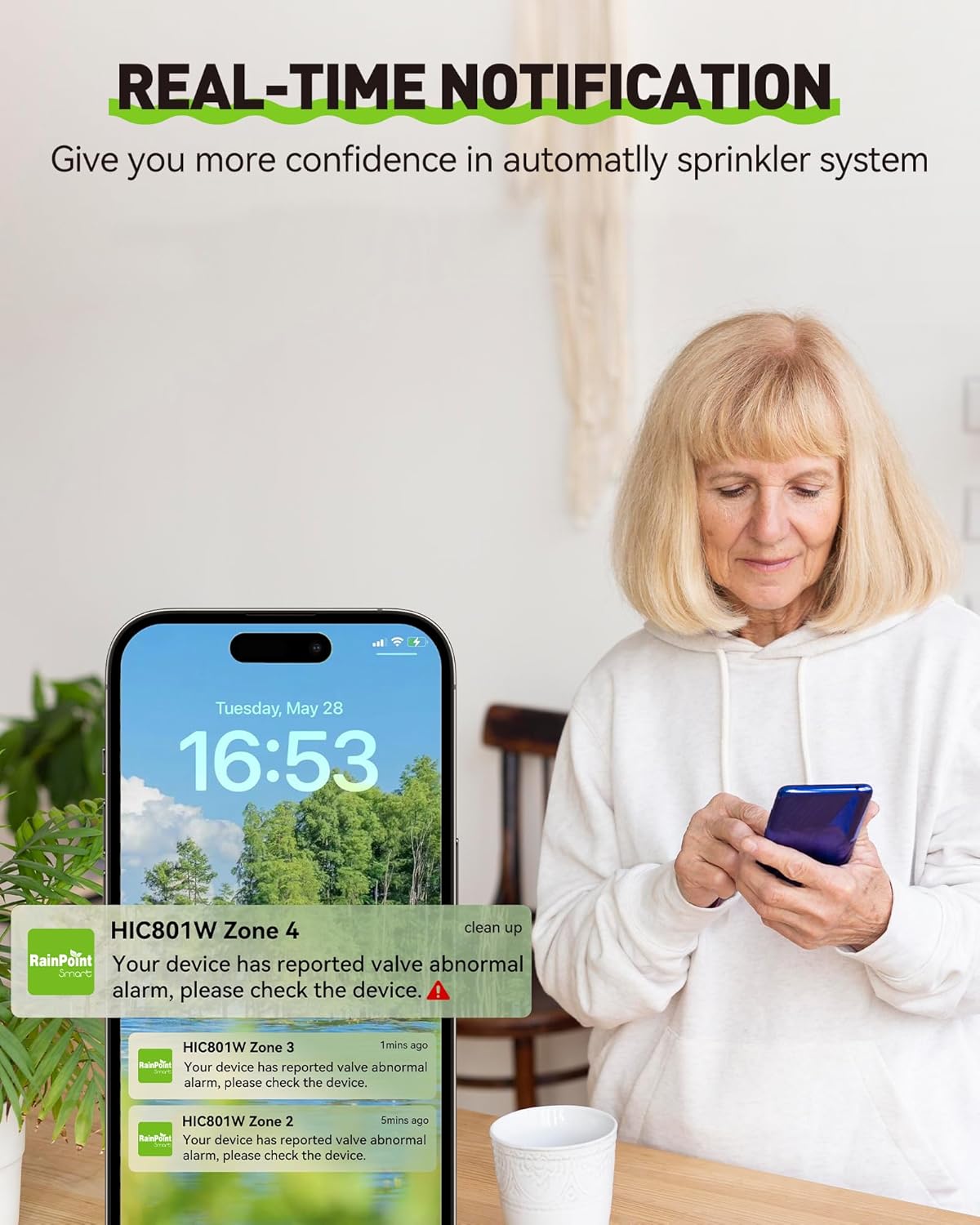
Image: A smartphone screen showing real-time notifications from the RAINPOINT app, indicating a reported valve abnormal alarm for Zone 4, providing confidence in the automated sprinkler system.

Image: A monthly irrigation plan calendar alongside the app interface, illustrating how users can record and review past irrigation activities to help refine future watering schedules.
7. Mantemento
The RAINPOINT HIC801W is designed for minimal maintenance. Follow these guidelines to ensure longevity and optimal performance:
- Manter limpo: Regularly wipe the exterior of the controller with a soft, dry cloth to remove dust and debris. Avoid using harsh chemicals or abrasive cleaners.
- Condicións ambientais: While the unit is robust, it is primarily designed for indoor use or protected outdoor locations. Avoid direct exposure to extreme weather conditions unless specifically housed in a weather-proof enclosure.
- Estabilidade Wi-Fi: Ensure your 2.4GHz Wi-Fi network is stable and the controller remains within good signal range for uninterrupted smart functionality.
- Comprobación do cableado: Periodically inspect the wiring connections to ensure they are secure and free from corrosion.
8 Solución de problemas
If you encounter issues with your RAINPOINT HIC801W, refer to the following common problems and solutions:
| Problema | Causa posible | Solución |
|---|---|---|
| O controlador non se acende. | No power to the outlet; faulty transformer; loose wiring. | Check the power outlet with another device. Ensure the transformer is securely plugged in. Verify 24VAC wiring connections to the controller. |
| Wi-Fi indicator flashing or off. | Not connected to Wi-Fi; weak Wi-Fi signal; incorrect Wi-Fi password. | Ensure your router is on and broadcasting a 2.4GHz network. Move the controller closer to the router. Re-attempt Wi-Fi pairing through the app, ensuring the correct password is entered. |
| Zonas sen rega. | Loose zone wiring; faulty solenoid; water supply off; rain delay active; schedule not set. | Check individual zone wiring connections. Verify water supply is on. Check the app for active rain delays or if a schedule is properly configured for the zone. Test the solenoid manually if possible. |
| App not connecting to controller. | Controller offline; app outdated; phone not on 2.4GHz Wi-Fi during initial setup. | Ensure the controller's Wi-Fi indicator is solid. Update the RAINPOINT SMART+ app to the latest version. For initial setup, ensure your phone is connected to a 2.4GHz Wi-Fi network. |
| Overwatering or underwatering. | Incorrect schedule settings; weather intelligence not enabled; soil sensor issues (if applicable). | Review and adjust your watering schedules in the app. Ensure weather-based watering and seasonal adjustment features are enabled. If using a soil sensor, check its functionality and placement. |
If the problem persists, please contact RAINPOINT customer support for further assistance.
9. Especificacións
| Característica | Detalle |
|---|---|
| Modelo | HIC801W |
| Zonas | 8 |
| Compatibilidade | Standard 24VAC sprinkler systems (99% compatible) |
| Conectividade Wi-Fi | Só wifi de 2.4 GHz |
| Método de control | RAINPOINT SMART+ App, On-device manual controls |
| Funcións intelixentes | Weather-based watering (rain skip, seasonal adjust), Optional soil moisture integration (sensor sold separately) |
| Fonte de alimentación | 24 voltios (CA) |
| Peso do elemento | 2.29 libras |
| Dimensións do paquete | 8.19 x 5.63 x 4.41 polgadas |
| Temperatura de funcionamento | 37 Degrees Fahrenheit (minimum, likely refers to freeze skip threshold) |
10. Garantía e soporte
RAINPOINT is committed to providing high-quality products and excellent customer service. For warranty information, please refer to the warranty card included with your product or visit the official RAINPOINT websitio.
For technical support, troubleshooting assistance, or any inquiries regarding your RAINPOINT Sprinkler Controller, please contact our customer service team:
- Chat en directo: Available on the RAINPOINT official websitio.
- Soporte por correo electrónico: Refer to the quick guide or official websitio para correo electrónico de contacto.
- Recursos en liña: Visit the RAINPOINT store on Amazon or their official websitio web con preguntas frecuentes e recursos adicionais.

Image: An image illustrating the available customer service options from RAINPOINT, including live chat, email support, and local business presence, with customer service representatives shown in the background.
Documentos relacionados - HIC801W
 |
RainPoint HIC801W 8-Zone Irrigation Controller User Manual Comprehensive user manual for the RainPoint HIC801W 8-Zone Irrigation Controller, covering setup, app connection, features, troubleshooting, and warranty information. |
 |
Guía de inicio rápido de RainPoint ITV305/ITV405: Configuración sinxela do temporizador da mangueira Poña en marcha rapidamente os seus temporizadores de mangueira RainPoint ITV305 e ITV405 con esta guía de inicio rápido e sinxela. Aprende a instalar, inserir as baterías, programar e solucionar problemas para o rego do seu xardín. |
 |
RainPoint ITV205 Two-Zone Water Timer User Manual This user manual provides comprehensive instructions for the RainPoint ITV205 two-zone water timer. Learn how to install, program, operate, troubleshoot, and maintain your timer for efficient garden watering. Covers features like rain delay, manual watering, and battery status. |
 |
RainPoint ITV201P User Manual: Smart Two-Zone Sprinkler Timer Guide User manual for the RainPoint ITV201P sprinkler timer. Learn installation, programming, and troubleshooting for efficient dual-zone garden watering. Includes contact info and support. |
 |
Manual do usuario do temporizador de auga de 2 zonas RainPoint ITV205-DLS Manual de usuario completo para o temporizador de rega de 2 zonas RainPoint ITV205-DLS, que abrangue a instalación, a programación, funcións como o retardo por choiva e o rega manual, e a resolución de problemas. |
 |
RAINPOINT Water Timer: User Manual and Programming Guide Comprehensive guide to setting up and programming your RAINPOINT water timer, including clock settings, multiple watering plans, and scheduling options. |
Ask a question about this manual
Ask about setup, troubleshooting, compatibility, parts, safety, or missing instructions. Manuals+ will review the question and use this page’s manual context to help answer it.