
1. Introdución
Thank you for choosing the LKTOP 100W Avata 2 Battery Charging Hub. This device is designed to efficiently charge up to three DJI Avata 2 Intelligent Flight Batteries, offering multiple charging modes and additional functionality as a power supply. Please read this manual thoroughly to ensure safe and optimal use of your charging hub.
2. Información de seguridade
- Use only recommended power adapters (100W USB-C PD adapter recommended) to avoid damage and ensure optimal performance.
- Do not expose the charging hub to water or moisture.
- Manter fóra do alcance dos nenos.
- Non desmonte nin intente reparar o dispositivo.
- Asegúrese de ventilar adecuadamente durante a carga para evitar o sobreenriquecido.
- Operate within the specified charging environment temperature of 5°C-40°C.
3. Produto rematadoview
The LKTOP 100W Avata 2 Battery Charging Hub features a compact design with an LED screen for real-time information and multiple charging modes.
Características principais:
- 100W High-Power Output: Fast charging for DJI Avata 2 batteries.
- Two Charging Modes: Sequential and Parallel charging.
- 60% Storage Mode: Optimizes battery health for long-term storage.
- Deseño 2 en 1: Functions as a charging hub and a power supply for other USB-C devices.
- Xestión intelixente: LED screen display and APP control for monitoring and settings.
- Protección integral: Includes over-temperature, short-circuit, over-voltage, baixo voltage, over-current, and over-power protection.

Image: The LKTOP 100W Avata 2 Battery Charging Hub connected to a power adapter, with three DJI Avata 2 batteries inserted.
4. Configuración
- Desempaquetar: Carefully remove the charging hub, USB-C to USB-C cable, and instruction manual from the packaging.
- Fonte de enerxía: Connect the charging hub to a compatible 100W USB-C Power Adapter (not included, LKTOP/DJI 100W USB-C Power Adapter recommended) using the provided USB-C to USB-C cable. Ensure the power adapter is plugged into a wall outlet.
- Inserir pilas: Insert up to three DJI Avata 2 Intelligent Flight Batteries into the designated slots on the charging hub.
- Encendido: The charging hub will automatically power on and begin charging.

Image: The charging hub set up with batteries and connected to an external power source, ready for use.
5. Instrucións de funcionamento
5.1 Modos de carga
The charging hub supports two primary charging modes, selectable via the control buttons or the mobile APP:
- Sequential Mode (Turn): Charges batteries one by one, prioritizing the battery with the highest power level first. A single battery can be fully charged in approximately 40 minutes.
- Modo paralelo: Charges all inserted batteries simultaneously. Three batteries can be fully charged in approximately 70 minutes.
- 60% Storage Mode: Charges or discharges batteries to approximately 60% for optimal long-term storage, preserving battery health.
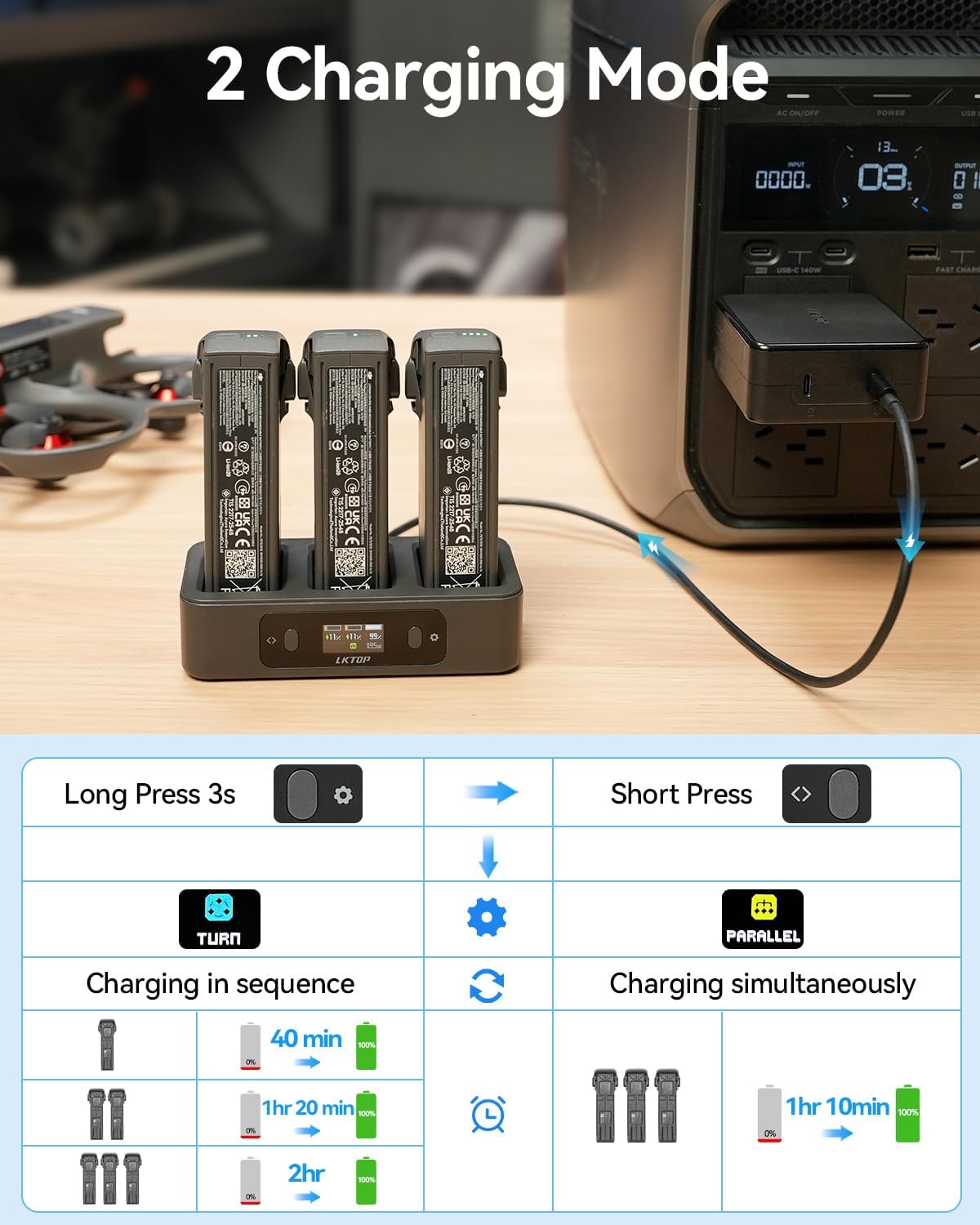
Image: Visual representation of Sequential and Parallel charging modes, showing charging times for one, two, and three batteries.
5.2 Using as a Power Supply (2-in-1 Design)
The charging hub can also function as a power bank. Without an external power source, simply insert a charged DJI Avata 2 battery into the hub and connect your device (e.g., remote controller, action camera, phone) to the USB-C output port on the hub.

Image: The charging hub acting as a power supply, charging a remote controller and a pocket action camera.
5.3 Pantalla LED
The integrated LED screen provides real-time information about the charging process:
- Estado de carga
- Current Battery Level (%)
- Input Charging Power (W)
- Vol. De cargatage & Current (V, A)
- Conta de ciclos da batería
- Battery Temperature (°C)
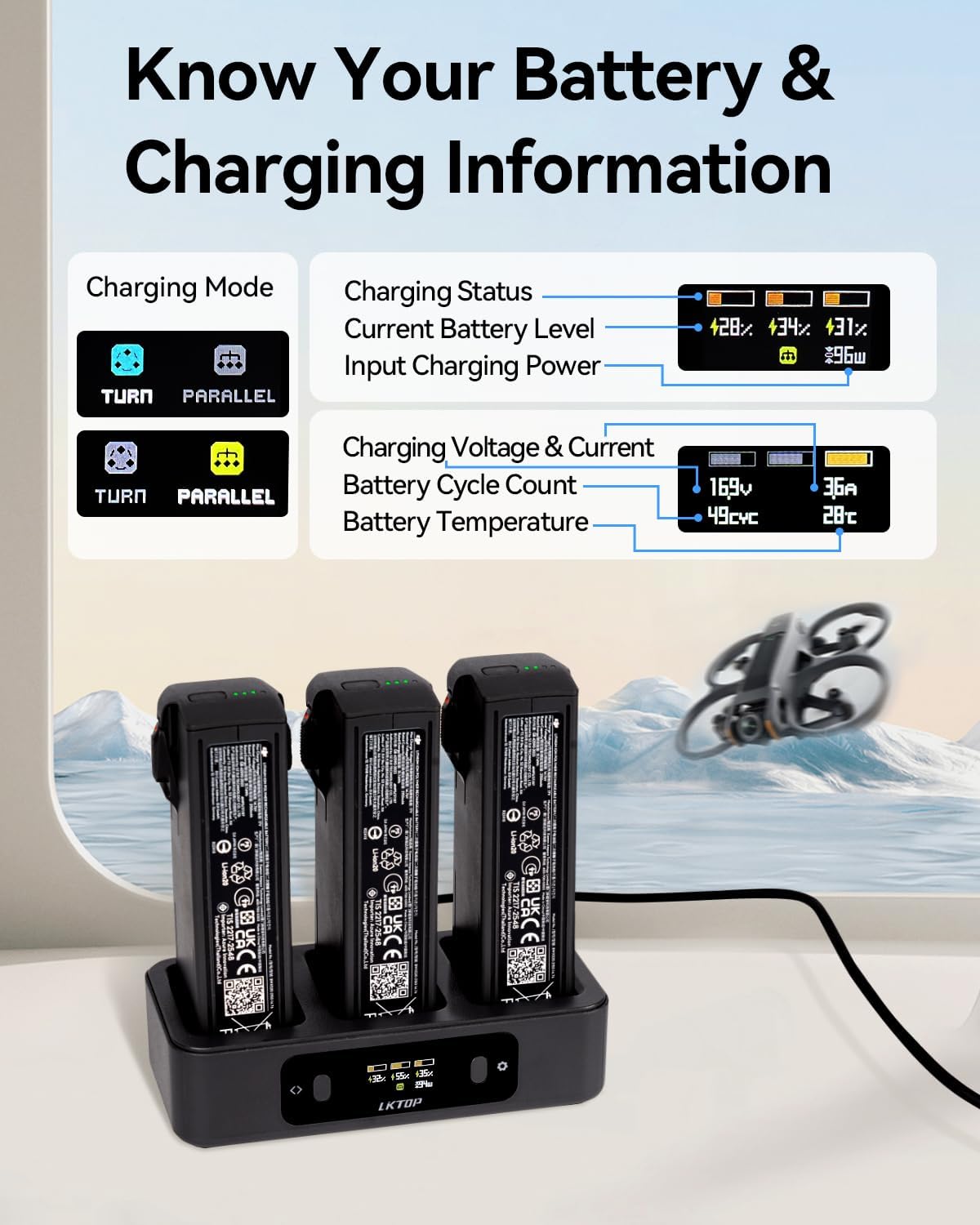
Image: The LED screen showing detailed battery and charging information.
5.4 Control APP
For enhanced control and monitoring, download the companion app:
- Escanea o código QR da imaxe de embaixo ou visita https://www.isdt.co/down/appJumplink/index_new.html to download the Polying app.
- Power on the charging hub.
- Activa o Bluetooth no teu dispositivo móbil.
- Open the Polying app, log in, connect to the charging hub, and follow the prompts to bind the device.
- Operate functions and monitor charging parameters in real-time via the app.

Image: Instructions for APP control, including QR code and connection steps.
Video: Official product video demonstrating the LKTOP 100W Avata 2 Battery Charging Hub in action, highlighting its features and usage.
6. Mantemento
- Limpeza: Use a soft, dry cloth to clean the charging hub. Do not use liquid cleaners or solvents.
- Almacenamento: Store the charging hub in a cool, dry place away from direct sunlight and extreme temperatures.
- Almacenamento da batería: For long-term battery storage, use the 60% Storage Mode to maintain battery health.
7 Solución de problemas
| Problema | Causa posible | Solución |
|---|---|---|
| Charging hub not powering on. | Insufficient power input from adapter. | Ensure your USB-C power adapter provides at least 65W, ideally 100W. Check cable connection. |
| Batteries not charging or charging slowly. | Low power input; incorrect charging mode selected. | Verify power adapter output. Switch to Parallel Mode for faster simultaneous charging. Check battery health. |
| LED screen not displaying information. | Power issue or display malfunction. | Ensure the hub is powered. If problem persists, contact support. |
| Non se pode conectar á aplicación. | Bluetooth off; app not installed; binding issue. | Ensure Bluetooth is enabled. Reinstall app. Follow binding steps carefully. |
8. Especificacións
- Marca: LKTOP
- Número de modelo: AC341
- Compatibilidade: DJI Avata 2 Intelligent Flight Battery (BWX520-2150-14.76)
- Entrada: 5V-20V = 5A (100W Max)
- Saída: 5V = 3A, 9V = 3A, 12V = 3A (36W Max)
- Recommended Power Adapter: DJI/LKTOP 100W USB-C Power Adapter
- Temperatura do ambiente de carga: 5°C-40°C
- Peso do produto: 0.17 Kilograms (7.05 oz ± 10%)
- Dimensións do produto: 5" D x 1.2" W x 2.4" H
- Número de portos: 3 (for batteries)
- Connector Type Used on Cable: USB-C
- Battery Charge Time (3 batteries): 70 minutes (Parallel Mode)
- Certificacións: CE, FCC, RoHS

Imaxe: Dimensións e especificacións detalladas do produto.
9. Garantía
Este produto vén cun 1 ano de garantía from the date of purchase. Please retain your proof of purchase for warranty claims. The warranty covers manufacturing defects but does not cover damage caused by misuse, accidents, unauthorized modifications, or normal wear and tear.
10. Apoio
For further assistance, technical support, or warranty inquiries, please contact LKTOP Direct through their official Amazon store or websitio.
LKTOP Direct Amazon Store: Visit LKTOP Direct Store