
1. Instrucións de seguridade importantes
Please read and save these safety instructions before using this tower fan. Failure to follow these instructions may result in electric shock, fire, or serious injury.
- Desconecte sempre o ventilador antes de limpalo, reparalo ou movelo.
- Do not operate the fan with a damaged cord or plug. If the cord or plug is damaged, contact customer service for assistance.
- Keep children and pets away from the fan, especially when it is operating. The enclosed grille design enhances safety around children and pets.
- Place the fan on a stable, level surface to prevent it from tipping over. This fan includes built-in tip-over protection, which automatically shuts off the unit if it is knocked over.
- Non introduza os dedos nin obxectos estraños en ningunha das aberturas do ventilador.
- Do not use the fan near water or in high-humidity environments.
- Asegúrese de que a fonte de alimentación coincida co voltage especificado na etiqueta de clasificación do ventilador.
2. Produto rematadoview
The Avamia NDTFT17RH-S is a 43-inch oscillating bladeless tower fan designed for efficient cooling in various indoor environments. It features a touch LED display, remote control, multiple speed and mode settings, and a 12-hour timer.

Image 2.1: Avamia NDTFT17RH-S Tower Fan and Remote Control.
Características principais:
- Potente fluxo de aire: High-efficiency brushless motor delivers airflow up to 26 ft/s and 1476 CFM.
- Oscilación ampla: 85° wide-angle oscillation for broad air distribution.
- Funcionamento silencioso: Operates at a low noise level of 26 dB, suitable for bedrooms.
- Configuración múltiple: 3 fan speeds and 3 breeze modes (Normal, Natural, Sleep).
- Control cómodo: Intuitive LED touch panel and included remote control.
- Función de temporizador: Programmable 1-12 hour timer.
- Características de seguridade: Bladeless design with enclosed grille and tip-over protection.
- Deseño de aforro de espazo: Slim profile with a built-in handle for portability.
3. Contido do paquete
Verifica que todos os compoñentes estean presentes no paquete:
- Avamia NDTFT17RH-S Tower Fan Unit
- Fan Base (two halves)
- Mando a distancia (con batería incluída)
- Manual de usuario
- Parafusos para o conxunto da base
4. Instrucións de montaxe
Follow these steps to assemble the fan base:
- Align Base Halves: Take the two halves of the fan base. Align them and connect them securely.
- Attach Base to Fan: Align the base holes with the fan's protrusions. Ensure a firm connection.
- Asegurar con parafusos: Insert and tighten the provided screws with a screwdriver to firmly attach the base to the fan unit.

Image 4.1: Step-by-step guide for base assembly.
5. Instrucións de funcionamento
The Avamia NDTFT17RH-S fan can be operated using the touch control panel on top of the unit or the included remote control.
5.1 Panel de control e control remoto

Image 5.1: Control panel icons for various functions.
- Botón ON/OFF: Acende ou apaga o ventilador.
- Botón de velocidade: Cycles through 3 fan speeds (Low, Medium, High).
- Botón de modo: Selecciona entre os modos Normal, Natural e Repouso.
- OSC (Oscillation) Button: Activa ou desactiva a función de oscilación de 85°.
- Botón do temporizador: Axusta o temporizador de apagado automático de 1 a 12 horas.
- Light Button (Remote Only): Turns the LED display on or off for undisturbed sleep.
5.2 Funcións
- Encendido/apagado: Press the ON/OFF button on the control panel or remote to turn the fan on or off.
- Axustar a velocidade do ventilador: Press the Speed button repeatedly to cycle through Low, Medium, and High-speed settings. The LED display will show the current speed.
- Seleccionar modo: Press the Mode button to choose between Normal, Natural, and Sleep modes. Each mode offers a different airflow pattern for varied comfort.
- Activar a oscilación: Press the OSC button to start the fan oscillating 85 degrees, distributing air across a wider area. Press again to stop oscillation.
- Establecer temporizador: Press the Timer button to set the fan to automatically turn off after a set period, from 1 to 12 hours. Each press increases the timer by one hour.
- Control de pantalla LED: Use the Light button on the remote control to turn the LED display on or off, which is particularly useful during nighttime operation to ensure a dark sleeping environment.
Video 5.2: Demonstration of the Avamia Tower Fan's powerful airflow and features.
6. Mantemento e Limpeza
Unha limpeza regular axuda a manter o rendemento do ventilador e alonga a súa vida útil.
- Desconecta sempre o ventilador da toma de corrente antes de limpalo.
- Limpe as superficies exteriores do ventilador cun pano suave eamp pano. Non use produtos de limpeza ou disolventes abrasivos.
- Non mergullo o ventilador na auga nin deixe que gotee a auga na carcasa do motor.
- For dust accumulation in the air inlet/outlet, use a vacuum cleaner with a brush attachment to gently remove dust.
- Garde o ventilador nun lugar fresco e seco cando non o use, preferiblemente na súa embalaxe orixinal.
7 Solución de problemas
If you encounter issues with your Avamia NDTFT17RH-S Tower Fan, refer to the following common problems and solutions:
| Problema | Causa posible | Solución |
|---|---|---|
| O ventilador non se acende. | No power supply; Power cord not securely plugged in; Tip-over switch activated. | Ensure the fan is plugged into a working outlet; Check the power cord connection; Place the fan upright on a flat surface. |
| Fluxo de aire débil ou nulo. | Air inlet/outlet blocked; Fan speed set too low. | Clean any obstructions from the air inlet/outlet; Increase the fan speed setting. |
| A oscilación non funciona. | Función de oscilación non activada. | Press the OSC button on the control panel or remote control. |
| O control remoto non funciona. | Battery depleted; Obstruction between remote and fan. | Replace the remote control battery; Ensure a clear line of sight between the remote and the fan. |
If the problem persists after trying these solutions, please contact Avamia customer support.
8. Especificacións
Detailed technical specifications for the Avamia NDTFT17RH-S Tower Fan:
| Característica | Especificación |
|---|---|
| Marca | Avamia |
| Nome do modelo | NDTFT17RH-S |
| Cor | Negro |
| Deseño de ventiladores eléctricos | Ventilador de chan |
| Fonte de enerxía | Fonte de alimentación con cable |
| Dimensións do produto (P x A x A) | 11.81" D x 11.81" W x 43.3" H |
| Tipo de habitación | Dormitorio |
| Característica especial | Luz LED |
| Nivel de ruído | 26 decibeis |
| Wattage | 50 vatios |
| Capacidade de caudal de aire | 1476 pés cúbicos por minuto (CFM) |
| Voltage | 220 Volts (compatible with 120V/60Hz power supply via generic North American plug) |
| Tipo de cambio | Toca |
| Peso do elemento | 7.7 libras (3.5 quilogramos) |
| Compoñentes incluídos | Mando a distancia |
| Uso interior/exterior | Interior |
| Método de control | Mando a distancia, táctil |
| Número de niveis de potencia | 3 |
| Tipo de motor | Sen escobillas |
| Baterías | Nonstandard Battery (included for remote) |
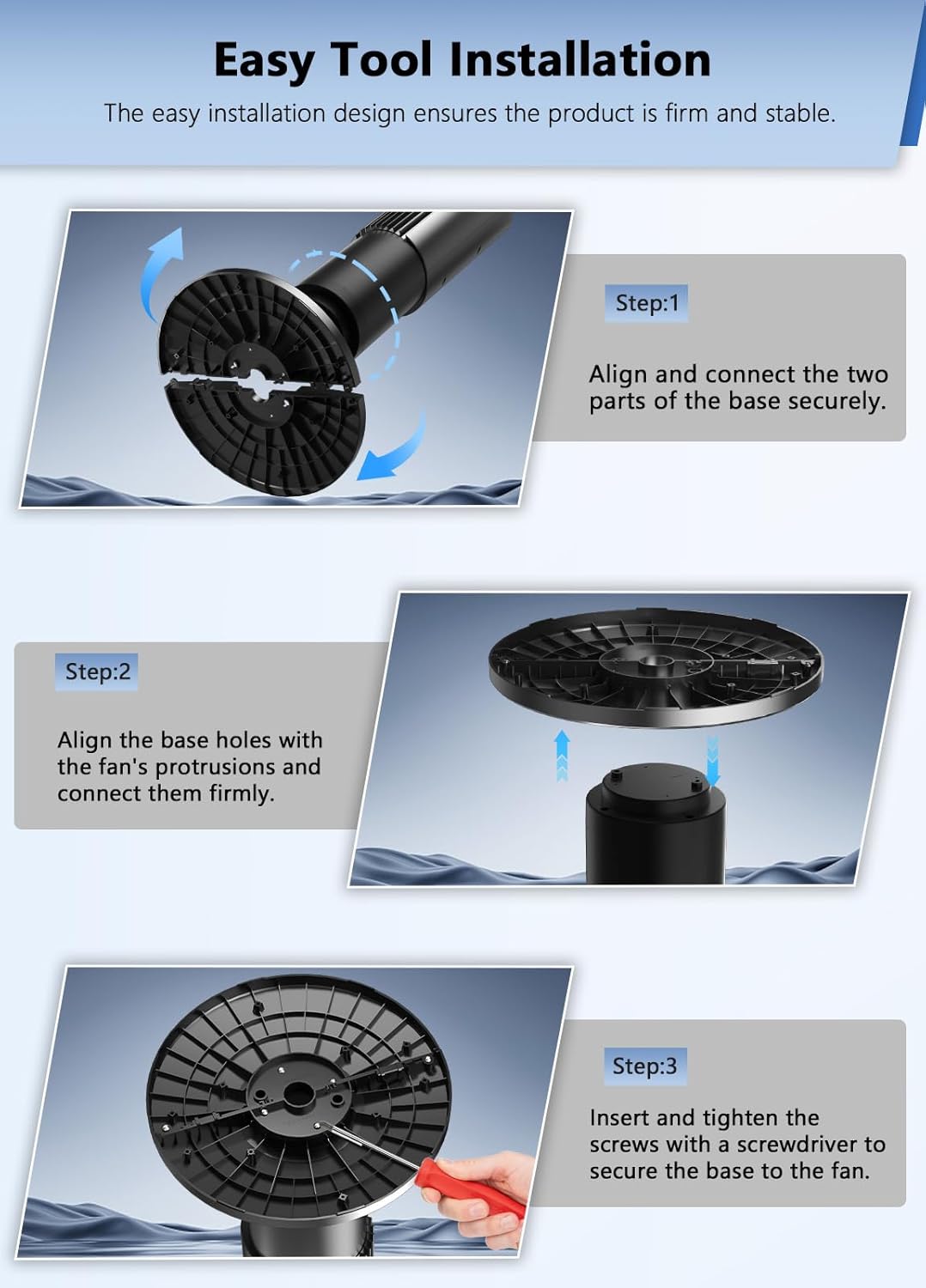
Image 8.1: Avamia NDTFT17RH-S Tower Fan Dimensions.
9. Garantía e soporte
Avamia products are manufactured to high-quality standards. For warranty information, technical support, or any questions regarding your product, please refer to the warranty card included in your package or contact Avamia customer service through the retailer where the product was purchased.