
Introdución
This manual provides essential information for the safe and effective use of your Minolta MNB5Z 56MP Dual Lens Point & Shoot Digital Camera. Please read this manual thoroughly before using the camera and keep it for future reference. The Minolta MNB5Z is designed to capture high-quality photos at 56MP and record videos in 5K Ultra HD, featuring a 5x optical zoom and a user-friendly 2.8-inch IPS touchscreen.
Información de seguridade
- Do not expose the camera to water or moisture. This camera is not water resistant.
- Evite deixar caer a cámara ou sometela a impactos fortes.
- Keep the camera away from direct sunlight, high temperatures, and dusty environments.
- Use only specified batteries and accessories.
- Non intente desmontar nin modificar a cámara. Encargue calquera mantemento a persoal cualificado.
- Manter fóra do alcance dos nenos.
Contido do paquete
Verifica que todos os elementos estean presentes no teu paquete:
- Minolta MNB5Z 56MP Digital Camera
- Cable de carga USB
- Batería recargable de iones de litio
- MicroSDHC Ultra 64GB Memory Card
- Trípode flexible para vlogging
- Carteira para tarxetas de memoria
- Lector de tarxetas USB (SD/microSD)
- Bolsa da cámara
- Kit de limpeza
- Corel Photo, Video, & Art Suite Deluxe Software (Download information may be included)
Configuración
1. Instalación da batería
- Localiza a tapa do compartimento da batería na parte inferior da cámara.
- Deslice o pestillo da tapa para abrir o compartimento.
- Insira a batería de ións de litio segundo os indicadores de polaridade (+/-).
- Peche a tapa do compartimento da batería firmemente ata que encaixe no seu lugar.
2. Instalación da tarxeta de memoria
The Minolta MNB5Z supports microSD and microSDHC cards up to 256GB.
- Open the battery compartment cover. The microSD card slot is usually located near the battery.
- Insert the microSD card with the gold contacts facing down, gently pushing until it clicks into place.
- Para retirala, empurre a tarxeta de novo ata que saia de golpe.
- Pecha a tapa do compartimento da batería.
3. Cargando a batería
- Connect the small end of the USB charging cable to the camera's USB port.
- Conecta o outro extremo do cable USB a un adaptador de corrente USB (non incluído) ou ao porto USB dun ordenador.
- The charging indicator light (CHG) will illuminate during charging and turn off when fully charged.
4. Acendido inicial
- Manteña premido o ON/OFF botón situado na parte superior da cámara.
- The camera will power on, and the display screen will activate.
- Follow any on-screen prompts for initial setup, such as setting the date and time.
Funcionamento da cámara
1. Disposición e controis da cámara
Familiarize yourself with the camera's buttons and touchscreen interface.

Imaxe: Traseira view of the Minolta MNB5Z camera, highlighting the touchscreen display and physical control buttons for navigation and function selection.
- Botón ON/OFF: Acende ou apaga a cámara.
- Botón do obturador: Press halfway to focus, fully to take a photo.
- Palanca de zoom: Controls the 5x optical zoom.
- Botón de modo: Switches between different shooting modes (Photo, Video, Playback, etc.).
- Directional Pad (DISP/OK): Navega polos menús e confirma as seleccións.
- Botón de reprodución: Entra no modo de reprodución para view fotos e vídeos.
- Botón de menú: Accede á configuración e ás opcións da cámara.
- Pantalla táctil IPS de 2.8 polgadas: For intuitive navigation and reviewing contido.
2. Facendo fotos
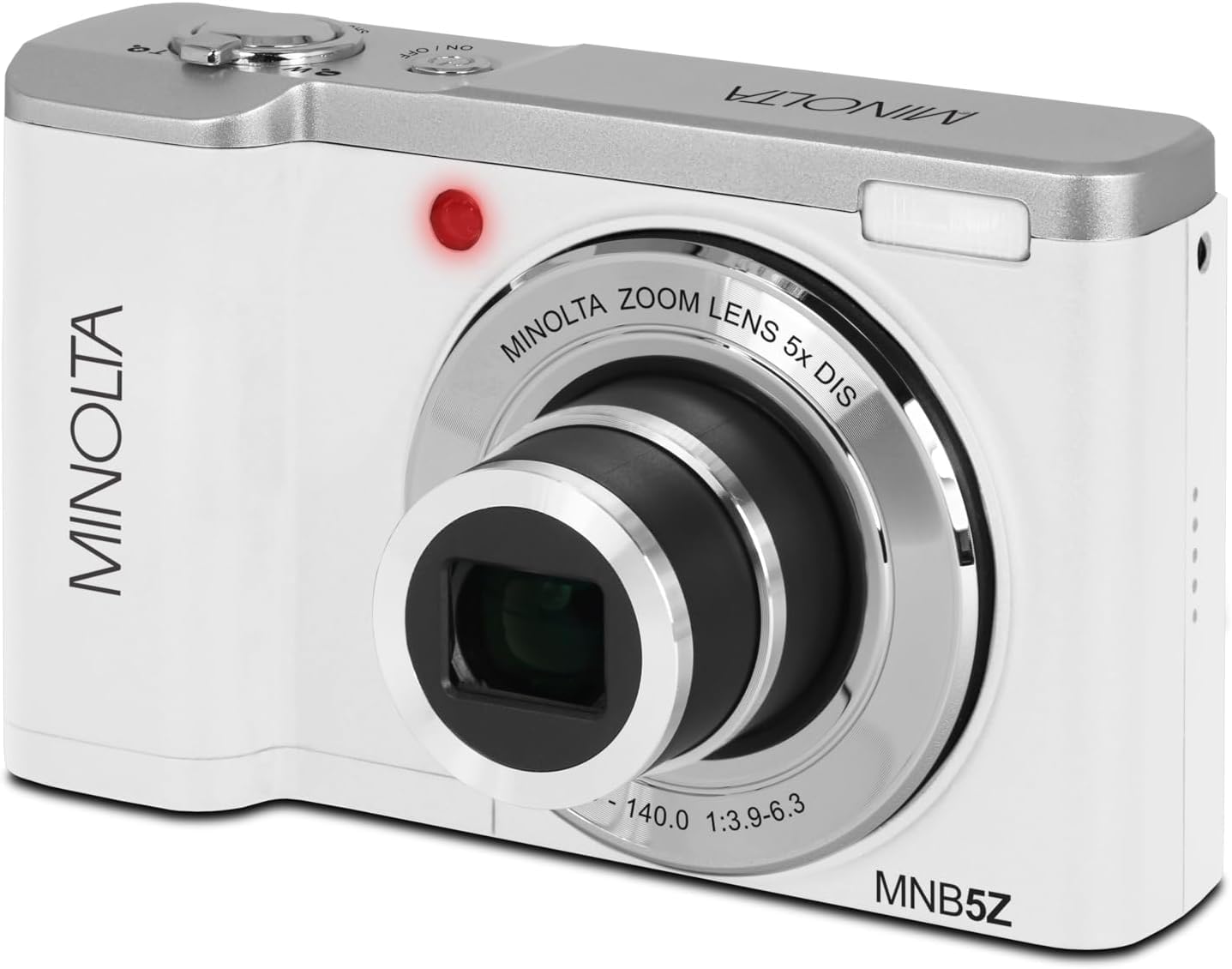
Imaxe: Fronte view of the Minolta MNB5Z camera, showing the lens extended for capturing images, with the Minolta branding visible.
- Turn on the camera and ensure it is in Photo mode.
- Encuadra a túa foto coa pantalla táctil IPS de 2.8 polgadas.
- Use a palanca do zoom para axustar o zoom óptico de 5x.
- Press the shutter button halfway down to allow the camera to focus. The focus indicator will confirm focus.
- Press the shutter button fully to capture the photo.
- Flash: The built-in flash can be set to Auto, On/Fill, or Off via the menu.
- Modos de disparo: Access various modes like Photo Burst, Time-Lapse, and Slow Motion via the Mode button or touchscreen menu.
3. Gravación de vídeos
- Turn on the camera and switch to Video mode using the Mode button.
- Frame your subject on the touchscreen.
- Press the shutter button to start recording. A recording indicator will appear on the screen.
- Preme de novo o botón disparador para deter a gravación.
- The camera records in 5K Ultra HD resolution and includes a built-in microphone for audio capture.
4. Reprodución
- Prema o botón Reprodución para entrar no modo de reprodución.
- Use the directional pad or swipe on the touchscreen to browse through your photos and videos.
- Prema o botón Aceptar para view un vídeo ou ampliar unha foto.
- Press the Playback button again to exit playback mode.
5. Configuración da cámara
- Press the Menu button to access camera settings.
- Use the directional pad or touchscreen to navigate through options such as resolution, white balance, ISO, exposure compensation, and color filters.
- Select an option and press OK to confirm or adjust.
- Preme de novo o botón Menú para saír do menú.
6. Conexión a un ordenador (USB)
- Asegúrese de que a cámara estea apagada.
- Conecte a cámara ao seu ordenador mediante o cable USB proporcionado.
- Turn on the camera. It should be recognized as a removable disk or media device.
- Agora podes transferir fotos e vídeos ao teu ordenador.
7. Conectividade Wi-Fi
The Minolta MNB5Z features Wi-Fi connectivity for wireless transfer of images and remote control via a compatible smartphone application (if available). Refer to the camera's on-screen menu for Wi-Fi setup instructions and pairing with your device.
Mantemento
1. Limpeza da cámara
- Use un pano suave e sen fiapos para limpar o corpo da cámara.
- For the lens and screen, use a specialized lens cleaning cloth and solution. Avoid harsh chemicals.
- Gently blow away dust from the lens surface before wiping.
2. Almacenamento

Imaxe: Fronte view of the Minolta MNB5Z camera with its lens retracted, demonstrating its compact form factor for easy storage in the included camera bag.
- When not in use, store the camera in the provided camera bag to protect it from dust and scratches.
- Retire a batería se a cámara non se utiliza durante un período prolongado.
- Store in a cool, dry place, away from extreme temperatures and humidity.
Resolución de problemas
| Problema | Solución |
|---|---|
| A cámara non se acende. | Ensure the battery is correctly inserted and fully charged. Try charging the battery for at least 2 hours. |
| Non se poden facer fotos/vídeos. | Check if the memory card is inserted correctly and has sufficient free space. Ensure the camera is in the correct mode (Photo/Video). |
| As imaxes son borrosas. | Ensure the lens is clean. Press the shutter button halfway to allow the camera to focus before fully pressing. Use digital image stabilization in shaky conditions. |
| O flash non funciona. | Check flash settings in the menu to ensure it is not set to 'Off'. |
| A cámara conxélase ou deixa de responder. | Remove the battery, wait a few seconds, and reinsert it to reset the camera. |
Especificacións
| Característica | Detalle |
|---|---|
| Nome do modelo | MNB5Z |
| Resolución fotográfica | 56 megapíxeles |
| Resolución de vídeo | 5K Ultra HD (30 FPS) |
| Zoom óptico | 5x |
| Estabilización da imaxe | Dixital |
| Tamaño da pantalla | Pantalla táctil IPS de 2.8 polgadas |
| Soporte para tarxetas de memoria | microSD, microSDHC (up to 256GB) |
| Conectividade | USB, Wi-Fi |
| Tipo de batería | Ion de litio |
| Flash | Built-In (Auto, On/Fill) |
| Tipo de sensor | CMOS |
| Velocidade de obturación mínima | 1/4000 seg |
| Soportado File Formatos | JPEG (Photos), MP4 (Videos) |
| Peso do elemento | 2.37 libras |
Garantía e Soporte
Minolta products are manufactured to the highest quality standards. For information regarding your product's warranty, please refer to the warranty card included in your package or visit the official Minolta support website. For technical assistance, troubleshooting, or service inquiries, please contact Minolta customer support.
Soporte en liña: Visit the official Minolta websitio web con preguntas frecuentes, descargas de controladores e información de contacto.
Atención ao cliente: Refer to your product packaging or the Minolta websitio web para obter os datos de contacto do servizo de atención ao cliente.