
Introdución
This manual provides essential information for the proper setup, operation, and maintenance of your My Arcade Sonic The Hedgehog Joystick Player. Please read this manual thoroughly before using the product to ensure a safe and enjoyable gaming experience.
Produto rematadoview
The My Arcade Sonic The Hedgehog Joystick Player is a portable retro gaming console featuring classic SEGA titles. It offers an authentic arcade experience with a joystick and dedicated buttons.
Características principais:
- Officially licensed SEGA game console.
- High-resolution 3.5-inch full-color display.
- Inclúe Sonic the Hedgehog e Sonic o ourizo 2.
- 3.5mm headphone jack for private audio.
- Altofalante incorporado con control de volume.
- Brillo da pantalla axustable.
- Powered by 4 AA batteries (not included) or USB-C cable (not included).
Compoñentes:
- Gaming Console Unit
- Joystick
- Action Buttons (A, B, C)
- Botón de inicio
- Credit/Start Button
- Control de volume (+/-)
- Control de brillo
- Conector para auriculares de 3.5 mm
- USB-C Power Input (5V IN)
- Battery Compartment (requires 4 AA batteries)

The My Arcade Sonic The Hedgehog Joystick Player, a portable retro gaming console.
Configuración
Powering the Console:
- Instalación da batería: Locate the battery compartment on the back of the console. Insert 4 AA batteries (not included), ensuring correct polarity.
- USB-C Power (Optional): Alternatively, connect a USB-C cable (not included) to the 5V IN port on the back of the console to power it.
Uso inicial:
- Peel off the protective screen sticker before use.
- Turn on the console using the power switch located on the back.

Traseira view of the console, highlighting the battery compartment, USB-C port, and headphone jack.
Instrucións de funcionamento
Game Selection and Start:
- Once powered on, use the joystick to navigate and select your desired game (Sonic the Hedgehog or Sonic o ourizo 2) from the main menu.
- Preme o START/CREDIT button to add virtual coins and begin the game.
- To skip the Sonic demo mode, press the START/CREDIT botón.
Controis:
- Joysticks: Controls character movement.
- Action Buttons (A, B, C): Perform in-game actions such as jumping or attacking.
- Control de volume (+/-): Adjust the sound level of the built-in speaker using the buttons on the back of the console.
- Brillo da pantalla: Adjust the screen brightness using the dedicated button on the back.
- Jack para auriculares: For private listening, connect 3.5mm headphones to the headphone jack on the back.
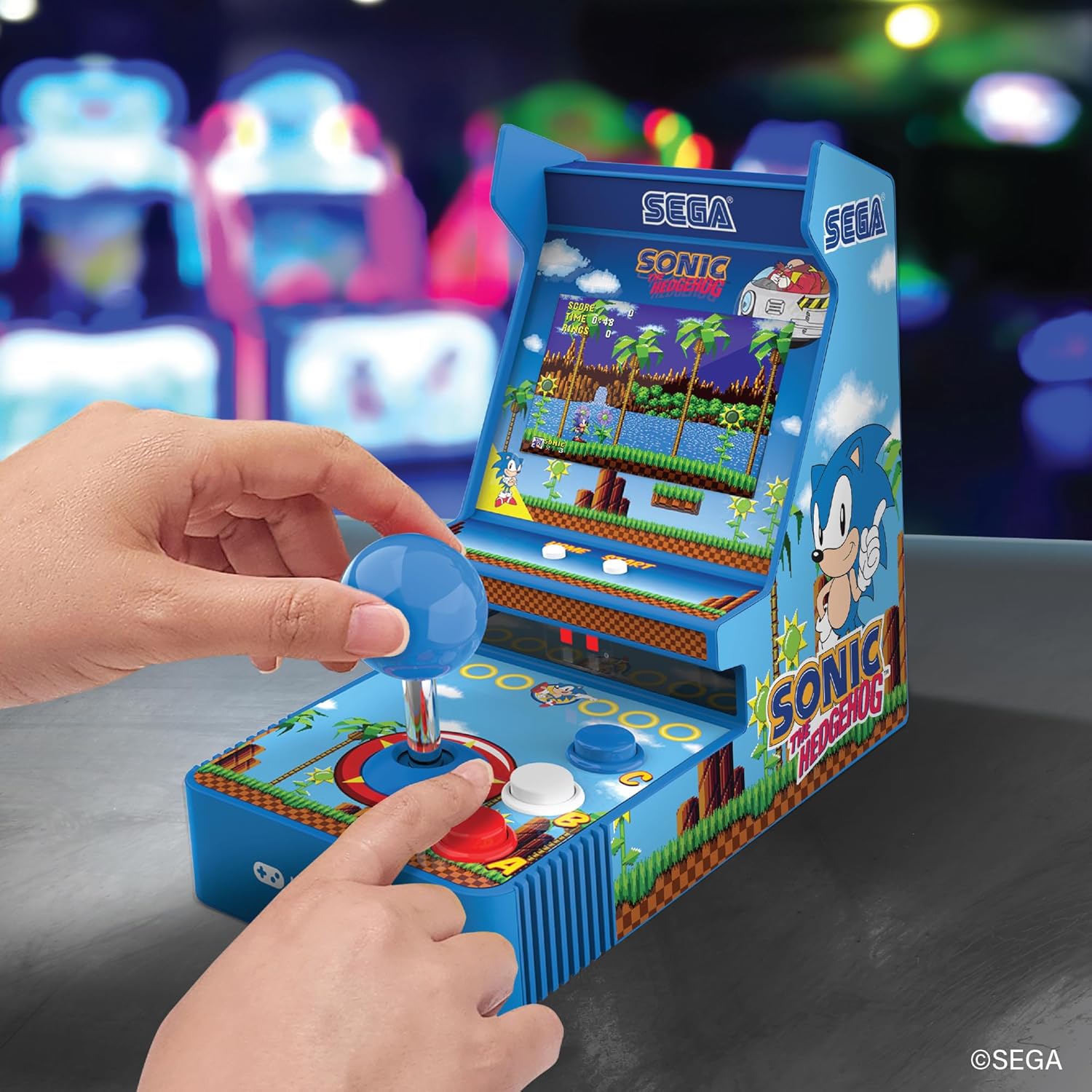
Fronte view of the console, showing the joystick, action buttons, and screen during gameplay.
Official video demonstrating the My Arcade Sonic Arcade Game in action, showcasinXogo e características de g.
Mantemento
To ensure the longevity of your My Arcade Sonic The Hedgehog Joystick Player, follow these simple maintenance guidelines:
- Keep the console clean by wiping it with a soft, dry cloth. Avoid using abrasive cleaners or solvents.
- Garda a consola nun lugar fresco e seco, lonxe da luz solar directa e de temperaturas extremas.
- If not in use for an extended period, remove the AA batteries to prevent leakage.
Resolución de problemas
If you encounter any issues with your My Arcade Sonic The Hedgehog Joystick Player, refer to the following common solutions:
- A consola non se acende: Ensure that fresh AA batteries are correctly installed or that the USB-C cable is securely connected to a power source.
- Game does not start from demo mode: Preme o START/CREDIT button to exit demo mode and begin gameplay.
- Sen son: Check the volume control buttons on the back of the console. If headphones are connected, ensure they are fully plugged in and functioning correctly.
- A pantalla está escura: Adjust the screen brightness using the dedicated button on the back of the console.
If problems persist, please contact My Arcade customer support for further assistance.
Especificacións
| Característica | Detalle |
|---|---|
| Dimensións do produto | 4 cm de longo x 7.6 cm de ancho x 6.8 cm de alto |
| Tipo de controlador | Joystick |
| Peso do elemento | 0.63 quilogramos (1.39 libras) |
| Tamaño da pantalla | 3.5 polgadas |
| Fonte de enerxía | 4 AA batteries (not included) or USB Type C (not included) |
| Interface de hardware | USB tipo C |
| Tipo de visualización | LCD |
| Material | Plástico |
| Capacidade de almacenamento da memoria | 4 MB |
| Número de modelo | DGUNL-7157 |
| UPC | 845620071579 |
Información de seguridade
- Non apto para nenos menores de 3 anos debido ás pezas pequenas.
- Supervise sempre os nenos pequenos durante o uso.
- Do not expose the console to water or excessive moisture.
- Avoid dropping or subjecting the console to strong impacts.
- Use only recommended battery types and ensure correct installation.
Garantía e Soporte
For warranty information or technical support, please refer to the official My Arcade websitio web ou póñase en contacto co seu departamento de atención ao cliente. Garde o recibo da compra como proba de compra.