
1. Introdución
Welcome to the user manual for your new Xiaomi Redmi Note 14 4G LTE smartphone. This guide provides essential information to help you set up, operate, and maintain your device. The Redmi Note 14 4G LTE is designed to offer a balanced experience with strong performance, a high-quality camera, and extended battery life.
Key features include a vibrant 6.67-inch AMOLED display with a 120Hz refresh rate, a powerful Helio G99-Ultra processor, and a versatile 108MP AI camera system. Its durable design features Corning Gorilla Glass 5 for enhanced screen protection and supports touch control even with wet fingers.
2. Que hai na caixa
Upon unboxing your Xiaomi Redmi Note 14 4G LTE, please ensure all the following items are present:
- Xiaomi Redmi Note 14 4G LTE Smartphone
- Adaptador de parede
- Cable USB
- Expulsor da bandexa SIM
- Cargador de coche rápido

Imaxe: Fronte view of the Xiaomi Redmi Note 14 4G LTE smartphone.
3. Guía de configuración
3.1. Instalación da tarxeta SIM
The Redmi Note 14 4G LTE supports dual SIM cards or one SIM and a MicroSD card. To install your SIM card(s):
- Localiza a bandexa da tarxeta SIM no lateral do teu dispositivo.
- Insira a ferramenta de expulsión da bandexa da SIM no pequeno orificio que hai xunto á bandexa e empurre suavemente ata que esta saia.
- Coloque a(s) tarxeta(s) nano-SIM e/ou tarxeta(s) microSD nas ranuras designadas da bandexa. Asegúrese de que os contactos dourados estean cara abaixo.
- Empuxa coidadosamente a bandexa de novo no dispositivo ata que faga clic.
3.2. Acendido e configuración iniciais
Para acender o dispositivo por primeira vez:
- Manteña premido o botón de acendido (situado no lado dereito) ata que apareza o logotipo de Xiaomi.
- Sigue as instrucións na pantalla para seleccionar o teu idioma, rexión e conectarte a unha rede wifi.
- Inicia sesión coa túa conta de Google ou crea unha nova para acceder aos servizos de Google e a Play Store.
- Set up your preferred screen lock method (PIN, pattern, password, fingerprint, or face unlock).
- Complete the setup process to begin using your device.

Imaxe: Lateral view of the Xiaomi Redmi Note 14 4G LTE, highlighting the SIM tray and power/volume buttons.
4. Funcionamento do teu dispositivo
4.1. Características da pantalla
The Redmi Note 14 4G LTE features a 6.67-inch AMOLED display with a resolution of 2400 x 1080 pixels. Enjoy smooth visuals with a 120Hz refresh rate and responsive interactions with a 240Hz touch sampling rate. The display offers up to 1800 nits peak brightness, ensuring clear visibility even in direct sunlight. It is protected by Corning Gorilla Glass 5, providing enhanced scratch resistance. The device also supports accurate touch recognition even with wet or oily fingers.
4.2. Rendemento
Powered by the Helio G99-Ultra processor (6nm manufacturing process, Octa-core up to 2.2GHz) and Mali-G57 MC2 GPU, coupled with 6GB of RAM, the device handles daily tasks, multitasking, and moderate gaming with ease. Apps open quickly, and switching between them is seamless, providing a fluid user experience.
4.3. Sistema de cámaras
Captura fotos e vídeos impresionantes co versátil sistema de tres cámaras:
- Cámara principal de 108 MP: Features 0.64µm pixel size (9-in-1 to 1.92µm), f/1.7 aperture, 6P lens, and a 1/1.67-inch sensor size for detailed and vibrant images in various lighting conditions.
- Cámara de profundidade de 2MP: f/2.4 aperture for enhanced portrait mode with natural background blur.
- Cámara macro de 2MP: f/2.4 aperture for close-up shots with fine detail.
- Cámara frontal: 20MP sensor (1/4-inch sensor size, f/2.2 aperture, 4P lens) for high-quality selfies and video calls.
Video recording capabilities include 1080p at 60fps/30fps and 720p at 30fps for both rear and front cameras.
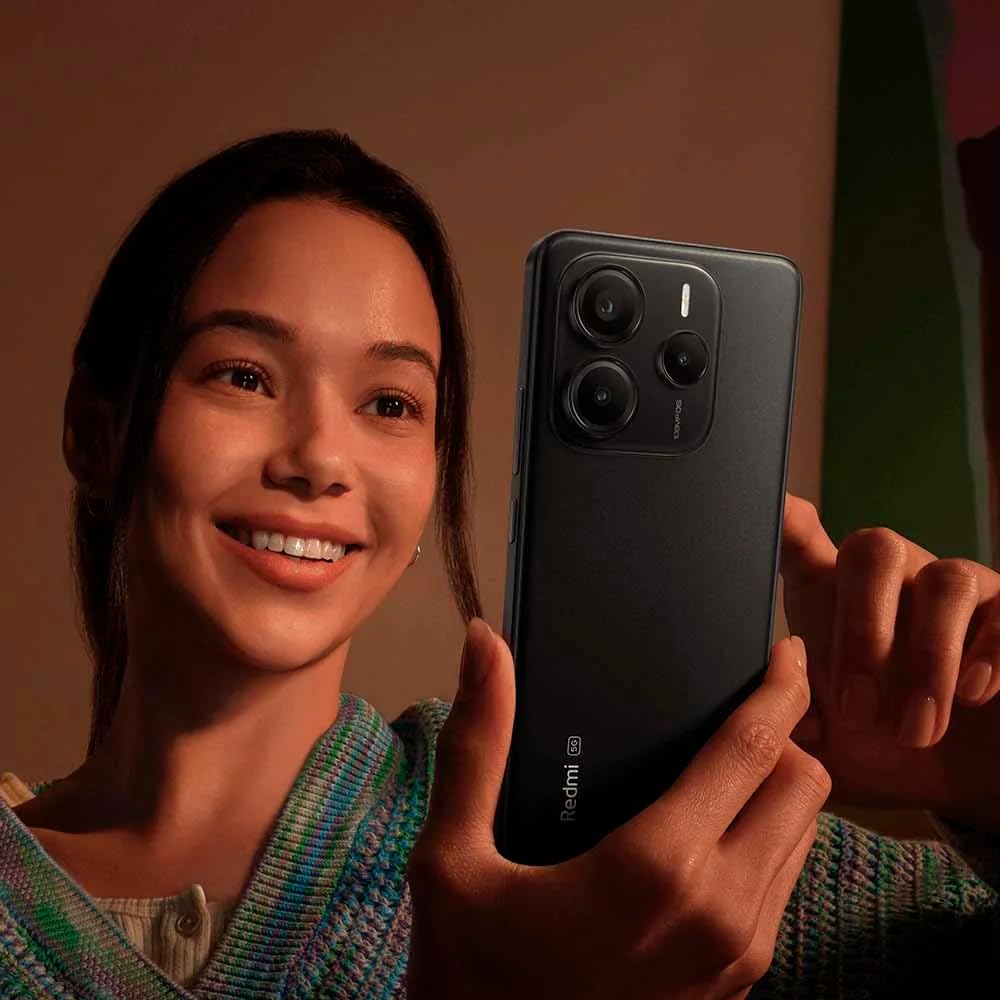
Image: A user holding the Xiaomi Redmi Note 14 4G LTE, demonstrating its camera use.
4.4. Duración da batería
Equipped with a 5500 mAh Lithium Polymer battery, the Redmi Note 14 4G LTE provides extended usage on a single charge, easily lasting through a full day of heavy use. The device supports fast charging to quickly get you back to full power.
5. Conectividade
The Redmi Note 14 4G LTE offers comprehensive connectivity options:
- Rede: Supports 4G LTE (Bands 1/2/3/4/5/7/8/20/28, TDD Band 38/40/41), 3G WCDMA (Bands 2/4/5/8), and 2G GSM (Quad Band). Designed for use on T-Mobile, Mint, Tello, or any T-Mobile network in the USA.
- Wi-Fi: 802.11a/b/g/n/ac, supports 2.4GHz and 5GHz Wi-Fi, and Wi-Fi Direct.
- Bluetooth: Version 5.3 for efficient wireless connections.
- GPS: L1, A-GPS supplementary positioning, GLONASS (G1), BDS (B1I), Galileo E1, Electronic compass, Wireless network, Data network, and Sensor Assisted Positioning.
- Sensores: Proximity sensor, Ambient light sensor, Accelerometer, Electronic compass, IR blaster, Gyroscope.
- Conector de audio: 3.5 mm.
6. Especificacións
| Característica | Especificación |
|---|---|
| Marca | Xiaomi |
| Nome do modelo | Nota 14 4G |
| Número de modelo do artigo | 24117RN76L |
| Sistema Operativo | Hyper OS baseado en Android 14 |
| Tamaño de visualización | AMOLED de 6.67 polgadas |
| Resolución | 2400 x 1080 |
| Taxa de actualización | Ata 120 Hz |
| Brillo máximo | 1800 nits |
| Procesador | Helio G99-Ultra (Octa-core, up to 2.2GHz) |
| RAM | 6 GB |
| Capacidade de almacenamento da memoria | 128 GB |
| Cámara principal | 108MP + 2MP + 2MP Triple Camera |
| Cámara frontal | 20 MP |
| Capacidade da batería | 5500 millónsamp Horas (mAh) |
| Conectividade | 4G LTE, Wi-Fi (802.11a/b/g/n/ac), Bluetooth 5.3, GPS |
| Características especiais | Dual SIM, Corning Gorilla Glass 5, Wet Finger Touch Control |
| Dimensións do produto | 5.91 x 3.94 x 5.91 polgadas |
| Peso do elemento | 13 onzas |
| Cor | Negro |
7. Mantemento
To ensure the longevity and optimal performance of your Xiaomi Redmi Note 14 4G LTE, follow these maintenance guidelines:
- Mantéñase limpo: Regularly wipe your phone with a soft, lint-free cloth. Avoid harsh chemicals or abrasive materials.
- Actualizacións de software: Install system updates as they become available to benefit from the latest features, security patches, and performance improvements.
- Coidado da batería: Avoid extreme temperatures. Do not let the battery drain completely frequently, and avoid keeping it at 100% charge for extended periods.
- Xestión de almacenamento: Limpar periodicamente o innecesario files, cache, and uninstall unused apps to free up storage space and maintain smooth operation.
- Protexer contra danos: Use a protective case and screen protector to guard against drops and scratches.
8 Solución de problemas
Se tes problemas co teu dispositivo, consulta os seguintes pasos comúns para a resolución de problemas:
- O dispositivo non se acende: Ensure the battery is charged. Connect the phone to its charger for at least 15 minutes, then try powering it on again. If it still doesn't turn on, perform a forced restart by holding the Power button for about 10-15 seconds.
- Aplicacións que se bloquean ou conxelan: Close the problematic app and reopen it. If the issue persists, clear the app's cache and data in Settings > Apps. As a last resort, uninstall and reinstall the app.
- Conectividade de rede deficiente: Check if Airplane Mode is off. Restart your device. Verify your SIM card is properly inserted. If issues persist, contact your mobile carrier.
- Esgotando a batería rapidamente: Reduce screen brightness, disable unused features like Bluetooth or GPS, and close background apps. Check battery usage in Settings to identify power-hungry apps.
- Pantalla táctil sen resposta: Restart the device. If the issue is localized, ensure the screen is clean and free of moisture. If the problem persists, a factory reset might be necessary (back up your data first).
9. Garantía e soporte
Your Xiaomi Redmi Note 14 4G LTE comes with a standard manufacturer's warranty. Please refer to the warranty card included in your product packaging for specific terms and conditions, including warranty period and coverage details. Keep your proof of purchase for warranty claims.
For further assistance, technical support, or to explore additional products, please visit the official Xiaomi websitio web ou póñase en contacto co seu servizo de atención ao cliente. Tamén pode visitar o Tenda Xiaomi en Amazon para obter máis información e ofertas de produtos.