
XIAOMI X7 Pro
POCO X7 Pro 5G Smartphone User Manual
Comprehensive guide for your Xiaomi POCO X7 Pro 5G
1. Introdución
Welcome to the user manual for your new Xiaomi POCO X7 Pro 5G smartphone. This guide provides detailed instructions on how to set up, operate, maintain, and troubleshoot your device. The POCO X7 Pro 5G is equipped with a powerful Dimensity 8400-Ultra CPU, ample RAM and storage options (8GB/12GB RAM, 256GB/512GB ROM), a long-lasting 6000mAh battery with 90W HyperCharge, and a versatile camera system featuring a 50 MP main camera with OIS, an 8 MP ultra-wide camera, and a 20 MP front camera. It also includes advanced features like NFC, Bluetooth 5.4, dual-frequency GPS, an IR blaster, dual speakers, and IP68 water and dust resistance.

Figura 1.1: Traseira view of the POCO X7 Pro 5G, highlighting its sleek design and camera array.
2. Configuración
2.1 Desembalaxe e contido da embalaxe
Ao abrir o paquete, asegúrese de que estean presentes todos os compoñentes:
- Teléfono intelixente POCO X7 Pro
- Adaptador de alimentación
- Cable USB Tipo-C
- Ferramenta de expulsión de SIM
- Funda protectora
- Información de seguridade
- Guía de inicio rápido e tarxeta de garantía
2.2 Instalación da tarxeta SIM e da microSD
To install your SIM card(s) and an optional microSD card:
- Localiza a bandexa da tarxeta SIM no lateral do dispositivo.
- Insert the SIM ejection tool into the small hole next to the tray and press firmly until the tray pops out.
- Tire da bandexa con coidado.
- Coloque a(s) tarxeta(s) nano-SIM e/ou tarxeta(s) microSD nas ranuras designadas da bandexa, asegurándose de que estean orientadas correctamente.
- Empurre suavemente a bandexa cara atrás na ranura ata que encaixe no seu lugar.

Figure 2.1: Right side of the POCO X7 Pro 5G, indicating button placement.

Figura 2.2: Abaixo view of the POCO X7 Pro 5G, showing the charging port and speaker.
2.3 Acendido e configuración iniciais
Para acender o dispositivo por primeira vez:
- Press and hold the Power button (located on the right side) until the POCO logo appears on the screen.
- Siga as instrucións en pantalla para completar a configuración inicial, incluíndo a selección do idioma, a conexión wifi, o inicio de sesión na conta de Google e a configuración de seguridade.
2.4 Carga do dispositivo
Your POCO X7 Pro 5G supports 90W HyperCharge for rapid charging.
- Connect the USB Type-C cable to the charging port at the bottom of the phone and the other end to the power adapter.
- Enchufe o adaptador de alimentación a unha toma de corrente.
- It is recommended to fully charge the device before its first use.
3. Operating Your POCO X7 Pro 5G
3.1 Navegación básica
The POCO X7 Pro 5G features an intuitive AMOLED touchscreen display for navigation.
- Toca: Selecciona un elemento ou abre unha aplicación.
- Pasar o dedo: Desprazarse por pantallas ou listas.
- Beliscar: Achegar ou afastar imaxes e web páxinas.
- Botón de encendido: Press to lock/unlock the screen, press and hold to power off or restart.
- Botóns de volume: Adjust media volume, ringtone volume, or notification volume.
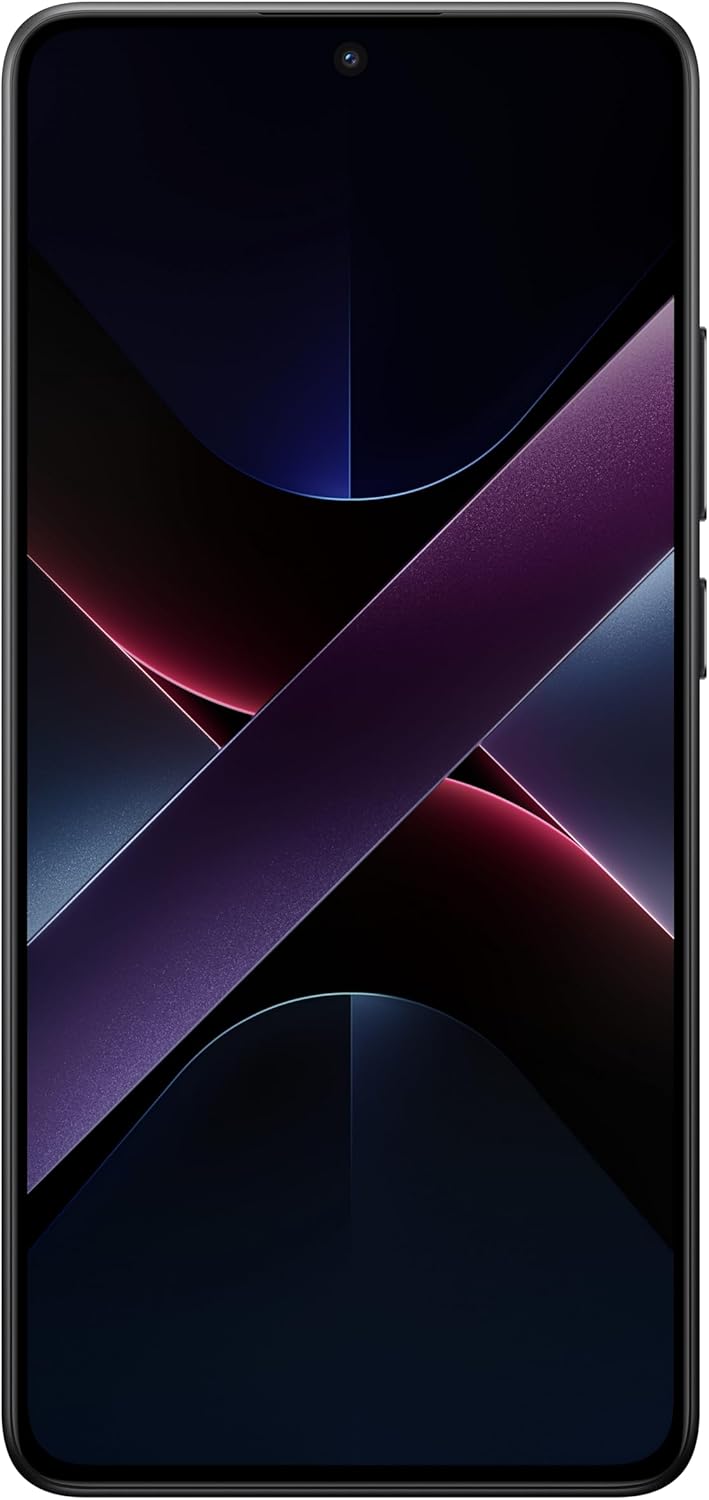
Figura 3.1: Fronte view do POCO X7 Pro 5G, mostraasing a súa vibrante pantalla.
3.2 Uso da cámara
Capture high-quality photos and videos with the POCO X7 Pro 5G's advanced camera system.
- Abre a aplicación Cámara desde a pantalla de inicio ou o caixón de aplicacións.
- Switch between the 50 MP main camera (with OIS), 8 MP ultra-wide camera, and 20 MP front camera using the on-screen controls.
- Toca o botón do obturador para sacar unha foto.
- Cambia ao modo vídeo para gravar vídeos.
- Explore various modes such as Portrait, Night, Pro, and more for enhanced photography.

Figura 3.2: Parte traseira angulada view, highlighting the dual camera setup.
3.3 Conectividade
O teu dispositivo admite unha variedade de opcións de conectividade:
- Datos móbiles 5G: Enjoy high-speed internet connectivity.
- Wi-Fi: Conéctate a redes sen fíos para acceder a Internet. Vai a Configuración > Wi-Fi.
- Bluetooth 5.4: Pair with wireless headphones, speakers, and other Bluetooth devices. Go to Settings > Bluetooth.
- NFC: Use for contactless payments and quick pairing with compatible devices.
- GPS: Utilize dual-frequency GPS for accurate location services and navigation.
- Blaster IR: Controla electrodomésticos compatibles como televisores e aparellos de aire acondicionado.
3.4 Xestión da batería
The POCO X7 Pro 5G is equipped with a 6000mAh battery and 90W HyperCharge technology.
- To check battery usage, go to Settings > Battery.
- Activa o modo Aforro de batería para prolongar a duración da batería cando sexa necesario.
- For optimal battery health, avoid extreme temperatures and use the provided charger.
3.5 Características de seguridade
Protect your device and data with various security options:
- Desbloqueo de impresión dixital: Register your fingerprints for quick and secure access.
- Desbloqueo facial: Use facial recognition to unlock your phone.
- PIN, Pattern, and Password: Set up a secure lock screen method.
- Buscar o meu dispositivo: Enable this feature to locate, lock, or erase your device remotely if it's lost or stolen.
4. Mantemento e coidados
4.1 Limpeza do dispositivo
To keep your POCO X7 Pro 5G in optimal condition:
- Usa un pano suave e sen fiapos para limpar a pantalla e a carcasa.
- Evita o uso de produtos químicos agresivos, produtos de limpeza abrasivos ou aerosois.
- Para manchas difíciles, lixeiramente dampen o pano con auga.
4.2 Actualizacións de software
Regular software updates provide new features, performance improvements, and security patches.
- Ensure your device is connected to Wi-Fi and has sufficient battery before performing an update.
- Go to Settings > About phone > System update to check for and install available updates.
4.3 Xestión do almacenamento
With 256GB or 512GB of internal storage, you have ample space, but managing it is still important.
- Eliminar regularmente o innecesario files, fotos e vídeos.
- Desinstalar as aplicacións non utilizadas.
- Utilize cloud storage services to back up large files.
- If you have a microSD card, move media files to it to free up internal storage.
4.4 Resistencia á auga e ao po (IP68)
The POCO X7 Pro 5G is rated IP68 for water and dust resistance, meaning it is protected against dust ingress and can withstand immersion in up to 1.5 meters of fresh water for up to 30 minutes. However, this is not permanent and resistance might decrease over time with normal wear. Avoid exposing the device to saltwater, chlorinated water, or other liquids. If the device gets wet, dry it thoroughly before charging.
5 Solución de problemas
This section addresses common issues you might encounter with your POCO X7 Pro 5G.
| Problema | Posible Solución |
|---|---|
| O dispositivo non se acende | Ensure the battery is charged. Connect to the charger for at least 15 minutes. If it still doesn't turn on, try holding the Power button for 10-15 seconds to force a restart. |
| A batería esgotando rapidamente | Check battery usage in Settings to identify power-hungry apps. Reduce screen brightness, disable unnecessary features (GPS, Bluetooth, Wi-Fi when not in use), and close background apps. Ensure software is up to date. |
| Connectivity issues (Wi-Fi, Bluetooth, 5G) | Toggle Wi-Fi/Bluetooth/Mobile Data off and on. Restart the phone. For Wi-Fi, forget the network and reconnect. For Bluetooth, unpair and re-pair the device. Ensure your SIM card is properly inserted for 5G. |
| As aplicacións fallan ou conxélanse | Force close the app and reopen it. Clear the app's cache and data in Settings > Apps. Ensure the app and your phone's operating system (Android 15) are updated to the latest versions. Restart the device. |
| Sobrequecemento do dispositivo | Close background applications, especially resource-intensive ones like games. Avoid using the phone while charging, especially with HyperCharge. Reduce screen brightness. If using a protective case, remove it temporarily. Ensure no apps are running excessively in the background (e.g., fitness apps as noted in some user reviews). |
| A cámara non funciona | Restart the camera app. Clear the camera app's cache and data. Ensure there are no physical obstructions on the camera lenses. Restart the phone. |
6. Especificacións técnicas
Below are the key technical specifications for the POCO X7 Pro 5G (Model: X7 Pro).
| Característica | Especificación |
|---|---|
| Marca | XIAOMI |
| Nome do modelo | Poco X7 Pro |
| Certificación | ANATEL: 092432409185/Model: 24094RAD4G |
| Ano | 2025 |
| RAM | 12 GB (also available in 8 GB) |
| Almacenamento interno | 256 GB (also available in 512 GB) |
| Sistema Operativo | Android 15 |
| Tamaño da pantalla | 6.67 polgadas |
| Tipo de visualización | AMOLED |
| Capacidade da batería | 6000 mAh (típico) |
| Cargando | Hipercarga de 90 W |
| Cámara principal | 50 MP con OIS |
| Cámara ultra gran angular | 8 MP |
| Cámara frontal | 20 MP |
| Conectividade | 5G, Bluetooth 5.4, Dual-frequency GPS, NFC |
| Resistencia á auga e ao po | IP68 |
| Peso | 400 g |
| Dimensións (paquete) | 17.8 x 9.3 x 5.2 cm |
| Compoñentes incluídos | POCO X7 Pro, Adapter, USB Type-C Cable, SIM Ejection Tool, Protective Case, Safety Info, Quick Start Guide, Warranty Card |
7. Garantía e soporte
7.1 Garantía do fabricante
The POCO X7 Pro 5G comes with a manufacturer's warranty of three months. Please refer to the warranty card included in your package for specific terms and conditions. This warranty covers manufacturing defects and malfunctions under normal use.
7.2 Atención ao cliente
For technical assistance, troubleshooting beyond this manual, or warranty claims, please contact Xiaomi customer support through their official websitio web ou centros de servizo autorizados. Garda á man o comprobante de compra cando contactes co servizo de asistencia.
For regulatory information regarding the product's certification, you can access the ANATEL system at: sistemas.anatel.gov.br/sch
Ask a question about this manual
Ask about setup, troubleshooting, compatibility, parts, safety, or missing instructions. Manuals+ will review the question and use this page’s manual context to help answer it.