
1. Introdución
Thank you for choosing the VIGORWORK 1 Din 12V Car Radio. This versatile audio system is designed to enhance your in-car entertainment experience, offering a wide range of features including DVD/VCD/CD/MP3 playback, Bluetooth connectivity for hands-free calls and audio streaming, FM radio, and support for USB, SD card, and AUX input. This manual provides detailed instructions to help you install, operate, and maintain your new car radio.
2. Contido do paquete
Please check the package contents carefully upon unpacking. If any items are missing or damaged, contact your retailer.
- VIGORWORK 1 Din Car Radio Unit
- Arnés de cables de alimentación e altofalantes
- Control remoto
- Installation Removal Keys (2 pieces)
- Manual de usuario

Image: Contents of the VIGORWORK car radio package, including the main unit, wiring, remote, removal keys, and manual.
3. Produto rematadoview
Familiarize yourself with the main components and controls of your car radio.
Deseño do panel frontal

Imaxe: Fronte view of the VIGORWORK car radio, highlighting the display, control knob, buttons (PWR, MUTE, BND, MOD, CLK), USB port, SD card slot, and AUX input.
- Power (PWR) / Mute: Turns the unit on/off or mutes/unmutes audio.
- Botón de volume: Adjusts audio volume. Press to select menu options.
- Band (BND): Switches between FM radio bands (FM1, FM2, FM3).
- Mode (MOD): Cycles through input sources (Radio, DVD/CD, USB, SD, AUX, Bluetooth).
- Reloxo (CLK): Displays or sets the time.
- Porto USB: Connect USB flash drives for media playback or charging.
- Ranura para tarxetas SD: Insira tarxetas SD para reproducir contido multimedia.
- Entrada AUX: Conecta dispositivos de son externos mediante un conector de 3.5 mm.
- Ranura do disco: Insert DVDs or CDs for playback.

Image: A smartphone screen displaying an incoming call next to the car radio, illustrating the intelligent Bluetooth call feature for convenient call management.

Image: A collage showing various car entertainment scenarios, including video playback, Bluetooth hands-free calling, listening to radio, and cell phone charging, demonstrating the unit's versatility.

Image: An infographic highlighting eight key advantages of the car radio, such as professional hardware, Bluetooth, DVD player, radio reception, U disk/SD card play, 52W*4 power output, USB car charger, and sound quality enhancement.
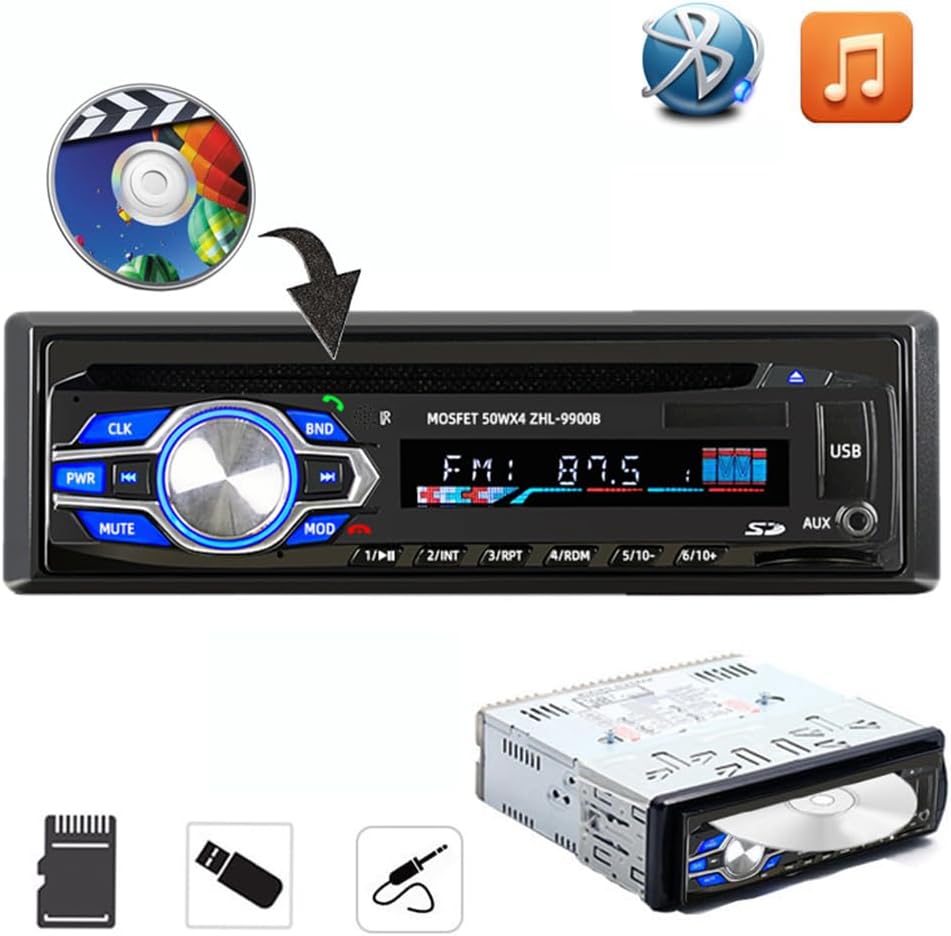
Image: The car radio unit with icons representing various media playback options, including CD/DVD, Bluetooth, and music notes, indicating its compatibility with different audio sources.

Image: The car radio unit with arrows pointing to the USB port and SD card slot, emphasizing its support for vast USB/SD storage equipment for convenient music playback.

Image: A hand holding a smartphone connected to the car radio via USB, illustrating the unit's ability to provide 5V USB charging for mobile devices.
Dimensións

Image: The car radio unit with dimensions labeled: 18.8cm (7.4 inches) width and 5.8cm (2.3 inches) height, indicating its standard 1 Din size.
4. Configuración e instalación
This car radio is designed for easy installation in most vehicles. It is recommended to have the installation performed by a qualified professional if you are unsure about the wiring or mounting process.
Pasos de instalación:
- Desconectar batería: Antes de arrincar, desconecte o terminal negativo da batería do seu vehículo para evitar curtocircuítos.
- Eliminar a unidade antiga: Carefully remove your existing car radio from the dashboard.
- Conectar cableado: Connect the provided wiring harness to your vehicle's wiring. Ensure correct connections for power (constant 12V, accessory 12V, ground), speaker outputs, and antenna. Refer to your vehicle's wiring diagram if necessary.
- Unidade de montaxe: Slide the new VIGORWORK car radio into the dashboard opening until it clicks into place. Use the provided removal keys to secure or remove the unit.
- Volver conectar a batería: Volva conectar o terminal negativo da batería do seu vehículo.
- Funcionalidade de proba: Turn on the unit and test all functions (radio, CD/DVD, USB, Bluetooth, AUX) to ensure proper operation.
5. Instrucións de funcionamento
5.1 Acendido/apagado e selección de modo
- Preme o PWR botón para acender a unidade. Mantén premido para apagar.
- Preme o MOD button repeatedly to cycle through available input sources: FM Radio, DVD/CD, USB, SD, AUX, Bluetooth.
5.2 Conexión Bluetooth
The unit features built-in Bluetooth for hands-free calling and audio streaming.
- Ensure the car radio is powered on and in Bluetooth mode (select using MOD botón).
- No teu dispositivo móbil, activa o Bluetooth e busca os dispositivos dispoñibles.
- Select "VIGORWORK" or a similar name from the list.
- Once paired, the unit will confirm the connection. You can now make/receive calls and stream audio.
- Use the car radio's controls or remote to answer/end calls, adjust volume, and control music playback.
5.3 Funcionamento da radio FM
- Preme MOD to select FM radio mode.
- Preme BND to switch between FM1, FM2, and FM3 bands. Each band can store 6 stations, totaling 18 presets.
- Usa o << e >> botóns para sintonizar ou buscar emisoras manualmente.
- Para buscar e gardar emisoras automaticamente, manteña premido o botón BND botón.
- To recall a preset station, press the corresponding number button (1-6).
Reprodución de tarxetas USB/SD de 5.4
- Insira unha unidade flash USB no porto USB ou unha tarxeta SD na ranura para tarxetas SD.
- The unit will automatically switch to USB/SD mode and begin playing compatible audio/video files.
- Usa o << e >> botóns para a navegación polas pistas.
- The unit supports MP3, WMA, and other common audio formats, as well as DIVX and MPEG4 video formats.
5.5 Reprodución de DVD/CD
- Gently insert a DVD or CD into the disc slot with the label side facing up.
- The unit will automatically load the disc and begin playback.
- Use the control buttons or remote for playback control (play, pause, skip, fast forward/rewind).
5.6 Entrada AUX
- Conecte un dispositivo de son externo (por exemplo, un teléfono intelixente ou un reprodutor de MP3) á toma de entrada AUX mediante un cable de son de 3.5 mm.
- Preme MOD para seleccionar o modo AUX.
- Audio from the connected device will now play through the car radio's speakers. Control playback from the external device.
6. Mantemento
Un mantemento axeitado garante a lonxevidade e o rendemento óptimo da radio do teu coche.
- Limpeza: Use un pano suave e seco para limpar o panel frontal. Para a sucidade persistente,ampen the cloth slightly with water. Do not use abrasive cleaners or solvents.
- Coidado do disco: Manexa os discos polos bordos. Mantelos limpos e sen rabuñaduras. Garda os discos nas súas caixas cando non os uses.
- Temperatura: Evite expoñer a unidade a temperaturas extremas, á luz solar directa durante períodos prolongados ou a alta humidade.
- Ventilación: Ensure the unit has adequate ventilation to prevent overheating. Do not block ventilation openings.
7 Solución de problemas
Se tes problemas coa radio do teu coche, consulta os seguintes problemas e solucións comúns:
| Problema | Causa posible | Solución |
|---|---|---|
| Sen Poder | Fusible fundido; Cableado incorrecto; Conexión solta. | Check vehicle's fuse box and unit's fuse; Verify wiring connections (constant 12V, accessory 12V, ground); Ensure all connectors are secure. |
| Sen son | Volume demasiado baixo; Función de silenciamento activa; Cableado incorrecto do altofalante; Altofalantes danados. | Increase volume; Press MUTE button; Check speaker wire connections; Test with known good speakers. |
| Bluetooth non se conecta | Bluetooth non activado no dispositivo; A unidade non está en modo de emparellamento; Interferencia. | Ensure Bluetooth is on and discoverable on your phone; Select Bluetooth mode on the unit; Move closer to the unit; Try unpairing and re-pairing. |
| Disc Error / Disc Not Playing | Dirty or scratched disc; Incorrect disc format; Disc inserted incorrectly. | Clean the disc; Ensure disc format is compatible (DVD, VCD, CD, MP3); Re-insert disc correctly. |
| USB/SD Not Reading | Incompatible file formato; Corrompido files; USB/SD card not formatted correctly; Card/drive capacity too large. | Garantir files are MP3/WMA/DIVX/MPEG4; Reformat USB/SD card to FAT32; Try a different USB/SD card. |
8. Especificacións
Key technical specifications for the VIGORWORK 1 Din Car Radio.
- Número de modelo: 5014BT
- Fonte de alimentación: 12 V CC (terra negativa)
- Potencia de saída: 52 W x 4 (máx.)
- Formatos de disco admitidos: DVD, VCD, CD, MP3
- Supported Video Encoding: MPEG-4, DIVX
- Rango de frecuencias FM: 87.5 - 107.90 MHz
- Bluetooth: Built-in Bluetooth for hands-free calls and audio streaming
- Conectividade: USB, SD Card, AUX (3.5mm Jack)
- Dispositivos compatibles: Smartphone, Tablet, Laptop (via AUX/Bluetooth)
- Modo de saída de audio: Estéreo
- Configuración da canle de son envolvente: 5.1 (for compatible media)
- Dimensións do artigo (L x W x H): Aproximadamente 7.4 x 2.3 x 6.5 polgadas (18.8 x 5.8 x 16.5 cm)
- Peso do artigo: Aproximadamente 3.03 libras (1.38 kg)
9. Garantía e soporte
For warranty information, technical support, or service inquiries, please contact the manufacturer, VIGORWORK, or your authorized retailer. Keep your purchase receipt as proof of purchase.