
Introdución
Grazas pola compraasing the Memorex MX-SBDA220 32-inch Bluetooth Dolby Atmos Soundbar. This soundbar is designed to enhance your home audio experience with immersive Dolby Atmos sound, delivering powerful and clear audio for movies, music, and gaming. This manual provides essential information for setting up, operating, and maintaining your new soundbar. Please read it thoroughly before use and retain it for future reference.
Instrucións de seguridade importantes
- Read all instructions before operating the soundbar.
- Conserve este manual para futuras consultas.
- Non use este aparello preto da auga.
- Limpar só cun pano seco.
- Non bloquee ningunha abertura de ventilación. Instáleo segundo as instrucións do fabricante.
- Non instale preto de fontes de calor como radiadores, rexistros de calor, cociñas ou outros aparellos (incluíndo amplificadores) que producen calor.
- Protexa o cable de alimentación para evitar que se pise ou se pinche, especialmente nos enchufes, tomas de corrente e no punto de saída do aparello.
- Use só anexos/accesorios especificados polo fabricante.
- Desenchufe este aparello durante tormentas eléctricas ou cando non se use durante longos períodos de tempo.
- Encargue toda a reparación a persoal de servizo cualificado. O mantemento é necesario cando o aparello resultou danado dalgún xeito, como o cable de alimentación ou o enchufe está danado, se derrama líquido ou caen obxectos no aparello, o aparello estivo exposto á choiva ou á humidade, non funciona normalmente. , ou foi abandonado.
O que hai na caixa
Carefully unpack your soundbar and ensure all items are present:
- Memorex MX-SBDA220 Soundbar
- Control remoto
- Cable de alimentación
- Guía de inicio rápido

Image: The Memorex MX-SBDA220 soundbar displayed with various connection cables including Optical, HDMI, and USB, alongside the Bluetooth logo, illustrating the multiple connectivity options.
Produto rematadoview
Fronte View
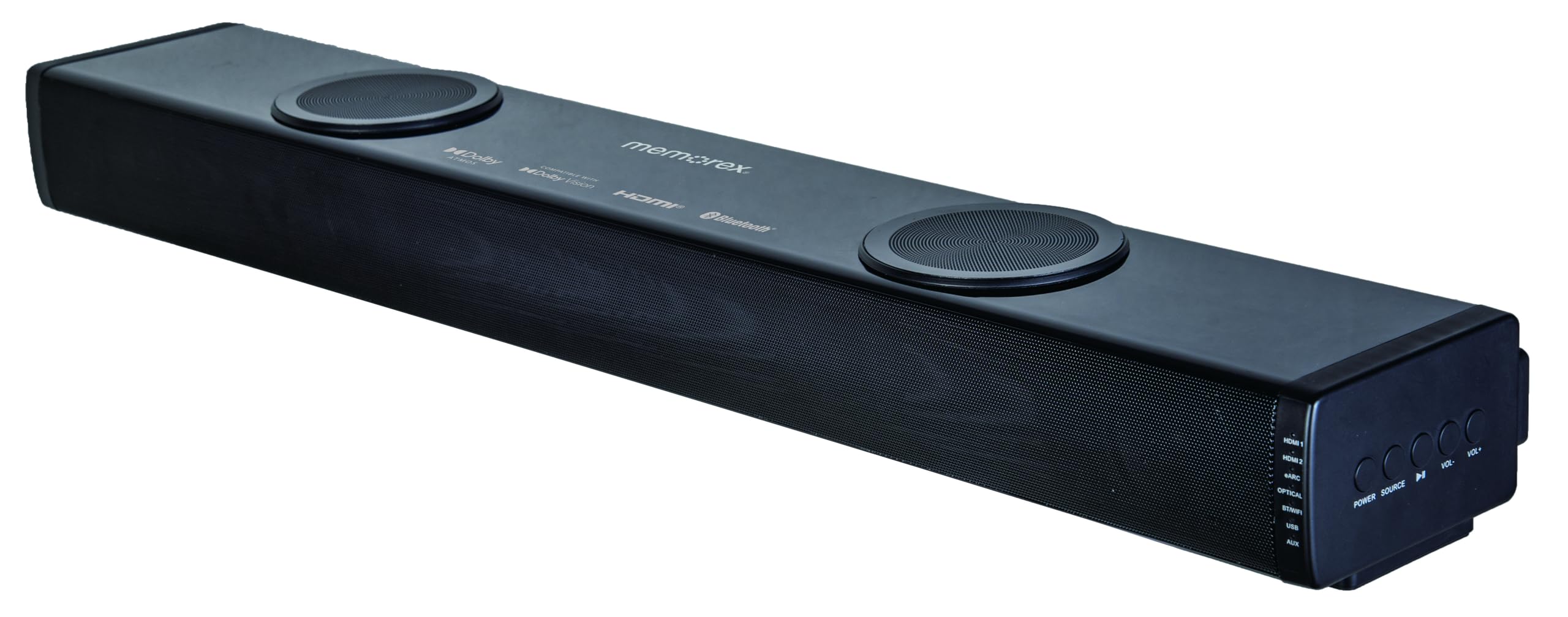
Imaxe: Unha fronte directa view of the Memorex MX-SBDA220 soundbar, highlighting its sleek design, front speaker grille, and the two circular top-firing speakers for Dolby Atmos effects.
Controis do panel lateral

Imaxe: Un ángulo view of the Memorex MX-SBDA220 soundbar, revealing the control panel on the right side. Buttons for Power, Source selection, Play/Pause, Volume Down, and Volume Up are visible, along with input indicators.
Control remoto

Image: The Memorex MX-SBDA220 soundbar shown with its full-function remote control positioned above it. The remote features buttons for power, input selection, sound modes, volume, bass, and treble adjustments.
Guía de configuración
1. Colocación física
Place the soundbar on a stable, flat surface directly in front of your television. Ensure there are no obstructions blocking the front or top-firing speakers for optimal sound delivery, especially for Dolby Atmos effects.
2. Connecting to Your TV/Devices
The MX-SBDA220 offers multiple connectivity options:
- HDMI ARC (canle de retorno de audio): For the best audio quality and control, connect an HDMI cable from the soundbar's HDMI ARC output to your TV's HDMI ARC input. This allows your TV remote to control the soundbar's volume.
- Entrada óptica: Connect an optical cable from the soundbar's OPTICAL input to your TV's optical digital audio output.
- HDMI IN (x2): Connect external devices like Blu-ray players or gaming consoles to the soundbar's HDMI IN ports. Then, connect the soundbar's HDMI ARC output to your TV's HDMI ARC input.
- Bluetooth: For wireless audio streaming from smartphones or tablets, select the Bluetooth input on the soundbar and pair your device.
- Reproductor USB: Insira unha unidade USB con audio files no porto USB para a reprodución directa.
- Entrada AUX: Use a 3.5mm audio cable to connect devices with an analog audio output to the soundbar's AUX input.
3. Conexión de alimentación
Connect the provided power cable to the soundbar's power input and then plug it into a wall outlet. The soundbar will enter standby mode.
Instrucións de funcionamento
Encendido/apagado
Preme o POTENCIA botón da barra de son ou do mando a distancia para acender ou apagar a unidade.
Selección de entrada
Preme o FONTE button on the soundbar or the corresponding input button (HDMI1, HDMI2, eARC, OPT, BT, USB, AUX) on the remote control to switch between audio sources. The LED display will indicate the active input.
Control de volume
Preme VOL+ or VOL- buttons on the soundbar or remote control to adjust the master volume.
Modos de son
The soundbar features 5 optimized sound modes. Press the corresponding button on the remote control to select:
- Película: Enhances cinematic audio with dynamic range.
- Música: Optimizes sound for music playback.
- Noite: Reduce o rango dinámico para unha escoita máis silenciosa, ideal para a noite alta viewing.
- Voz: Enhances vocal clarity for dialogue-heavy content.
- Xogo: Ofrece unha experiencia de son inmersiva para xogos.
Axuste de graves e agudos
Usa o BASS+ / BASS- e TREBLE+ / TREBLE- buttons on the remote control to fine-tune the low and high frequencies to your preference.
Emparejamento Bluetooth
- Seleccione o BT input on the soundbar. The LED display will flash, indicating pairing mode.
- On your mobile device, enable Bluetooth and search for "MX-SBDA220".
- Select the soundbar to pair. Once connected, the LED display will stop flashing.
Reproducción USB
Insert a USB flash drive into the USB port. The soundbar will automatically switch to USB input and begin playing compatible audio files. Use the remote control for playback functions (Play/Pause, Skip Track).
Coidados e Mantemento
- Limpeza: Usa un pano suave e seco para limpar a superficie da barra de son. Non empregues produtos de limpeza líquidos nin aerosois.
- Ventilación: Asegúrese de que as aberturas de ventilación non estean bloqueadas para evitar o sobrequecemento.
- Almacenamento: Se garda a barra de son durante un período prolongado, desconéctea da toma de corrente e gárdea nun lugar fresco e seco.
- Evitar a humidade: Keep the soundbar away from water, rain, and excessive humidity.
Guía de resolución de problemas
| Problema | Posible Solución |
|---|---|
| Sen poder |
|
| Sen son |
|
| O control remoto non funciona |
|
| Problemas de vinculación Bluetooth |
|
Especificacións técnicas
| Característica | Especificación |
|---|---|
| Número de modelo | MX-SBDA220 |
| Tipo de altofalante | Atmospheric (Dolby Atmos 2.0.2CH) |
| Potencia de saída total | 100 Watts (20W x 2 front + 30W x 2 top) |
| Tecnoloxía de conectividade | Bluetooth 5.0, HDMI (ARC x1, IN x2), Optical, USB, AUX |
| Alcance Bluetooth | Ata 10 metros (33 pés) |
| Dimensións do produto (P x A x A) | 5.93" x 8.1" x 37.57" (aproximadamente) |
| Peso do elemento | 2.2 libras |
| Compoñentes incluídos | Soundbar, Remote Control, Power Cable, Quick Start Guide |
| UPC | 838689000208 |
Información da garantía
Memorex products are manufactured to the highest quality standards. For specific warranty details, including coverage period and terms, please refer to the warranty card included with your product or visit the official Memorex websitio. Garde o recibo da compra como proba de compra para calquera reclamación de garantía.
Atención ao cliente
If you encounter any issues or have questions regarding your Memorex MX-SBDA220 Soundbar that are not covered in this manual, please contact Memorex customer support. Contact information can typically be found on the official Memorex websitio web ou na Guía de inicio rápido que se inclúe co produto.