
1. Introdución
This manual provides detailed instructions for the installation, operation, and maintenance of your Inefala 9-inch Android Car Radio. Please read this manual thoroughly before using the product to ensure proper function and safety. This device is designed specifically for Hyundai i20 models from 2015 to 2018.

Figure 1: Inefala 9-inch Android Car Radio and accessories.
2. Información de seguridade
- Instalación profesional recomendada: Due to the complexity of car audio systems, professional installation is highly recommended to prevent damage to the vehicle or the product.
- Desconexión de alimentación: Always disconnect the vehicle's battery before beginning any installation or wiring work.
- Cableado: Ensure all wiring is correctly connected according to the wiring diagram. Incorrect wiring can cause damage or fire.
- Seguridade na condución: Non manexes o dispositivo dun xeito que te distraia da condución. Prioriza sempre a seguridade viaria.
- Temperatura: Evite expoñer o dispositivo a temperaturas extremas ou á luz solar directa durante períodos prolongados.
3. Características do produto
The Inefala Android Car Radio offers a range of advanced features for an enhanced in-car experience:
- Android System (2GB RAM + 64GB ROM): Provides powerful and stable processing with ample storage for applications.
- Wireless Carplay/Android Auto: Integración perfecta co teléfono intelixente para navegación, chamadas, mensaxes e música.
- Ligazón espello: Display your smartphone screen directly on the car radio's display via USB or Wi-Fi.
- Pantalla táctil de 9 polgadas: Large display for clear visibility and easy interaction.
- Navegación GPS: Supports online and offline maps, with access to navigation apps via Wi-Fi.
- Conectividade Wi-Fi: Download apps, music, and videos, and access online content.
- Bluetooth: For hands-free calling, music streaming, and file Transferir.
- Radio FM/RDS: Enjoy your favorite radio stations with clear reception and RDS information.
- EQ (Ecualizador): Customize audio output for an optimized listening experience.
- 26 User Interface Themes: Personalize the display's appearance.
- Control do volante (SWC): Integrate with your vehicle's existing steering wheel controls.
- Dual USB Input: Para conectar dispositivos externos.
- Función de pantalla dividida: View and operate two applications simultaneously.
- DSP (Procesador de son dixital): 4 x 45W audio output with adjustable sound effects.
4. Configuración e instalación
4.1. Pre-Installation Overview
Before installation, ensure you have all necessary tools and components. It is recommended to compare the new unit with your original car radio to understand the fitment.
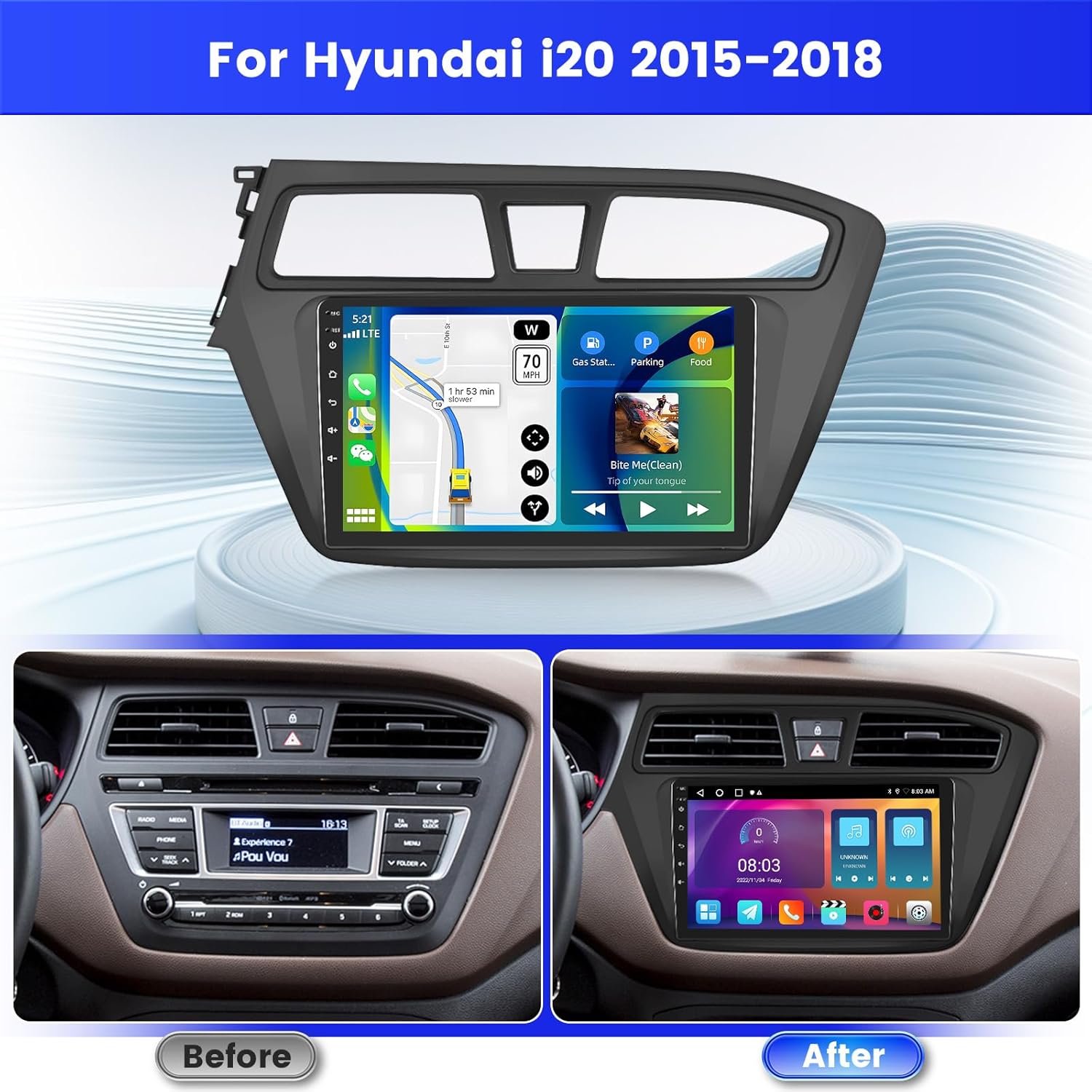
Figure 2: Before and After Installation in a Hyundai i20 (2015-2018).
4.2. Reversing Camera Wiring
The reversing camera input cable must be connected, even if a reverse camera is not currently in use, to avoid affecting Bluetooth and Wi-Fi signal reception.
- Red Cable (①): Connects to the positive terminal of the car's reverse light cable.
- Black Cable (②): Connects to the negative terminal of the car's reverse light cable.
- The other two red extension cables (③ and ④) do not need to be connected.

Figura 3: Diagrama de cableado da cámara de marcha atrás.
The backup camera offers HD resolution, waterproof design, 170° wide-angle view, and night vision capabilities.
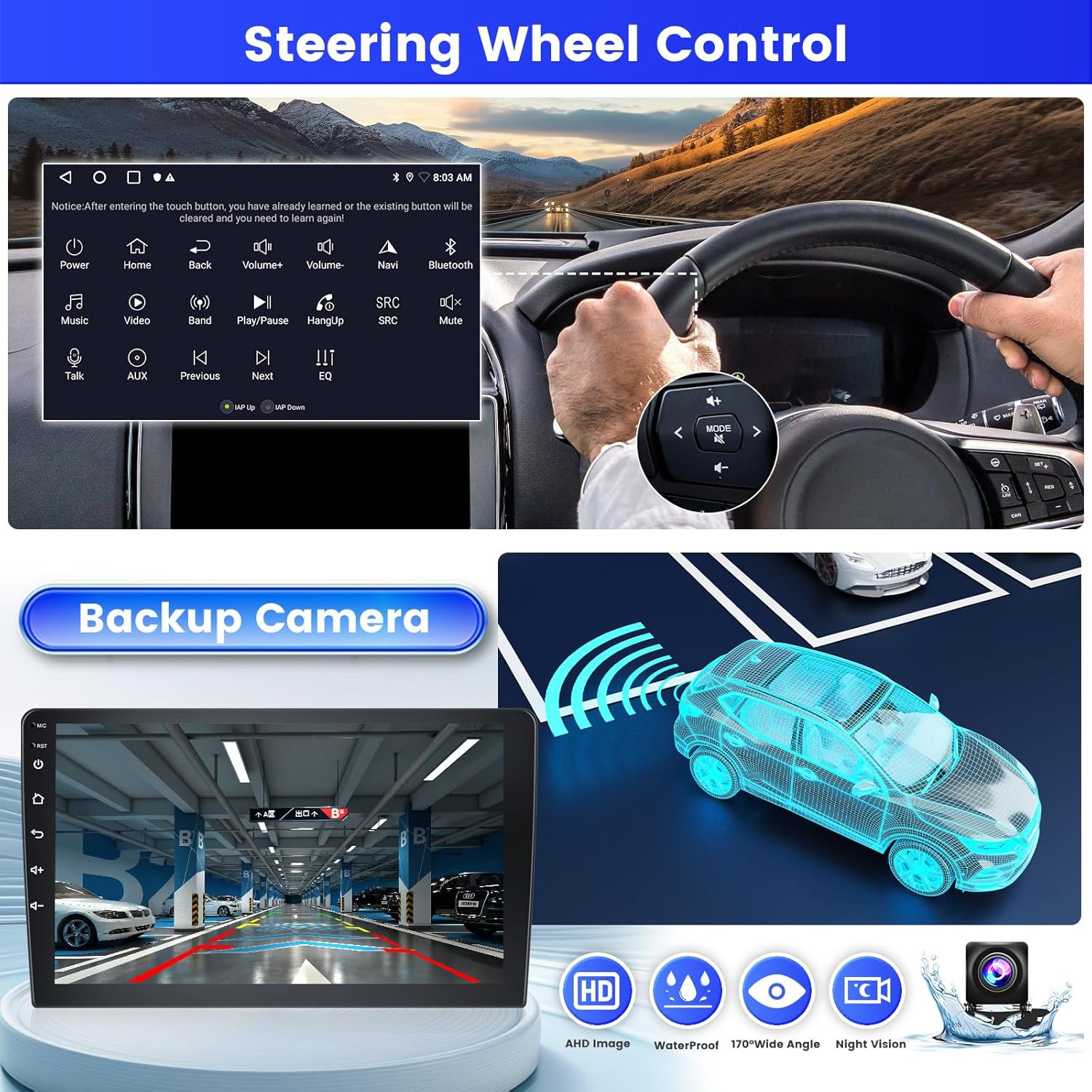
Figure 4: Backup Camera Functionality.
5. Instrucións de funcionamento
5.1. Wireless Carplay / Android Auto / Mirror Link
Connect your smartphone to the device via USB cable or Wi-Fi to utilize Wireless Carplay, Android Auto, or Mirror Link functionalities. This allows you to access phone features like calls, messages, music, and navigation directly from the car radio display.

Figure 5: Wireless Carplay and Android Auto Interface.

Figure 6: Carplay, Android Auto, and Mirror Link Overview.
5.2. GPS Navigation and Wi-Fi
The unit supports GPS navigation with pre-installed maps and allows for downloading online navigation applications via Wi-Fi. Connect to a Wi-Fi network to access online content, download apps, music, and videos.
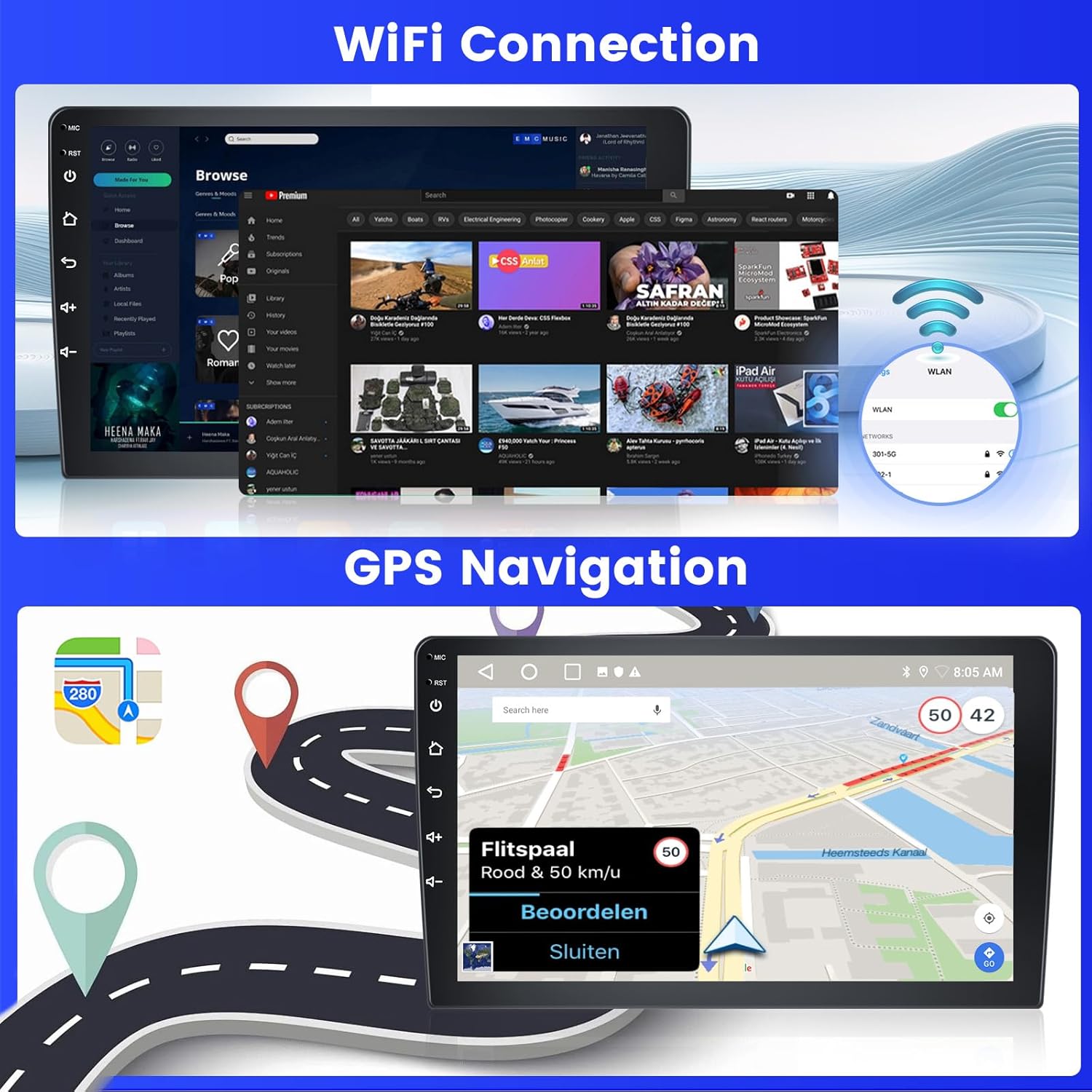
Figure 7: Wi-Fi Connectivity and GPS Navigation.
5.3. FM/RDS Radio and Bluetooth
Tune into FM radio stations. The RDS (Radio Data System) feature provides additional information like station name and song titles where available. Connect your phone via Bluetooth for hands-free calls, music streaming, and contact synchronization.

Figure 8: FM/RDS Radio and Bluetooth Functions.
5.4. Audio Settings (DSP & EQ)
Utilize the built-in Digital Sound Processor (DSP) and Equalizer (EQ) to fine-tune your audio experience. Adjust sound effects and balance for optimal listening.
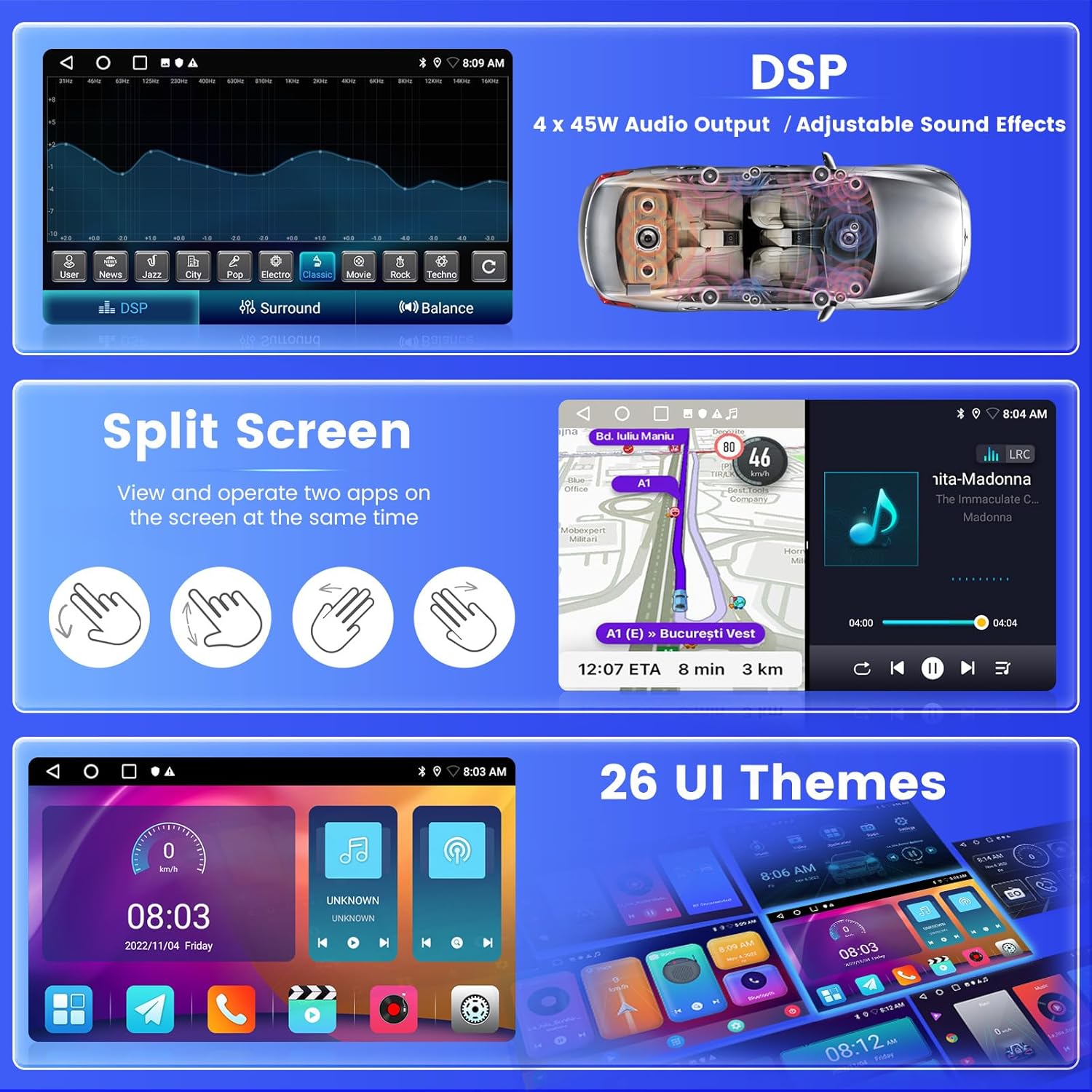
Figure 9: DSP, Split Screen, and UI Themes.
5.5. Funcionalidade de pantalla dividida
The split-screen feature allows you to run and view two applications simultaneously on the 9-inch display, such as navigation and music playback.
5.6. Control do volante (SWC)
Integrate the car radio with your vehicle's steering wheel controls for convenient operation without taking your hands off the wheel.
- Without CANBUS Decoder: Connect the plugs or the steering wheel control wires (Key1/Key2) in the power cable to the corresponding port or wire of your original car. Then, go to "SWC manual match" in the settings to activate the button function.
- With CANBUS Decoder: Connect the CANBUS before powering on the radio. Follow this path: Car Settings > Factory (000000) > CarType Setting to make SWC work properly. First, select the brand of the CANBUS decoder, then select the matching model and year according to the actual situation.

Figura 10: Configuración do control do volante.
6. Mantemento
- Limpeza: Usa un pano suave e seco para limpar a pantalla e o exterior. Evita produtos de limpeza abrasivos ou solventes.
- Actualizacións de software: Periodically check for software updates to ensure optimal performance and access to new features. Updates can usually be found via the system settings or the manufacturer's websitio.
- Condicións ambientais: Opere o dispositivo dentro dos rangos de temperatura recomendados. A calor ou o frío extremos poden afectar o rendemento e a vida útil.
7 Solución de problemas
- Sen enerxía:
- Comprobe todas as conexións de alimentación e os fusibles.
- Ensure the vehicle's battery is charged.
- Sen son:
- Verificar as conexións dos altofalantes.
- Comprobe os niveis de volume e a configuración de silenciamento.
- Asegúrate de que estea seleccionada a fonte de son correcta.
- Problemas co sinal GPS:
- Asegúrese de que a antena GPS estea instalada correctamente e teña unha visión clara view do ceo.
- Check for obstructions that might block the signal.
- Problemas de conexión Bluetooth:
- Asegúrate de que o Bluetooth estea activado tanto na radio do coche como no teu teléfono intelixente.
- Elimina as vinculacións anteriores e tenta volver vincular os dispositivos.
- Reinicie os dous dispositivos.
- Problemas de conectividade wifi:
- Ensure the Wi-Fi antenna is properly connected.
- Verify the Wi-Fi network password.
- Check if the reversing camera input cable is connected, as it can affect Wi-Fi reception if disconnected.
- Os controis do volante non funcionan:
- Review the SWC wiring connections.
- Perform the SWC manual matching procedure in the settings (refer to Section 5.6).
- If using a CANBUS decoder, ensure it is correctly configured for your vehicle model.
8. Especificacións
| Característica | Especificación |
|---|---|
| Marca | Inefala |
| Número de modelo | 142a600b-954c-428f-a043-24405babf69f |
| Sistema Operativo | Android |
| RAM | 2 GB |
| Almacenamento interno (ROM) | 64 GB |
| Tamaño da pantalla | 9 polgadas |
| Tecnoloxía de conectividade | Bluetooth, USB, Wi-Fi |
| Características especiais | Carplay, Android Auto, Mirror Link, FM RDS Radio, EQ, WIFI, GPS, 26 UI Themes, SWC, Dual USB Input |
| Dispositivos compatibles | Teléfono intelixente |
| Modo de saída de audio | Estéreo |
| Configuración da canle de son envolvente | 5.1 |
| Potencia de saída | 22 vatios |
| Consumo de enerxía | 45 vatios |
| País de Orixe | China |
9. Garantía e soporte
9.1. Garantía do fabricante
O produto vén cun Garantía do fabricante de 24 meses. Esta garantía cobre os defectos nos materiais e na fabricación no uso normal.
9.2. Soporte en liña
For any inquiries or assistance, online support is available. The manufacturer commits to responding within 24 hours. You can contact the seller, "xinghua001", through the Amazon platform or via email at inefalaservices@163.com.

Figure 11: Contacting Support.