
XIAOMI 24044RN32L
XIAOMI Redmi A3X Smartphone User Manual
Modelo: 24044RN32L
1. Introdución
This manual provides essential instructions for setting up, operating, and maintaining your XIAOMI Redmi A3X smartphone. Please read this guide thoroughly to ensure proper use and to maximize the device's capabilities. The Redmi A3X features a 6.71-inch HD+ display, a 5000mAh battery, and runs on Android 14.
2. Contido do paquete
Verifica que todos os elementos estean presentes na caixa do produto:
- XIAOMI Redmi A3X Mobile Phone
- Cable USB Tipo-C
- Ferramenta de expulsión da SIM
- Guía de inicio rápido
- Tarxeta de garantía
- Información de seguridade
- Wall Charger (Note: Availability may vary by region.)
3. Dispositivo rematadoview
Familiarize yourself with the physical components of your Redmi A3X smartphone.
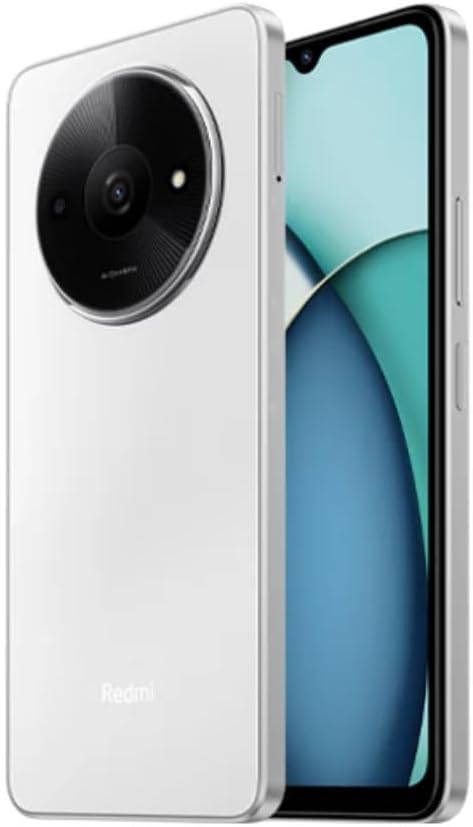
Figura 3.1: Fronte e traseiro View of the Redmi A3X. This image displays the phone in Moonlight White, highlighting its 6.71-inch display and the distinctive circular camera module on the back.

Figura 3.2: Redmi A3X Certification Information. This image shows the phone's screen displaying regulatory details such as the model number (24044RN32L), FCC ID (2AFZZN32L), and battery capacity (5000mAh).
3.1 Características físicas
- Visualización: 6.71-inch Dot Drop HD+ display.
- Cámara traseira: Circular module housing the 8MP main camera and auxiliary lens.
- Cámara frontal: Located in the display's dot drop notch.
- Sensor de impresión dixital lateral: Integrated into the power button for convenient unlocking.
- Porto USB tipo C: Para carga e transferencia de datos.
- Conector para auriculares de 3.5 mm: For audio accessories.
- Bandexa da tarxeta SIM: Supports Dual SIM and microSD card expansion.
4. Configuración
4.1 Inserción de tarxetas SIM e tarxetas MicroSD
- Localiza a bandexa da tarxeta SIM no lateral do teu dispositivo.
- Introduza a ferramenta de expulsión da tarxeta SIM no pequeno orificio da bandexa da tarxeta SIM para abrila.
- Place your Nano-SIM card(s) and/or microSD card into the tray with the gold contacts facing down. Ensure correct orientation as indicated on the tray.
- Empurre con coidado a bandexa de volta no teléfono ata que quede aliñada co lateral.
Nota: This device supports dual SIM cards and a microSD card simultaneously. For USA market, this phone is compatible with T-Mobile, Mint, Tello, and other T-Mobile network providers. Outside the USA, it works with any GSM carrier SIM.
4.2 Acendido e carga iniciais
- To power on, press and hold the power button (located on the side) until the XIAOMI logo appears.
- Siga as instrucións na pantalla para completar a configuración inicial, incluíndo a selección do idioma, a conexión wifi e a configuración da conta de Google.
- To charge the device, connect the USB Type-C cable to the phone's charging port and the other end to the provided wall charger.
- The device supports 10W charging. Use only XIAOMI-approved chargers and cables.
5. Instrucións de funcionamento
5.1 Navegación básica
Your Redmi A3X runs on Android 14. Navigate the interface using gestures or on-screen buttons. Swipe up from the bottom to access the app drawer, swipe down from the top for notifications and quick settings.
5.2 Características de visualización
- 6.71" HD+ Dot Drop Display: Ofrece unha ampla viewárea de ing.
- Frecuencia de actualización de 90 Hz: Provides a smoother visual experience for scrolling and app usage. This can be adjusted in display settings.
- DC Dimming: Reduces screen flickering at low brightness levels for improved eye comfort.
- Luz nocturna: Adjusts screen colors to warmer tones to reduce blue light exposure, especially useful before sleep. Activate this feature in Display settings.
6. Características da cámara
The Redmi A3X is equipped with an 8MP main rear camera and a 5MP front camera, offering various modes for photography and videography.
6.1 Cámara traseira
- Resolución: 8MP with f/2.0 aperture and a 4P lens. Includes an auxiliary QVGA lens.
- Gravación de vídeo: Supports 1080P at 30fps and 720P at 30fps.
- Modos: filmCamera, HDR mode, Portrait mode, Time-lapse.
Cámara frontal 6.2
- Resolución: 5MP with f/2.2 aperture.
- Gravación de vídeo: Supports 1080P at 30fps and 720P at 30fps.
- Modos: filmCamera, HDR mode, Soft-light ring, Portrait mode, Time-lapse.
7. Conectividade
7.1 Network Bands
The device supports a wide range of network bands for global compatibility:
- 4G LTE TDD: 38/40/41
- FDD 4G LTE: 1/3/5/7/8/20/28
- 3G WCDMA: 1/5/8
- 2G GSM: 2/3/5/8
7.2 Conectividade sen fíos
- Wi-Fi: Supports 2.4GHz and 5GHz Wi-Fi networks.
- Bluetooth: Versión 5.4 para conectar accesorios sen fíos.
- Radio FM: Supported via the 3.5mm headphone jack.
- GPS: Integrated GPS, Glonass, Galileo, and Beidou for accurate location services.
8. Características de seguridade
Your Redmi A3X offers multiple options to secure your device and data.
- Sensor de impresión dixital lateral: Register your fingerprint(s) for quick and secure unlocking. Access this in Settings > Security & privacy > Device unlock.
- Desbloqueo facial por IA: Use your face to unlock the device. Ensure good lighting conditions for optimal performance. Access this in Settings > Security & privacy > Device unlock.
9. Mantemento
9.1 Coidados xerais
- Manteña o dispositivo seco. A humidade pode danar os circuítos electrónicos.
- Evita as temperaturas extremas. As altas temperaturas poden acurtar a vida útil dos dispositivos electrónicos e danar as baterías.
- Non deixe caer, golpee nin axite o dispositivo. Un manexo brusco pode romper placas de circuíto interno e mecánica fina.
- Clean the screen and body with a soft, dry cloth. Avoid using harsh chemicals or abrasive materials.
9.2 Actualizacións de software
Your Redmi A3X will receive regular software updates. It is designed to receive 2 major Android version updates and 3 years of security patch updates. Ensure your device is connected to Wi-Fi and has sufficient battery before performing updates.
10 Solución de problemas
| Problema | Posible Solución |
|---|---|
| O dispositivo non se acende. | Asegúrate de que a batería estea cargada. Conecta o cargador e agarda uns minutos antes de tentar acender de novo. |
| Non se pode conectar á rede. | Check if the SIM card is correctly inserted. Verify that mobile data is enabled in settings. Restart the device. Confirm network compatibility with your carrier. |
| O sensor de pegadas dixitais non funciona. | Ensure your finger is clean and dry. Re-register your fingerprint in settings if the issue persists. |
| Rendemento lento. | Close unused applications. Clear cache from apps. Restart the device. Consider performing a factory reset if issues persist (back up data first). |
11. Especificacións
| Característica | Detalle |
|---|---|
| Número de modelo | 24044RN32L |
| Mostrar | 6.71" Dot Drop HD+ (1650x720), 90Hz Refresh Rate, DC Dimming |
| Procesador | Unisoc T603, Octa-core up to 1.8GHz |
| RAM | 3 GB |
| Almacenamento interno | 64 GB |
| Almacenamento ampliable | microSD (up to 1TB, shared with SIM slot) |
| Cámara traseira | 8MP (f/2.0) + Auxiliary lens |
| Cámara frontal | 5MP (f/2.2) |
| Batería | 5000mAh (typ), 10W charging |
| Sistema Operativo | Android 14 |
| Conectividade | Dual SIM, 4G LTE, Wi-Fi (2.4GHz/5GHz), Bluetooth 5.4, GPS, FM Radio |
| Sensores | Side fingerprint sensor, AI face unlock, Virtual proximity, Virtual ambient light, Accelerometer, Electronic compass |
| Jack de audio | 3.5 mm |
| Dimensións | Approx. 7.11 x 3.25 x 0.33 inches (based on package dimensions and 8.3mm thickness from description) |
| Peso | 12.8 onzas |
12. Garantía e soporte
Your XIAOMI Redmi A3X comes with a warranty. Please refer to the included Warranty Card for detailed terms and conditions. For technical support or further assistance, please visit the official XIAOMI support websitio ou póñase en contacto co seu servizo de atención ao cliente.
Podes atopar máis información e recursos de apoio en Tenda XIAOMI en Amazon.
Ask a question about this manual
Ask about setup, troubleshooting, compatibility, parts, safety, or missing instructions. Manuals+ will review the question and use this page’s manual context to help answer it.