Introdución
Thank you for choosing the OEM Part Remote Control. This remote is designed to work out of the box with your ONN Roku TV Model 100071701, requiring no programming. Simply insert batteries and begin use.
1. Configuración
1.1 Instalación da batería
Your remote control requires two (2) AAA (LR6) batteries. Batteries are not included.
- Localice o compartimento da batería na parte traseira do control remoto.
- Deslice a tapa da batería cara abaixo para abrila.
- Insira dúas pilas AAA, asegurándose de que os terminais positivo (+) e negativo (-) estean aliñados correctamente cos indicadores do interior do compartimento.
- Deslice a tapa da batería de novo no seu lugar ata que faga clic de forma segura.
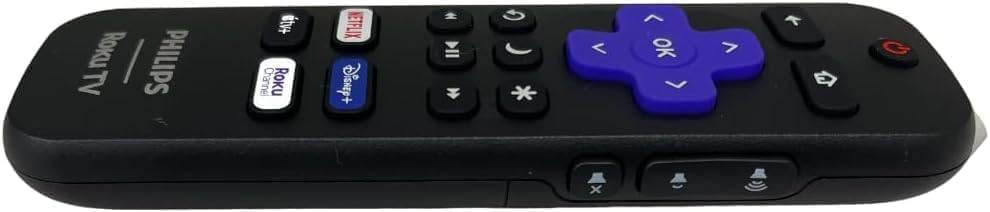
Esta imaxe mostra o lado profile of the remote control, highlighting the area where the battery cover is located. The battery compartment is typically on the back, and this view helps in identifying the sliding mechanism for opening it.
1.2 Uso inicial
Once batteries are installed, the remote is ready for immediate use. No programming or pairing is required for compatible ONN Roku TV models.
2. Uso do mando a distancia
Familiarize yourself with the buttons on your remote control for optimal use.
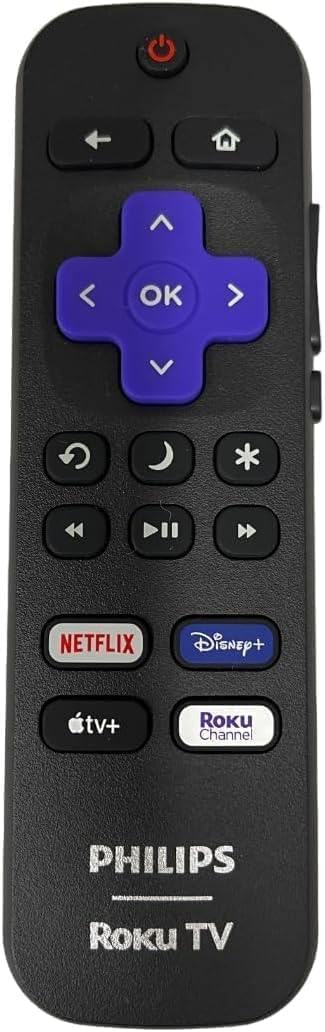
This image shows the front face of the remote control, displaying all the buttons. From top to bottom, these include the Power button, navigation cluster (Back, Home, Directional Pad, OK), playback controls (Rewind, Play/Pause, Fast Forward), Mute, Volume Up/Down, and dedicated streaming service shortcut buttons (Netflix, Disney+, Apple TV+, Roku Channel).
2.1 Funcións dos botóns
- Poder: Acende ou apaga o televisor.
- De volta: Volve á pantalla ou ao menú anterior.
- Casa: Navigates to the Roku Home screen.
- Pad direccional (arriba, abaixo, esquerda, dereita): Navigates through menus and content.
- OK: Selects a highlighted item.
- Subir/Baixar o volume: Axusta o volume do televisor.
- Silenciar: Silencia ou activa o son do televisor.
- Rebobinar, Reproducir/Pausar, Avanzar rápido: Controla a reprodución multimedia.
- Shortcut Buttons (Netflix, Disney+, Apple TV+, Roku Channel): Provides direct access to these streaming applications.
- Estrela (*): Accesses options or settings within certain apps or menus.
- Sleep/Moon icon: May activate a sleep timer or display options.
- Replay/Loop icon: Replays the last few seconds of content.
3. Mantemento
3.1 Limpeza
To clean your remote, gently wipe it with a soft, dry cloth. Do not use liquid cleaners or abrasive materials.
3.2 Substitución da batería
Substitúa as pilas cando a resposta do mando a distancia sexa lenta ou deixe de funcionar. Substitúa sempre as dúas pilas ao mesmo tempo por pilas AAA novas. Non mestures pilas vellas e novas, nin pilas de diferentes tipos.
4 Solución de problemas
| Problema | Solución |
|---|---|
| O control remoto non responde | Check battery orientation and charge. Replace batteries if necessary. Ensure there are no obstructions between the remote and the TV's IR receiver. Try restarting the TV. |
| Os botóns son pegajosos ou non responden | Clean the remote surface. Avoid spilling liquids on the remote. |
| O alcance remoto é limitado | Ensure fresh batteries are installed. Remove any objects blocking the line of sight between the remote and the TV. |
If issues persist, please refer to the 'Support' section for further assistance.
5. Especificacións
- Modelo: 100071701
- Dispositivos compatibles: ONN Roku TV 55” QLED 4K UHD (2160p) Smart TV Model 100071701, and other compatible Roku TVs.
- Fonte de enerxía: 2 x AAA (LR6) Batteries (not included)
- Dimensións: 1.77 x 0.87 x 5.55 polgadas
- Peso: 1 libras (sen baterías)
- Cor: Negro
- Característica especial: Non se require programación
6. Apoio
For any questions or assistance regarding your OEM Part remote control, please feel free to contact the seller or manufacturer. Provide your product model number (100071701) for quicker service.
If your TV Model is not listed as compatible, please contact us, and we will gladly help you find the correct remote for your TV.

