
1. Produto rematadoview
The Fanvil V60P is a professional IP phone designed for business communication. It features a color display, programmable keys, and Power over Ethernet (PoE) support for simplified installation and operation. This manual provides essential information for setting up, operating, and maintaining your device.
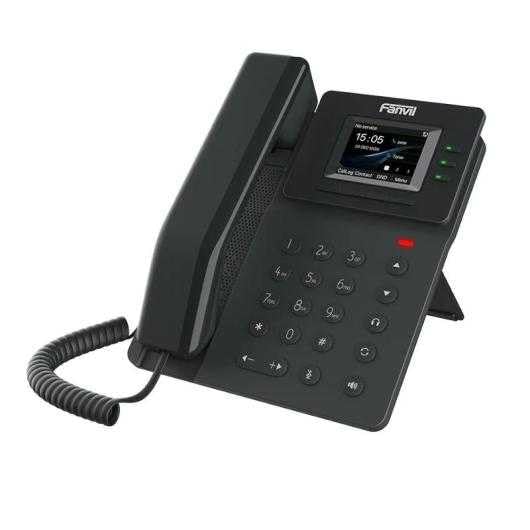
Figure 1: Fanvil V60P Professional IP Phone. This image shows the black IP phone with its handset, color display, and numeric keypad. The display shows "15:05" and menu options.
2. Configuración e instalación
2.1 Contido do paquete
Before installation, verify that all items are present in the package:
- Fanvil V60P IP Phone unit
- Auricular e cable en espiral
- Cable Ethernet
- Stand
- Guía de instalación rápida (se está incluída)
2.2 Conexión física
- Coloque o soporte: Securely attach the desk stand to the back of the phone unit.
- Conecta o teléfono: Conecte un extremo do cable en espiral ao auricular e o outro extremo ao porto do auricular da base do teléfono.
- Connect to Network and Power (PoE):
- Conecte un extremo do cable Ethernet ao LAN porto no teléfono.
- Connect the other end of the Ethernet cable to a Power over Ethernet (PoE) enabled switch or injector. The phone will power on automatically.
- Conectar ao PC (opcional): If you need to connect a computer through the phone, connect an Ethernet cable from your PC to the PC porto no teléfono.
Note: If PoE is not available, a separate power adapter (not included) may be required. Refer to the product specifications for compatible power adapter details.
3. Instrucións de funcionamento
3.1 Funcións de chamada básicas
- Facendo unha chamada:
- Pick up the handset or press the Speakerphone button.
- Marque o número desexado usando o teclado.
- Preme o Marque soft key or wait for the automatic dialing timeout.
- Respondendo a unha chamada:
- Colle o auricular.
- Alternatively, press the Speakerphone button or the Resposta tecla de función.
- Finalizando unha chamada: Hang up the handset or press the Speakerphone button.
3.2 Using Programmable DSS Keys
The Fanvil V60P features 6 programmable DSS (Direct Station Select) keys. These keys can be configured for various functions such as speed dial, line keys, busy lamp field (BLF), or other custom features as defined by your system administrator.
- To use a programmed DSS key, simply press the corresponding button.
- Configuration of DSS keys is typically done via the phone's web interface or your IP PBX system.
3.3 Local Phonebook
The phone supports a local phonebook with up to 1000 entries.
- Access the phonebook via the Directorio or Contactos soft key on the display.
- Use the navigation keys to browse entries.
- Select an entry and press the Marque soft key to initiate a call.
3.4 Audio Conferencing
The V60P supports local 6-party audio conferencing.
- Establish a call with the first participant.
- Preme o Conf soft key. The first participant will be put on hold.
- Dial the number of the second participant and establish the call.
- Preme o Conf soft key again to merge all participants into a conference.
- Repeat steps 2-4 to add more participants, up to a total of 6.
4. Mantemento
4.1 Limpeza do dispositivo
To maintain the appearance and functionality of your Fanvil V60P IP Phone (made of plastic material), follow these cleaning guidelines:
- Disconnect the phone from its power source (PoE) before cleaning.
- Use un suave, lixeiramente damp, lint-free cloth to wipe the surfaces.
- Evita o uso de produtos químicos agresivos, produtos de limpeza abrasivos ou solventes, xa que poden danar o plástico e a pantalla.
- Do not spray cleaners directly onto the phone.
4.2 Actualizacións de firmware
Firmware updates may be released periodically to improve performance, add features, or fix bugs. Consult your IT administrator or Fanvil's official website for information on available updates and instructions for installation.
5 Solución de problemas
This section addresses common issues you might encounter with your Fanvil V60P IP Phone.
| Problema | Causa posible | Solución |
|---|---|---|
| O teléfono non se acende. | Sen conexión PoE ou cable Ethernet defectuoso. | Ensure the Ethernet cable is securely connected to the LAN port and a PoE-enabled switch/injector. Verify the PoE source is active. |
| Sen ton de marcación. | SIP registration failure or network issue. | Check network connectivity. Verify SIP account settings with your IT administrator. Restart the phone. |
| Non se poden facer/recibir chamadas. | Network issues, incorrect SIP configuration, or firewall blocking. | Confirm network connection. Check SIP registration status on the phone's display. Contact your IT administrator for network and SIP configuration verification. |
| Mala calidade de audio. | Network congestion or faulty handset/speaker. | Check network bandwidth and latency. Try using a different handset or speaker mode. If the issue persists, contact support. |
6. Especificacións
| Característica | Detalle |
|---|---|
| Modelo | V60P |
| Sistema | Linux |
| Mostrar | 2.4-inch, 320 x 240 Color Screen |
| Teclas DSS | 6 claves programables |
| Liñas SIP | 4 |
| Local Phonebook | 1000 entradas |
| Auricular | Auricular con cable |
| Audioconferencia | 6-party Local Conference |
| Wideband Codecs | G.722, Opus |
| Narrowband Codecs | G.711, G.723.1, G.726, G.729, G.729A, G.729B, G.729AB, iLBC |
| Poe | Si |
| Portos de rede | 2 portos Ethernet de 10/100 Mbps |
| Soporte de EHS | Si |
| Soporte IPv6 | Si |
| Material | Plástico |
| Dimensións (LxWxH) | 15 x 200 x 15 cm |
| Peso | 600 gramos |
| Identificador de chamada | Si |
| Operación multilínea | Si |
| Conference Call Functionality | Support Multiple Conferences |
| Standby Duration (if applicable) | 10 horas |
7. Garantía e soporte
7.1 Garantía do produto
The Fanvil V60P IP Phone comes with a garantía de tres anos contra defectos de fabricaciónEsta garantía cobre defectos de materiais e fabricación en condicións normais de uso. Conserve o comprobante de compra para reclamacións de garantía.
7.2 Soporte técnico
For technical assistance, troubleshooting beyond this manual, or warranty inquiries, please contact your reseller or Fanvil's official customer support channels. You may need to provide your product model (V60P) and serial number.